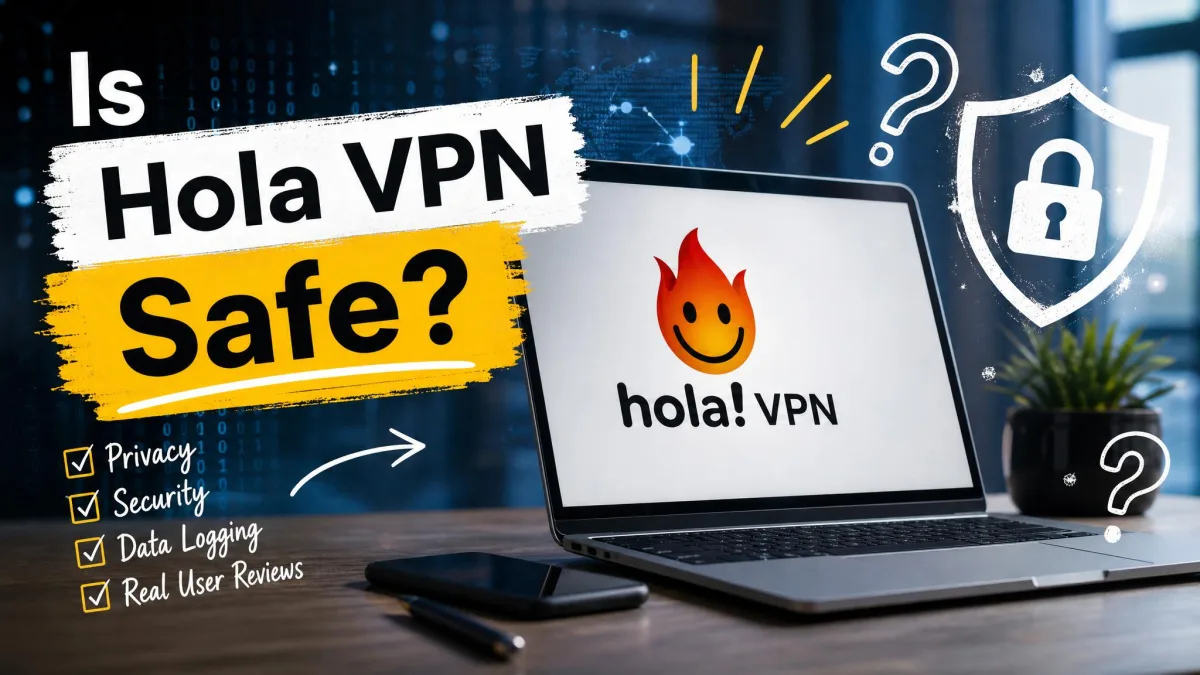
No. The free version of Hola is not safe for private browsing, because its free desktop and Android apps route other people's traffic through your device and your internet connection. Hola Premium stops that sharing, but it still runs under a privacy policy with broad logging and no independent audit, so it falls short of what a privacy tool should offer.
If you're considering Hola because it's free, here's what that trade actually costs you. We answer "is Hola VPN safe" the way a network administrator would, by following where your traffic goes and what the company keeps afterward.
Is Hola VPN safe? The short answer
This page covers safety and trust only. For speeds, streaming, pricing and setup, our full Hola VPN review goes deeper and gives Hola the same 3.5/10 rating.
How Hola works, and why it is not a traditional VPN
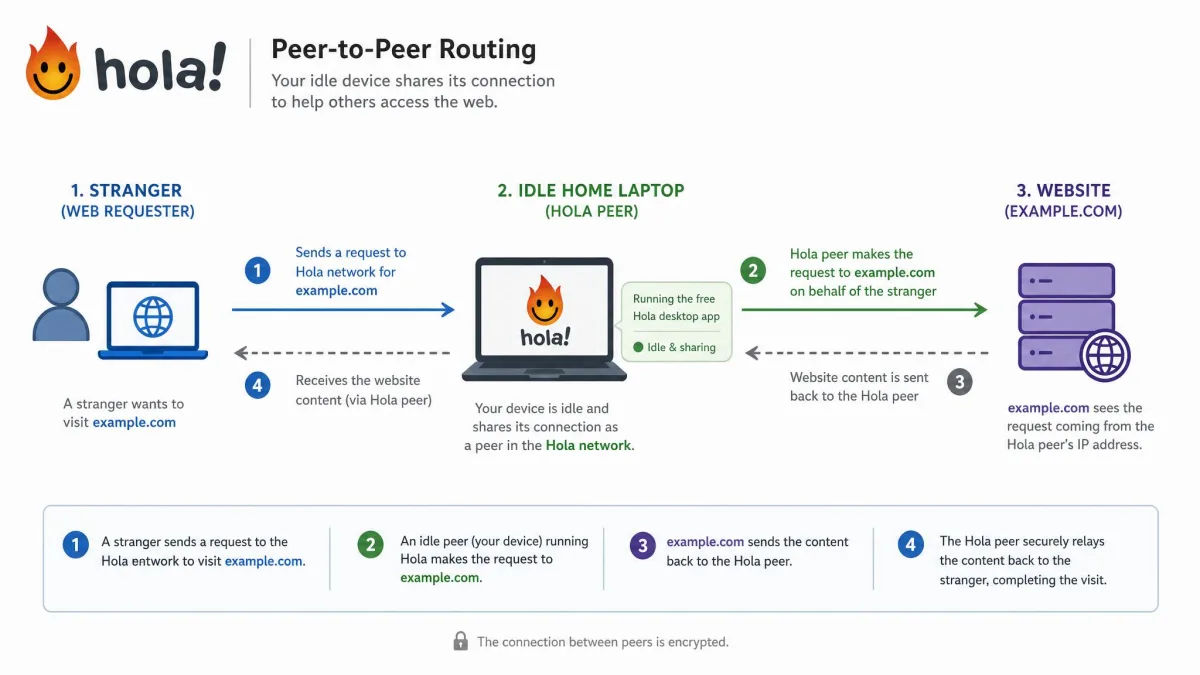
Our verdict hinges on architecture. In how a traditional VPN works, your device opens an encrypted tunnel to a server the provider runs, and your requests reach the web from that server's IP address. Hola starts the same way, with every client connecting to Hola's data-center proxy servers. After that, an internal algorithm decides whether each request is served directly, sent to another data center, or handed to the peer-to-peer network, where it leaves the internet from another Hola user's home connection.
Your device becomes an exit node for other users
Hola's own FAQ says free users share idle bandwidth as a "value exchange." In return for free access, you provide network and processing power while the device is idle, and some other users' traffic is routed through it. Hola caps this at less than 100MB per day on desktop and around 3MB per day on mobile, and says peers are used only when idle, preferably on Wi-Fi.
Which Hola install makes you an exit node depends on the product, and Hola's pages don't fully agree. The FAQ names the free Windows and Mac desktop apps and the Android app from outside Google Play as contributing clients, and it excludes the browser extensions, the iOS app and the Google Play Android app. The privacy policy, however, says free users of Hola products "may be a peer on the Bright Data network," so we treat any free Hola install with caution.
SafetyDetectives' review of the free desktop app confirms the practical effect: other Hola users browse the web through your IP address and system resources. Security.org adds that contributing to the peer network uses your upload bandwidth, which hurts on slow connections or plans with a low data cap.
Hola charges validated corporations to use its peer network through Bright Data. Whatever those customers do with a request routed through your device appears to come from your connection.
Hola Free vs Hola Premium: who shares bandwidth
Premium changes your role on the network, not the company's data practices. Hola's FAQ says Premium subscribers "are never used as a peer," though they can still be routed through other people's devices. They use the peer network without contributing to it.
Logging is where Premium falls short. The current privacy policy has no Premium-specific carve-out, while the Chrome Web Store listing says Hola does not log browsing activity. No audit has settled which statement holds, so we don't describe Premium as no-logs. Plans and prices are in our Hola VPN review, since they don't change the safety picture.
The Luminati botnet scandal and what has changed since
Because free users act as exit nodes, the 2015 incident is more than old news. It showed what that network can be used for once someone else is paying for it.
The 2015 bandwidth-resale and botnet controversy
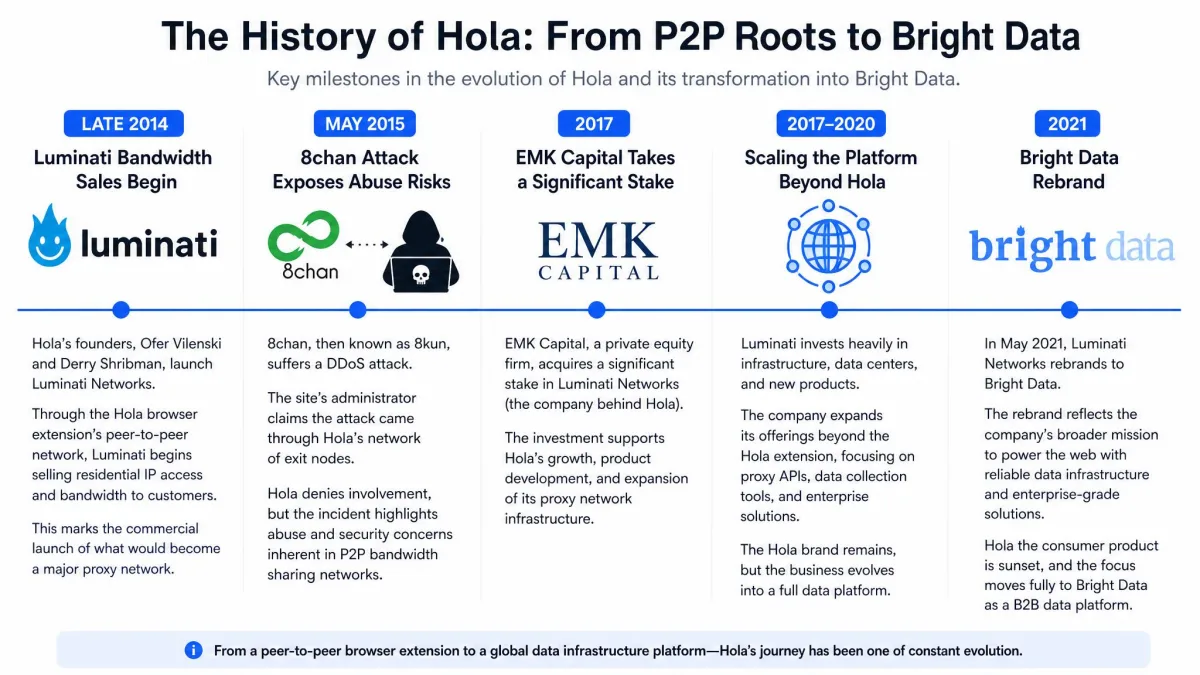
Hola began selling access to its user base as exit nodes under the Luminati brand in late 2014, charging $20 per gigabyte. For free users, that meant they were the product. In May 2015, 8chan founder Fredrick Brennan reported that an attacker had used the Luminati network to flood his site with thousands of POST requests, causing a "100x spike over peak traffic."
TorrentFreak's report that Hola's founder confirmed it sells users' bandwidth followed on May 28, 2015, when Hola claimed 46 million users. Within days, a research group called Adios Hola published several vulnerabilities, including remote code execution, across the Windows client, the browser extensions and the Android app. The researchers later called Hola's patch incomplete and described the service as a "poorly secured botnet, with serious consequences." That reporting covered the software of 2015, not today's builds.
Has Hola cleaned up its act? Hola, Bright Data, and today's setup
Hola did change how it discloses the model. After Brennan's report, it rewrote its FAQ to state that users act as exit nodes, and 01net notes that today's installer explains the peer network before installation completes.
The business itself did not change. EMK Capital bought a majority stake in Luminati in August 2017, and Luminati rebranded as Bright Data in March 2021. Hola's FAQ now says the network is shared "for business use by Bright Data." CyberInsider still lists Hola on its VPN Warning List, updated January 30, 2026, for reselling user bandwidth. Disclosure beats secrecy, but the free product still runs on the same exchange: your idle connection for someone else's customers.
Hola's security features examined
If the peer model is the structural risk, encryption is the part Hola gets mostly right, at least on desktop.
Encryption and protocols
The Windows, macOS and iOS apps use IKEv2/IPsec by default, with AES256 as the default cipher. That's a reasonable baseline. The weak spot is the fallback, because free Windows users can be put on PPTP or L2TP instead, and PPTP has been considered broken for years. There's no WireGuard and no OpenVPN in any Hola app.
The extension and the Android apps work differently. Hola describes them as "proxy split tunneling (not all your traffic is encrypted)," and says the unencrypted portion travels like regular internet traffic, usually HTTPS that Hola doesn't encrypt again. They also allow an HTTP fallback when it helps a site load, which is a trade no privacy tool should make silently.
Kill switch, IP and DNS leaks
Leak results depend on which Hola product was tested. On desktop they look good. Security.org's Windows tests passed WebRTC and DNS leak checks, SafetyDetectives saw no DNS, IPv6 or WebRTC leaks on servers in 10+ countries, and 01net recorded no IP or DNS leaks. The browser extension is another story, since MakeUseOf found it has no kill switch or IP leak protection and its leak results were unreliable.
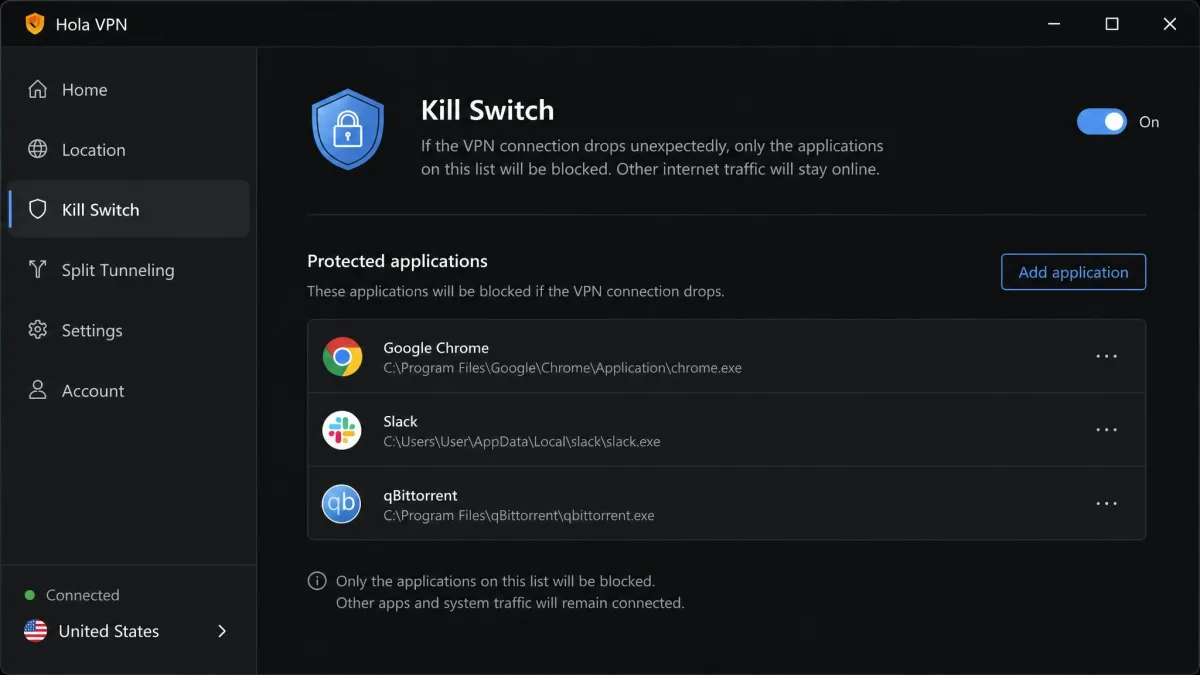
A VPN kill switch should stop all traffic when the tunnel drops. Hola's version lives only in the Windows app and blocks only the apps you add to it, so Security.org notes that any app left off the list keeps sending traffic over your real IP. 01net saw the App Kill Switch cut the connection immediately when the VPN dropped, but we'd still call a per-app switch a partial safeguard. Hola also doesn't document what leak protection it uses, and SafetyDetectives' emails asking about it went unanswered.
What Hola logs and shares: the privacy policy, read closely
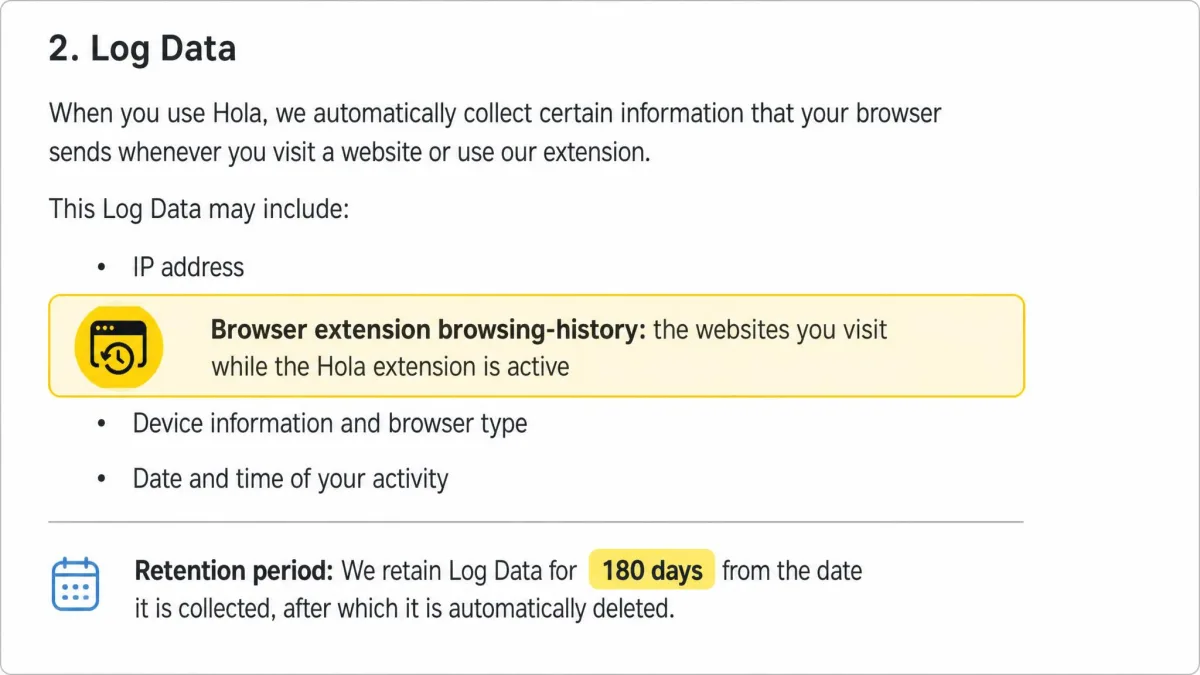
Encryption protects traffic in transit, while Hola's privacy policy, last updated April 14, 2026, covers what happens to the data it keeps. Log data includes your IP address, operating system, browser type and access times, and the policy says log data from the browser extension "may include browsing history." Account data adds your name, email and payment details.
Hola retains log data "for a period of up to 12 months, unless otherwise required." It shares log data when needed to comply with a subpoena or court order, detect fraud or protect rights and safety. Hola has never had an independent no-logs audit.
Hola's FAQ is candid about what the system can see. When it senses dubious activity, Hola says it can "see the source of the request and help law enforcement get to the cyber criminal." That may be fair for a proxy business, but it's the opposite of what most people want from a VPN.
Where Hola is based and why jurisdiction matters
Hola is run from Israel by Hola VPN Ltd., the entity named in its privacy policy, and it was founded by Ofer Vilenski and Derry Shribman. Israel sits outside the 5, 9 and 14 Eyes intelligence-sharing alliances, which sounds good on paper. In practice, jurisdiction matters less when a provider already keeps access logs for up to a year and hands them over under a court order. Location only protects data that doesn't exist.
Malware flags, IT bans, and what experts say
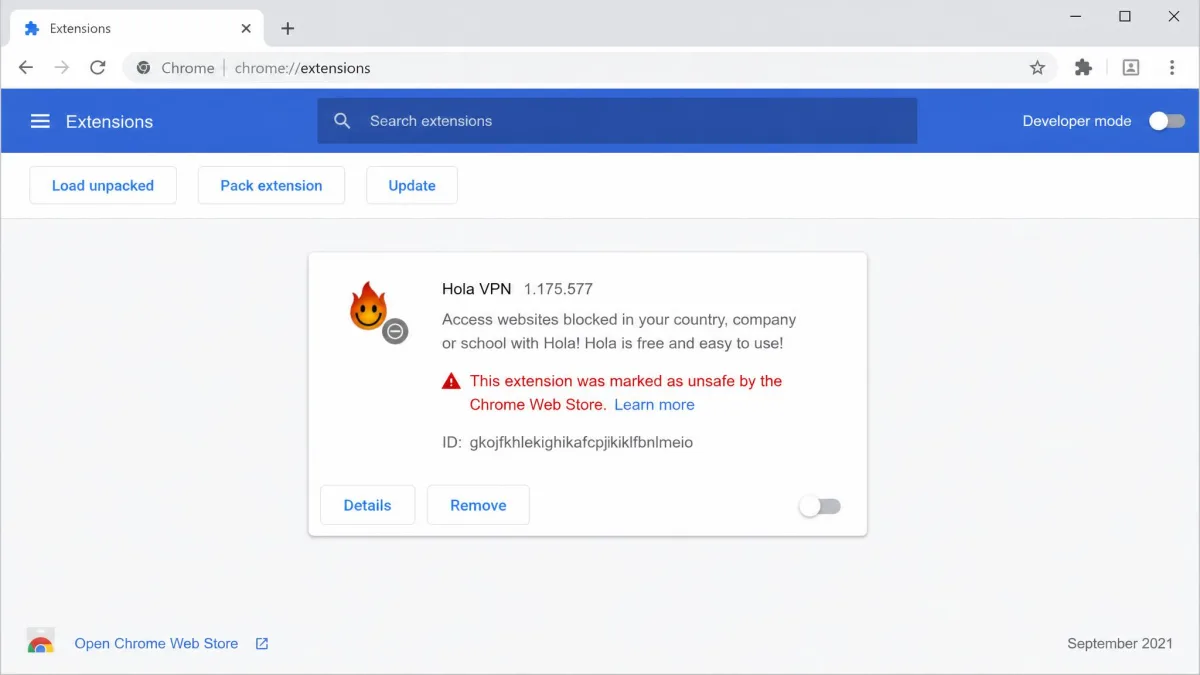
Access logs kept for up to a year, plus the 2015 history, explain why security teams keep their distance. In September 2021, Google blocked the Chrome extension over malware allegations, and installed copies were switched off with a "marked unsafe by the Chrome Web Store" notice. Hola called the notice "obviously false," and the extension is listed again today. Antivirus tools can still flag Hola files, which Hola's FAQ calls likely false positives from its smart-cache component.
Institutions have been less forgiving. The University of Delaware's IT team prohibits Hola on University-owned machines and recommends uninstalling it from personal devices. Its notice, first published in 2019, says Hola "allows anonymous users to browse the web through your internet connection." A 2016 CSIRO study of VPN apps examined 283 Android VPN apps and singled out Hola as the example of apps that forward traffic through other users.
So is Hola safe by expert standards? Security.org gives it a SecurityScore of 6/10, and SafetyDetectives ranks it #70 of 83 VPNs. Trustpilot's 1,236 reviews are kinder, with a 4.4 TrustScore and praise for ease of use. We think that gap is about convenience, not safety, because people rate what they can see.
Is the Hola Chrome extension safe?
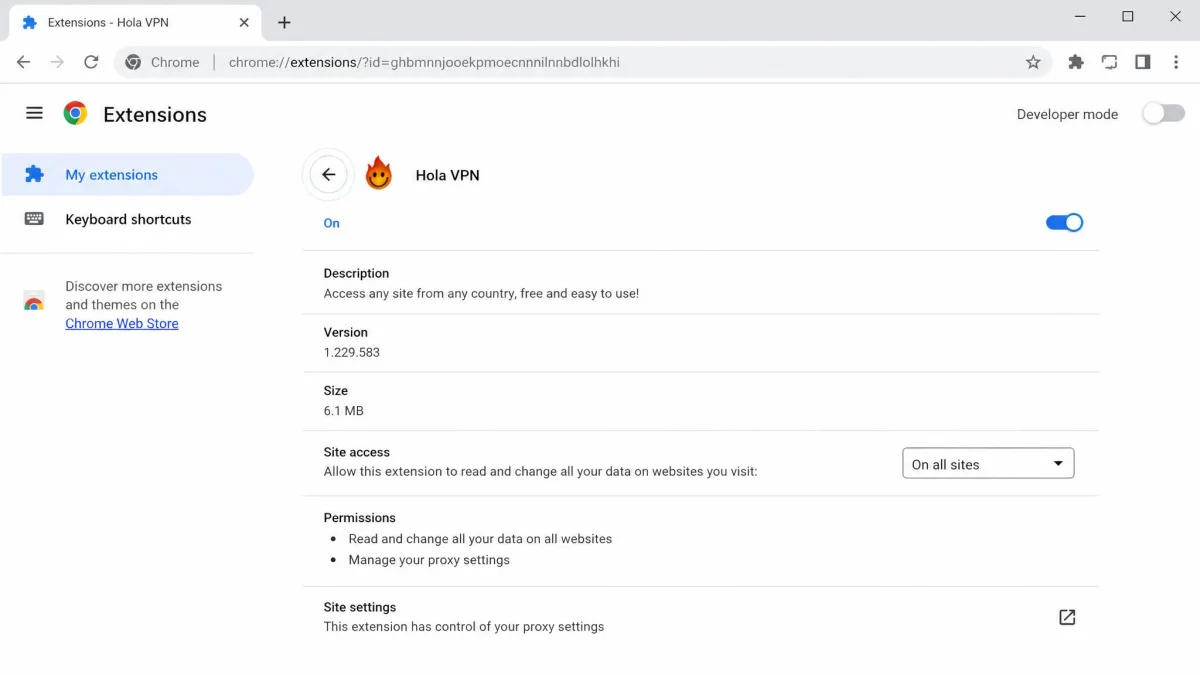
The extension is the Hola product most people meet first, with 4,000,000 users on the Chrome Web Store. Per Hola's FAQ, the Chrome, Opera and Edge extensions are not part of the peer-to-peer network, so the exit-node risk applies to the free desktop and Android apps instead. The extension's risks are different: broad permissions, proxy traffic that isn't fully encrypted, and log data that can include your browsing history.
The permissions the extension asks for
The current extension, version 1.258.557, can control the browser's proxy settings, see and modify requests to every website, and read your tabs and navigation. It can also read and write cookies and inject scripts into pages, with host access that covers every site you visit.
Some of that is needed for any proxy extension to work. Cookie access plus script injection on every site, though, is a lot of trust to hand a company that keeps extension browsing history. Is Hola VPN safe to use for casual unblocking in a throwaway browser profile? Possibly. In a browser where you bank or sign in to work, we wouldn't take that risk.
Safer alternatives to Hola
Unlike Hola, a conventional VPN routes your traffic only through servers the provider controls, which removes the exit-node problem entirely. If price is why you looked at Hola, start with our list of free VPNs that don't share your connection, which covers the best no-cost options we recommend. For browser-only protection, we keep a separate roundup of safer free VPN Chrome extensions.
Proton VPN's free plan is the clearest contrast. It offers unlimited data with no ads and includes a kill switch on the free tier. It's based in Switzerland, with a no-logs policy audited annually by Securitum, though the free plan covers 1 device. Here's how the three options compare on safety alone.
| Safety check | Hola Free | Hola Premium | Proton VPN Free |
|---|---|---|---|
| Routes other users through your device | Yes, on free desktop and non-Play Android apps | No | No |
| Logging | IP, device and access logs, kept up to 12 months | Same policy, no Premium carve-out | Audited no-logs |
| Encryption | AES256 on desktop; extension not fully encrypted | IKEv2/IPsec with AES256 | AES-256 or ChaCha20 |
| Kill switch | Windows app, selected apps only | Same per-app switch | Yes |
| Leak protection | Desktop tests passed; extension unreliable | Same apps as Free | Yes |
| Jurisdiction | Israel | Israel | Switzerland |
How to remove Hola safely
If Hola is installed, remove every piece of it, because the desktop app and the browser extension are separate installs. In Chrome, open chrome://extensions, find Hola VPN, then click Remove. For the desktop and mobile apps, follow the step-by-step uninstall instructions in our Hola review.
Who can still use Hola, and when to avoid it
Hola still has a narrow place. If you only want to change your apparent location to reach a region-locked site, on a device that holds nothing sensitive, Premium does that without enrolling you as a peer. Even then, the safer free options above cover the same need without the peer network.
Avoid Hola for anything tied to your identity or money, such as banking, work accounts or email. Skip it on work or school machines, where IT policies may ban it outright, and on metered connections, where the free desktop app's upload use adds up. It won't help with torrenting either, since Hola blocks P2P traffic on its servers.
Frequently asked questions
Is Hola VPN safe to use on Chrome?
Is Hola a virus or malware?
Does Hola sell your bandwidth?
Does Hola keep logs?
Is Hola Premium safer than the free version?
Is the Hola Browser safe?
How do I completely uninstall Hola?
The bottom line
Hola's pitch is free unblocking. What it asks in return is the problem. The free desktop and Android apps lend your connection to Bright Data's customers, and the company's first run at this model ended with a website under attack from its users' IP addresses.
If Hola is already on your machine, remove it and move to a VPN that keeps traffic on its own servers. If you only need to reach a region-locked site now and then, a free plan like Proton's gets you there without lending anyone your IP address.