A VPN that puts the word "fastest" in its own name sets a high bar, and the first thing anyone shopping for a fast connection wants to know is whether the product lives up to it. Speed is the reason most people accept the small hassle of running a VPN at all, so a service that promises to be the quickest has to answer for that claim on a stopwatch, not in a marketing headline.
That is the question we set out to answer. We tested FastestVPN across the things that actually decide whether a VPN is worth paying for: raw download speed on nearby and distant servers, streaming access on the big platforms, leak protection, the apps on desktop and mobile, and the value of its pricing. Our testing covered the Windows and macOS apps on a home fiber connection, with speed, leak, and streaming checks run on both nearby and long-distance servers so the numbers reflect real use rather than a single lucky session.
One point of housekeeping before we start. The product in this review is FastestVPN from fastestvpn.com, the Cayman Islands service with the lifetime plan. It is not Namecheap's similarly named "FastVPN," which is a different product entirely. If you landed here looking for the one with the $40 lifetime deal, you are in the right place.
FastestVPN at a Glance (Pros and Cons)
Before the section-by-section detail, here is the short version of what using FastestVPN is actually like. It is an inexpensive, no-logs service with a clean set of apps and dependable streaming access. Where it falls short is scale: the server network is small, split tunneling is missing on half the platforms, and the speed drop on long-distance servers is large enough that the name overpromises.
Pros
- Independently audited no-logs policy, with Cayman Islands jurisdiction outside the 5/9/14-Eyes alliances
- Unblocks Netflix, Disney+, Hulu, Prime Video, Max, and BBC iPlayer
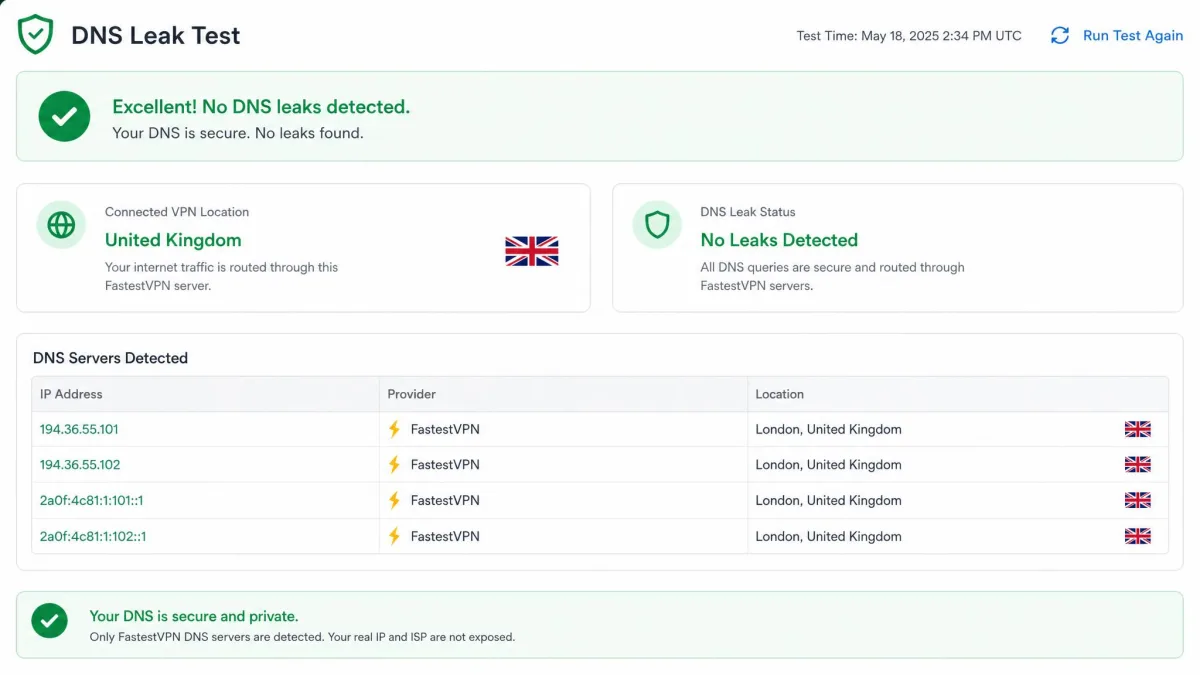
- No DNS or WebRTC leaks detected in our testing
- 10 simultaneous device connections, more than most rivals
- Very cheap, including a $40 one-time lifetime plan
- Clean, easy-to-navigate desktop and mobile apps
Cons
- Download speeds drop sharply on distant servers, so it is not truly "fastest"
- Small server network of around 800 servers limits location choice
- Split tunneling is limited to Android and Windows
- No browser extensions and no two-factor authentication on the account
- The Mac app produced occasional connection failures during testing
Taken together, that is a value pick with a privacy backbone, not a performance flagship. The rest of this review walks through each area in the order that matters most for a fast VPN, starting with what is under the hood.
Features (encryption, protocols, kill switch, split tunneling)
The feature set is where FastestVPN reads more like a premium product than its price suggests. Encryption is 256-bit AES, the same standard the higher-priced services use, and there is no weaker fallback option to worry about. On top of that you get a kill switch, P2P-optimized servers, an ad blocker, malware protection, a NAT firewall, the FastestPass password manager, unlimited bandwidth, and 24/7 live chat. Dedicated IP and port forwarding are available as paid add-ons.
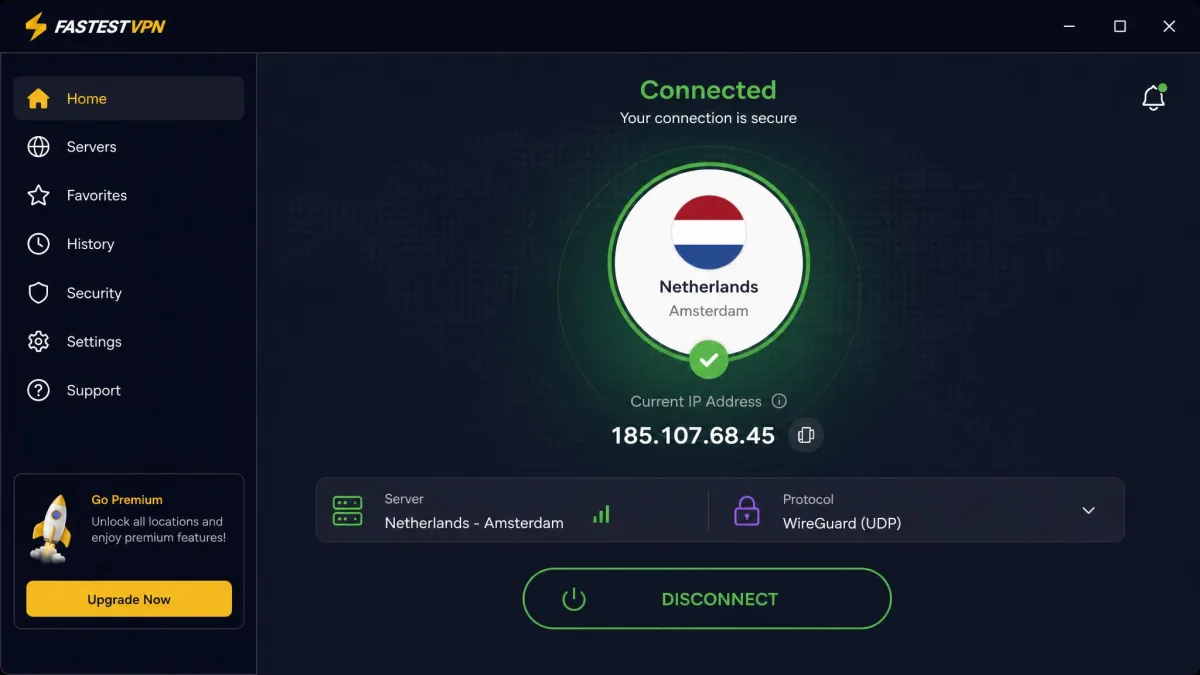
Protocol support is broad. The apps carry WireGuard, the modern protocol that drives most of the speed on VPNs today, alongside OpenVPN in both UDP and TCP forms, plus IKEv2/IPSec, plain IPSec, OpenConnect, and L2TP. WireGuard is the one you will want to leave selected for everyday use, since it is the fastest of the group and the one our speed numbers below are based on. Having OpenVPN on hand still matters, because it is the protocol to fall back on when a restrictive network blocks WireGuard traffic outright. IKEv2 is the useful middle option on mobile, where it reconnects quickly as you move between Wi-Fi and cellular, and the older L2TP and plain IPSec choices are there mostly for compatibility with legacy hardware rather than daily use.
Two features come with asterisks. The kill switch behaves differently depending on your platform: it runs automatically on macOS but is an optional, manually enabled setting on Windows, so Windows users should switch it on before trusting it. Split tunneling, which lets you route some apps through the VPN and others around it, is limited to the Android and Windows apps. If you are on iOS or macOS, it simply is not there.
The Windows kill switch is off by default. Open the settings and enable it before you rely on FastestVPN to protect you if the connection drops, because on Windows it will not engage on its own.
The password manager and malware blocking are welcome extras at this price, and unlimited bandwidth means there is no data cap to plan around. The NAT firewall adds a layer of protection against unsolicited inbound connections, and the P2P-optimized servers are set aside specifically for torrent traffic rather than being scattered through the general network. The dedicated IP add-on is worth a look if you keep hitting captchas or need a stable address for remote access, and port forwarding helps a specific class of P2P and self-hosting setups, though both cost extra on top of the base plan. None of these are unique to FastestVPN, but seeing them all bundled into a service this cheap is unusual, and it is part of why the value case holds up. Test the features that matter to you rather than assuming every bundled extra is best-in-class, since some, like the ad blocker, are convenience tools rather than reasons to buy on their own.
Speed and Performance (our test results)
Here is the section the name demands. We ran our speed checks on WireGuard, testing nearby servers first and then long-distance connections, on both Windows and macOS.
The short answer is that FastestVPN is fast up close and ordinary at range. On nearby servers, a WireGuard connection lost roughly a fifth of the base download speed. That is a good result, and about what we see from strong performers. A drop in that range is barely perceptible in daily use: a connection that starts fast stays fast, pages load without a pause, and a 4K stream still opens on the first try. The drop grew with distance. On far-off servers the loss widened considerably, and across both Mac and Windows our real-world download speeds landed close to 45% below the unprotected baseline. On the longest hops the reduction stretched further still, running toward half of the base connection, which is where the gap between the name and the reality opens up. That puts everyday performance at "average" rather than "fastest."
FastestVPN is quick on the servers nearest you and merely average once you reach across the map, which is the honest version of what the name promises.
— From our hands-on testing
The exact percentage you see will vary, and that is worth being clear about. Measured speed loss depends heavily on server distance, your base connection, and even the time of day, so treat these figures as the shape of the performance rather than a fixed guarantee. A fiber line at midnight and a shared cable connection at peak evening hours will not read the same, and neither will two sessions to the same city an hour apart. What held true across sessions is the pattern: strong nearby, weaker far away. Upload speeds and latency followed the same curve, staying comfortable on close servers and stretching out as the distance grew. Higher latency is the part you feel most in the moments a benchmark does not capture, such as a video call that lags or a game that stutters, so a nearby server helps there as much as it does on raw throughput. For a sense of why any VPN slows you down in the first place, our explainer on whether a VPN slows down your internet speed covers the mechanics.
FastestVPN also advertises 10 Gbps servers, which sets a high ceiling on paper. That ceiling matters most if you have a multi-gigabit connection, since most home connections will not saturate a 10 Gbps port either way. What the fast hardware really buys you is consistency under load: a well-provisioned server holds its speed when a lot of people are connected at once, so the 10 Gbps figure is best read as headroom rather than a figure you will actually hit. For the majority of users, the nearby-server speed is what you will feel day to day, and there FastestVPN is genuinely good.
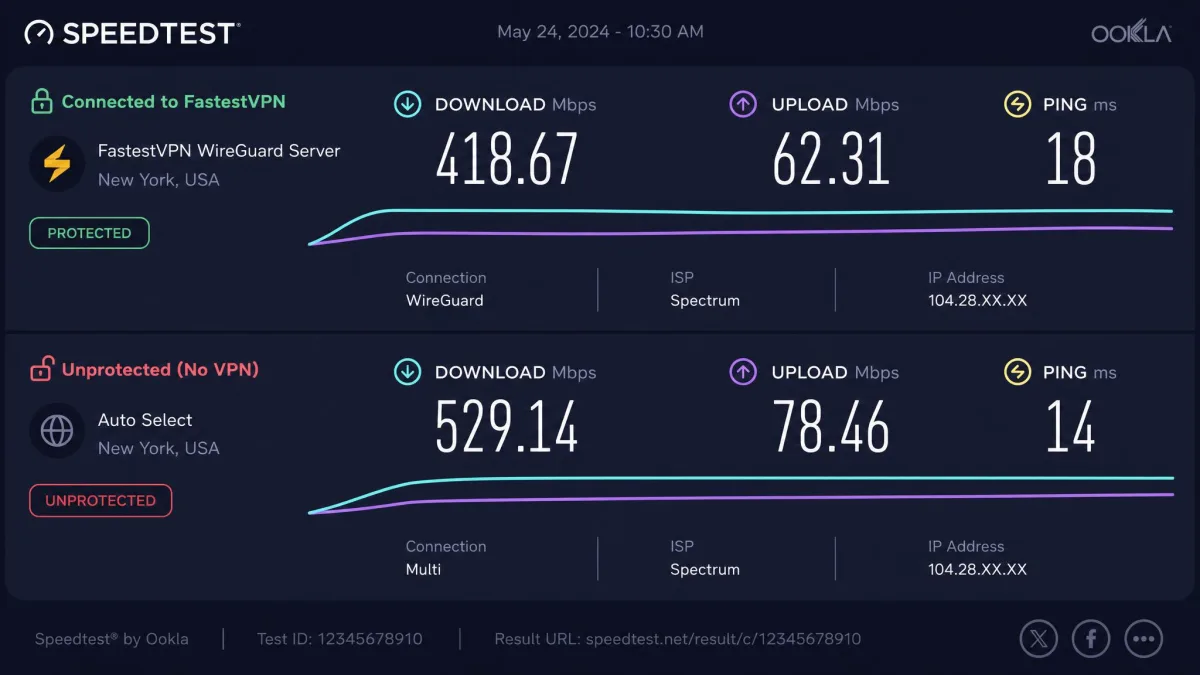
The takeaway: if your priority is the quickest possible connection to a server on the other side of the world, this is not the outright winner. If you want a connection that stays fast to the servers you actually use most, it delivers. For most people, whose VPN use is streaming and browsing on a server in their own region or the next country over, that nearby-server strength is the number that counts. The honest way to frame it is that the name describes the best case rather than the average one, and the best case is one you can reach simply by picking a close server.
Server Network and Locations
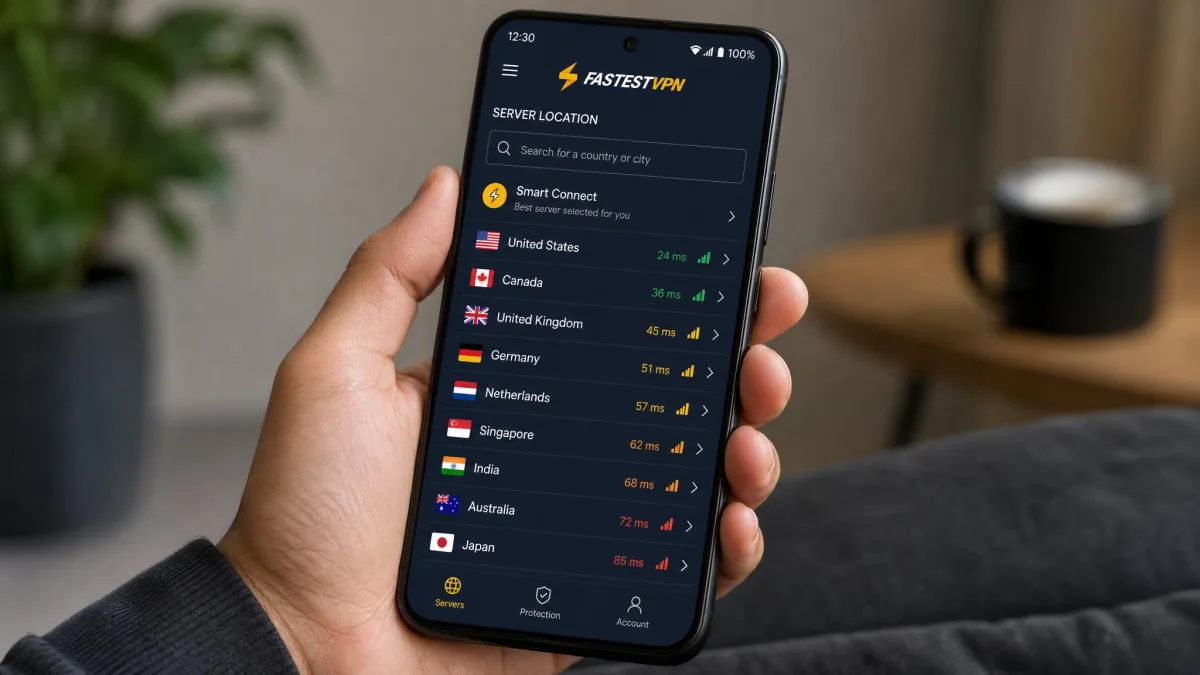
Speed and server choice are linked, so the network deserves its own look. FastestVPN runs 800+ servers across 49+ countries and 100+ locations. That is enough to cover the major regions most people connect to. The country list spans North America, Europe, and a solid spread of Asia-Pacific.
It is also, plainly, a small network next to the top tier. The leaders run several thousand servers across a hundred or more countries, and that gap has two practical effects. First, your choice of location is narrower, so a specific city or a less common country may not be on the list. Where a big provider might offer several US cities, a smaller network often gives you one or two, which matters if you need to appear in a particular metro area for a regional service. Second, fewer servers can mean more crowding at peak times, which feeds back into the speed drop on popular locations. A busy server shares its capacity across everyone connected to it, so the same location that felt quick at midday can soften in the evening rush.
Server count is not the whole story, but it does bound your options. If you need a very specific country that sits outside the mainstream, check FastestVPN's location list before you buy, because 49 countries covers the common cases and not the long tail.
For most streaming and privacy use, the network is sufficient. The locations that carry the popular Netflix and BBC iPlayer libraries are all present, and the P2P servers cover the European countries that matter for torrenting. The 100+ locations spread across those 49 countries also give you a little room to switch when a single server gets blocked or congested, which is the practical value of location count over a raw server tally. If you collect obscure server locations or want the widest possible map, though, this is one of the areas where FastestVPN's budget positioning shows most clearly, and it is a fair trade to weigh against the price.
Streaming and Unblocking (Netflix, Disney+, etc.)
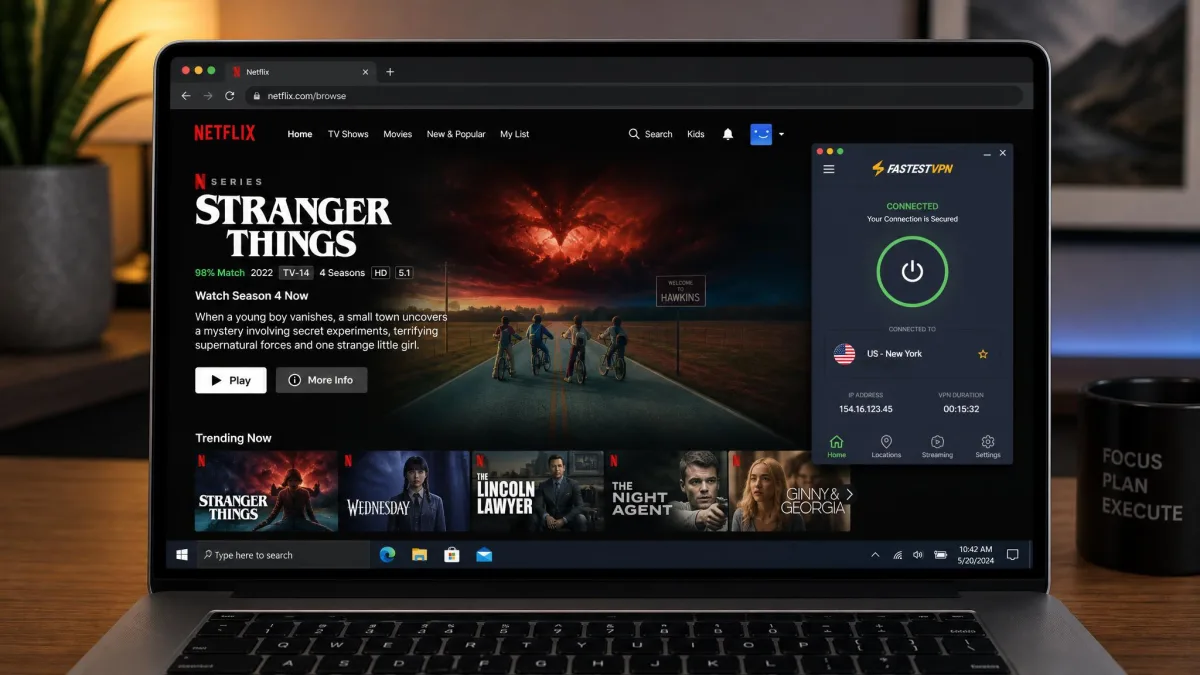
Streaming is where FastestVPN quietly outperforms its price. In our checks it unblocked Netflix in the US, UK, Japan, and Sweden, plus Disney+, Hulu, Amazon Prime Video, Max, and BBC iPlayer. Those are the platforms most people are paying a VPN to reach, and all of them loaded.
The one caveat is buffering. On nearby servers, streams started quickly and held their quality. On distant servers, the same speed drop that shows up in the benchmarks turned into occasional buffering, especially at higher resolutions. The fix is the obvious one: pick the closest server that carries the library you want. If you are in Europe reaching for US Netflix, expect the trade-off between library access and a slightly slower start.
For everyday streaming, that combination of broad platform support and reliable unblocking is a strong result. Netflix in particular is aggressive about blocking VPNs, so a service that opened four separate Netflix regions in testing is doing better than many pricier rivals. If a specific stream refuses to load, switching to another server in the same country almost always clears it, since the platforms block individual server addresses rather than the whole service. If IPTV is your use case, our guide to fast VPNs for IPTV is a useful companion.
Torrenting and P2P
FastestVPN supports P2P, but not everywhere on the network. Torrenting runs on the P2P-optimized servers. Those sit in locations including Germany, Finland, and Portugal. Point your client at one of those and downloads work as expected, with the traffic routed through servers set up to handle it rather than a general-purpose location that may throttle or block it.
The honest note is speed. On the P2P servers, our download rates ran slow, which fits the broader pattern of the network being fine up close and softer at range. If you are far from the German, Finnish, or Portuguese servers that carry P2P, that distance stacks on top of the usual torrent overhead, so a large download can take longer than the same file would on a faster VPN. Combined with the kill switch, unlimited bandwidth, and the audited no-logs policy, the privacy side of torrenting is well covered, so the limitation is throughput rather than safety. That is an important distinction: a slow torrent is an inconvenience, while a torrent that leaks your address is a real problem, and FastestVPN handles the part that matters. The unlimited bandwidth is worth underlining here, since a data cap is the quiet dealbreaker for torrenting on cheaper services, and FastestVPN does not impose one. If torrenting is your main reason for buying a VPN, our roundup of fast VPNs for torrenting weighs the faster options against this one.
Torrent only on the P2P-optimized servers. If you connect to a standard location and start a download, you will not get the P2P routing FastestVPN sets up for that traffic, and performance will suffer.
Privacy and Security (no-logs policy, jurisdiction, audits)
This is the part of the review where FastestVPN goes from "good value" to "genuinely reassuring." The no-logs policy has been independently audited by Altius IT, which carried out its assessment in January 2023. An independent audit is the difference between a company promising it keeps no logs and a third party checking the claim, and it is not something every budget VPN can point to. The audit covered the logging practices, which is the core question for a privacy tool, though it is worth knowing that a policy audit inspects how the service is configured rather than continuously monitoring it after the fact.
Jurisdiction backs that up. FastestVPN is headquartered in the Cayman Islands, which sits outside the 5/9/14-Eyes intelligence-sharing alliances. For a privacy tool, being based outside those data-sharing frameworks is a meaningful advantage, since there is no local mandatory-retention regime forcing the company's hand. That matters most in the situation privacy tools exist for, where a request for user data has no local logs to hand over and no legal machinery compelling the company to have kept them.
On the technical side, our leak testing came back clean: no DNS leaks and no WebRTC leaks on either platform. A no-logs policy is only as good as the connection that enforces it, so a clean leak result is exactly what you want to see next to the audit. A DNS leak quietly hands your browsing history to your internet provider even while the VPN looks connected, so this is not a box-ticking test. A WebRTC leak is the browser-level equivalent, exposing your real address through a video-call feature even with the tunnel up, and FastestVPN closed both. Encryption is the standard 256-bit AES, and the kill switch, once enabled on Windows, closes the gap if the tunnel drops.
There are two gaps worth naming. There is no two-factor authentication on the account itself, so your login is protected by a password alone. And there are no browser extensions, which some users prefer for quick, tab-level protection. Neither undermines the core privacy story, but both are features the more expensive services include. For a wider look at how the no-logs services compare, see our roundup of the best no-logs VPNs for privacy.
An audit has a date. FastestVPN's no-logs audit was carried out in January 2023, so it reflects the service as it stood then. Independent verification is a strong signal, and a more recent re-audit would be a stronger one still.
Apps and Ease of Use (desktop and mobile)
A fast connection is only useful if the app around it stays out of your way, so ease of use matters more than it gets credit for. The good news is that FastestVPN's redesigned desktop and mobile apps are clean and easy to navigate, and a clear step up from the clunkier earlier versions. The main screen is the familiar big-connect-button layout, with the protocol picker and settings a click away rather than buried.
The rough edge showed up on macOS. During testing, the Mac app produced occasional connection failures, where a session would not establish on the first try and needed a second attempt. It was not constant, and reconnecting cleared it, but it is the kind of friction you notice on a product whose whole pitch is speed. The Windows app was steadier in our use, connecting on the first attempt each time and holding the session without dropping.
Remember the two platform-specific quirks from the features section, because they land here in daily use. Split tunneling is present on Windows and Android and absent on iOS and macOS, and the kill switch is automatic on Mac but manual on Windows. Neither is a dealbreaker, but both mean the experience is not identical across your devices. Availability is broad otherwise, with apps for Windows, macOS, Android, and iOS, so you can cover a mixed household from one account, and the 10-connection limit means you rarely have to sign out of one device to use another.
Pricing and Plans
Pricing is FastestVPN's strongest argument, and it is worth laying out clearly. The month-to-month plan is $5 per month, which is unremarkable. The value appears when you commit. The 1 Year + 1 Year Free plan bills $19.95 for two years, which works out to roughly $0.83 per month, one of the lowest effective rates of any VPN we have looked at.
Then there is the lifetime plan. For $40 as a one-time payment, you get the service with no recurring bill at all. Lifetime VPN deals always carry a note of caution, since "lifetime" means the lifetime of the company's offer rather than a legal guarantee, but at $40 the math is easy: it pays for itself against the monthly rate inside a year. Every paid plan includes 10 simultaneous device connections, which is more than most rivals allow, with extra devices available at $1 each.
The safety net is a 31-day money-back guarantee, which gives you a full month to run your own speed and streaming tests before committing. That window is generous, and given that performance varies by location, using it to test the servers you actually care about is the smart move. Run a few speed checks on the servers you would use most in the first week, and you will know whether the value stacks up for your connection well before the refund window closes.

For a household that wants no-logs privacy and dependable streaming across a lot of devices without a recurring bill, the value here is hard to argue with. You are trading the outright speed and server breadth of the premium tier for a price that undercuts almost everyone.
Customer Support
Support runs on 24/7 live chat, which is the channel most people reach for when a connection will not cooperate. In practice the chat responds quickly, so you are not left waiting when something breaks. Round-the-clock coverage also means the time zone you sit in does not decide whether you get help, which is not a given even among pricier services that route support through business hours. That responsiveness is the good part.
The weaker part is depth. Answers can be brief and surface-level, so a straightforward question gets a fast, useful reply, while a more technical problem may need you to push for detail or escalate. In practice that means the first response is best treated as a starting point rather than a final answer when your question is unusual, and you may go a round or two before you reach someone who can dig into a specific configuration. For a budget service the round-the-clock availability is a genuine plus, and most users will find the quick first response covers the common issues like choosing a server or switching a protocol. The written help center fills some of the gap, with setup walkthroughs for each platform that answer the routine questions without a chat at all. If you expect deep troubleshooting on an unusual router or a niche client setup, temper that expectation and lean on the written guides.
FastestVPN vs. the Competition
FastestVPN does not exist in a vacuum, so it helps to place it against two faster, pricier rivals we have reviewed. The comparison below is not close on speed or server count, but it is not meant to be. The question is what you give up to save money, and what you keep.
| VPN | Buy | Cheapest price | Servers | Countries | Money-back | Devices | Netflix |
|---|---|---|---|---|---|---|---|
|
$0.83/mo (2-yr) or $40 lifetime | 800+ | 49+ | 31-day | 10 | Yes | |
 |
Check price → | See our review | 3,000+ | 105 | 30-day | 8 | Yes |
 |
Check price → | See our review | 2,200+ | 75+ | 30-day | Unlimited | Yes |
Against ExpressVPN, you give up a much larger and faster server network and gain a dramatically lower price and a lifetime option ExpressVPN does not offer. Against IPVanish, which is one of the faster VPNs we have reviewed, you trade some raw speed and unlimited connections for the lifetime deal and Cayman Islands jurisdiction. CyberGhost sits in similar territory on the premium side, and our CyberGhost review covers where it lands.
The pattern is consistent. The premium services win on speed at distance, server breadth, and polish. FastestVPN wins on price, matches them on core privacy with its audit, and keeps up on the streaming most people actually do. If speed across long distances is your single deciding factor, pay more. If value with no obvious privacy compromise is the goal, this is the case for FastestVPN.
Quick Verdict (rating + who it's for)
FastestVPN earns a 7.5 out of 10. It is a fast-enough, private, cheap VPN that is held back from a higher score by a small server network, uneven speeds at distance, and a few missing conveniences like browser extensions and account 2FA. The name oversells the speed, but nothing else about the product oversells itself.
It is for the value-focused user who streams, wants a verified no-logs policy, and does not want a recurring subscription. It is not for the person who needs the quickest possible connection to far-flung servers, or who wants the widest server map on the market. Read the name as "fast enough for what most people do," and FastestVPN is an easy recommendation.
The Bottom Line
The pricing is what seals it. At roughly $0.83 a month on the two-year plan, or $40 once for the lifetime option, FastestVPN costs a fraction of the premium services, and that is the number that turns a solid VPN into an easy one to recommend. Do not take the value on faith, though. Use the 31-day guarantee to confirm the servers you actually care about are quick enough for you, run those checks in the first week, and you will know whether it fits your connection with plenty of time to spare.