
uMobix Review 2026: Is It Legit & Worth the Money?

Is uMobix legit, and is it actually worth the money? That is the real question behind most searches for this monitoring app. We installed uMobix on a real Android phone and tested it for two weeks across calls, messages, GPS, and social apps to see what you actually get.
uMobix promises keylogging, real-time tracking, deleted-message recovery, and dozens of social platforms. In this honest review, we cover what it monitors, setup, cost, whether it is legal and safe, and how it compares to mSpy, Eyezy, and FlexiSPY.
uMobix Review: Our Quick Verdict & Rating
uMobix is a genuinely functional monitoring app, not a scam, and on Android it delivers most of what it advertises. Real-time updates were quick, the keylogger worked, and the social-app coverage is a real strength. The catch is cost and gaps: it is priced like a premium product but skips geofencing alerts and call recording, and the iPhone experience is much thinner. For an Android user who wants broad social and messaging visibility, uMobix is worth it.
Visit uMobix Official SiteWhat We Liked
The dashboard updated fast, social-app coverage was broad, and deleted-message recovery pulled back texts we had removed. The keylogger was reliable, and the Android install was simpler than we expected.
What We Didn't Like
The price stings on shorter plans, and there is no geofencing alert or call recording. The iOS version leans on iCloud backups and drops Android-only features, so iPhone buyers get less for similar money.
How We Tested uMobix
We did not rely on the marketing pages. We bought a plan, installed uMobix on a dedicated Android test phone, and used it for two weeks.
What Is uMobix and Who Is It For?
uMobix is a phone monitoring app, often called a spy app, that lets you see what is happening on another phone from a web dashboard. Once installed on the target device, it quietly collects activity and sends it to your account, which you open from any browser.
It suits two audiences: parents watching a child's phone, and anyone monitoring a device they own or have a lawful right to monitor, such as a company phone with employee consent. Be clear on one thing: uMobix is a monitoring tool, not a full parental-control suite. If you want screen-time scheduling and content filtering, this is not that product. If you want to see what is said and done on a phone, it is.
uMobix Features: What Can You Actually Monitor?
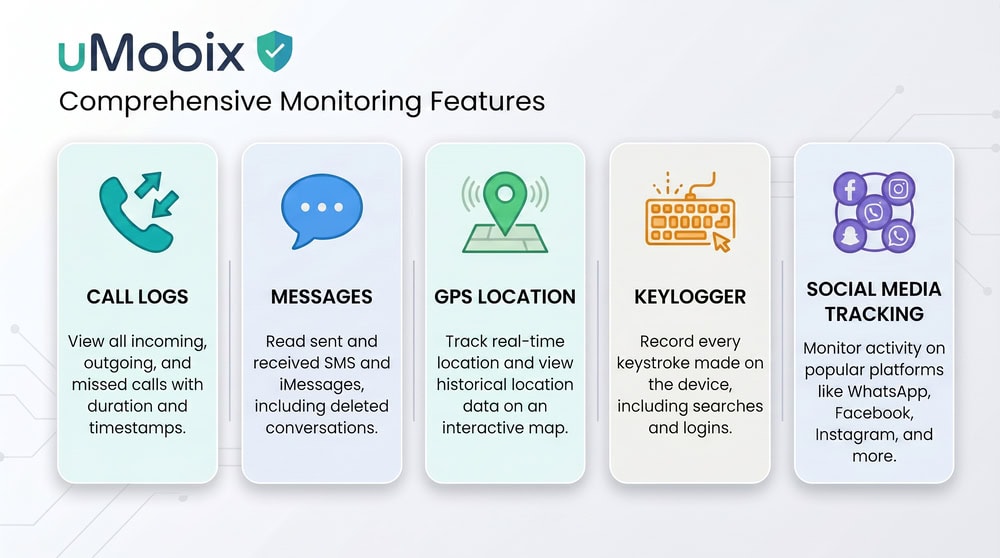
This is where uMobix earns its reputation, and most of the list works on Android. You get real-time GPS with location history, a keylogger, call logs with timestamps and duration, SMS including deleted messages, browser history, photos and videos, app usage time, the contact list, SIM-change detection, and screen activity captured through periodic screenshots. It also offers remote app blocking plus camera and microphone access.
The headline is social coverage. uMobix advertises 30+ apps, and its own site cites as many as 41, spanning WhatsApp, Snapchat, Instagram, TikTok, Facebook Messenger, Telegram, Viber, and Tinder.
Social Media & Messaging (WhatsApp, Snapchat, Instagram, TikTok)
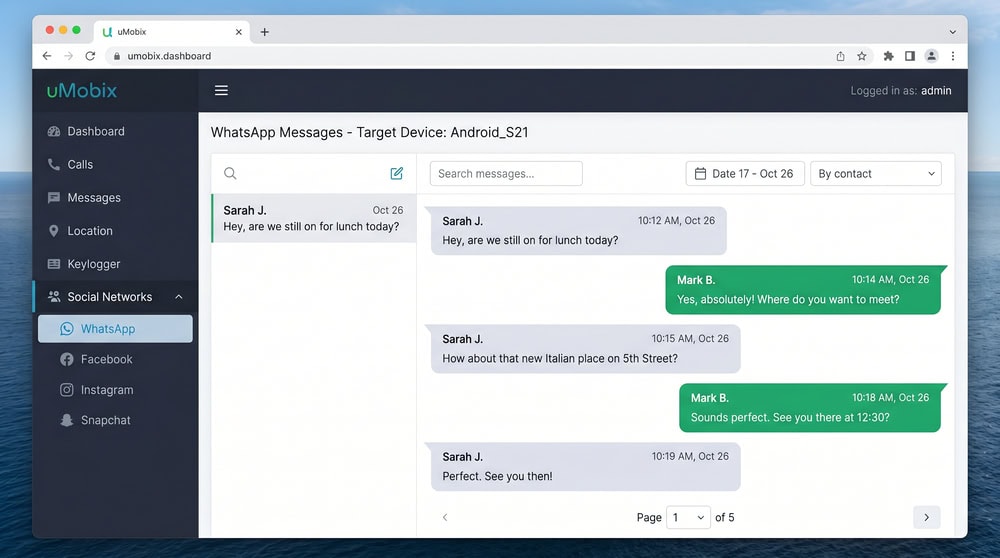
Social monitoring is the strongest part of uMobix. We watched WhatsApp and Instagram messages appear within minutes, and Snapchat and TikTok activity showed up too, which matters because Snapchat is one of the harder apps to capture. Each platform gets its own tab.
Calls, SMS & Keylogger
Call logs arrived with timestamps and duration, and SMS capture included messages deleted on the device. The keylogger recorded typed text across apps, which is how uMobix surfaces content from platforms it does not parse directly. One limit: there is no call recording on Android, so you see who called and for how long, but not what was said.
GPS Location Tracking
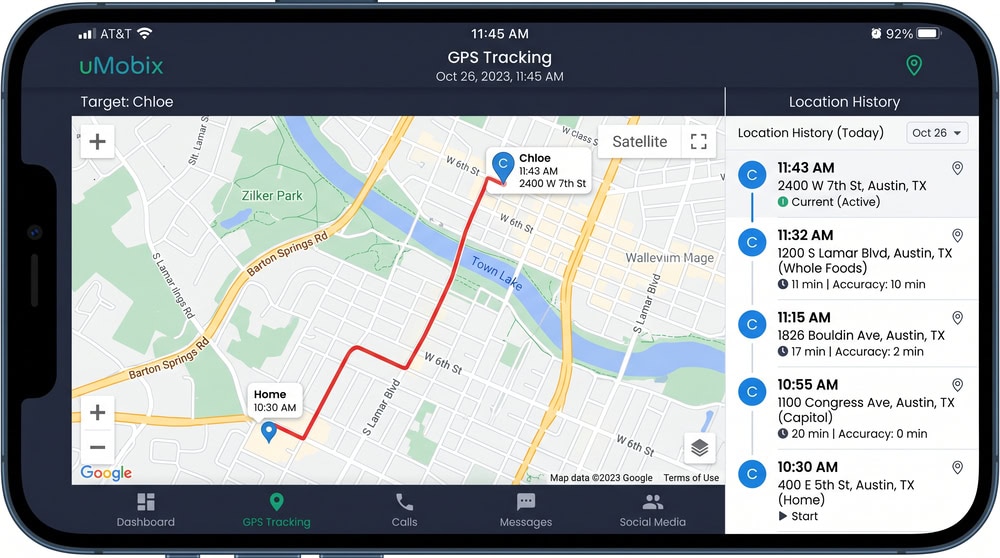
Real-time GPS was accurate. We compared location history against routes we actually drove, and the pins lined up well. uMobix logs a trail over time, so you can scrub back through where a device has been. The gap is geofencing: uMobix does not alert you when a device enters or leaves a zone.
Photos, Video & Web Activity
uMobix pulls photos and videos from the gallery and logs browser history so you can see which sites were visited.
Android vs iOS - What's Different
The Android and iOS experiences are not equal, and this is the most important thing to grasp before buying. On Android, uMobix runs as a hidden app with the full feature set, including the keylogger. On iPhone, it works through iCloud sync rather than an installed app, so no jailbreak is required, but the feature set is reduced, with no keylogger.
How to Install and Set Up uMobix
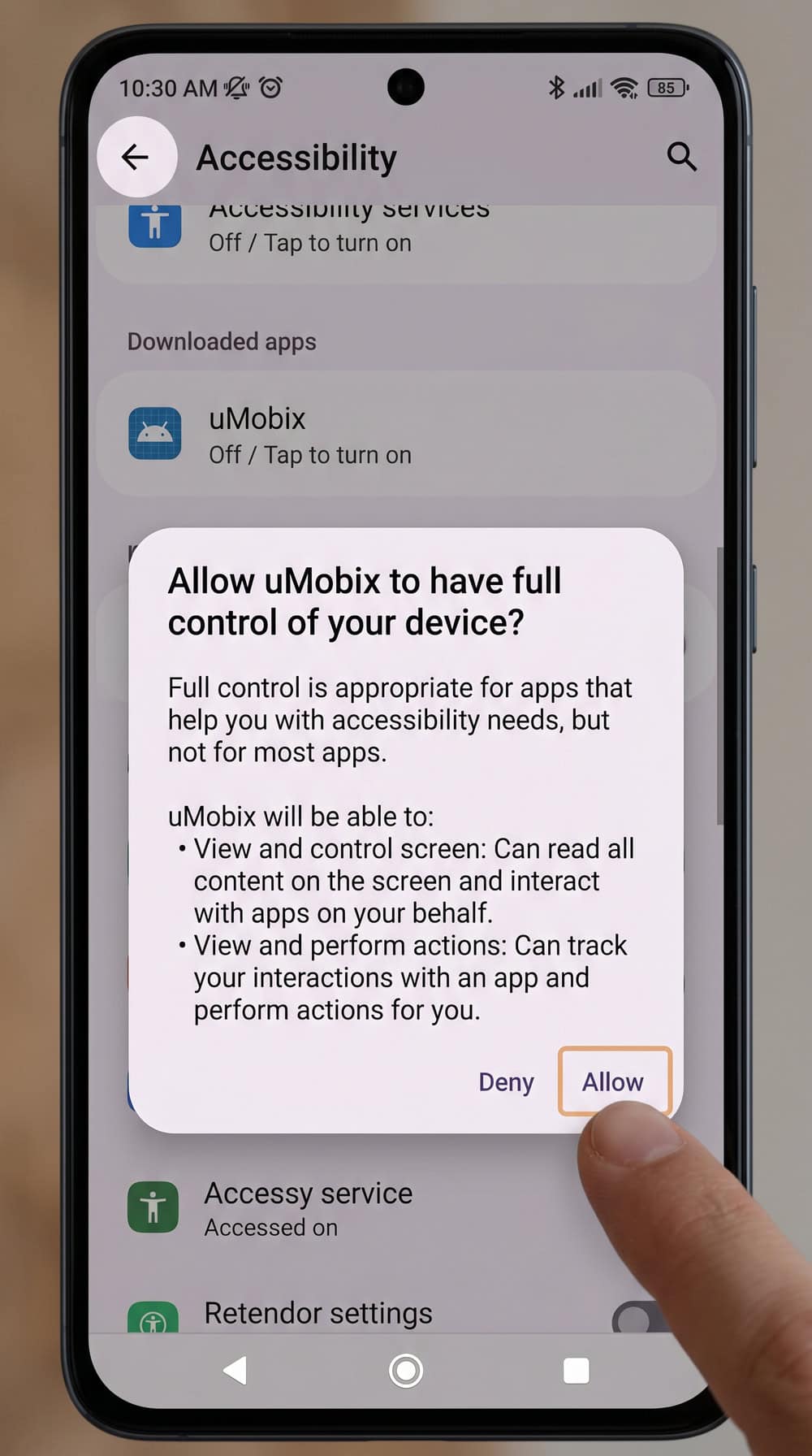
Installation on Android was straightforward, though it requires brief physical access to the target phone. After buying a plan, you create an account and uMobix emails setup instructions. To install, download the app on the target device, then open Settings and grant the permissions uMobix needs, including accessibility access so the keylogger and social capture work. It took us under 15 minutes.
uMobix runs on Android OS 4.0 and up, and no root is required, which removes the biggest hurdle other spy apps create. Once permissions are granted, the app hides itself and syncs. On iPhone there is nothing to install: you enter the target Apple ID and iCloud credentials into your dashboard, and uMobix reads data from the iCloud backups.
uMobix Pricing and Plans: Is It Worth the Money?
uMobix uses the usual tiered structure: the longer you commit, the lower the monthly cost. The 1-month plan runs $49.99, the 3-month plan drops to $29.99 per month, and the 12-month plan is cheapest per month. Each license covers one device.
| Plan | Price per month | Best for | Devices |
|---|---|---|---|
| 1-month | $49.99 | Trying it short-term | One device |
| 3-month | $29.99 | A school term or trial | One device |
| 12-month | $12.49 (~$149.88/yr) | Long-term, lowest cost | One device |
The annual plan is where uMobix becomes competitive, dropping to $12.49 per month, roughly a quarter of the 1-month rate, which makes the short plans best for genuine short-term needs only. That $12.49 is the standard checkout rate, so watch for promo codes or seasonal sales that can lower the live total at checkout. There is no full free trial, though uMobix offers a free live demo dashboard. A 14-day money-back guarantee exists, but it is conditional and tied to qualifying technical issues, so read the terms first.
Check uMobix Plans & PricingIs uMobix Legit, Safe, and Legal?
uMobix is a legitimate product from an established company, not a scam. It does what it says, the dashboard is professionally built, and it has thousands of real reviews across independent platforms. So on "is uMobix legit," the answer is yes.
Legal use is a separate question. Monitoring is generally lawful when you own the device or have proper consent, such as a parent overseeing a minor child's phone or an employer monitoring a company device with the employee's knowledge. Installing it on another adult's phone without consent is illegal in many places and can carry serious penalties.
On safety, uMobix runs in stealth mode on Android and hides its icon, so a casual user is unlikely to spot it.
What Real Users Say About uMobix
Independent sites give uMobix a mixed-but-decent reception. On Trustpilot, it sits in the "Average" range, around 3.7 to 3.8 out of 5 across several hundred reviews at the time of writing. These scores drift, so treat them as a snapshot.
The praise centers on feature breadth and real-time syncing, which matches what we saw. The complaints cluster around billing, refund friction, and customer support response times, so support quality is the soft spot. Support did respond when we reached out, but expect the refund policy to be enforced strictly.
uMobix Pros and Cons
Pros
- Real-time tracking with quick dashboard updates
- Broad social-media coverage across 30+ apps
- Deleted-message recovery for SMS and chats
- Reliable Android keylogger
- Straightforward Android install with no root required
- Free demo dashboard to preview the interface
Cons
- Premium pricing, especially on the 1-month plan
- iOS is limited to iCloud backups with fewer features
- A monitoring tool, not a full parental-control suite
- No geofencing alerts and no call recording
- Conditional 14-day refund rather than a simple guarantee
- Customer support response times draw complaints
uMobix vs Alternatives: mSpy, Eyezy & FlexiSPY
Our mSpy review covers the closest rival in price and polish, with geofencing uMobix lacks. Our Eyezy review details the cheapest annual option, with strong alerting through Magic Alerts. Our FlexiSPY review covers the priciest, most powerful option, the only one with true call recording.
| Feature | uMobix | mSpy | Eyezy | FlexiSPY |
|---|---|---|---|---|
| 1-month price | $49.99/mo | $48.99/mo | $47.99/mo | Lite $29.95 / Premium $79 |
| 12-month price | $12.49/mo | $11.66/mo | $9.99/mo | ~$179/yr (Premium) |
| OS support | Android 4.0+; iOS via iCloud | Android + iOS | Android + iOS | Android + iOS (root/jailbreak) |
| Social-media tracking | 30+ apps | Yes (broad) | Yes (Social Spotlight) | Yes (broad) |
| Keylogger | Yes (Android) | Yes | Yes | Yes |
| Location / geofencing | GPS history; no alerts | GPS + geofencing | Pinpoint + Magic Alerts | GPS + geofencing |
| Call recording | No | No (Premium) | No | Yes (Extreme) |
| Stealth | Hidden on Android | Stealth mode | Stealth | Stealth |
If you want geofencing alerts, mSpy or Eyezy make more sense, and Eyezy is the value pick annually. If you need to hear calls, FlexiSPY is the only real option. uMobix wins on social-media breadth and ease of Android install.
Frequently Asked Questions
Is uMobix legit or a scam?
uMobix is legit. It is a real, working monitoring app from an established company. In our two-week Android test it captured calls, messages, locations, and social activity as advertised.
Is uMobix worth the money?
On the annual plan, yes, especially for social-media monitoring on Android. The 1-month plan at $49.99 is expensive, and the value drops if you only need basic location tracking or you are on iPhone.
Is uMobix legal to use?
It is legal when you monitor a device you own or have proper consent to monitor, such as your minor child's phone. Monitoring another adult's phone without consent is illegal in many places.
Does uMobix work on iPhone the same as Android?
No. On Android it installs as a hidden app with the full feature set, including the keylogger. On iPhone it works through iCloud sync with no app to install, but loses the keylogger and several real-time features.
Can uMobix be detected, or is it hidden?
On Android, uMobix runs in stealth mode and hides its app icon, so a casual user is unlikely to notice it. No monitoring app is truly undetectable, but in normal use it stays out of sight.
Does uMobix work without the target phone?
For Android, no, you need brief physical access to install it. For iPhone, you do not install anything, but you do need the target Apple ID and iCloud credentials.
Does uMobix track Snapchat and deleted messages?
Yes. uMobix captured Snapchat activity and recovered deleted SMS in our testing, and its keylogger picks up typed content from apps it does not parse directly.
Final Verdict: Should You Buy uMobix?
uMobix is a legitimate, well-built monitoring app that does most of what it promises, and on Android it is one of the more capable spy apps you can buy. Its social-media coverage is genuinely strong, real-time syncing was reliable, and the no-root install lowers the barrier. The reservations are just as real: the 1-month price is steep, there is no geofencing or call recording, the iPhone version is a shadow of the Android one, and the refund policy is conditional.
So, is uMobix worth it? For an Android user who wants broad social and messaging visibility and will commit to a longer plan, yes, it earns the spend. If you are on iPhone, want geofencing or call recording, or want filtering and screen-time controls, look at mSpy, Eyezy, or FlexiSPY first. For its core job on Android, uMobix delivers.
 MSpy Review
 FlexiSPY Review
 Cocospy Review
 Hoverwatch Review
 Highster Mobile Review
 Spyera Review
 SpyFone Review
 Eyezy Review