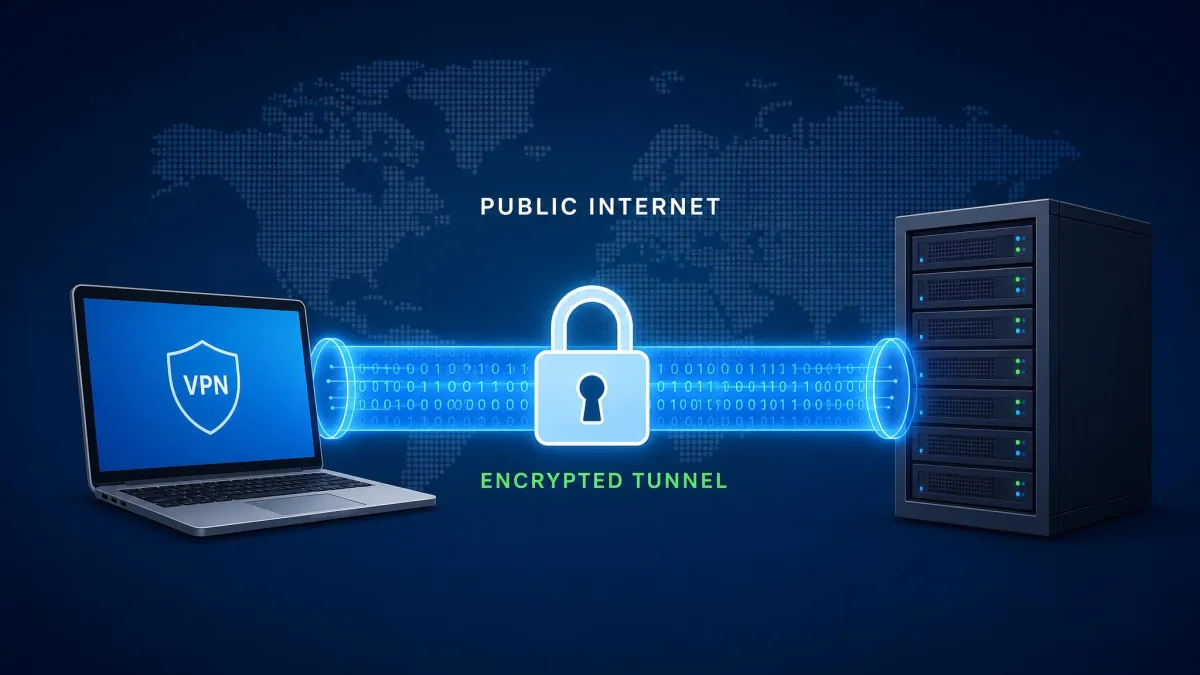
WireGuard is a modern VPN protocol. It builds a secure, encrypted tunnel between two devices over the internet. It runs on top of UDP and uses a small fixed set of cryptographic tools. It identifies each peer by a public key, not a username and password. That combination makes it faster and leaner than the older protocols most VPNs have relied on for years. It is also far easier to audit.
We spend a lot of time testing VPN apps against real speed, leak, and reliability benchmarks. WireGuard keeps showing up as the default protocol behind the fastest connections we measure. This guide walks through how the protocol actually works. We cover the encrypted tunnel, the handshake, and the specific ciphers it uses. We also cover where it is strong and where it has genuine tradeoffs, and how it compares to OpenVPN and IPsec.
The short version is simple. WireGuard trades the endless configuration options of older protocols for a single, opinionated design. That one decision shapes almost everything about how it behaves. It is worth understanding before you pick a VPN protocol.
What Is WireGuard?
WireGuard is an open-source VPN protocol. It was first released in 2015 and created by Jason A. Donenfeld. A VPN protocol is the set of rules that governs a private connection. It decides how two devices authenticate each other, how they encrypt traffic, and how they route data through a tunnel. WireGuard is the protocol layer, not a consumer app. Many VPN services now build their apps directly on top of it.
Its reputation comes from a deliberate choice: do less, but do it well. Older protocols pile on options. WireGuard ships with one cipher suite, one handshake, and a configuration file you can read in a few seconds. The whole implementation is only a few thousand lines of code. OpenVPN and a full IPsec stack run into the hundreds of thousands.
That small size is not just an engineering vanity metric. WireGuard was merged into the mainline Linux kernel in version 5.6 in March 2020. That is a level of trust the older protocols never earned. The Linux kernel components are licensed under GPLv2, and other implementations use various free and open-source licenses. WireGuard is also cross-platform. It officially supports Android, iOS, Linux, macOS, Windows, and the BSDs. You can read the official WireGuard documentation for the full platform list and configuration reference.
How Does WireGuard Work? (Step by Step)
At a high level, WireGuard connects two peers in three moves. It gives each one a key pair. It wraps their traffic in strong encryption. Then it sends the result as UDP packets to a known endpoint. There is no session to log into and no dial-up style negotiation. Once the config is in place, the tunnel is essentially always ready. The next three sections break that process into its moving parts: the tunnel and transport, the key model, and the handshake that ties them together.
The Encrypted Tunnel and UDP Transport
WireGuard runs over UDP only. Its default listening port is UDP 51820, though you can configure it. There is no native TCP mode. That is a meaningful design decision, and we will come back to it. When your device sends traffic through the tunnel, WireGuard encrypts each packet. It then wraps that packet in a UDP packet addressed to the peer's endpoint, the public IP and port where the other side is listening.
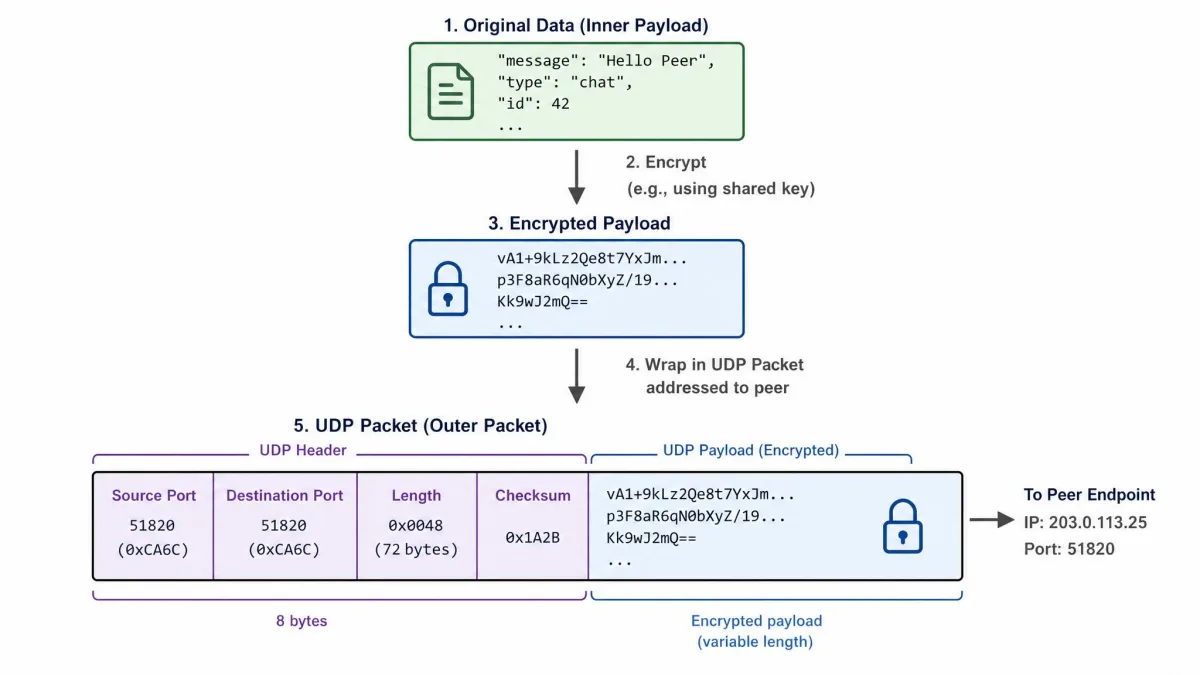
Using UDP keeps the protocol simple and fast. UDP does not track connection state or retransmit lost packets the way TCP does. So WireGuard avoids the overhead and the "TCP over TCP" slowdown that plagues some VPN setups. The tradeoff is visibility. UDP traffic is easier for a network to spot and block, which matters on restrictive networks.
One useful behavior falls out of this model. WireGuard stays silent when there is nothing to send. It only transmits when a peer actually has packets to move, so an idle tunnel produces no chatter. In our testing that makes it well suited to always-on use on a phone. It can sit in the background without draining data or battery, and it roams cleanly between WiFi and cellular in most configurations.
WireGuard listens on UDP port 51820 by default. You can change this in the config, and many VPN providers do. But the protocol never falls back to TCP the way OpenVPN can.
The Cryptokey Routing / Public-Private Key Model
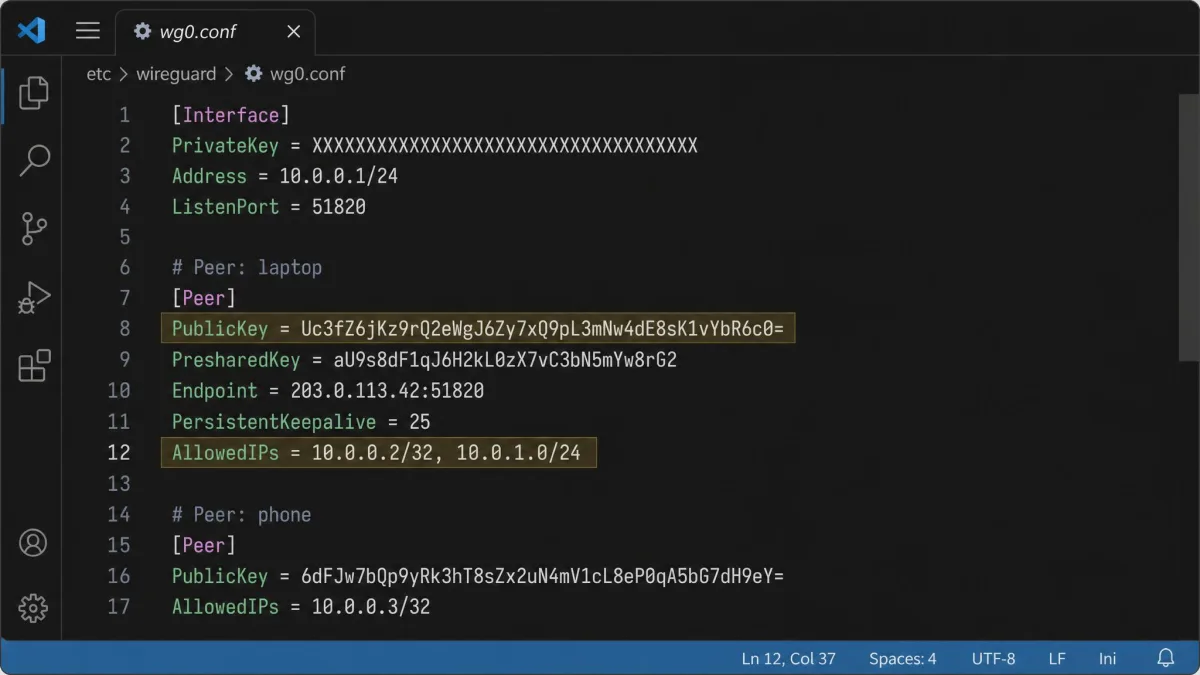
WireGuard does not use usernames and passwords. Instead it identifies every peer by a cryptographic key pair. Each device holds a private key it never shares and publishes a matching public key. To connect two peers, each side lists the other's public key in its own configuration. This public-private key model is the whole of the authentication system. It is what makes the setup so short.
The clever part is how those keys route traffic. WireGuard calls the mechanism cryptokey routing. Each peer's public key is tied to a set of AllowedIPs, the range of internal addresses that peer is allowed to use. That single association does double duty. It works as the routing table, deciding which peer an outbound packet should go to. It also works as the access control list, deciding which source addresses to accept on an inbound packet.
The practical effect is that identity and routing become the same thing. A packet is only accepted if it is encrypted with a key that matches the address it claims to come from. There is no separate firewall rule to keep in sync. That removes a whole category of misconfiguration.
The WireGuard Handshake
Before any data flows, the two peers perform a handshake. It agrees on the temporary keys that will encrypt the session. WireGuard uses a lightweight handshake built on the Noise Protocol Framework, specifically the NoiseIK pattern. It completes in a single round trip. There is very little startup delay compared with the multi-step negotiation of older protocols.
The handshake does two important jobs. First, it mutually authenticates both peers. Each side proves it holds the private key matching a public key the other already trusts. Second, it establishes perfect forward secrecy by deriving fresh ephemeral keys for each session. If those session keys are ever compromised, past traffic stays protected. The keys that encrypted it no longer exist.
Handshakes repeat periodically while a tunnel is active, roughly every couple of minutes, to rotate the session keys. Between handshakes the connection needs no maintenance. That is part of why WireGuard reconnects so quickly after a brief network drop.
WireGuard folds authentication, key exchange, and routing into one tight design, so the tunnel is essentially always ready rather than something you dial into.
— From our hands-on testing notes
The Cryptography Behind WireGuard (ChaCha20, Curve25519, and More)
WireGuard's cryptography is where its "do less, but do it well" philosophy is clearest. It uses a single fixed set of primitives. There is no cipher negotiation and there are no optional or legacy algorithms. Because there is nothing to negotiate, there is nothing to attack in the negotiation. An attacker cannot trick the two peers into agreeing on a weaker option. That eliminates the downgrade attacks that have hurt older protocols.
Here is the suite it locks in:
- ChaCha20 for symmetric encryption, a fast, state-of-the-art cipher that performs well even on devices without hardware AES acceleration.
- Poly1305 for message authentication, ensuring packets have not been tampered with in transit.
- Curve25519 for key exchange, the elliptic-curve Diffie-Hellman method that lets two peers derive a shared secret.
- BLAKE2s for hashing, and SipHash24 for its internal hashtable keys.
- HKDF for key derivation, arranged through the Noise protocol framework.
Contrast that with OpenVPN. It relies on the OpenSSL library and supports a wide, configurable range of ciphers. Flexibility sounds appealing. But it means more code, more choices to get wrong, and more surface area to attack. WireGuard's fixed suite is opinionated on purpose. If a primitive is ever found weak, the plan is to bump the whole protocol to a new version rather than negotiate alternatives on the fly.
Does your VPN app let you choose a protocol? If you care about speed on older or mobile hardware, WireGuard's ChaCha20 cipher is a good reason to prefer it. It stays fast without the dedicated AES instructions that budget and mobile chips sometimes lack.
How Secure and Private Is WireGuard?
On the security side, WireGuard is on very solid ground. It combines modern cryptographic primitives, perfect forward secrecy, a fixed suite that cannot be downgraded, and a small, widely reviewed codebase. The compact code is repeatedly praised as easy to audit. Linus Torvalds famously called it "a work of art" next to OpenVPN and IPsec. A smaller codebase means fewer places for bugs to hide. That is a real security advantage, not just a talking point.
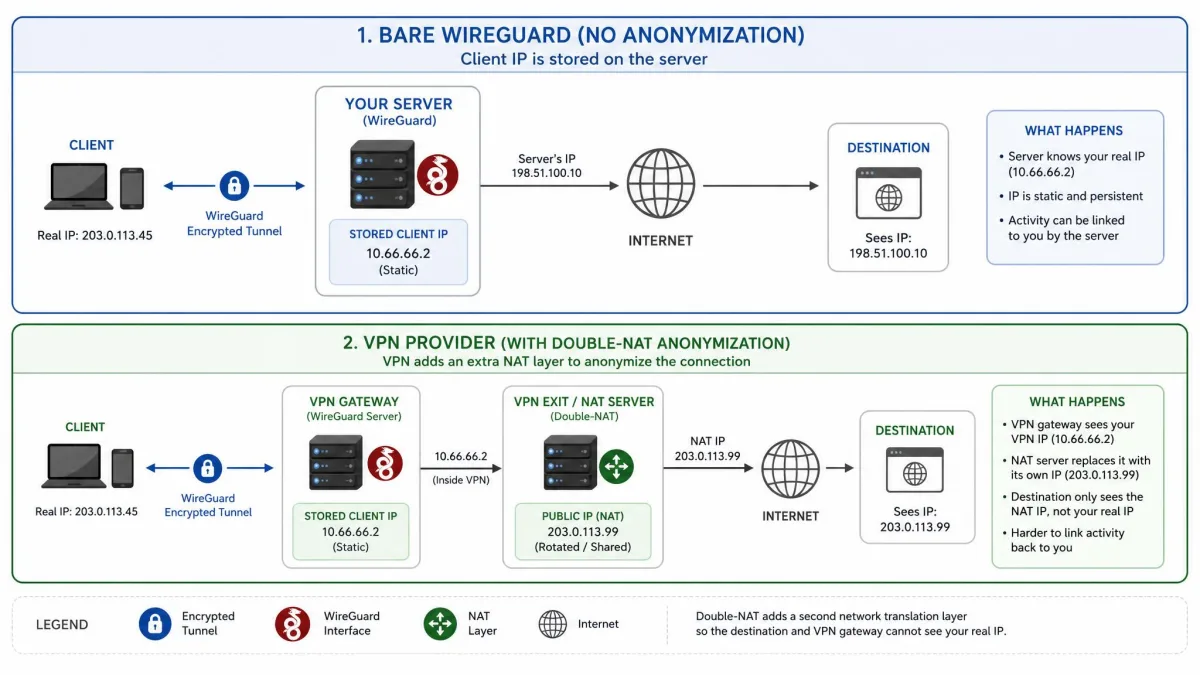
Privacy is more nuanced. This is the part we think buyers most often misunderstand. The bare protocol was designed for performance and simplicity, not for anonymity at a commercial VPN scale. By default, WireGuard saves the connected client's IP address on the server. That record is retained until the server reboots. It also assigns a static internal IP address per key pair rather than rotating addresses dynamically. Without mitigation, that static address can become a tracking or leak vector. Your tunnel keeps the same internal identity across sessions.
This is exactly why serious no-logs providers do not ship the raw protocol untouched. They layer their own privacy engineering on top of it.
The default logging and static-IP behavior is a property of the bare WireGuard protocol, not of any particular VPN app. When you evaluate a service, check what it does to mitigate this. Do not just check whether it "supports WireGuard."
Providers handle it in different ways. NordVPN's NordLynx implementation adds a double-NAT layer, so no identifiable link between your account and an internal IP is stored. Mullvad and OVPN erase peer data after 180 seconds without a handshake. The takeaway is to separate the protocol from its deployment. WireGuard itself is secure. A well-built VPN service closes the privacy gap the raw protocol leaves open.
Pros and Cons of WireGuard
No protocol is perfect for every situation. WireGuard's strengths and weaknesses come from the same set of design decisions. Here is how the tradeoffs shake out based on how it behaves in real use.
Pros
- Fastest protocol in our benchmarks, thanks to kernel-level, multi-threaded operation
- Lightweight, with a config file short enough to read at a glance
- Modern fixed cryptographic suite with no downgrade attacks
- Small, auditable codebase that has been merged into the Linux kernel
- Quick reconnects and clean roaming between networks in most configurations
Cons
- The bare protocol's static-IP and logging defaults create privacy caveats
- UDP-only transport is easy to fingerprint and block on restrictive networks
- Newer than OpenVPN and IPsec, so support is broad but not yet universal
- No built-in obfuscation to disguise VPN traffic as ordinary web traffic
Performance: Why WireGuard Is Faster
Speed is WireGuard's headline feature. The reasons are structural. The Linux implementation runs inside the kernel. That lets secure networking happen without the constant, costly handoffs between kernel space and user space that slow older tools down. It is also multi-threaded, so it can spread work across CPU cores instead of bottlenecking on one. Add the lean codebase and the efficient ChaCha20 cipher. The result is a protocol built to move data quickly.
The numbers bear this out in relative terms. In everyday use WireGuard is noticeably faster than OpenVPN. It is roughly 15% quicker in normal conditions and around 56% faster when OpenVPN is forced into its slower TCP mode. In our own testing, a commercial WireGuard implementation reached about 903 Mbps on nearby servers. That is well ahead of the OpenVPN throughput we typically record on the same connections.
One honest caveat on benchmarks. WireGuard's own official performance page now disavows the classic throughput table from its early whitepaper as outdated. We treat speed as a relative advantage rather than a fixed megabit figure. Absolute numbers depend heavily on your hardware, server, and network. The consistent finding across our tests is directional and clear. WireGuard is faster than OpenVPN and at least matches IPsec.
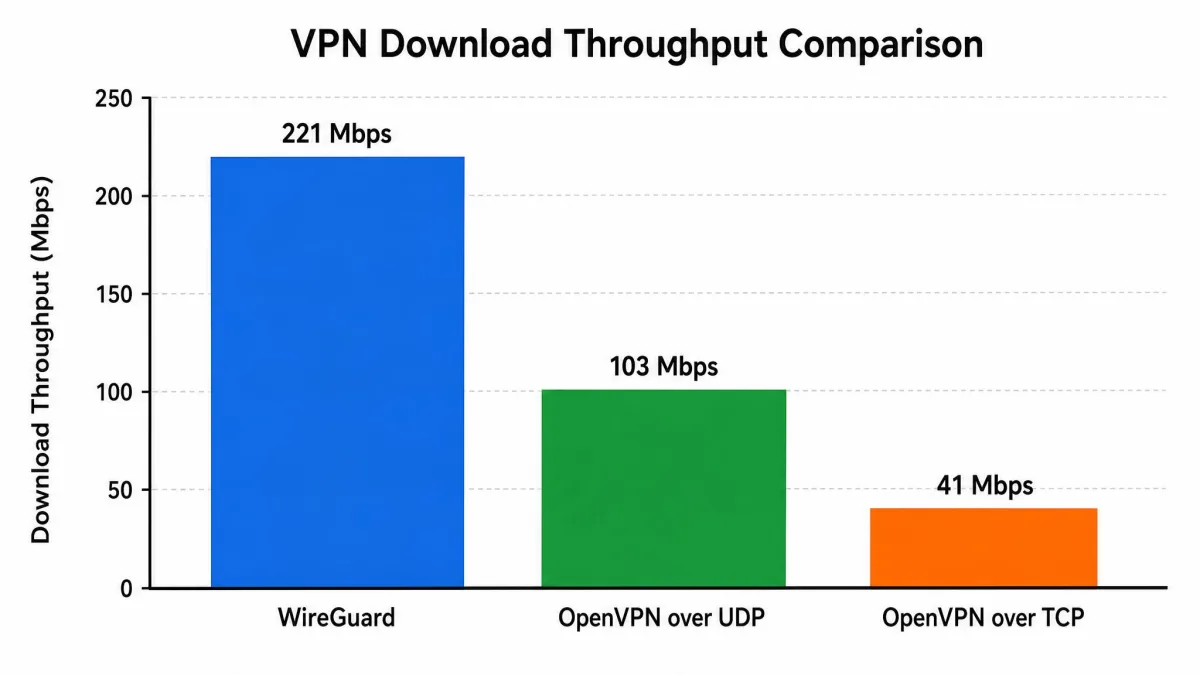
WireGuard vs Other VPN Protocols
The clearest way to understand WireGuard is to line it up against the two protocols it was built to improve on. The table below summarizes how the three compare across the factors that actually affect your connection. The two sections after it dig into the details.
| Protocol | Speed | Encryption / cipher | Codebase | Transport | Auditability | Obfuscation |
|---|---|---|---|---|---|---|
| WireGuard | Fastest; multi-threaded, kernel-level | Fixed modern suite (ChaCha20, Poly1305, Curve25519, BLAKE2s) | ~few thousand lines | UDP only (port 51820) | High, small and audited | Weak, UDP easily fingerprinted |
| OpenVPN | Slowest, especially in TCP mode | Configurable via OpenSSL (AES and others) | Hundreds of thousands of lines | UDP or TCP | Lower, large codebase | Strong, TCP 443 can mimic HTTPS |
| IPsec / IKEv2 | Fast, in-kernel; slightly behind WireGuard in some tests | Configurable suite (AES and others) | Large, complex | UDP (IKE 500/4500), ESP | Lower, large codebase | Moderate, well-known ports blockable |
WireGuard vs OpenVPN
OpenVPN is the veteran. Its biggest advantage over WireGuard is flexibility. It can run over either UDP or TCP, which helps it slip past network blocks, though the TCP mode is notably slower. TCP on port 443 looks a lot like ordinary HTTPS traffic. That makes OpenVPN much harder to fingerprint and block, which is why it remains the go-to for restrictive networks.
The costs of that flexibility are speed and complexity. OpenVPN's codebase runs into the hundreds of thousands of lines. It also leans on the large OpenSSL library for its configurable ciphers. That is far more code to audit and far more configuration to get right. WireGuard wins decisively on speed and simplicity. OpenVPN wins on stealth and universal support. If you want a deeper head-to-head, see our WireGuard vs OpenVPN comparison.
WireGuard vs IPsec / IKEv2
IPsec with IKEv2 is the closest competitor on raw performance. Like WireGuard, IPsec runs in the kernel and is genuinely fast. WireGuard still edges it out in some of our tests thanks to multi-threading. Where IKEv2 has traditionally shone is roaming. Paired with MOBIKE, it reconnects very smoothly when you switch between WiFi and cellular, which is why it is popular as a mobile protocol.
The difference is heritage. IPsec is a legacy protocol with a large, complex codebase and a multi-step negotiation process. That is exactly the kind of accumulated complexity WireGuard was designed to avoid. WireGuard aims to deliver comparable speed with a fraction of the code and configuration. Our IPsec vs WireGuard and IKEv2 vs WireGuard breakdowns cover the specifics.
How to Set Up and Use WireGuard
Setting up WireGuard is refreshingly quick compared with traditional VPNs. The core steps are the same everywhere. You generate a key pair on each device, exchange public keys, list each peer with its AllowedIPs, and point the client at the server's endpoint. The resulting config file is short, often under a dozen lines. The tunnel comes up as soon as you enable the interface.
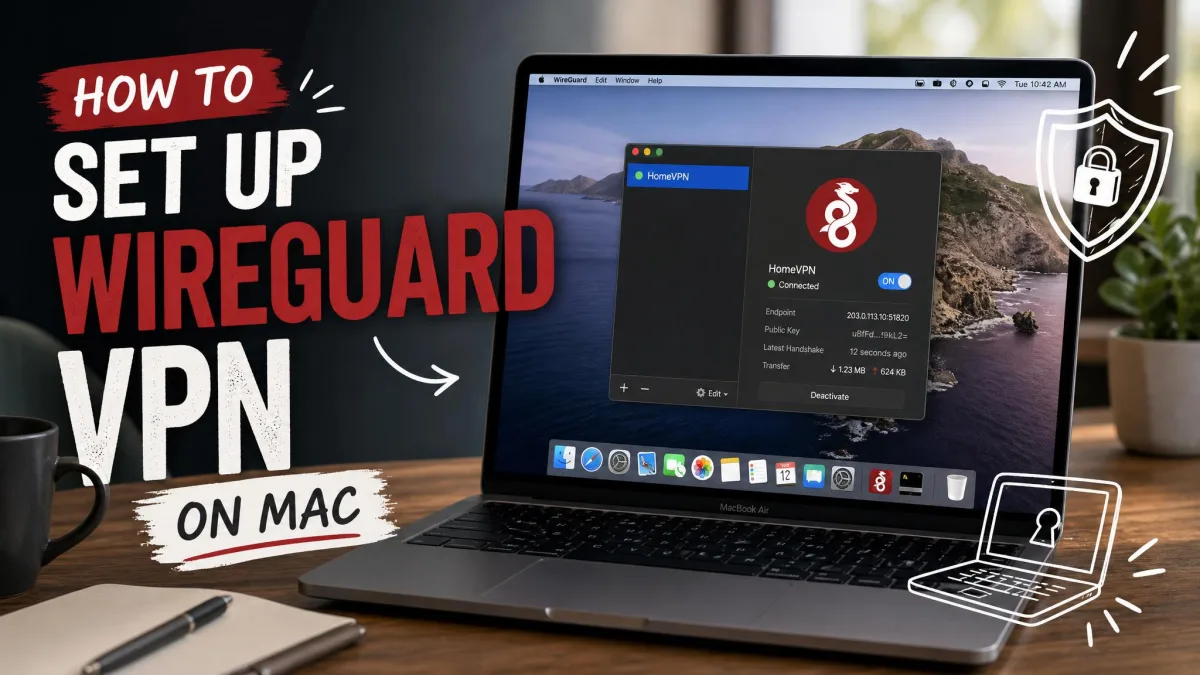
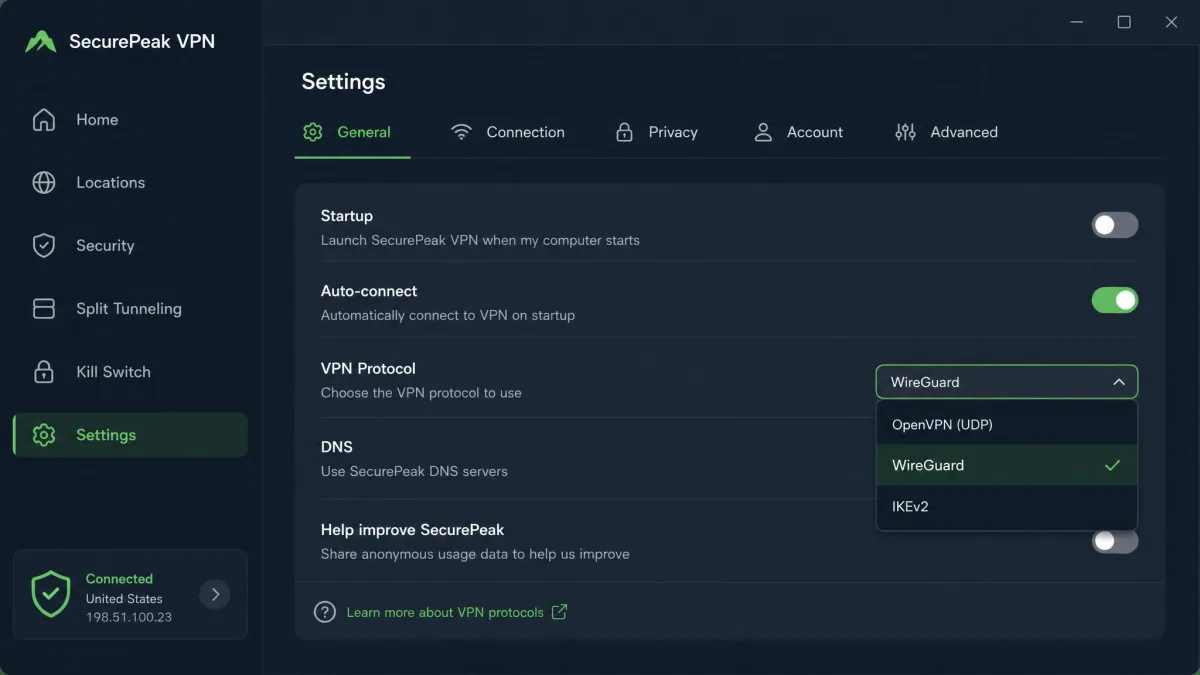
Most people never touch a raw config, though. If you use a commercial VPN, the app handles all of this. It simply lets you select WireGuard, or the provider's branded version of it, from a protocol menu. For a hands-on setup, the WireGuard reference implementation and the official quick-start guide cover the command-line tools. Our how to set up WireGuard on Mac walkthrough covers the desktop app.
There is one reliability quirk worth knowing. WireGuard is designed to roam cleanly and stay silent when idle, and most of the time it does. But reconnection can be inconsistent after switching networks or waking from sleep. The tunnel occasionally drops and does not recover until you toggle it off and on. The standard fix is a PersistentKeepalive value in the config. It keeps the tunnel alive behind NAT and after a device sleeps. Many VPN apps set this for you.
Common Mistakes When Evaluating WireGuard
The most frequent mistake we see is treating "supports WireGuard" as a privacy guarantee. As covered above, the bare protocol stores your client IP and hands out a static internal address. What matters is how a provider mitigates that, whether through double-NAT or session erasure. Ask about the mitigation, not just the checkbox.
A second mistake is expecting WireGuard to work everywhere OpenVPN does. Its UDP-only transport has no obfuscation, so a firewall can fingerprint it easily. On locked-down networks, a protocol that can hide inside TCP 443 may connect where WireGuard cannot. Finally, do not chase the old whitepaper's benchmark numbers. Treat WireGuard's speed as a strong relative advantage, verified in testing, rather than a promise of a specific megabit figure on your line. If you are shopping, our Best WireGuard VPNs guide starts from services that get the deployment right.
Frequently Asked Questions
Is WireGuard safe to use?
Is WireGuard a VPN or a protocol?
Does WireGuard hide my IP address?
Is WireGuard TCP or UDP?
Is WireGuard free?
Conclusion: Is WireGuard Right for You?
WireGuard earns its reputation. It narrows itself to one modern cipher suite, one fast handshake, and a key-based routing model. That delivers speed and simplicity the older protocols struggle to match, with a codebase small enough to actually trust. For most people, on most networks, it is the protocol we reach for first.
The two honest caveats are worth repeating. On restrictive networks that block or fingerprint UDP, OpenVPN's ability to hide inside TCP 443 can still win. And because the bare protocol's privacy defaults are minimal, the quality of your VPN provider's implementation matters as much as the protocol itself. Pick a service that mitigates the static-IP behavior, and WireGuard gives you the fastest, cleanest tunnel available today. To go deeper on the fundamentals, see our companion explainer on what is WireGuard, or compare protocols directly in our best VPN protocol guide.