Your iPhone is stuck on the Apple logo, caught in a boot loop, or frozen in recovery mode, and nothing you try brings it back. That is the exact moment a tool like iToolab FixGo is meant for. It promises to repair the software fault behind the freeze without wiping your photos, and to do it in a few clicks.
We put that promise to the test. This review covers what FixGo does, what it costs, how the two repair modes work, and what happened when we ran it against real stuck-iPhone scenarios.
What Is iToolab FixGo?
iToolab FixGo is a desktop app for Windows and Mac that repairs iOS system problems. You connect a frozen or misbehaving iPhone, iPad, iPod touch or Apple TV, and the software reinstalls clean firmware to clear the fault.
The headline claim is that it fixes 200+ iOS, iPadOS and tvOS system issues. That covers the ones people search for most: an iPhone stuck on the Apple logo, a black or frozen screen, a boot loop, a device stuck in recovery mode, and iTunes errors like 4013 and 4005. The pitch is simple. You get iTunes-style repair power without the risk of a full restore erasing everything, and without needing any technical skill.
Key Features of iToolab FixGo
Beyond the core repair, FixGo bundles several tools that power users normally reach for iTunes or third-party utilities to do:
- One-click entry and exit from Recovery Mode, which is free to use.
- iOS downgrade without a jailbreak.
- Factory reset without a passcode.
- Fixes for iTunes/Finder restore errors such as 4013 and 4005.
- Both a data-safe repair path and a deep-repair path.
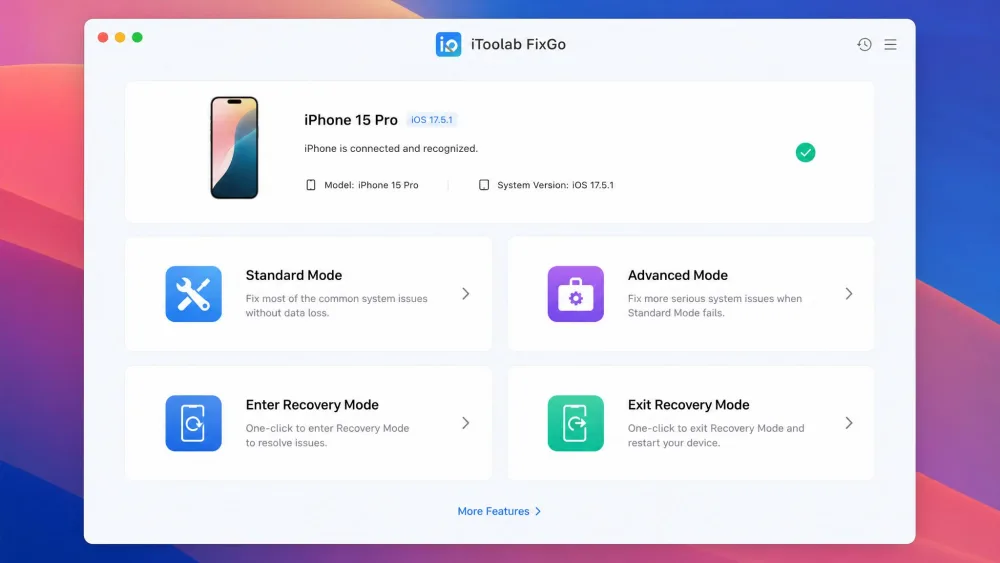
Standard Mode vs Advanced Mode
The two repair modes are the heart of the app, and choosing the right one matters. Standard Mode fixes common issues while keeping all your device data, including photos, videos, apps and music. This is the mode you want for a stuck logo or a frozen screen. Advanced Mode performs a deep repair and factory reset, and it erases all device data. You only reach for it when Standard Mode fails or the device is badly corrupted.
Choose the mode by the fault. A stuck screen or a frozen logo clears in Standard Mode; save the deep, data-erasing Advanced Mode for cases where the gentle repair does not stick.
Supported Devices & iOS Versions
FixGo works on iPhone, iPad, iPod touch and Apple TV, including the latest iPhone models, and it supports up to iOS 27. The Windows build runs on Windows 11, 10, 8.1, 8 and 7 with a modest 256MB of RAM as a minimum, and the Mac build reaches from macOS Sonoma back to OS X 10.11 El Capitan. One limit to note: it does not run inside a virtual machine.
200+ iOS Issues It Can Fix
The 200+ figure spans the full range of iOS, iPadOS and tvOS system faults: the frozen screens, boot loops, recovery-mode traps and update errors that stop a device from booting normally. It does not extend to physical damage. A cracked screen or a failed battery is a repair-shop job, not a software fix.
Pros and Cons
Pros
- Standard Mode repairs without data loss.
- One-click Recovery Mode entry and exit is free.
- Fixes 200+ iOS, iPadOS and tvOS issues.
- Simple enough for non-technical users.
- 30-day money-back guarantee.
Cons
- It is a paid, licensed tool.
- Success is not guaranteed on severe faults.
- It needs a computer to run.
- Firmware downloads can be slow.
- It cannot fix hardware faults or bypass MDM locks.
Pricing and Plans
FixGo is a licensed product, and the plan you pick depends on how often you expect to need it.
- 1-Month plan: $29.95
- 1-Year plan: around $35.95, though this figure shifts with iToolab's frequent promotions and coupon discounts.
- Lifetime plan: $49.95
- A 1-Year Business plan sits near $355.95, for teams that support many devices.
For a one-off repair, the lifetime licence at $49.95 is the obvious value: it costs only a little more than a single month and never expires. Every plan carries a 30-Day money-back guarantee, so you can request a refund if the repair does not solve your problem. Cancelling a subscription and claiming a refund can be a hassle, so keep your purchase record handy.

How to Use iToolab FixGo (Step by Step)
The workflow is short, and the interface keeps you on track with four clear action tiles.
Fix iOS in Standard Mode
- Install FixGo and connect your iPhone with a cable.
- Choose Standard Mode from the home screen.
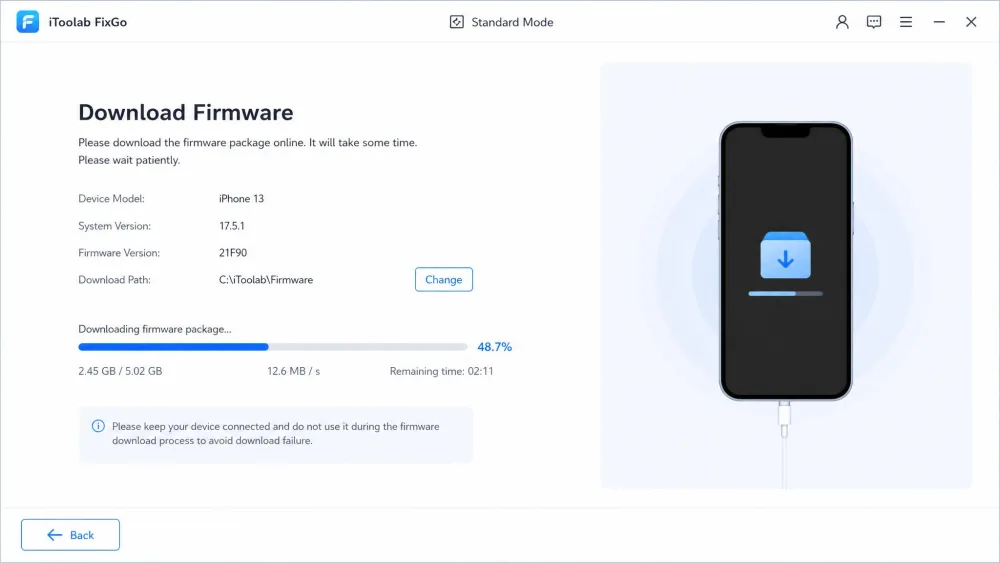
- Let the app download the matching firmware package.
- Click Repair Now and wait for the device to reboot.
Your photos, apps and settings stay in place through this path.
Fix iOS in Advanced Mode
If Standard Mode does not clear the fault, switch to Advanced Mode. The steps look the same: connect, download firmware, run the repair. The difference is that Advanced Mode erases the device, so only use it when you have a backup or the data is already lost.
Enter / Exit Recovery Mode
The Recovery Mode tool is free and takes one click each way. Connect the device, choose Enter Recovery Mode or Exit Recovery Mode, and the app handles the rest. It is a genuinely useful free feature when a device is only stuck in recovery mode and needs a nudge back out. If manual button combinations feel fiddly, Apple also documents the process in its recovery-mode guide.
Does iToolab FixGo Really Work? Our Hands-On Test
We ran FixGo against real stuck-iPhone scenarios on both Windows and Mac, timing each repair and checking afterward whether any data went missing.
The short answer is yes, with caveats. On a frozen, stuck iPhone, Standard Mode completed its repair and left the photos, videos, apps and music fully intact. That is the result that matters most for a data-safe tool. Entering and exiting Recovery Mode was smooth and worked exactly as advertised.
The interface helped rather than hindered. Four plain action tiles kept every step obvious, and someone with no technical background could follow along. We also cleared a reboot loop quickly and brought a disabled iPhone back without deleting its data.
Advanced Mode repairs finished in roughly ten to fifteen minutes, though they wipe everything, so that speed comes at the cost of your data. The slow parts are the setup and the firmware download. Installation was noticeably sluggish to get going, and on some runs the firmware download stretched to nearly an hour.
It is not flawless. Success is mixed on the harder cases: Standard Mode can fail on stubborn faults, forcing a move to the data-erasing Advanced Mode. FixGo only fixes software issues, so it cannot touch hardware faults or bypass an MDM activation lock. One more thing worth knowing: after a repair the device updates to the latest iOS, and a jailbroken device loses its jailbreak.
Advanced Mode erases everything on the device. Before you run it, make sure you have a current backup, or accept that the data on the device is gone for good.
What Real Users Say (Trustpilot & Reviews)
Real-world feedback tracks what we found. When FixGo works, people are happy: data-safe repairs of stuck screens and boot loops are the common success story, and the free Recovery Mode feature earns goodwill because it solves a real problem at no cost.
The complaints cluster in two areas. The first is a mixed success rate: Standard Mode can stall on stubborn faults and push you toward the data-erasing Advanced Mode. The second is support and billing, where slow customer service and friction around cancellations and refunds come up repeatedly. One caution on research: a Trustpilot profile at fixgo.com carries a high star rating, but it belongs to a tire retailer, not this iOS tool, so do not read that score as a verdict on the software.
Best Alternatives to iToolab FixGo
FixGo is not the only iOS repair tool, and two comparisons frame its value: Apple's own free restore, and Tenorshare ReiBoot.
| Product | Buy | Data-loss risk | Issues fixed | Ease of use | Price | Free tier | iOS support |
|---|---|---|---|---|---|---|---|
|
Check price → | None in Standard Mode | 200+ | One-click, non-technical | From $29.95/mo, $49.95 lifetime | Free Recovery Mode entry/exit | Up to iOS 27 |
 |
Read review → | None in Standard Repair | 150+ | One-click, non-technical | From $24.95/mo, $79.95 lifetime | Free download + free Recovery Mode | Latest iOS/iPadOS |
 |
Learn more → | Full restore erases data | Generic restore | Manual, more error-prone | Free | Free | Latest iOS |
Tenorshare ReiBoot is the closest head-to-head rival. It fixes 150+ issues, also keeps data in its standard repair, and starts a little cheaper per month, though its lifetime licence costs more. FixGo counters with a broader 200+ issue range. iTunes or Finder recovery is free and always available, but a full restore erases the device, which is the exact pain FixGo is built to avoid.
If you are weighing up the wider iToolab range, our reviews of iToolab AnyGo for iOS, iToolab RecoverGo for iOS and iToolab UnlockGo for iOS cover the sibling tools. For iPhone housekeeping rather than repair, see our CCleaner for iOS review.
Frequently Asked Questions
If a repair fails and I want a refund, how smooth is that?
Will my iPhone auto-update to a new iOS after a repair?
Can I run FixGo inside a virtual machine on my main computer?
Does FixGo fix a cracked screen or a dead battery?
How is FixGo different from just restoring in iTunes or Finder?
I only need to get out of recovery mode, is there a free way?
Verdict: Is iToolab FixGo Worth It?
For a stuck iPhone that a normal restart cannot fix, FixGo is a practical, low-stress option. Standard Mode does the important thing well: it clears the fault while keeping your data, and the free Recovery Mode tool means you can attempt a fix before spending a cent. The lifetime licence at $49.95 is fair value for a tool you may only need once.
The honest caveats are that it is not free, success is not guaranteed on the worst faults, and support can be slow if billing goes sideways. For a quick repair without an iTunes wipe, it does what it promises.