iToolab RecoverGo for iOS is a desktop iPhone data recovery tool that scans an iPhone or iPad and pulls back deleted files, with or without a backup. We ran it through our usual recovery bench to see how far that promise holds.
Our short answer: it is a capable, honest tool with a clean workflow, but it has real limits worth knowing before you pay. Below we cover what it does, how recovery works, what it costs, and how it compares.
What Is iToolab RecoverGo for iOS?
RecoverGo for iOS is iToolab's iPhone data recovery software, built to retrieve lost or deleted data from iOS devices. You install it on a PC, connect your iPhone or iPad, and let it scan for recoverable items. No jailbreak is required, which keeps the process low-risk.
The pitch that matters most is recovery without a backup. If you deleted a file and never synced a backup, RecoverGo scans the device's own storage for traces of it. It also reads existing iTunes and iCloud backups, covering both the "I have a backup" and "I have nothing" cases.
The interface is clean and easy to navigate, and setup friction is minimal. Connecting an iPhone just needs a "Trust this computer" confirmation, and no technical expertise is required.
Key Features
RecoverGo covers the feature set you expect from a modern recovery tool, plus a few conveniences that matter day to day.
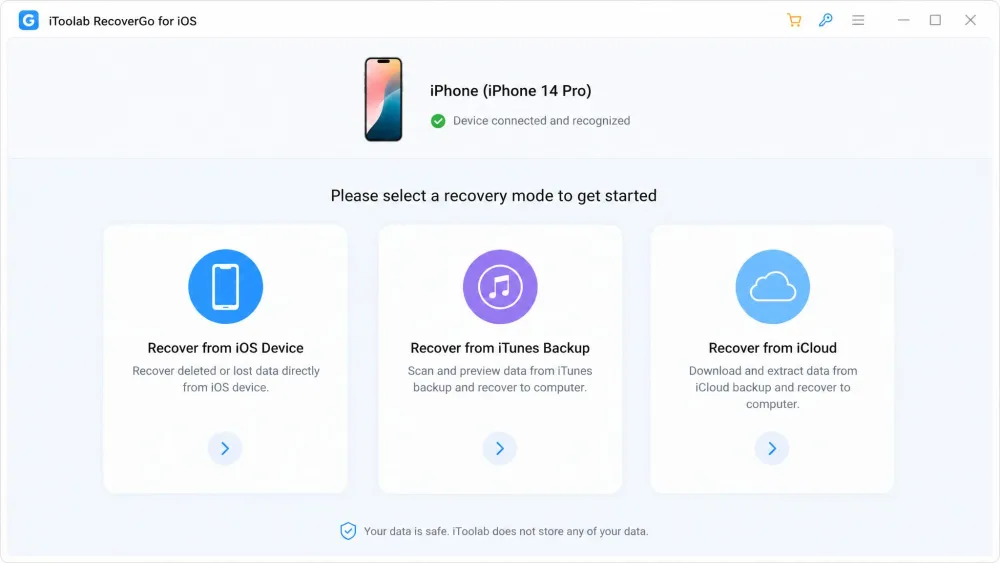
Recovery Modes (Device, iTunes Backup, iCloud)
There are three recovery modes: a direct scan of your iOS device, selective restore from an iTunes backup, and recovery from iCloud, including contacts, calendars, photos, videos, notes and reminders. Having all three in one app means you can try the device scan first, then fall back to a backup if it comes up short.
Supported Data Types
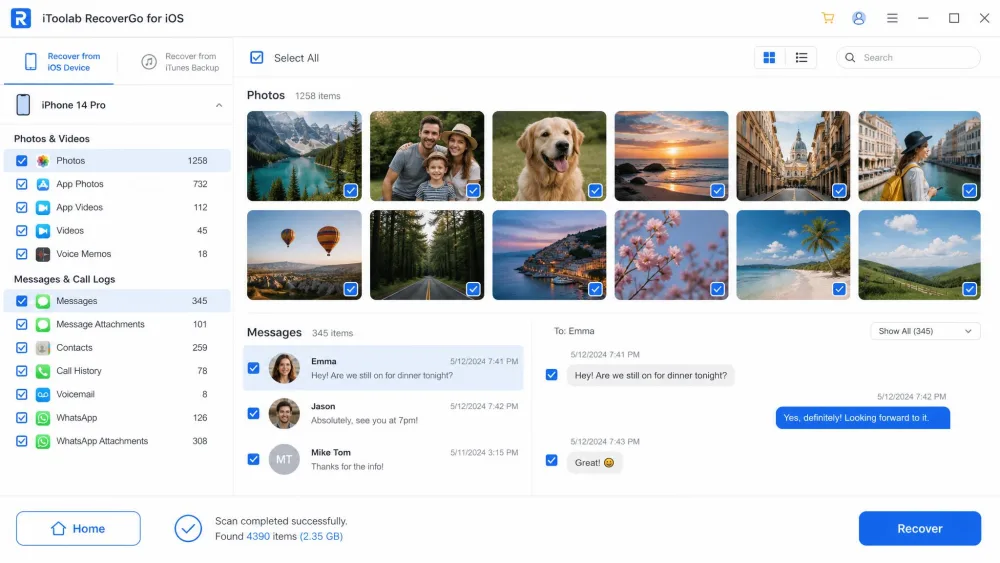
RecoverGo handles a broad range of content: photos, videos, messages, WhatsApp chats, contacts, call history, voice memos, notes, calendars, reminders, Safari history, FaceTime data, and some third-party app data. iToolab's page lists roughly 14 named categories, though some review sites count 20 or more depending on how third-party app data is grouped. Either way, the coverage is wide enough for the losses most people face.
Recover Without a Backup
This is the reason most people reach for a tool like this. With no backup, RecoverGo scans the device storage itself rather than a saved file. In testing, it recovered data across several scenarios, including after a factory reset and a system error, without any backup. Still, there is no guarantee once files have been overwritten, and continuing to use the phone after deletion lowers the odds.
Preview & Selective Recovery
After a scan, RecoverGo shows all recoverable data in a preview so you can inspect what it found before committing. You pick individual items or select multiple entries rather than restoring everything. This lets you confirm a file is intact before you pay.
Run the free scan first. It costs nothing and shows exactly what is recoverable, so you know whether a license is worth buying before you spend a cent.
How Does RecoverGo for iOS Work?
The flow is short and follows the same three steps regardless of the mode you choose.
Step 1: Select a Recovery Mode
Launch RecoverGo on your PC and pick one of the three modes: recover from the iOS device, an iTunes backup, or iCloud. If you are unsure, start with the direct device scan, since it does not depend on having set up a backup beforehand.
Step 2: Connect and Scan Your Device
Connect your iPhone or iPad with a USB cable and tap "Trust this computer" when prompted. RecoverGo detects the device and begins scanning. Scanning speed varies with how much data is on the device and its condition, so a nearly full phone takes longer. Some reviewer tests finished in under 10 minutes, but treat that as a best case, not a promise.
Step 3: Preview and Recover Your Data
When the scan finishes, browse the results by category and preview individual files. Select the items you want, then click recover. Here is the one hard limit: the free version stops at preview, so you need a license before anything can actually be saved.
In our recovery work, the tools that earn trust let you see the goods before you pay. RecoverGo does exactly that, so you can judge whether it rescues what you lost.
Pricing and Plans
RecoverGo for iOS is a paid tool with a free scan-and-preview tier. Paid plans each cover 5 devices and 1 PC, and iToolab lists a 30-Day money-back guarantee.
The 1-Month plan runs $35.95 (regular $69.95) and auto-renews. The 1-Year plan is $39.95 (regular $99.95) and also auto-renews. The Lifetime plan is a one-time $49.95 (regular $159.95) with no renewal. For most people, Lifetime is the sensible pick: data loss tends to recur, and it costs barely more than a single year.
The monthly and yearly plans auto-renew. For a one-off rescue, buy the plan and cancel renewal, or choose the Lifetime license to sidestep recurring charges.
One requirement stands out: RecoverGo for iOS runs on Windows 11, 10, 8 and 7. Based on iToolab's listings and the reviews we consulted, there is no confirmed Mac build, so plan on using a Windows PC if you are a Mac household.
Pros and Cons
After running it through our process, here is the balance sheet.
Pros
- Recovers without a backup by scanning the device directly
- Three modes in one app: device, iTunes and iCloud
- Free scan and full preview before you pay
- Clean, beginner-friendly interface with no jailbreak needed
- One-time Lifetime license available at $49.95
Cons
- Windows only, with no Mac version
- Recovery is not guaranteed once data has been overwritten
- Severely damaged devices may return only partial results
- Monthly and yearly plans auto-renew by default
Is iToolab RecoverGo Safe and Legit?
Yes, RecoverGo for iOS is a legitimate product from an established developer, and it does not require jailbreaking, which is the riskiest thing a recovery tool can ask of you. The scan is read-only in practice, so running it does not overwrite the data you are trying to save.
iToolab is an established vendor with a public support presence, so you are not buying from an anonymous developer. The honest caveat is not about malware or scams; it is about expectations. No recovery tool can promise a full rescue, and RecoverGo is upfront that overwritten data may be gone for good.
The safest thing to do the moment you lose a file is stop using the device. Every new photo, message or app update can overwrite the very data you are trying to get back.
How It Compares: Best Alternatives to RecoverGo for iOS
RecoverGo is not the only iPhone recovery tool we test. The alternatives buyers ask about most are Dr.Fone, iMyFone D-Back and EaseUS MobiSaver. Here is how they line up.
| Product | Buy | Price (entry) | No-backup recovery | Data types | Free scan |
|---|---|---|---|---|---|
 |
Check price → | $35.95/mo, $49.95 lifetime | Yes | 14+ categories | Scan + preview |
 |
Read review → | $99.95 toolkit | Yes | iMessage, SMS, contacts + toolkit | Scan only |
 |
Read review → | $39.95/mo, $69.95 lifetime | Yes | Messages, media, WhatsApp, Viber | Scan + preview |
 |
$69.95 Pro | Yes | 1000+ file types | Scan only |
On price, RecoverGo's $49.95 Lifetime undercuts every rival's comparable tier, including iMyFone D-Back's $69.95 lifetime and the $69.95 EaseUS MobiSaver Pro. Dr.Fone is the priciest at $99.95, though it bundles repair and transfer modules RecoverGo lacks. For more, our reviews of the wider iToolab family, including the iToolab AnyGo for iOS review and the iToolab UnlockGo for iOS review, cover how the developer's other tools hold up.
The takeaway: for straightforward iPhone recovery on Windows, RecoverGo offers the best value. Need a broader repair-and-transfer toolkit? Dr.Fone is worth the premium. Want the widest file-type net? EaseUS casts it.
Frequently Asked Questions
Is iToolab RecoverGo for iOS safe and legit?
Is RecoverGo for iOS free?
Does RecoverGo for iOS actually work?
Can RecoverGo recover data without a backup?
How long does a scan take and what is the success rate?
Which iOS versions and data types does it support?
What are the best alternatives to RecoverGo for iOS?
Verdict: Is iToolab RecoverGo for iOS Worth It?
For Windows users who need to recover iPhone data, RecoverGo for iOS is easy to recommend. It does the core job well, it is honest about its limits, and the free preview lets you confirm it works before paying. The $49.95 Lifetime license is the best value in its class.
The reasons to look elsewhere are specific rather than damning. Mac users need a Windows PC, and anyone whose lost data was overwritten weeks ago should temper their expectations. Neither is unique to RecoverGo; both are true of every recovery tool we test.