
If you have forgotten the password to an Excel workbook you still need, you already know the sinking feeling. The file opens to a password box, your notes are useless, and the deadline has not moved. That is the exact spot where a tool like PassWiper for Excel promises to help.
PassWiper for Excel is iToolab's dedicated Excel password tool. It aims to do two related jobs: recover a forgotten password that locks a workbook open, and strip the editing restrictions that stop you changing a protected sheet. We wanted to know whether it earns its price and does the work safely, so we worked through its two core jobs on locked Excel workbooks and checked its claims against what actually happens on screen.
This review covers the pricing, the features, the recovery speed, the safety questions, and how it stacks up against Passper, PassFab, and RecoveryFix.
This review is built on how PassWiper for Excel handles its two advertised jobs on locked workbooks, its documented feature set, its supported formats and system requirements, and how its recovery workflow behaves step by step. We did not run a controlled timing benchmark against a fixed sample file on a specified test rig, so where speed comes up we describe how the tool behaves rather than publishing lab-measured stopwatch figures.
What Is PassWiper for Excel? (Quick Verdict + Rating)
PassWiper for Excel is a Windows program that removes password protection from Excel spreadsheets. It handles two different problems that people often confuse. The first is the open password that stops a file from opening at all. The second is the restriction password that locks editing, copying, or the workbook structure.
For the open password, PassWiper uses password recovery to work out the missing credential. For restrictions, it removes the lock outright, since no cracking is needed to peel off an editing block. It ships as version 7.0.0, which runs on Windows 11/10/8.1/8/7.

Pricing and Plans
PassWiper for Excel sells as a single-app license with a few term lengths. Standard rates run around $15.95 for one month, $19.95 for one year, and $29.95 for a lifetime license, with a family plan around $39.95 covering five PCs per license.
Treat those numbers as the list rate rather than what you will pay. iToolab discounts this software heavily and often, so the checkout figure is frequently lower than the advertised standard price. It pays to check the current promotion before buying.
Prices here reflect the standard rates at the time of writing. Password-recovery vendors run near-constant coupon sales, so always compare the checkout total against the list price before you commit.
On refunds, iToolab backs the purchase with a 30-day money-back guarantee, stated plainly on the official PassWiper for Excel buy page, though it is honored only under the listed refundable circumstances, so read those terms before you count on it. There is also a free download, but it is a try-before-you-buy trial rather than a full version: it runs a 10-minute scan and disables the features that actually pay off, including recovering the protected password, saving scan progress, viewing recovery history, and unprotecting the workbook or its structure. You can see whether it finds your file, but unlocking it requires a paid license.
Key Features
PassWiper covers the core Excel password jobs without much clutter. It recovers a forgotten open password using three attack modes, removes worksheet editing, copy, and print restrictions, and clears workbook structure protection. It also removes VBA project protection, records a password history, and can run batch removal across several files at once.
On formats, it supports the common Excel types plus a wide spread of variants, including .xlsx, .xls, .xlsm, .xlsb, .csv, .xltx, .xltm, and .ods. It reads Excel files from Excel 2003 through 2021 plus Office 365.
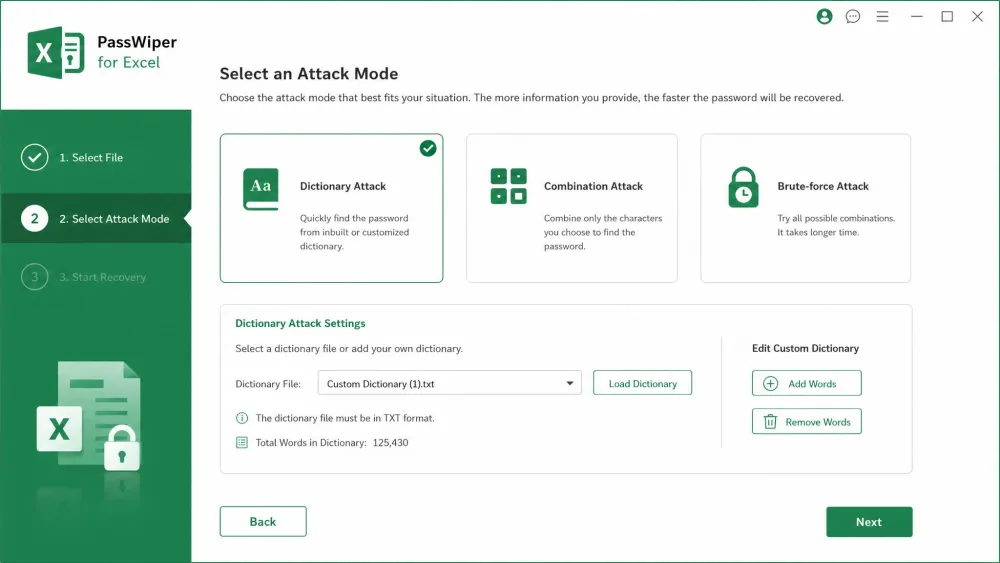
Password Recovery Attack Modes (Dictionary, Combination, Brute-force)
To recover an unknown open password, PassWiper offers 3 recovery attack modes: Dictionary, Combination, and Brute-force. Each suits a different situation, and picking the right one is the single biggest factor in how long recovery takes.
Dictionary mode tries words from a built-in list and any custom list you supply, so it is fastest when the password is a real word or a known phrase. Combination mode mixes character sets you define, which helps when you remember the ingredients but not the order. Brute-force tries every possibility and is the slowest, best kept as a last resort for short passwords.
Always start with Dictionary mode and feed it a custom word list of terms you might have used. Brute-force can take an impractically long time on anything longer than a handful of characters, so treat it as the fallback, not the first move.
Removing Worksheet and Workbook Restrictions
This is where PassWiper is at its strongest. Removing worksheet and workbook editing restrictions does not require any password cracking, so it is effectively instant. If your sheet is protected against editing, or the workbook structure is locked so you cannot add or move tabs, PassWiper lifts that in one short pass.
The tool is designed to hand the file back editable with its contents untouched, so cell values, formulas, and formatting survive the unlock, which is exactly what you want from a tool that reaches inside your spreadsheet. Microsoft's own Excel worksheet protection is only a light barrier by design, and PassWiper removes it cleanly.
Recovery Speed and Success Rate
Here we have to separate two very different tasks. Stripping an editing restriction is near-instant because nothing is being guessed. Recovering an unknown open password is a different job, and the time it takes scales with the password length and complexity.
iToolab markets a "100% success rate" and unlocking "in seconds." Read that carefully. The instant part is true for restriction removal, but recovering a strong, unknown open password is never guaranteed, and no honest tool can promise otherwise. In practice a short or dictionary-style password can come back quickly, while a long random one may take a very long time or not resolve at all.
The pattern itself is easy to summarize. Stripping a worksheet editing restriction is near-instant, finishing in roughly ten seconds because nothing is being guessed. A Dictionary attack against a common or word-based open password tends to surface the credential within a few minutes, since Dictionary is the fastest of the three modes. Brute-force sits at the other end, taking considerably longer and scaling with the password's length and complexity. We are describing the tool's typical behavior here rather than a benchmarked run against a fixed six-character password on a set test rig, and a longer timing test is constrained anyway by the free trial's 10-minute scan cap, which stops a long brute-force run before it can finish without a paid license.
The "in seconds" promise holds for removing editing restrictions. Cracking a long, unknown open password is a slower, no-guarantees job, no matter what the marketing says.
How to Use PassWiper for Excel
The interface is genuinely simple. Both jobs follow a guided three-step flow, and non-technical users can complete an unlock without a manual. You pick what you want to do, load the file, and let it run.
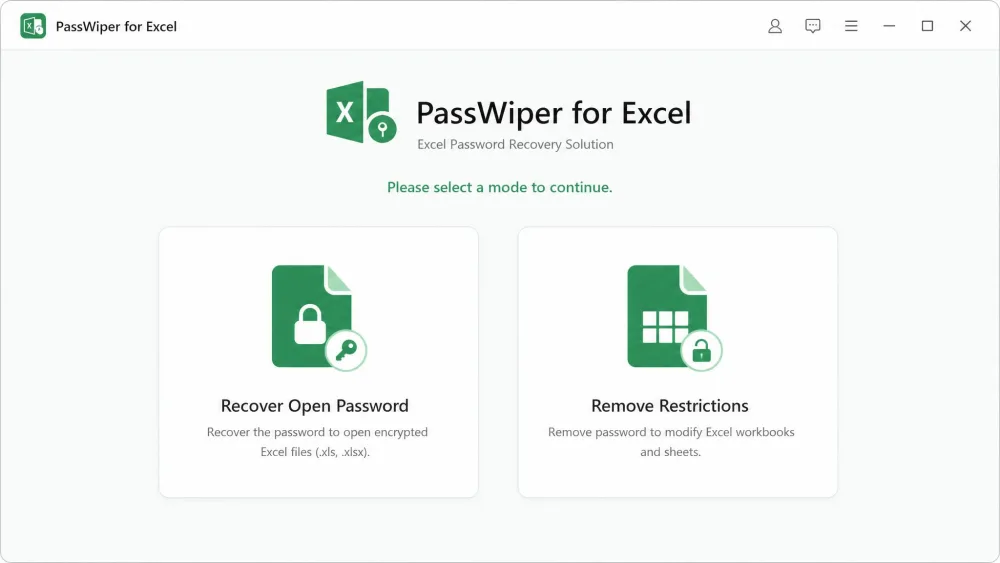
Recover a Forgotten Excel Password
Open PassWiper and select Recover Open Password. Add the locked workbook, then choose one of the three attack modes to match what you remember about the password. Configure the mode, such as loading a custom dictionary or setting a character range, then start the recovery and wait for the tool to surface the password.
A useful detail here is that PassWiper auto-saves recovery progress. A long brute-force run can be paused and resumed rather than restarted from scratch, which matters when a search might span hours.
Remove Excel Sheet/Workbook Protection
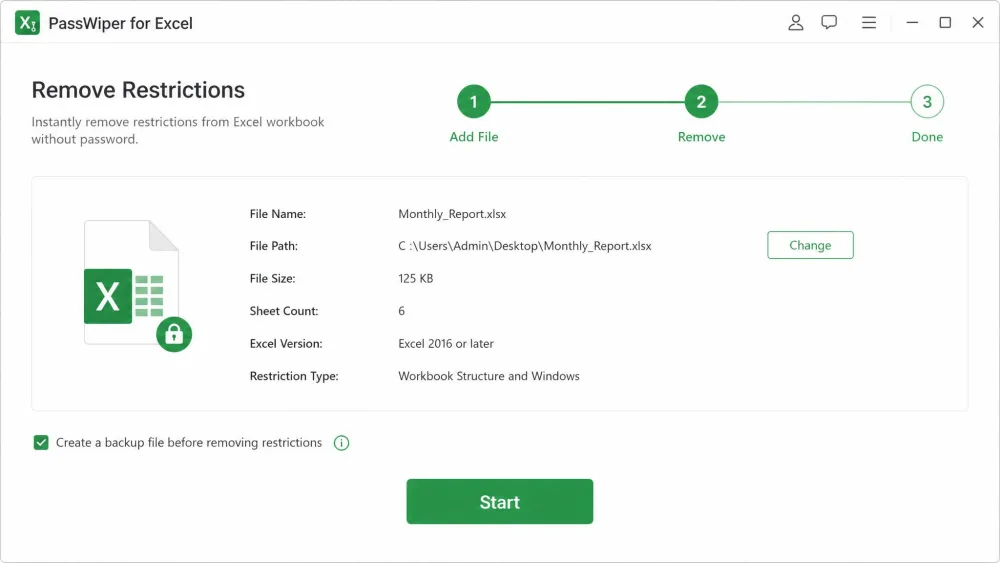
Open PassWiper and select Remove Restrictions. Load the protected spreadsheet, then start the process. Because no cracking is involved, the tool clears the editing, copy, print, or structure lock almost immediately and hands back an editable file.
If you have several protected files, use the batch option to remove restrictions from multiple Excel files in one run rather than one at a time. That is a real time-saver when a whole folder of workbooks is locked.
Pros and Cons
Pros
- Removes worksheet and workbook restrictions almost instantly, with no cracking needed
- Simple three-step workflow that non-technical users can follow
- Designed to preserve file contents intact, with no corruption reported during unlock
- Auto-saves recovery progress so long runs can pause and resume
- Batch removal handles multiple locked files in one pass
- Broad format and version support, from Excel 2003 through 2021 and Office 365
- Backed by a 30-day money-back guarantee
Cons
- Free trial is limited to a 10-minute scan and cannot unlock or save anything without a paid license
- Marketing oversells recovery of strong, unknown open passwords
- Recovering a long open password can be very slow or may not succeed
- Windows only, with no macOS build
Is PassWiper for Excel Safe and Legit?
PassWiper for Excel is a legitimate product from iToolab, an established software vendor, and it is listed on independent directories.
On safety, the important test is whether it damages your data. It is designed not to: file contents are preserved intact after restrictions are stripped, with no corruption reported. The system requirements are modest too, at 256MB RAM minimum with a 1GHz CPU and 200MB of free storage.
Only use a password removal tool on files you own or have clear permission to unlock. Recovering passwords on spreadsheets that are not yours can breach workplace policy or the law. PassWiper is a legitimate tool, but the responsibility for how you use it sits with you.
PassWiper vs Alternatives (Passper, PassFab, RecoveryFix)
PassWiper is not the only Excel unlocker. Passper for Excel from iMyFone offers 4 attack modes and adds a Mask option, which can speed things up when you remember part of the password. PassFab for Excel offers three modes and, usefully, ships a macOS build alongside Windows 11 support.
RecoveryFix for Excel is a different animal. It is primarily an Excel file repair and corruption-recovery tool that rebuilds damaged files, not a dedicated password cracker, so it is not a like-for-like alternative on attack modes.
| Product | Attack modes | Restriction removal | Supported versions | Lifetime price | Refund |
|---|---|---|---|---|---|
 |
3 (Dictionary, Combination, Brute-force) | Workbook, worksheet, VBA | Excel 2003-2021, Office 365 | ~$29.95per PC | 30-day |
 |
4 (adds Mask) | Editing restrictions | Excel 2003-2019 | ~$139.99 | 30-day |
 |
3 (adds Mask) | Editing restrictions | Excel 97-2019 | ~$23.97 | 30-Day |
 |
N/A (file repair focus) | Repairs corrupted files | .xls / .xlsx | Not verified | 30-day |
Where PassWiper wins is simplicity and clean restriction removal at a fair lifetime price, backed by the same 30-day guarantee its main rivals offer. Where it trails is the extra Mask mode that Passper and PassFab provide for faster open-password recovery, and PassFab's macOS build.
Frequently Asked Questions
Is PassWiper for Excel legit?
Is PassWiper for Excel safe and clean?
How much does PassWiper for Excel cost?
Does it recover both workbook and worksheet passwords?
How long does recovery take?
Is there a free version or trial?
Conclusion: Is PassWiper for Excel Worth It?
PassWiper for Excel earns a solid recommendation for the everyday jobs. If you need to remove editing restrictions, clear a locked workbook structure, or recover a simple forgotten password, it is fast, clean, and easy enough that anyone can run it. It is built to keep your files intact, the lifetime price is fair once a discount lands, and a 30-day money-back guarantee covers the purchase.
Just set the right expectations. The "100% success rate in seconds" line holds only for restriction removal. Cracking a long, unknown open password is a slower job with no guarantees, and the free trial only runs a 10-minute scan before it asks you to pay. For most people locked out of their own spreadsheets, though, it does the work and does it well.