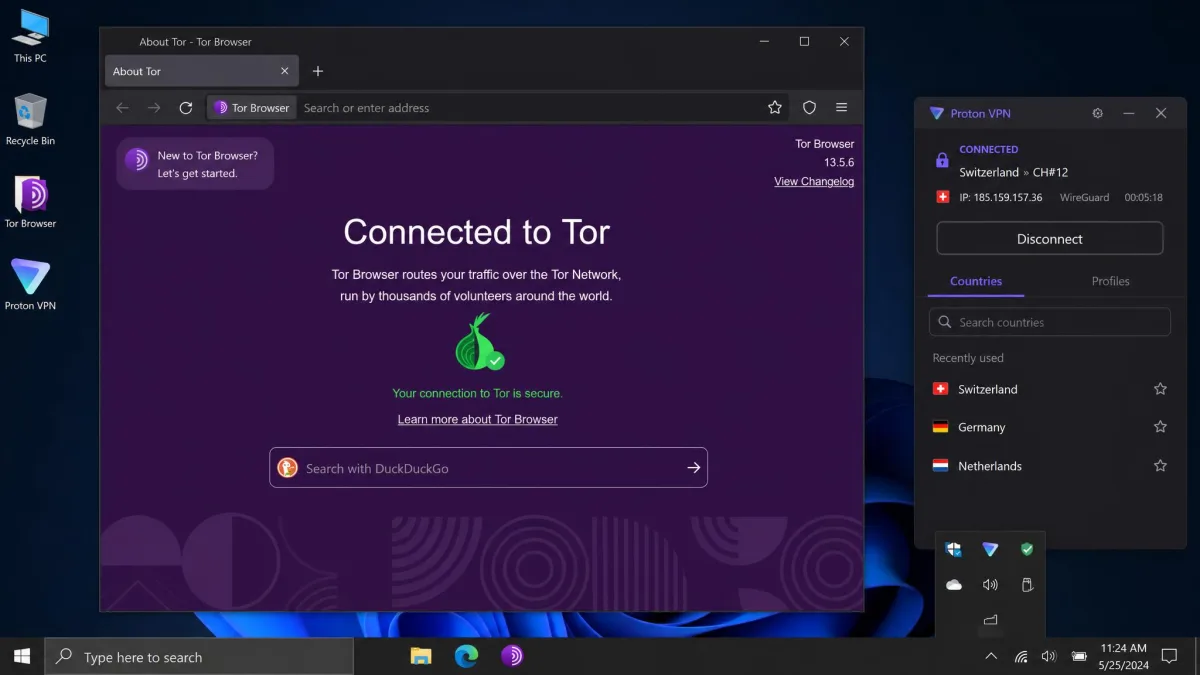
Tor is one of the strongest privacy tools on the internet, but it has a weak spot: your ISP can see that you are using it, and a hostile exit node can watch unencrypted traffic on its way out. Onion over VPN fixes that gap by sending your connection through a VPN server first and then into the Tor network, so nobody upstream sees Tor at all. That single reordering is the whole idea, and it changes who can see what about your browsing.
We have spent years testing VPNs against real speed, leak, and streaming benchmarks, and onion over VPN is the feature people ask us about most once they start caring about anonymity. It sounds intimidating. In practice, the concept is simple, and turning it on can be as easy as clicking one server.
This guide walks through what onion over VPN actually is, how the traffic flows step by step, how it compares to VPN over Tor and to a double VPN, whether it is safe, and how to set it up two different ways. By the end you will know whether you need it at all, because for a lot of people the honest answer is no.
What is onion over VPN?
Onion over VPN, also called Tor over VPN, is a privacy method that routes your traffic through a VPN server first and then into the Tor network. You get two layers of protection stacked on top of each other: the VPN's encryption and Tor's onion routing. Your internet service provider sees an ordinary encrypted VPN tunnel and never learns that Tor is involved.
The name comes from the order of the layers. Your data hits the VPN before it ever touches Tor, so the VPN wraps the outside of the connection. This is different from simply opening the Tor Browser on its own, and it is different again from the reverse setup we cover later.
To make sense of the combination, it helps to be clear on the two pieces that go into it.
What is a VPN? (quick primer)
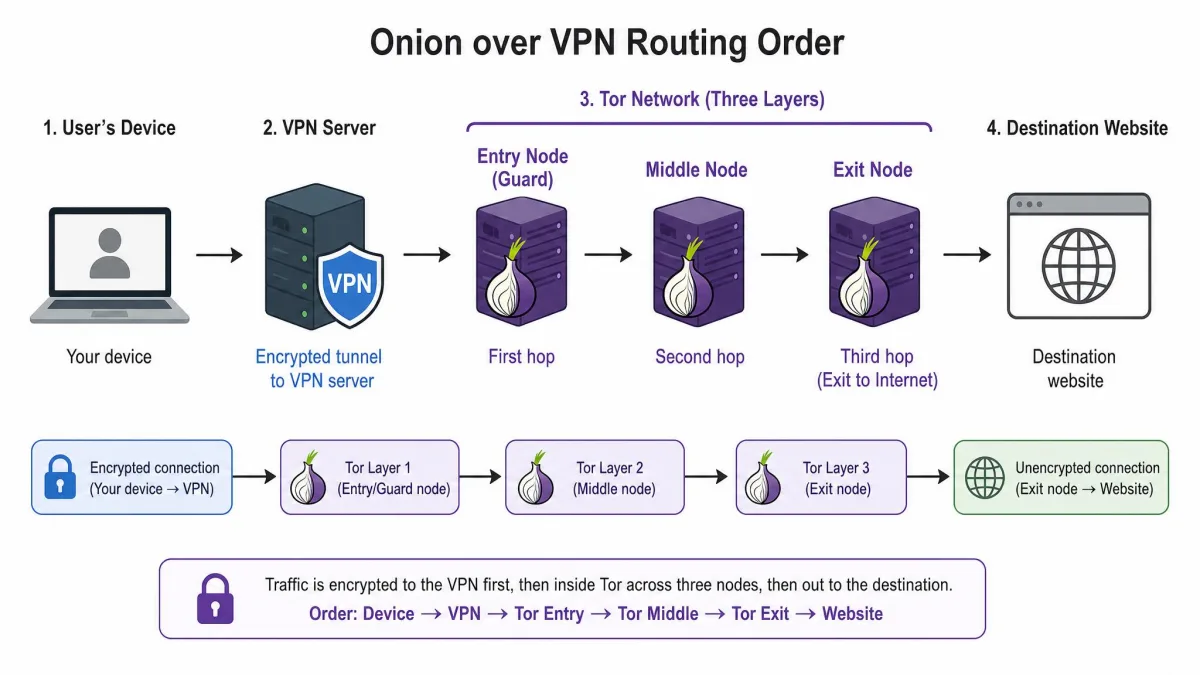
A VPN, or virtual private network, is a service that creates an encrypted connection between your device and a server run by the provider. All of your internet traffic travels through that encrypted tunnel, so your ISP and anyone on your local network can see that you are connected to a VPN but not what you are doing.
The website you visit sees the VPN server's IP address instead of your real one. That hides your location and keeps your browsing private from the network you are on. If you want the full picture, our explainer on what a VPN is and how it works covers the basics, and a companion piece breaks down how VPN encryption works in more detail.
A VPN protects the whole connection, but it asks you to trust one company: the provider running the server. That trust question is exactly what pairing a VPN with Tor is meant to soften.
What is the Tor network? (quick primer)
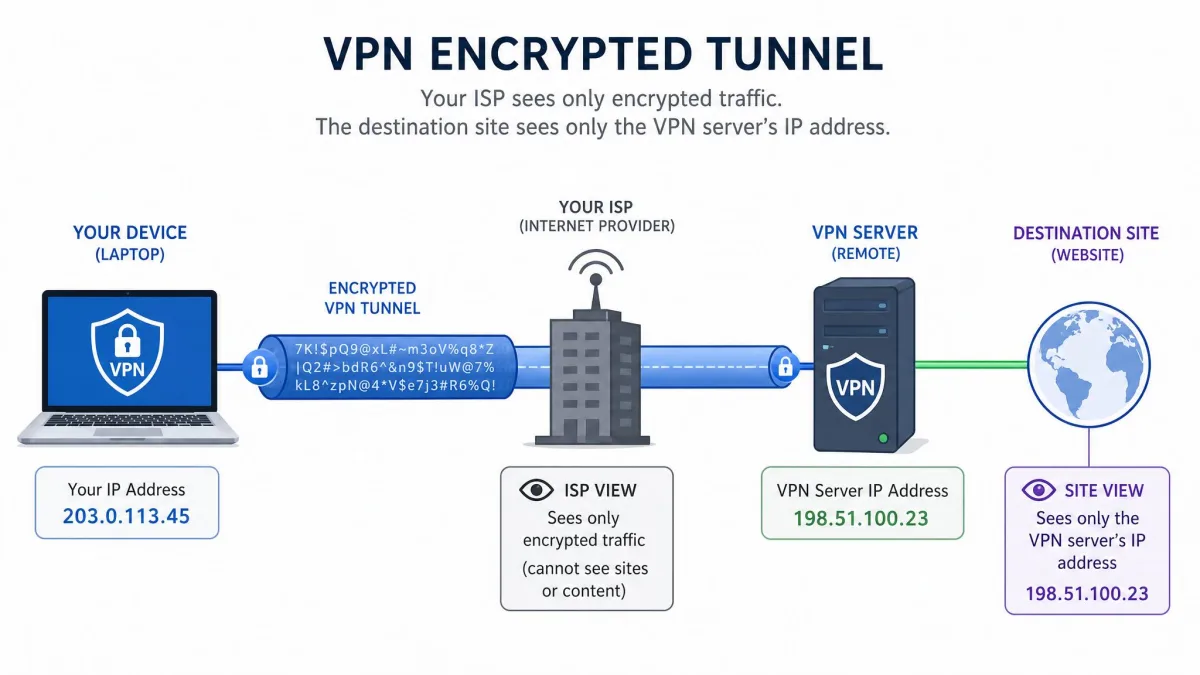
Tor is a free, open network that anonymizes your traffic by bouncing it through a series of volunteer-run servers called relays. Tor routes each connection through at least three nodes: an entry node, a middle relay, and an exit node. It peels off one layer of encryption at each hop, which is where the "onion" name comes from.
No single relay knows both who you are and where you are going. The entry node sees your address but not your destination, and the exit node sees your destination but not your address. The network began as a U.S. Naval Research Laboratory project, and you can read the full history on the Tor network's Wikipedia page.
Tor gives you strong anonymity for free. Its weakness is that your ISP can tell you are on the network, and the exit node can inspect any traffic that is not already encrypted end to end.
How does onion over VPN work?
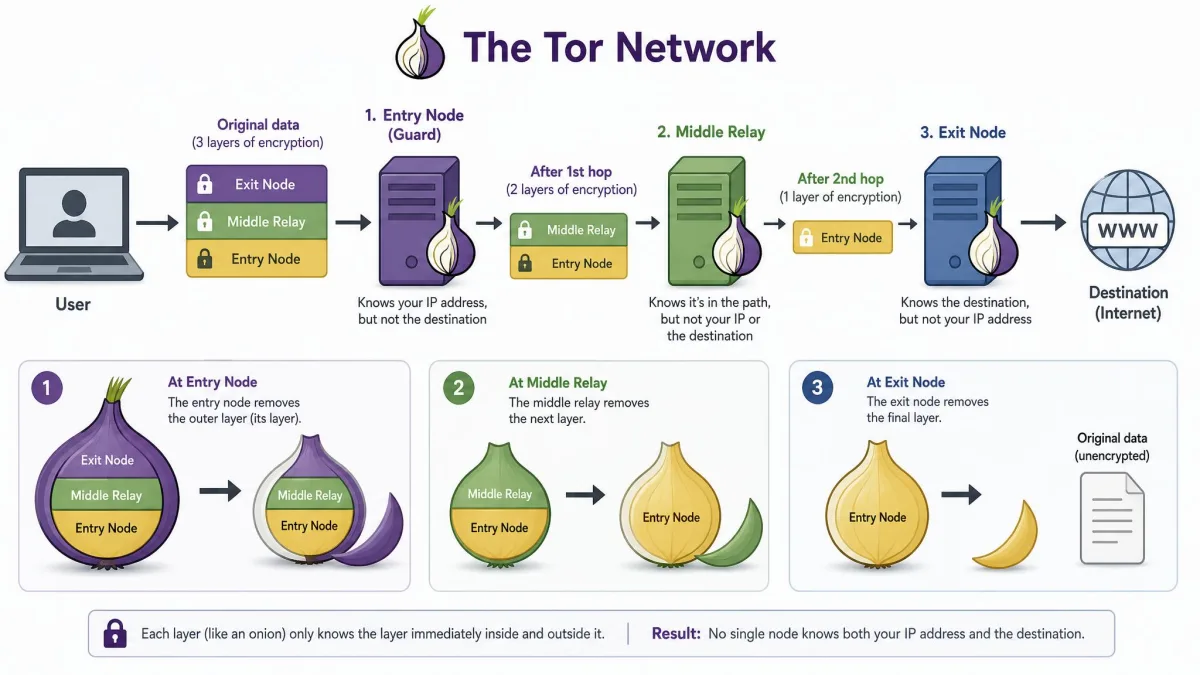
Onion over VPN closes both of those Tor weaknesses by putting a VPN in front. When you connect, your device first opens an encrypted tunnel to the VPN server. Only after that does your traffic enter Tor, so the entry node never sees your real home IP address. It sees the VPN server instead.
Your ISP, meanwhile, sees only the encrypted VPN tunnel. It cannot tell that Tor is on the other side, which matters if you live somewhere that treats Tor use itself as suspicious. The two systems keep their own encryption, so you are running VPN encryption and onion routing at the same time.
There is a limit worth naming early: you do not choose which exit node or exit IP you get. Tor assigns that, and it can change from one request to the next. That is normal for Tor, but it explains a lot of the friction we describe later.
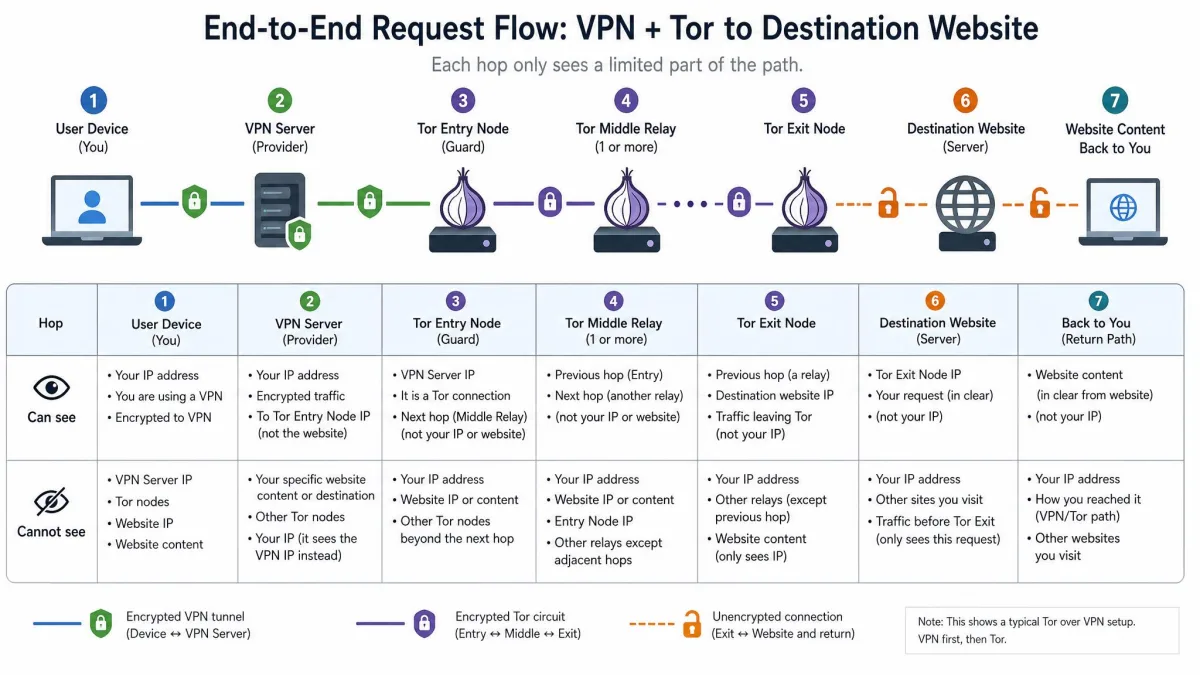
The traffic flow, step by step (You → VPN → Tor entry → relays → exit → site)
Here is the full path a single request takes, in order:
- You connect to the VPN. Your device builds an encrypted tunnel to the VPN server. Your ISP sees this connection and nothing more.
- Traffic reaches the VPN server. The server decrypts the outer VPN layer and forwards your traffic toward Tor. Your real IP address stops here.
- Tor entry node. The entry node receives your traffic from the VPN server, so it logs the VPN's IP rather than yours.
- Middle relay(s). Traffic bounces through one or more middle relays, each stripping a layer of encryption and knowing only the previous and next hop.
- Tor exit node. The exit node sends your request out to the open internet. The destination website sees only this exit node's IP.
- Destination site. The site responds, and the whole chain runs in reverse back to you.
At no point does one party hold the full story. Your ISP knows you use a VPN, the VPN knows you are heading into Tor but not where you land, the entry node sees the VPN, and the site sees only the exit. That layering is the entire security argument for onion over VPN.
Onion over VPN vs. VPN over Tor (and vs. Double VPN)
People mix up three setups that sound alike, so let us separate them clearly. The order of the layers, and whether Tor is involved at all, changes what each one is good for.
Onion over VPN is the setup we have been describing: you connect to the VPN first, then Tor. Your ISP cannot see Tor, and you can reach .onion sites.
VPN over Tor reverses the order. Your traffic enters Tor first and then passes through the VPN. Here your ISP can see that you are using Tor, but not the VPN behind it. This setup only reaches the clear web, cannot open .onion sites, is harder to configure, and offers less day-to-day utility. It exists for narrow cases where you want the site to see a fixed VPN IP rather than a rotating Tor exit.
Double VPN, also called multi-hop, has nothing to do with Tor. It chains your traffic through two VPN servers for two layers of VPN encryption. It is faster than either Tor-based method because it uses VPN hops only, but it cannot reach .onion sites and does not give you Tor's volunteer-relay anonymity. We break the concept down further in our guide to what a double VPN is.
The table below lines them up on the points that actually decide which one you want.
| Method | How it routes | Anonymity level | Speed | Accesses .onion sites | Best for |
|---|---|---|---|---|---|
| Onion over VPN | You → VPN → Tor (entry/relay/exit) → site | High (VPN + Tor layers) | Slowest | Yes | Hiding Tor use from your ISP, .onion access, censorship |
| VPN over Tor | You → Tor → VPN → site | High but narrower use | Slow (Tor-bound) | No (clear web only) | Rare cases: trusting the exit but not the VPN |
| Double VPN | You → VPN server 1 → VPN server 2 → site | Medium-high (two VPN layers, no Tor) | Faster than Tor-based | No | Extra VPN layering without Tor's slowdown |
For almost everyone who searches for this topic, onion over VPN is the version worth understanding. VPN over Tor is a specialist tool, and a double VPN is a separate product decision entirely.
Benefits of onion over VPN
The appeal is real protection, layered so that no single point can unmask you. The clearest way to see why that matters is to picture someone in a censorship-heavy region, where the mere fact of connecting to Tor can draw the wrong kind of attention. Onion over VPN hides that act inside an ordinary-looking VPN tunnel, so the person can reach the wider internet without their provider ever knowing Tor was involved. That protection is the reason the setup exists, and it is why journalists and activists reach for it first.
The pros and cons below sum up how the trade-offs land in daily use.
Pros
- Hides Tor use from your ISP, which sees only an encrypted VPN tunnel
- Masks your real IP address from the Tor entry node
- Two layers of protection: VPN encryption plus onion routing
- Lets you access .onion sites and services
- With a provider feature, works across any app on your device
Cons
- Very slow: expect a large speed drop once traffic enters Tor
- Not usable for streaming, gaming, or video calls
- You cannot choose your Tor exit node or exit IP
- Many websites block or challenge Tor exit traffic with CAPTCHAs
- Overkill for everyday private browsing, where a plain VPN is enough
Drawbacks and limitations of onion over VPN
The trade-off for that protection is speed, and it is steep. Once your traffic passes through Tor, throughput drops sharply. Some benchmarks put the connection at roughly 3 to 10 percent of your baseline speed, compared with about 85 to 95 percent for a plain WireGuard VPN, though the exact figure varies widely with your VPN server, the Tor path, and time of day. Treat those numbers as ballpark, not a guarantee.
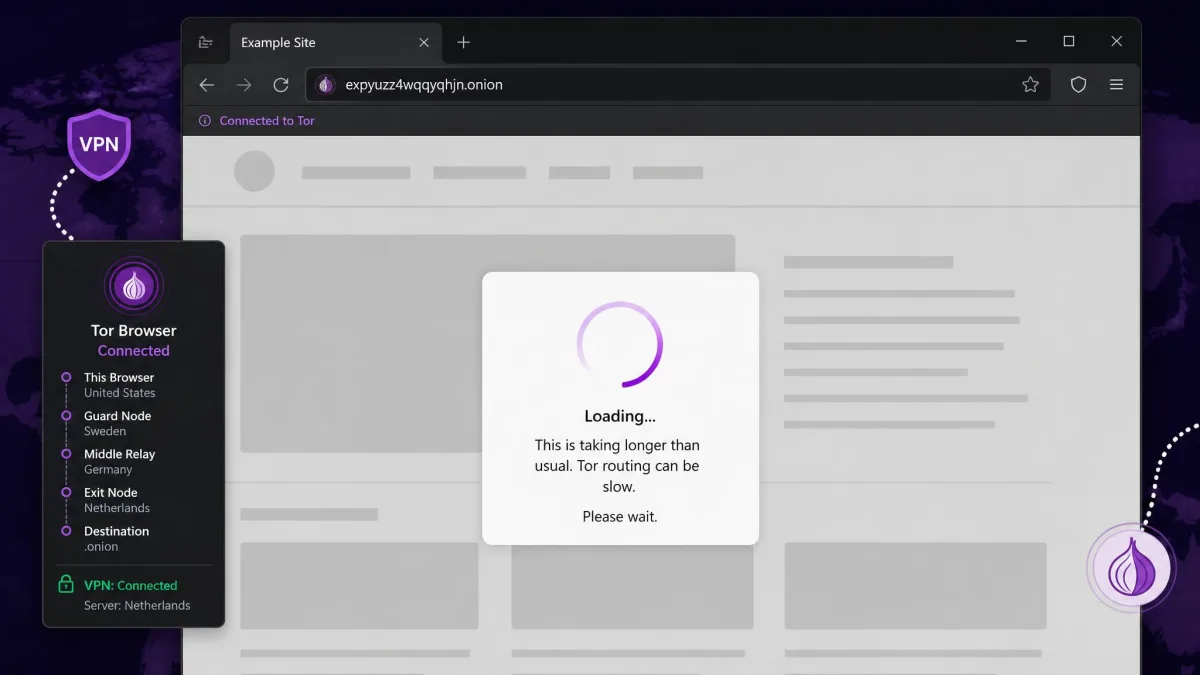
In practice that means pages that take several seconds each to load, often in the range of 5 to 15 seconds, and image-heavy sites like social media feel sluggish. The connection is fine for reading text, email, and forums. It is not for streaming video, gaming, or video calls.
You also give up control of your exit point. You cannot pick which exit node or exit IP you get, and it can change between requests. That rotation is why banking and login-based sites often flag the connection as suspicious: from their side, your apparent location keeps shifting.
If you only want your ISP and the sites you visit to stop tracking you, a standard VPN gives you almost all of the everyday privacy benefit with none of Tor's slowdown. Save onion over VPN for the moments that genuinely need Tor.
Is onion over VPN safe?
Yes, onion over VPN is safe to use, and in most countries it is perfectly legal. Both a VPN and Tor are legal tools with legitimate privacy uses. That said, "safe" does not mean "invincible," and the biggest risk is believing the setup makes you fully anonymous when it does not.
A few countries restrict or ban VPNs or Tor, so check your local rules before you rely on it. And the layering only protects you if every piece is configured correctly. A leak or a dropped connection can undo the whole chain in an instant, which is why the details in this section matter more than the marketing.
Security risks to know (exit nodes, DNS/WebRTC/IPv6 leaks, traffic correlation)
The Tor exit node is the classic weak point. It sends your traffic to the open internet, so any data that is not already encrypted end to end can be read there. Always keep to HTTPS sites, and remember that a malicious exit node can watch unencrypted traffic pass through.
Leaks are the other quiet danger. If your device leaks DNS requests, WebRTC data, or IPv6 traffic outside the tunnel, your real information can escape even though the main connection looks secure. There is also traffic correlation: a well-resourced adversary watching both ends of the network can sometimes match timing patterns to link you to your activity.
Onion over VPN does not make you anonymous by default. Watch for three specific gaps: a Tor exit node can read any traffic that is not end-to-end encrypted; DNS, WebRTC, and IPv6 leaks can expose your real IP outside the tunnel; and no amount of layering protects you from a false sense of total anonymity. Verify your setup for leaks before you trust it.
There is one more risk that is easy to miss. When you use a provider's one-click Tor server through a normal browser, you route through Tor but skip the hardened Tor Browser, which leaves your browser fingerprint exposed. That brings us to what the Tor Project itself recommends.
The Tor Project does not recommend pairing a VPN with Tor unless you are an advanced user who can configure both without compromising your privacy. Its reasoning, laid out in the Tor Project's guidance on using a VPN with Tor, is that a poorly configured VPN can add new ways to be identified rather than remove them. VPN vendors market onion over VPN as a clear upgrade; the honest position sits between the two. It helps against a specific threat, and it can hurt if you set it up carelessly.
How to use onion over VPN (step-by-step)
There are two ways to run onion over VPN. The easy way uses a VPN that has the feature built in. The manual way pairs any VPN with the Tor Browser yourself. We have set up both many times, and they suit different needs.
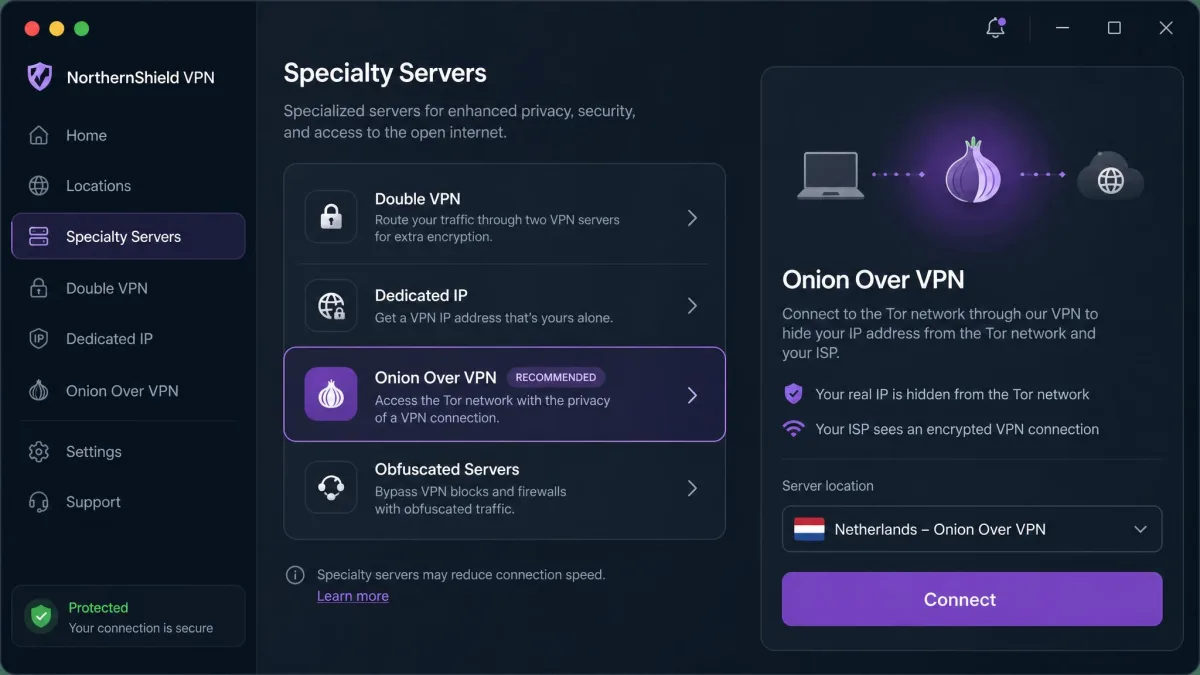
The easy way: a VPN with a built-in Onion Over VPN feature
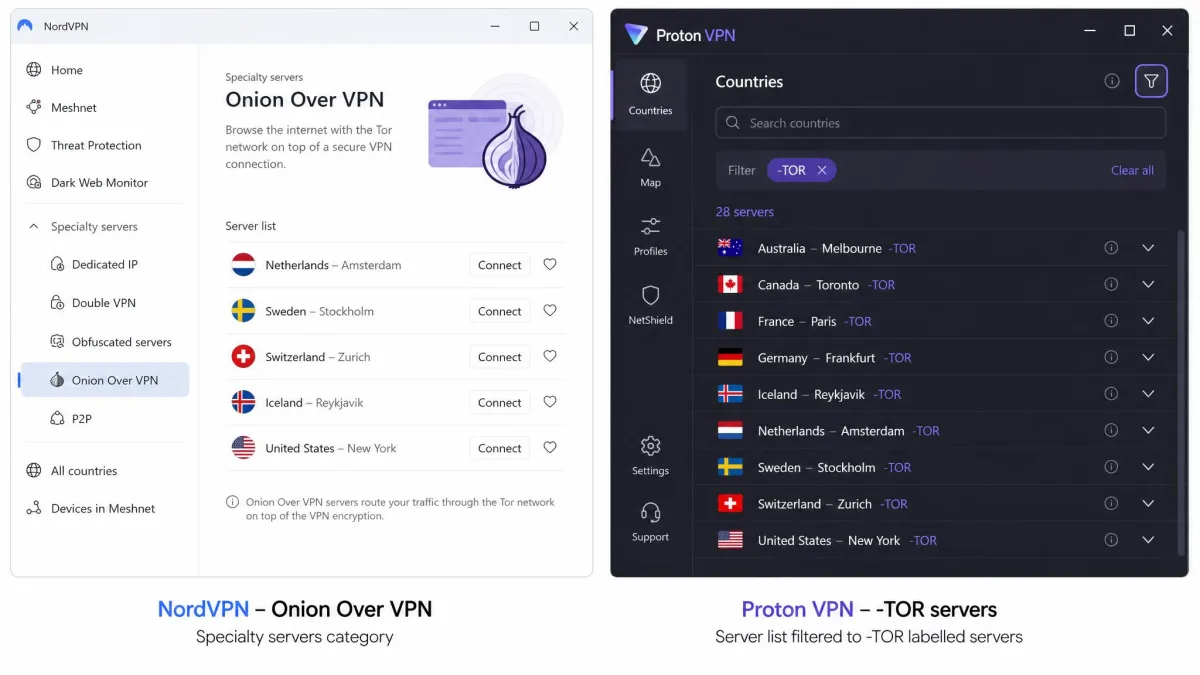
Some providers bake the whole route into a single server. With NordVPN, for example, you open the app, find the Onion Over VPN category under Specialty Servers, and connect. NordVPN routes your traffic through one of its servers and then through three random Tor nodes, and you can use any browser afterward with no separate Tor Browser install.
Proton VPN takes a similar approach under the name Tor over VPN. Its Tor servers carry a "-TOR" suffix in the server list, such as FR#13-TOR, and connecting to one routes your traffic through Tor in a regular browser. It is a premium feature limited to paid plans, and worth noting: only TCP traffic goes through Tor, while UDP and ICMP go through the VPN server but not Tor.
The steps look like this:
- Open your VPN app and sign in.
- Find the Onion Over VPN or Tor server option (a specialty category or a "-TOR" labelled server).
- Turn on the kill switch before you connect.
- Click connect and wait for the tunnel to build.
- Browse as normal once connected.
In our testing this route is genuinely simple: pick the specialty server, connect, and you are done, with no extra software to manage. The trade-off is the fingerprinting gap we flagged, because you are in a normal browser rather than the hardened one.
The manual way: VPN + Tor Browser
The manual route gives you the hardened Tor Browser, which is the more private option. You run your VPN first, then open Tor on top of it.
- Connect to your VPN and confirm the kill switch is on.
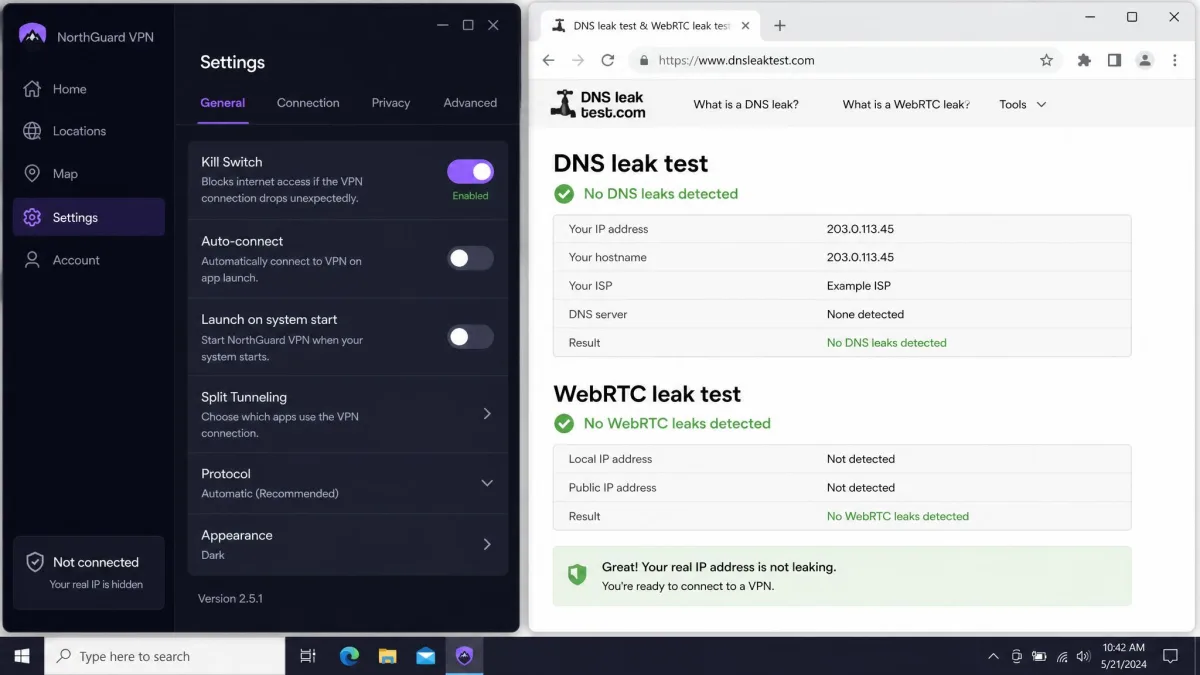
- Verify the VPN is active and not leaking (a quick IP and DNS leak test is enough).
- Download the Tor Browser from the official Tor Project site.
- Open the Tor Browser and let it connect to the network.
- Browse through Tor, now wrapped inside your VPN tunnel.
In our experience this is straightforward, but it does add a second app and a second connection to wait on before you can browse. The payoff is that the Tor Browser blocks the fingerprinting and scripting tricks a normal browser leaves open, so for sensitive work it is the route we prefer.
Whichever route you choose, keep the VPN kill switch on. If the VPN connection drops mid-session, your Tor activity can be exposed to your ISP in that gap. A kill switch cuts your internet the instant the tunnel fails, which makes it close to mandatory here.
When you should (and shouldn't) use onion over VPN
Be honest with yourself about the threat you are actually facing, because the slowdown is the price of admission and it is high. Onion over VPN earns its cost in a handful of situations and is wasted effort in most others.
Use it when you need to access .onion sites, when you want to hide the fact that you use Tor from your ISP, or when you are browsing under censorship or heavy surveillance. Journalists, researchers, activists, and anyone whose safety depends on strong anonymity are the people who benefit. In those cases the extra layer is worth every slow page.
Skip it for everyday privacy. For most users the extra Tor layer is overkill, and it mainly earns its slowness for .onion access or browsing under real pressure. If you just want to stop your ISP from logging your browsing, unblock a website, or keep your connection private on public Wi-Fi, a standard VPN does the job at full speed. Streaming, gaming, downloading large files, and video calls are all off the table on onion over VPN, so do not try to force them.
For most everyday users, onion over VPN is overkill. It earns its slowness only when you genuinely need Tor: for .onion access, or for browsing under censorship or surveillance.
— From our hands-on testing
Safety tips and best practices
A few habits keep the layering honest. We run through these every time we set up onion over VPN, and they matter more than which provider you pick.
Keep the kill switch on at all times so a dropped VPN never exposes your Tor use. Test for DNS, WebRTC, and IPv6 leaks before you trust the connection, because a silent leak defeats the whole point. Stick to HTTPS sites so a malicious exit node cannot read your traffic on the way out.
Do not log into accounts that identify you while you are trying to stay anonymous, since one login can tie the whole session back to you. Use the hardened Tor Browser when browser fingerprinting is part of your threat model. And choose a no-logs VPN provider you actually trust, because you are still handing that first hop to one company. If you want to understand what that first hop is doing, our primers on how a VPN tunnel works and what VPN split tunneling is are good next reads.
For a balanced counter-view on whether the combination is worth it at all, PCWorld's analysis argues that pairing a VPN with Tor can add complexity without adding much real protection for ordinary users. It is a fair point, and it lines up with the Tor Project's own caution.
VPNs that offer onion over VPN
If you want the one-click route, a handful of major providers build the feature in. Two stand out because their implementations are documented and reliable.
NordVPN calls its version Onion Over VPN and offers it as a Specialty Servers category. You connect to one server and it handles the VPN hop plus three random Tor nodes, with no Tor Browser needed. It works with any app once connected, which is the draw for people who want more than browsing covered.
Proton VPN calls its version Tor over VPN and marks the relevant servers with a "-TOR" suffix. It gives you .onion access in a normal browser, offers "-TOR" servers in many countries, and requires the kill switch to be on for onion access on macOS and iOS. It is a paid-plan feature. In our testing Proton's searchable "-TOR" servers feel a little easier to reach day to day than switching NordVPN to the right specialty category, though both work well once you know where the option lives.
A quick honesty note: we are not listing server counts here because neither provider publishes a verified total for its Onion or Tor servers, so any number you see quoted elsewhere is a guess. Pick based on the feature working, your trust in the provider, and price.
Whichever provider you choose, the built-in feature routes you through a normal browser, not the hardened Tor Browser. That is fine for hiding Tor use from your ISP and reaching .onion sites, but if browser fingerprinting is part of your threat model, use the manual VPN plus Tor Browser route instead.
Conclusion
Onion over VPN is a genuine privacy upgrade for a specific job, not an everyday default. Get the setup right and it does exactly what it promises; the verdict below sums up when that effort is worth making and when a plain VPN serves you better.
Frequently asked questions
Can I run a double VPN and onion over VPN at the same time?
Is onion over VPN safe and legal to use?
Why is onion over VPN so slow?
Do I need the Tor Browser to use onion over VPN?
What is the best VPN for onion over VPN?