VeePN is a Panama-based commercial VPN service that encrypts your internet connection and routes it through servers in dozens of countries. It sells itself on low entry pricing, a broad feature list, and apps for nearly every device you own. We wanted to know whether the low price hides a weak product, so we put it through our standard battery of speed, leak, streaming, and privacy checks.
Our review team tested VeePN across Windows, macOS, Android, and iOS over several weeks, running speed benchmarks, DNS and WebRTC leak tests, and real streaming sessions on the services people actually pay for. We paid for the plan ourselves rather than taking a press account, so the signup, billing, and refund experience you will read about is the same one you would face.
The short version is that VeePN is fast and cheap, with clean apps and strong protocol support. The weak spots are consistency and transparency: streaming and server connections can be hit or miss, customer support is thin, and the no-logs claim still lacks a published independent audit. This review walks through every part of that trade-off before you decide.
VeePN at a Glance
VeePN Pros and Cons
Every VPN forces a trade-off between price, speed, and trust. VeePN lands firmly on the price-and-speed side of that line, and the cons below are mostly about consistency rather than any single dealbreaker. We weighed both columns against what the service actually costs.
Pros
- Very low entry pricing on 2-year plans
- Fast connections with modest speed loss, even on distant servers
- Full protocol lineup including WireGuard and Shadowsocks
- Clean, beginner-friendly apps across every major platform
- Panama jurisdiction, outside the 5/9/14 Eyes alliances
- No IP, DNS, or WebRTC leaks in our tests
Cons
- No published independent no-logs audit
- Streaming servers connect inconsistently
- Slow, thin customer support
- Auto-renewal and refund complaints are common
- Marketed country count far exceeds what reviewers verify
- Browser extensions are proxy-only, not full VPN protection
Pricing and Plans
VeePN uses a three-tier structure, and the sticker price you see depends heavily on how long a plan you commit to. Long-term plans are cheap; the single-month option is not. We priced every tier at checkout using our own account.
The 2-year Basic plan starts at $1.99 per month as an intro rate, which is among the lowest entry prices we have seen from a mainstream VPN. The Pro tier, marked "Most Popular," runs $2.49 per month on the same 2-year term and raises the device limit. The Max tier sits at roughly $3.99 per month, though that figure moves with whatever promotion is live at checkout, so treat it as a ballpark rather than a fixed number. Renewal is the number to watch, and it is one VeePN does not publish on its pricing page. Third-party reports put the post-intro rate at the standard monthly price, around $11.99 per month on Basic, but expect it to vary by tier, term, and whatever appears at checkout when your term ends.
Month-to-month pricing is a different story. The 1-month plan starts around $11.99 for Basic and climbs from there, and the exact number shifts between roughly $11 and $15 depending on tier and current promo. As with most VPNs, the monthly option exists mainly to make the annual plans look like a bargain. You can see the current breakdown on the VeePN pricing page.
Basic vs Pro vs Max Tiers
The tiers differ mainly on how many devices you can connect at once. Basic covers 5 simultaneous connections, Pro raises that to 10, and Max pushes it to 20. The core VPN features, encryption, protocols, and server access are the same across all three, so the decision comes down to how many devices live in your household.
For most people, Pro is the sensible middle: 10 devices covers a couple of phones, laptops, a tablet, and a smart TV without hitting the ceiling. Max only makes sense for large households or someone connecting an unusual number of devices. Basic is fine for a single user with a phone and a laptop.
If you are new to VPNs, start on a long plan only after you have tested the service inside its refund window. The intro price applies to the first term, and standard rates apply at renewal.
Money-Back Guarantee and Free Trial
VeePN offers a 30-day money-back guarantee on annual and multi-year plans, dropping to 14 days on the monthly option. That is the standard window for the category and gives you real time to test streaming, speed, and support before committing.
There is also a free trial, though its length depends on where you sign up. The desktop signup flow offers a 3-day trial, while the mobile apps advertise a 7-day trial. Both are credible, and the difference appears to come down to platform. One practical warning: auto-renewal and refund handling draw the most complaints about VeePN, including unexpected charges and difficulty getting the guarantee honored, so set a calendar reminder before any trial or term ends.

Speed and Performance
Speed is where VeePN earns most of its goodwill. A VPN always costs you some throughput because your traffic is encrypted and rerouted, so the question is how much. On our test machines, the answer was reassuringly little.
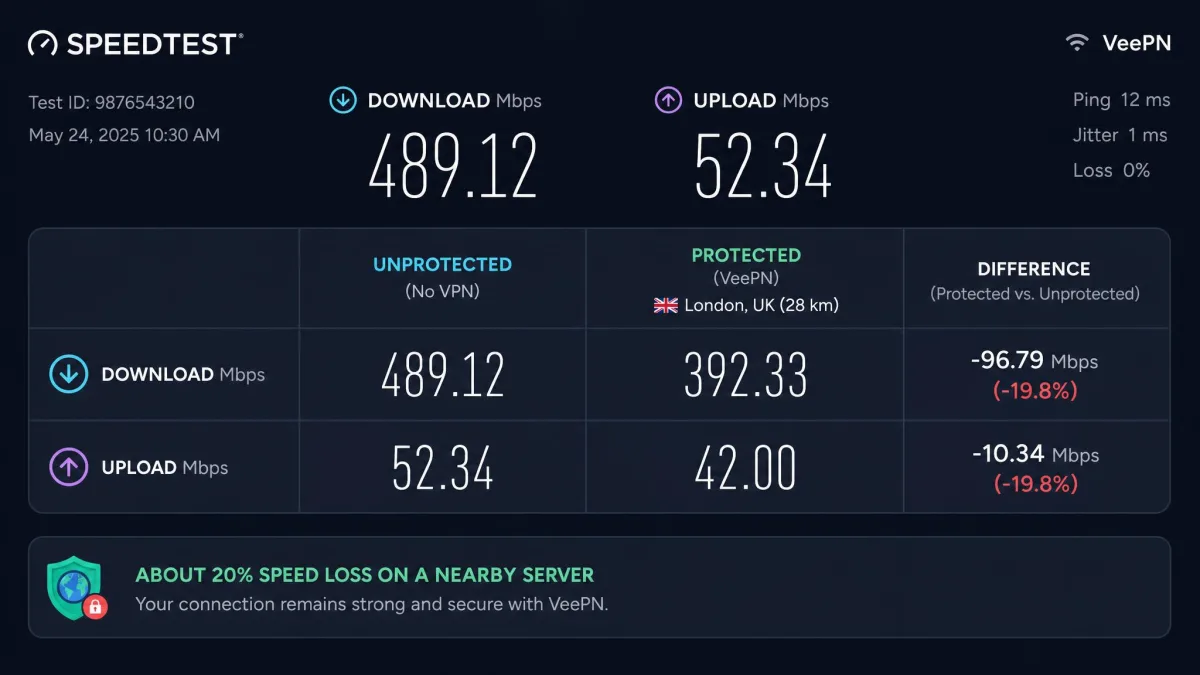
We measured a speed loss of about 20% when connecting to nearby servers, which is well within the range where video calls, streaming, and large downloads stay comfortable. That is a strong result for a budget service and matches what a network-minded tester hopes to see from a modern WireGuard implementation. In practical terms, a 20% dip is the difference you might not notice on a fast home connection at all.
Speed Test Results
Distant servers cost more, as expected, but not painfully so. Connections to far-away locations lost roughly 30% of our baseline speed and stayed usable throughout, which is the more important point. Plenty of cheaper VPNs collapse on long-haul routes; VeePN held a workable connection even across continents.
We ran each route more than once and compared it against an unprotected baseline, because a single reading tells you little about a VPN's day-to-day behavior. Nearby European and North American servers were the steadiest performers, holding that 20% loss run after run. The longer transcontinental hops drifted more between attempts, but even our worst distant reading stayed high enough to stream in HD and pull large downloads without stalling. WireGuard was the protocol that delivered these numbers; switching to OpenVPN cost noticeably more throughput, which is expected and not unique to VeePN.
The caveat is consistency rather than raw speed. Some servers connected instantly while others refused to connect at all, and the streaming-optimized servers were the worst offenders for stalling. Connection time was the variable that tested us most, since a server that eventually connected still sometimes made us wait or retry before the tunnel came up. When a server did connect, throughput was reliably good. Getting a clean connection on the first try was the part that occasionally tested our patience, and it is the recurring theme of this review: the ceiling is high, but the floor moves.
Streaming Performance
Streaming is the single most inconsistent part of VeePN, and it is the area where we would temper your expectations most. The service can unblock major libraries, but it rarely does so effortlessly, and results shift depending on which server and protocol you use.
Netflix, BBC iPlayer, and Prime Video
Netflix access worked for us across several regional libraries, but it often needed a manual nudge. The reliable fix was switching protocol, typically from OpenVPN to IKEv2, or jumping off the dedicated streaming server onto a standard one in the same country. Once we found a working combination, playback was smooth, but the trial-and-error is more than a polished service should ask of you.
BBC iPlayer and Prime Video were more of a coin toss. In some sessions Prime Video unblocked without complaint while Netflix and BBC iPlayer stalled on endless loading, and on other days that pattern reversed. We tried the US and UK Netflix libraries alongside BBC iPlayer and Prime Video across multiple servers, and the pattern held: a combination that worked one evening was no guarantee the next. The streaming-optimized servers, which are supposed to make this easier, were frequently the ones that failed to load. If reliable access to a specific streaming service is your main reason for buying a VPN, this inconsistency is the thing to weigh most carefully.
VeePN can unblock Netflix, BBC iPlayer, and Prime Video, but not dependably on the first try. Use the money-back window to confirm it works with the exact services you care about.
Security and Encryption
On the core security fundamentals, VeePN is on solid ground. It uses AES-256 encryption, the same cipher standard adopted by banks and governments, and pairs it with a modern protocol lineup. This is the part of the product we had the fewest reservations about.
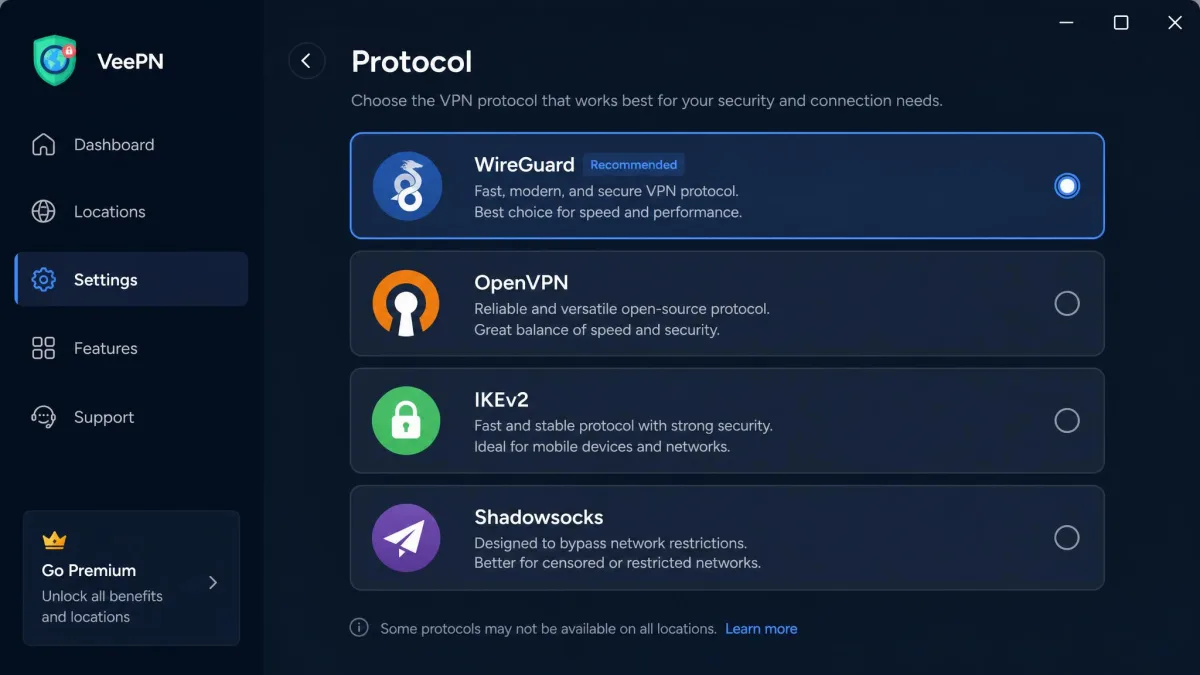
Protocols (WireGuard, OpenVPN, IKEv2, Shadowsocks)
VeePN supports WireGuard, OpenVPN, IKEv2, and Shadowsocks. WireGuard is the modern default and the reason speeds hold up so well. OpenVPN and IKEv2 give you compatibility and stability options, and IKEv2 in particular proved useful as our go-to fix when a streaming server misbehaved. Shadowsocks is the standout inclusion at this price: it is a proxy protocol designed to disguise VPN traffic, and it doubles as a useful tool for restrictive networks and faster torrenting.
Kill Switch and Leak Tests
The kill switch cuts your internet if the VPN connection drops, preventing your real IP from leaking during the gap. VeePN's implementation runs continuously rather than only activating at the moment of disconnect. Its history is mixed: the kill switch failed testing in late 2025 but passed a 2026 retest, so reliability has improved even though it has been inconsistent over time. We would verify it works on your own setup during the refund window.
Leak testing was the clearest win. Across more than 15 server locations, our DNS and WebRTC leak tests came back clean with no IP leaks detected. That is exactly what you want to see, and it means the encryption is doing its job even when other parts of the experience wobble.
Privacy, Logging, and Jurisdiction
Privacy is where VeePN's story gets more complicated, and where the low price starts to show its edges. The building blocks are good, but the verification that would let us fully trust the marketing is missing.
No-Logs Policy and Panama HQ
VeePN is headquartered in Panama, which sits outside the 5/9/14 Eyes intelligence-sharing alliances. That jurisdiction is a genuine plus, and it is the same base that NordVPN uses. The company advertises a no-logs policy, meaning it claims not to record your browsing activity or connection metadata.
The complication is the privacy policy itself, which we found ambiguous. It contains conflicting language about what personal data is retained, and only EU users are granted a clearly defined deletion right. That is not the crisp, unambiguous commitment we look for from a service asking you to route all your traffic through it.
Independent Audit Status
Here is the sticking point. VeePN's no-logs claim has not been publicly verified by an independent audit. An unpublished Cure53 audit is sometimes referenced, but no report has ever been released, and we could find no evidence that any independent no-logs audit has been completed and made public. Without a published report, the no-logs policy remains a promise rather than a verified fact.
Why does this matter so much for a VPN specifically? A VPN sees every site you visit, so the entire value of a no-logs promise rests on trust, and an audit is how the industry converts that promise into something checkable. Community sentiment is broadly positive, with a 4.5 out of 5 Trustpilot rating across 3,795 reviews and 87% of those at five stars, but user ratings measure satisfaction, not what happens to your data behind the scenes. Until VeePN publishes an audit, we treat the no-logs policy as unproven rather than broken.
This is the clearest gap between VeePN and its pricier rivals. NordVPN has had its no-logs policy audited repeatedly by PwC and Deloitte, and Surfshark has been independently audited too. If an audited privacy guarantee is non-negotiable for you, VeePN does not yet clear that bar.
Panama jurisdiction is a real advantage, but a no-logs policy you cannot independently verify is a promise, not a guarantee.
— From our hands-on VeePN testing
Server Network and Locations
VeePN's server network is large enough for most needs, though the marketing overstates it. Published server totals cluster around 2,500 to 2,600 and drift as the network changes, which is a healthy count for a mid-tier service.
The country count is where the numbers get slippery. VeePN markets 148 countries, but independent counts verify far fewer, landing anywhere from 42 to 85 depending on how they are measured. That is a wide gap, and the marketed figure sits well above what anyone actually confirms. For practical purposes, assume solid coverage across North America, Europe, and major Asian hubs rather than the near-global footprint the number implies.
The reason those verified counts disagree with each other, and with the marketing, usually comes down to virtual locations. A virtual server presents an IP address registered to one country while the hardware physically sits somewhere else, which lets a provider claim a country without operating a machine there. That is not inherently a problem, and it can even improve speeds, but it does mean the headline 148 is a marketing figure rather than a map of where your traffic really exits. In our use the servers that mattered, the mainstream North American and European locations, were present and worked, which is what most buyers actually need.
When a VPN's marketed country count is far higher than what reviewers verify, the marketed number often counts virtual locations. Check that the specific country you need is available before you buy.
Apps and Device Compatibility
VeePN's app coverage is genuinely broad. It runs on Windows, macOS, Linux, iOS, and Android, with browser extensions for Chrome, Firefox, and Edge, plus apps for routers, Fire TV, Apple TV, Android TV, and gaming consoles. If you own it, VeePN probably supports it.
The extra features are stacked on top: a kill switch, the NetGuard ad and malware blocker, split tunneling on Windows and Android, Double VPN for chaining two servers, breach alerts, and an optional real-time antivirus add-on. One caveat worth flagging is that the browser extensions are free but proxy-only, with 30% to 50% speed drops, so they are a lightweight convenience rather than full VPN protection.
Ease of Use
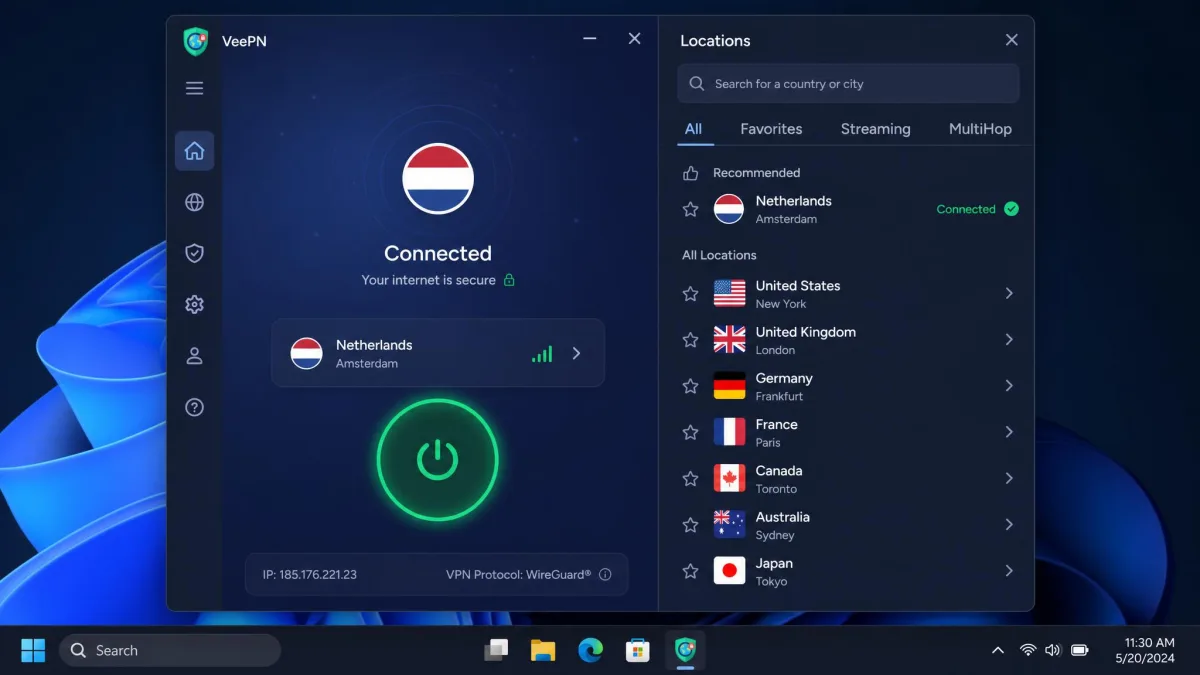
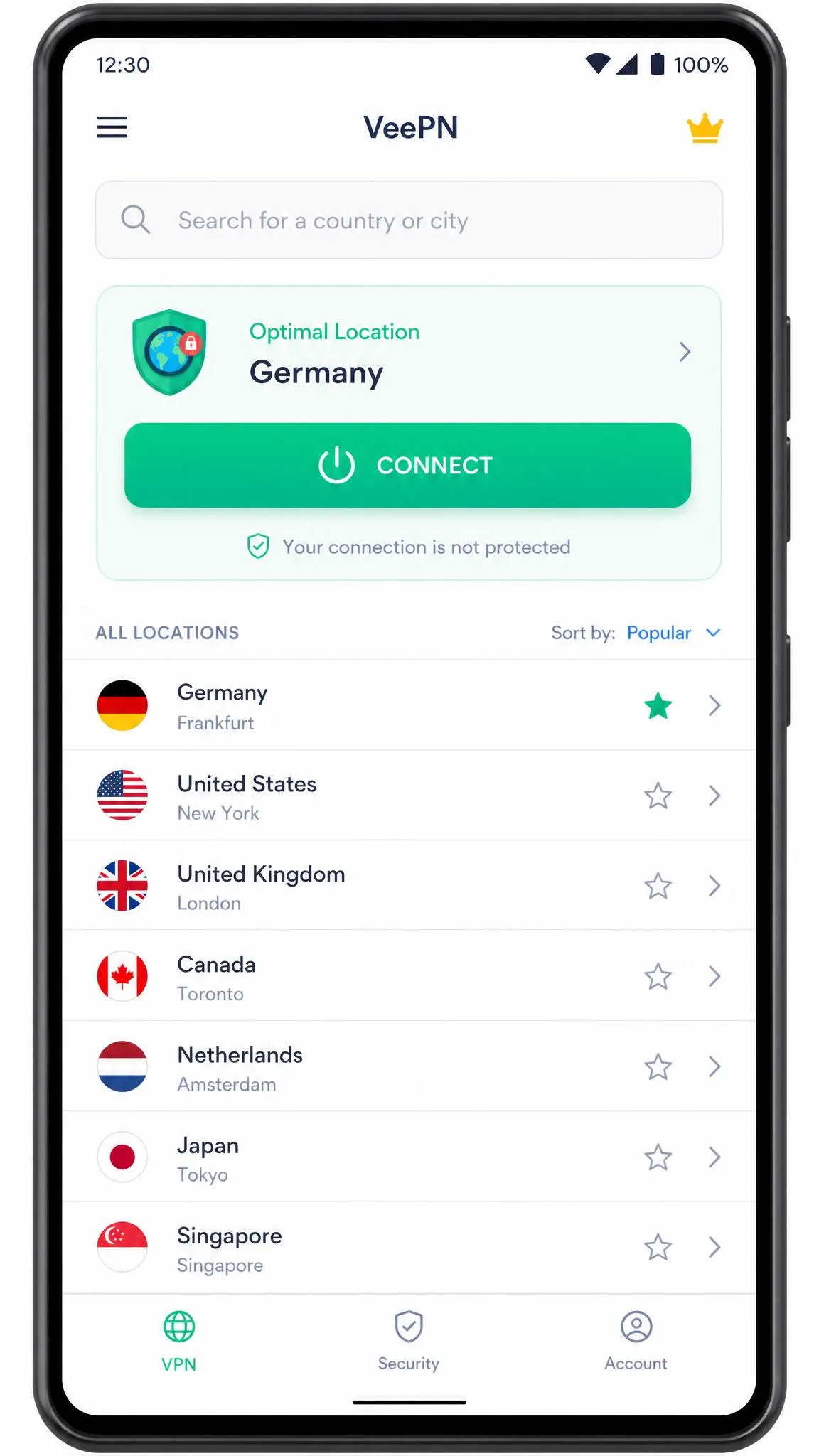
This is a quiet strength. The apps are clean and beginner-friendly, and we found them easy to install and navigate even from a first-time user's perspective. The main screen is a single large connect button with a searchable server list, and the defaults are sensible enough that a newcomer can be protected in under a minute. For a service aimed at budget-conscious buyers who may be new to VPNs, that simplicity matters.
Torrenting and P2P
VeePN supports P2P and torrenting, and this is one of the areas where it quietly excels. Torrenting was fast in our testing, with Shadowsocks roughly doubling download speed and completing a 1.62 GB file in about 5 minutes. That is a strong result and makes VeePN a legitimate option for a P2P-focused user.
Two things make that speed possible. First, the same WireGuard performance that helps everyday browsing carries straight over to large swarms, so peers connect and saturate quickly. Second, Shadowsocks gives you a fallback that disguises the traffic and, in our runs, was the setting that produced the fastest completion times. The kill switch matters here too, since a dropped connection during a long download is exactly the moment you do not want your real IP exposed, and VeePN's continuous kill switch is designed to cover that gap.
The one limitation is that some torrent sites are blocked on US servers only, so if you torrent, connect through a non-US location to avoid the restriction. Outside that quirk, the combination of good speeds and Shadowsocks makes for a capable torrenting setup, and it is one of the few areas where VeePN's budget price buys you performance that matches services costing more.
Does VeePN Work in China?
China is the hardest test for any VPN, and VeePN is unreliable there. The company itself suggests using WireGuard paired with Double VPN to get through the Great Firewall, but it concedes that this may not work. That honesty is welcome, but it is also a clear signal.
The underlying problem is that China actively detects and blocks VPN traffic rather than simply filtering websites, so a provider needs constantly updated obfuscation to stay ahead. VeePN's Shadowsocks support is exactly the kind of tool that can help, since it is built to disguise a VPN connection as ordinary traffic, and pairing it with Double VPN adds another layer for the firewall to see through. But none of that is a guarantee, and a technique that works one week can fail the next as the censorship system adapts.
If working access inside China is your primary requirement, VeePN is not a VPN we would stake a trip on. The Shadowsocks support helps its odds compared with a bare-bones service, but there is no guarantee, and we would not recommend relying on it for essential access behind heavy censorship. Travelers who need dependable access should install and test a proven China-capable option before they leave, because troubleshooting from inside the firewall is far harder than setting things up in advance.
Customer Support
Customer support is VeePN's weakest area, and it is the one that would frustrate us most in daily use. Support is slow and thin: live chat is often unavailable despite a 24/7 claim, email replies take several days, and the agents we dealt with struggled with technical questions.
That combination is the real issue. A 24/7 promise sets an expectation that the live chat frequently did not meet, and falling back to email meant waiting days for a reply on a problem you wanted solved that evening. When answers did arrive, the more technical questions, the ones a budget-conscious newcomer is least equipped to solve alone, were often the ones support handled least confidently. For a service that leans on beginners, that is an awkward gap, because newcomers are exactly the people most likely to need help.
The saving grace is that the apps are simple enough that most users will rarely need support at all. The defaults work, the connect button is obvious, and the common tasks do not require a support ticket. But when something does go wrong, or when you need to invoke the refund guarantee, be prepared for a slower and less helpful process than the price might suggest, and plan around it rather than assuming support will catch a mistake for you.
Do not count on fast support to fix a billing issue. Cancel auto-renewal well ahead of your renewal date rather than relying on customer service to reverse an unexpected charge.
VeePN vs. Alternatives
VeePN's pitch is price, so the fair comparison is against the two rivals people cross-shop it with most: NordVPN and Surfshark. The table below shows where the cheaper entry price costs you something and where it does not.
| Product | Buy | Entry price (2-yr) | Servers | Countries | Devices | Audited no-logs |
|---|---|---|---|---|---|---|
|
Check price → | $1.99/mo | ~2,500 to 2,600 | 42 to 85 verified | 5 / 10 / 20 by tier | No published audit |
 |
Check price | $3.49/mo | 9,300+ | 137 | 10 | Yes (PwC, Deloitte) |
 |
Check price | $2.49/mo | 4,500+ | 100+ | Unlimited | Yes |
VeePN wins on entry price and holds its own on speed and protocols. Where it falls behind is verification and scale: NordVPN offers a far larger, audited network, and Surfshark bundles unlimited devices with an audited no-logs policy for only a little more per month. For a broader shortlist, see our roundups of the best cheap VPNs and the best free VPNs, or read our full NordVPN review and Surfshark review.
A cheaper entry price is only a bargain if the plan still does what you need. We would rather pay a dollar more per month for an audited no-logs policy than save it and take the privacy claim on faith.
Final Verdict: Is VeePN Worth It?
VeePN is a fast, affordable, capable VPN with a few real weaknesses, and whether it is worth it depends on what you need from it. The fundamentals are good: strong speeds, AES-256 encryption, a full protocol lineup, clean apps, a Panama base, and no leaks in our tests. At $1.99 per month on a long plan, that is a lot of VPN for the money.
The reservations are equally real. Streaming is inconsistent, customer support is slow, refund and auto-renewal complaints are common, the country count is inflated, and the no-logs policy has never been publicly audited. Independent verdicts on VeePN are genuinely split for these reasons, and we land in the middle: a solid budget pick with caveats, not an unqualified recommendation.
Buy VeePN if you want fast, cheap everyday privacy and torrenting, and you are willing to work around the occasional streaming hiccup. Look elsewhere, at NordVPN or Surfshark, if an audited no-logs policy or dependable streaming is your priority. The 30-day guarantee means you can test all of this yourself before committing.