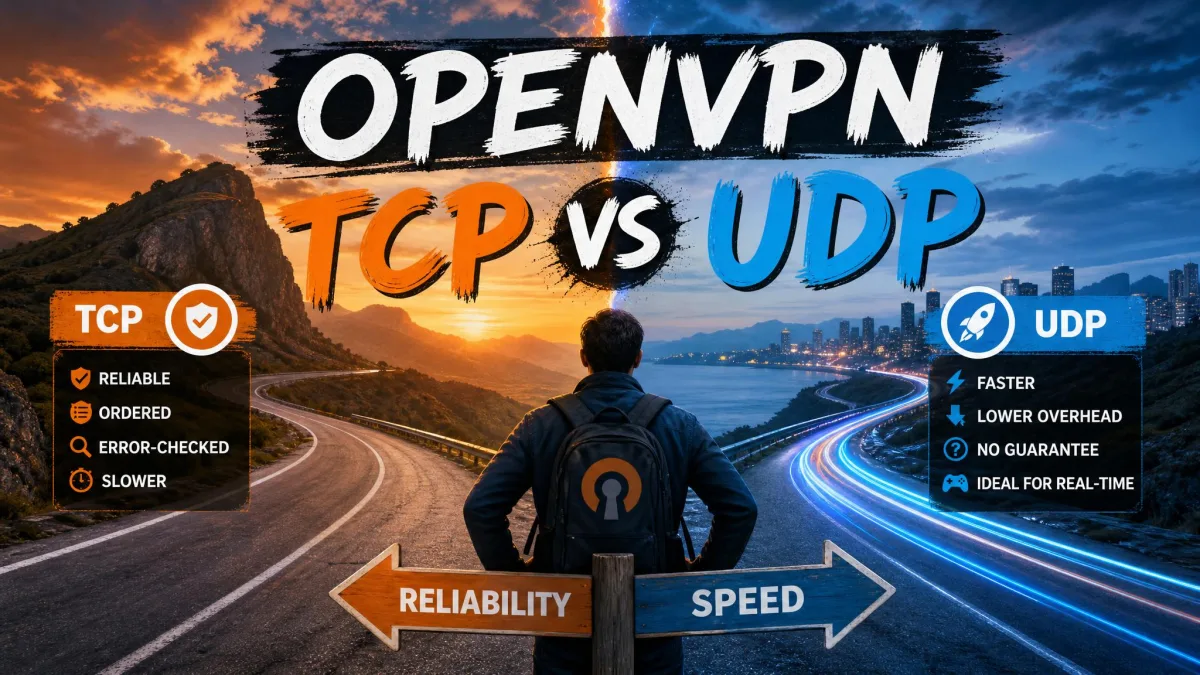
OpenVPN runs over two different transport protocols: UDP and TCP. That single choice, buried in a settings dropdown, decides how fast your connection feels, how well it holds up on a shaky network, and whether it can slip past a restrictive firewall. The encryption is the same either way, so this is a performance-and-reliability decision, not a security one.
We have spent years testing VPNs against real speed, leak, and streaming benchmarks, and the transport toggle is one of the few settings that reliably changes the numbers. UDP is faster and leaner, and it is the right default for most connections. TCP is slower but more dependable, and it can tunnel through firewalls that block everything else by disguising itself as ordinary HTTPS web traffic.
Here is the short version before we get into the detail: leave your VPN on UDP, and only switch to TCP when the connection keeps dropping or refuses to connect at all.
Quick Answer: TCP vs UDP at a Glance
For most people, most of the time, the answer is UDP. It sends data continuously without waiting for confirmation, which keeps latency low and throughput high. That makes it the better choice for streaming, gaming, video calls, and normal browsing.
Reach for TCP only when UDP stops working. Because TCP guarantees delivery and can run on port 443 to mimic HTTPS, it connects on networks that filter or throttle VPN traffic: hotel WiFi, school and office networks, and some public hotspots. The trade is speed. TCP carries more overhead and can feel sluggish, especially over long distances.
The encryption OpenVPN uses is exactly the same whether you connect over UDP or TCP. Neither option is "more secure" than the other. You are choosing a delivery method, not a level of protection.
What Are TCP and UDP?
Both TCP and UDP are transport protocols: they define how packets of data move between your device and a server across a network. OpenVPN can wrap its encrypted tunnel inside either one. Understanding how each behaves explains every practical difference that follows.
How TCP Works (Reliable, Connection-Oriented)
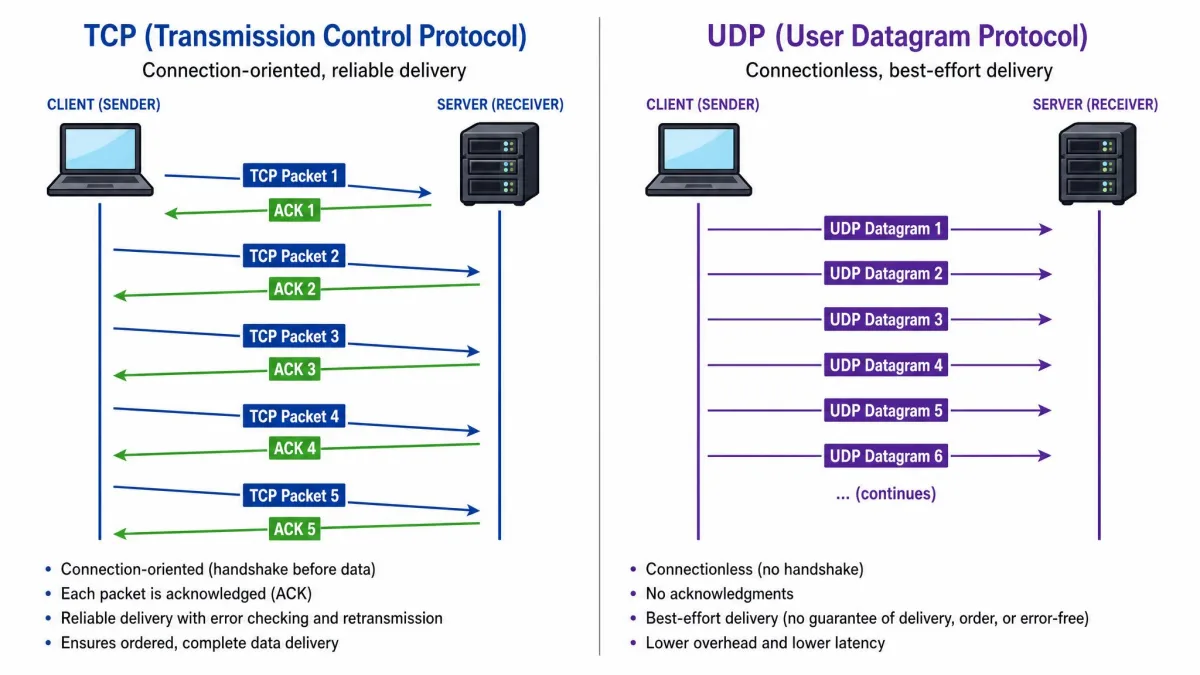
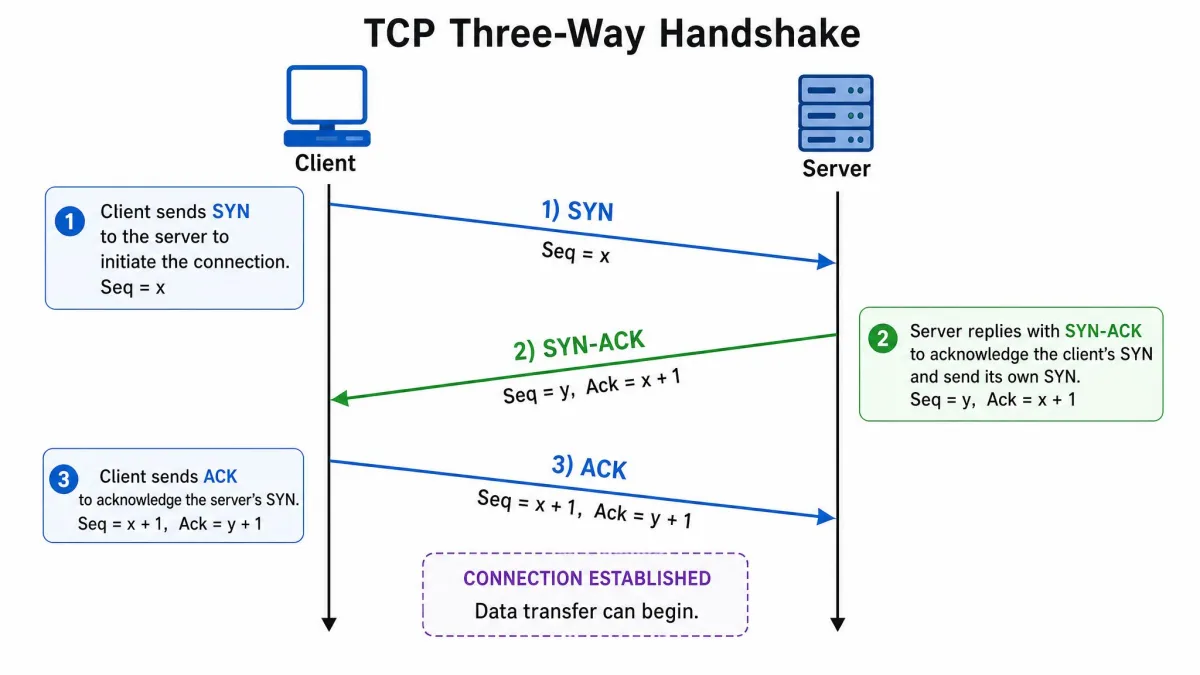
TCP, the Transmission Control Protocol, is connection-oriented. Before any data moves, the two sides complete a three-way handshake to establish the connection. From there, TCP breaks your data into packets and waits for confirmation that each one arrived in the correct order.
If a packet goes missing, TCP notices and resends it. If packets arrive out of sequence, TCP reorders them before handing them to the application. This is reliable, ordered, error-checked delivery, and it is why the web, email, and file transfers all run on TCP. The cost is overhead: every acknowledgment and retransmission takes time, and the TCP header is 20 bytes at minimum.
How UDP Works (Fast, Connectionless)
UDP, the User Datagram Protocol, is connectionless. It fires off datagrams without negotiating a connection first and without tracking what it has already sent. There are no delivery guarantees, no ordering, and no duplicate protection. If a packet is lost, UDP does not notice and does not resend it.
That sounds worse, but for many jobs it is exactly what you want. Skipping acknowledgments and retransmissions means less waiting and less overhead. The UDP header is just 8 bytes, compared with TCP's 20-byte minimum, a 12-byte difference on every packet. For real-time traffic where a slightly late packet is useless anyway, UDP's send-and-forget approach wins.
OpenVPN Over TCP vs UDP: The Key Differences
When OpenVPN runs over each protocol, it inherits that protocol's personality. Here is how the differences play out where you will actually notice them.
Speed and Throughput
UDP is faster. It sends packets continuously without pausing for acknowledgments, and its smaller header adds less per-packet overhead. In our testing, UDP feels noticeably leaner for everyday browsing, streaming, and gaming, and it is the transport we leave enabled by default on our own connections.
TCP is slower by design. The acknowledgment cycle and retransmission logic that make it reliable also make it wait, and those waits accumulate into lower throughput. No source we trust gives a fixed percentage for the gap, and we will not invent one, but the direction is consistent across every benchmark we have run: UDP moves data faster.
Reliability and Packet Loss
This is where TCP earns its place. TCP guarantees that every packet arrives, in order, error-checked, resending anything that goes missing. On an unstable connection, that persistence keeps the tunnel intact when UDP might drop data.
UDP accepts minor packet loss as the price of speed. For streaming a video or playing a game, a dropped packet here and there is invisible. For a connection that is already flaky, though, UDP's lack of retransmission can mean a session that stutters or fails, and TCP's guaranteed delivery becomes the safer bet.
Latency and Real-Time Performance
Latency is where UDP's advantage is easiest to feel. In a video call over TCP, a couple of missing packets can freeze the picture for around half a second while the protocol re-requests them. UDP just keeps going, so the call stays fluid even if a frame or two is lost along the way.
The same pattern holds for 4K streaming. UDP skips a dropped frame and keeps playing, while TCP pauses the whole stream to recover it, which shows up as buffering. For anything real-time, the packet you had to stop and wait for is often stale by the time it arrives.
Match the protocol to the task: UDP for streaming, gaming, and video calls where smoothness beats perfection, and TCP for restrictive networks or unstable links where getting the data through matters more than raw speed.
Firewall Bypass and Port 443
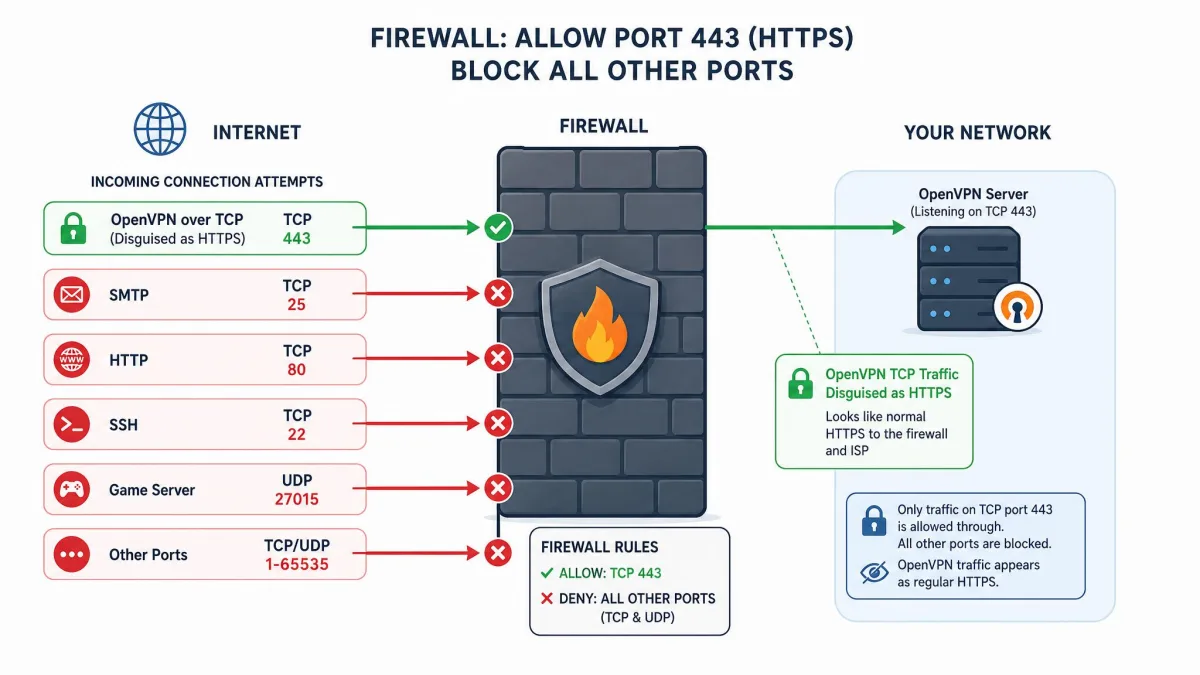
TCP's headline trick is firewall traversal. OpenVPN over TCP is commonly configured on port 443, the same port HTTPS uses, so its traffic looks like an ordinary encrypted website connection and is difficult to distinguish from normal SSL browsing.
That matters because restrictive networks tend to leave a few ports open no matter what: port 53 for DNS, port 80 for HTTP, and port 443 for HTTPS. Block those and the network breaks for everyone, so they stay open. Running OpenVPN TCP on 443 rides through on the one door that cannot be closed. UDP, by contrast, is often blocked outright on locked-down networks.
Security (Identical for Both)
There is no security difference between the two. OpenVPN's encryption is the same regardless of whether it runs over UDP or TCP. The transport choice changes speed, reliability, and firewall behavior, and nothing else. If you have read that TCP is "safer," that is a myth: your data is protected identically either way.
OpenVPN TCP: Pros and Cons
TCP is the reliability specialist. It shines when the network is working against you, and it falls behind when you simply want speed.
Pros
- Guaranteed, ordered, error-checked delivery, with automatic retransmission of lost packets
- Excellent at firewall traversal on port 443, where it mimics HTTPS traffic
- More dependable on unstable or lossy connections
- Connects on restrictive networks that block UDP outright
Cons
- Slower throughput due to acknowledgment overhead
- Higher latency, which hurts gaming and video calls
- The speed penalty grows with distance to the server
- Vulnerable to the TCP-over-TCP slowdown on poor connections
OpenVPN UDP: Pros and Cons
UDP is the everyday default. It is the faster, lower-overhead option that suits the vast majority of connections.
Pros
- Faster throughput and lower latency
- Smaller 8-byte header means less per-packet overhead
- Ideal for streaming, gaming, VoIP, and general browsing
- No TCP-over-TCP meltdown risk
Cons
- No retransmission, so minor packet loss is possible
- Often blocked on restrictive networks where only web ports stay open
- On a genuinely unstable link, its send-and-forget design can leave you worse off than TCP
Its downsides are the flip side of its speed. UDP offers no retransmission, so minor packet loss is possible, and it is often blocked on restrictive networks where only web ports stay open. On a genuinely unstable link, its send-and-forget design can leave you worse off than TCP.
TCP vs UDP Comparison Table
Here is the whole comparison at a glance.
| Feature | OpenVPN UDP | OpenVPN TCP |
|---|---|---|
| Speed/Throughput | Faster, lower overhead (8-byte header) | Slower, acknowledgment overhead (20-byte header) |
| Reliability | No retransmission; minor packet loss possible | Guaranteed, ordered, error-checked delivery |
| Latency | Lower; best for real-time traffic | Higher; retransmission adds lag |
| Firewall bypass (Port 443) | Often blocked on restrictive networks | Excellent on TCP 443, mimics HTTPS |
| Security | Identical encryption | Identical encryption |
| Best for | Streaming, gaming, VoIP, everyday browsing | Restrictive/unstable networks, firewall traversal |
The TCP-over-TCP Problem (Why TCP Can Feel Slow)
There is a specific reason OpenVPN TCP can feel worse than its overhead alone suggests, and it has a name: the TCP-over-TCP problem, sometimes called TCP meltdown.
Most of what you do online already runs over TCP. Your browser loading a page uses TCP. When you tunnel that inside an OpenVPN TCP connection, you stack one TCP layer inside another. On a good connection, that is fine. On a lossy one, it turns ugly. Both the inner TCP (the browser) and the outer TCP (the VPN) notice the same lost packet and both try to resend it at once, while both also slow down to ease congestion. The two retransmission systems fight each other and pile on congestion instead of clearing it.
The result is dramatic. On an unstable network, TCP-wrapped VPN traffic can collapse to a fraction of what UDP delivers over the same link. This is the single biggest reason we tell people not to leave a VPN on TCP permanently. UDP carries no second retransmission layer, so it sidesteps the meltdown entirely.
Do not run OpenVPN TCP as your permanent setting just because it "feels safe." On a poor connection, stacking TCP inside TCP can tank your speed far below what UDP would give you. Treat TCP as a fallback, not a default.
When to Use OpenVPN UDP
UDP is the right default for almost everyone. Use it when:
- You are streaming video, including 4K, where buffering matters more than a perfect frame.
- You are gaming or making video and voice calls, where low latency is everything.
- You are browsing normally and simply want the fastest connection.
- Your network is stable and does not block VPN traffic.
In practice, that covers the majority of connections most days. Leave UDP on and forget about it until something breaks.

When to Use OpenVPN TCP
Switch to TCP when UDP is not working or not allowed. Reach for it when:
- Your connection keeps dropping or refuses to establish on UDP.
- You are on a restrictive network such as hotel, school, library, or office WiFi that blocks VPNs.
- Your link is genuinely unstable and you need guaranteed delivery over raw speed.
- Only web ports are open, and you need to run on port 443 to get through.
There is a common real-world clue here. If your VPN works on mobile data but not on WiFi, the WiFi network is usually blocking UDP. Switching to TCP, often on port 443, typically restores the connection.
One caveat on censorship: TCP on port 443 gets through basic port-based blocking, like a school or library filter, but sophisticated deep packet inspection can still fingerprint OpenVPN's TLS handshake regardless of the port. Against state-level censorship, port 443 alone is not enough.
How to Switch Between TCP and UDP
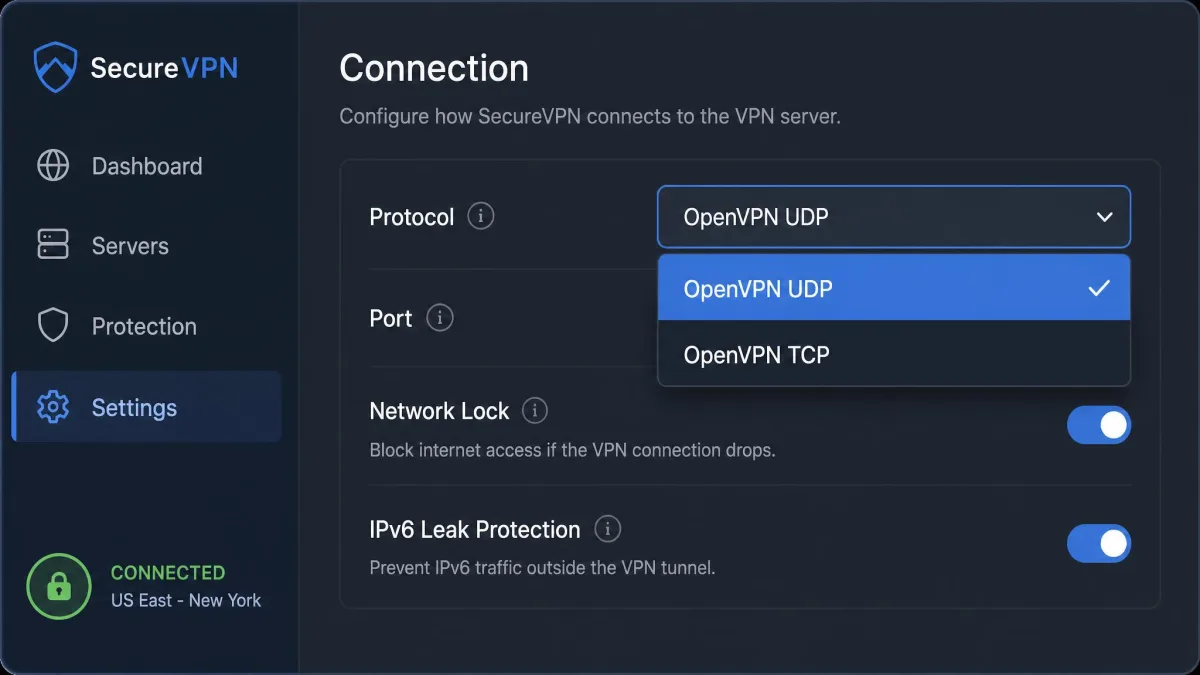
In most VPN apps, the protocol lives behind a manual-mode setting. The exact labels vary, but the path is consistent: open Preferences, choose the Connection tab, enable manual mode, then pick OpenVPN UDP or OpenVPN TCP from the protocol dropdown. Reconnect and you are on the new transport.
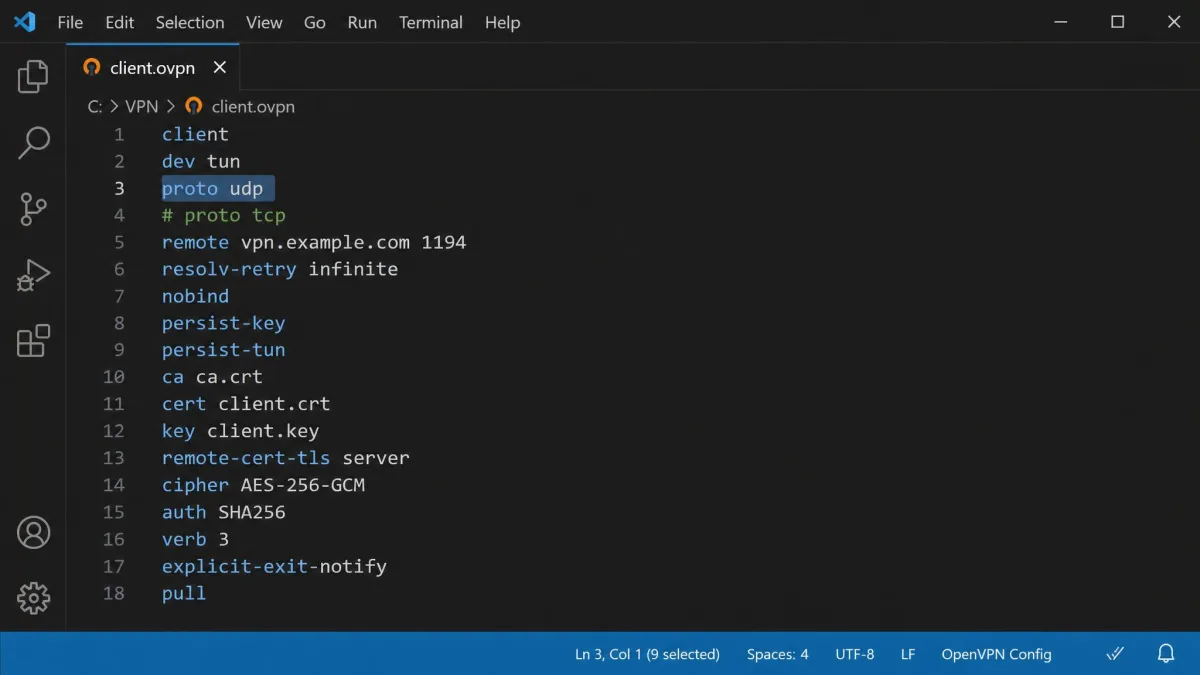
If you connect with a raw OpenVPN config instead of an app, the transport is set by a single line in the .ovpn file. Use proto udp for UDP or proto tcp for TCP. By default, OpenVPN listens on port 1194 for both, while TCP is frequently moved to 443 for firewall traversal. Change the proto directive, adjust the port if needed, and reload the profile.
If your VPN app offers an "automatic" protocol option, it usually tries UDP first and falls back to TCP when UDP fails. That mirrors exactly what we would do by hand, so it is a sensible setting to leave on.
OpenVPN vs WireGuard: How the Transport Choice Fits In
OpenVPN is the long-standing, thoroughly audited protocol that gives you this TCP-versus-UDP choice in the first place. Its flexibility, especially the ability to hide on TCP 443, is exactly why it remains a gold standard for getting through hostile networks.
WireGuard is the newer, leaner alternative, and it changes the framing of this whole comparison, because WireGuard runs exclusively over UDP. There is no TCP mode to switch to. That keeps it fast and simple, and it is why WireGuard often beats OpenVPN UDP on raw speed in our benchmarks. The trade-off is firewall traversal: without a TCP-over-443 disguise, plain WireGuard is easier for restrictive networks to block.
So the practical picture is layered. For everyday speed, WireGuard or OpenVPN UDP. For punching through a firewall, OpenVPN TCP on 443 is still the tool that does the job. If you want the full breakdown, see our WireGuard vs OpenVPN comparison.
Conclusion: Which Should You Choose?
For nearly everyone, the answer is OpenVPN UDP. It is faster, lower-latency, and better suited to streaming, gaming, calls, and daily browsing, which is almost everything most people do online. Set it and leave it.
Keep TCP in your back pocket for the days UDP lets you down. When a connection keeps dropping, when a network blocks your VPN, or when you need to slip through on port 443, switch to TCP and accept the speed cost as the price of getting connected at all. The rule of thumb we follow ourselves is simple: run UDP by default, and only switch to TCP when the connection drops or refuses to establish. You can confirm the same guidance in OpenVPN's official docs.