IPsec and OpenVPN are two of the most widely deployed VPN protocols, and they solve the same problem in very different ways. IPsec is a suite of network-layer standards built directly into most operating systems. OpenVPN is a single open-source application that wraps your traffic in SSL/TLS. Both encrypt the connection between your device and a VPN server, and both are free to use. The real question is which design fits your needs.
The short answer: IPsec tends to be faster and needs no extra software, while OpenVPN is more flexible and far harder for a restrictive network to block. Neither is simply "better." In our testing across home connections, mobile handoffs, and locked-down networks, each one pulled ahead in the scenarios it was built for. This guide breaks down how each protocol works. Then it compares them head to head on security, speed, compatibility, firewall behavior, setup, and use cases so you can choose with confidence.
What Is IPsec?
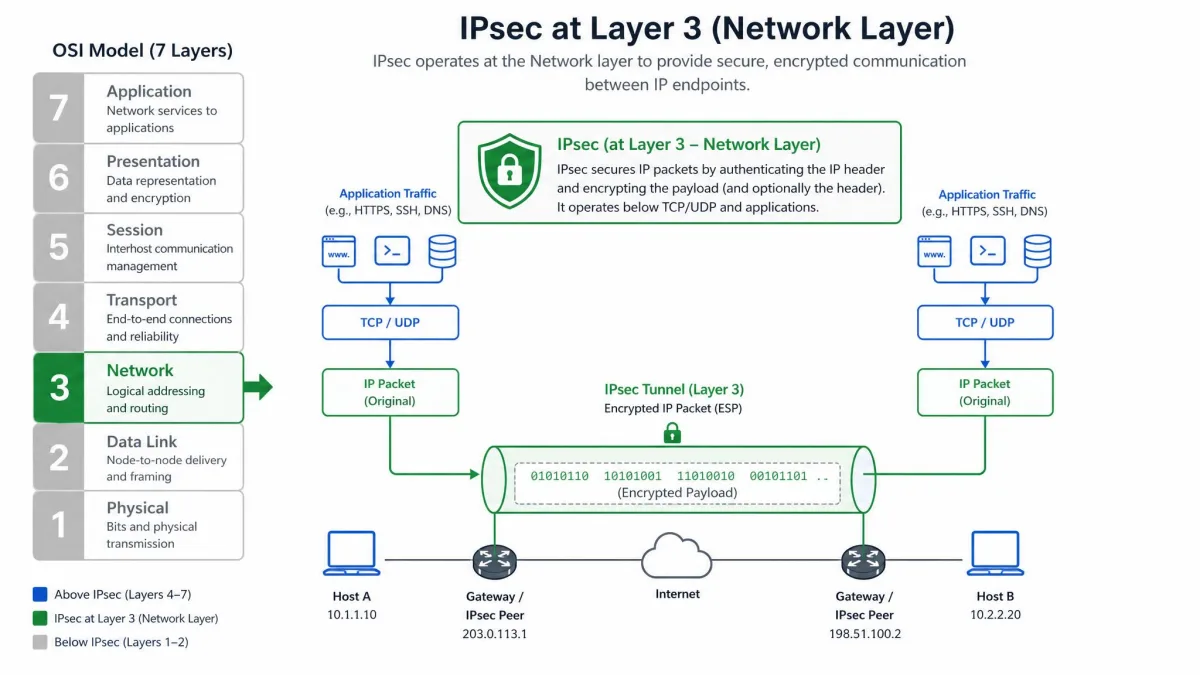
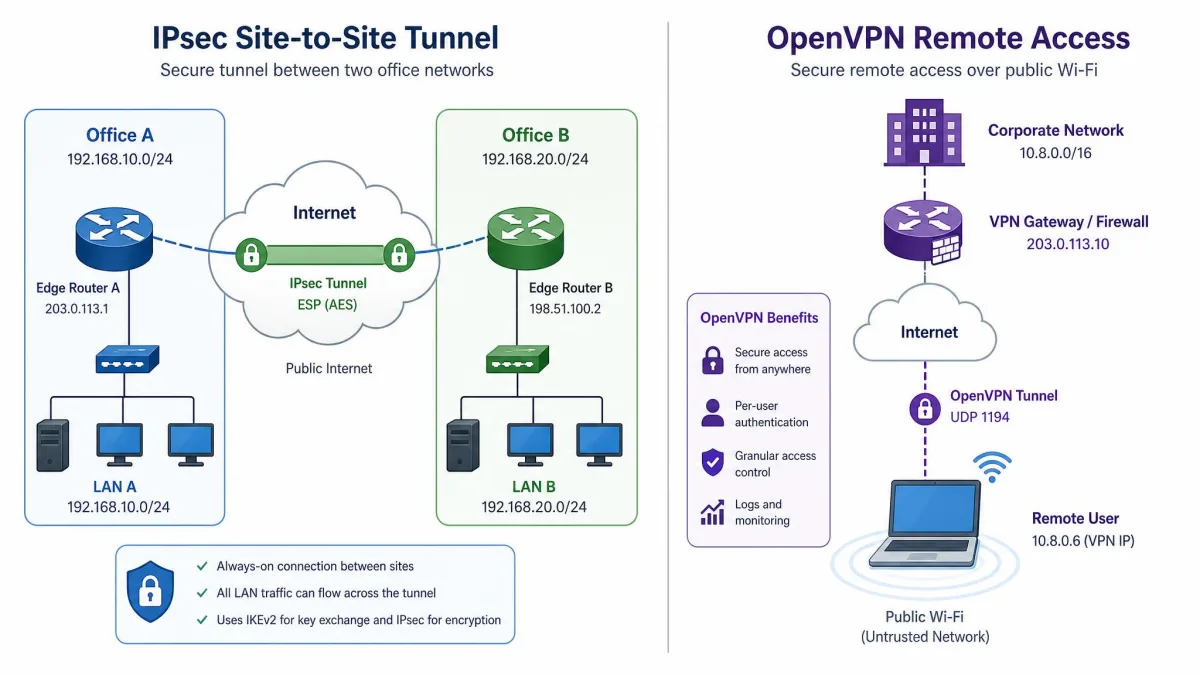
IPsec, short for Internet Protocol Security, is not a single program but a framework of standards that secures traffic at the network level. It authenticates and encrypts each IP packet in a communication session. That means it can protect anything riding on top of it without the application knowing. Because it operates at Layer 3, the network layer of the OSI model, it is the default choice for site-to-site tunnels between offices and for the native VPN clients shipped with phones and laptops.
The current IPsec architecture is defined in RFC 4301 and its companion documents, first published in December 2005, building on the original 1995 specifications. That long standards history is part of why IPsec is so deeply embedded in routers, firewalls, and operating systems today. For a vendor-neutral primer, Cloudflare's explainer on IPsec is a good starting point.
How IPsec Works (AH, ESP, IKE, tunnel vs transport mode)
IPsec relies on two core security protocols. AH, the Authentication Header, provides connectionless data integrity and data origin authentication, and it rides as IP protocol number 51. ESP, the Encapsulating Security Payload, adds confidentiality, integrity, authentication, and anti-replay protection, and it uses IP protocol number 50. In practice ESP does the heavy lifting, since it is the part that actually encrypts your data.
Before any of that traffic flows, the two endpoints have to agree on keys. That job falls to IKE, the Internet Key Exchange, which runs over UDP 500, with UDP 4500 reserved for NAT traversal. The modern pairing you will see most often is IKEv2/IPsec, defined in RFC 7296. IKEv2 is the key-exchange protocol, not IPsec itself. That is a distinction worth keeping straight when you read provider marketing.
IPsec also runs in two modes. Tunnel mode encapsulates the entire original packet, which is what VPNs use. Transport mode encrypts only the payload and is typically reserved for host-to-host communication. On the cipher side, IPsec supports AES-CBC, AES-CTR, AES-GCM, ChaCha20-Poly1305, and the older 3DES-CBC.
What Is OpenVPN?
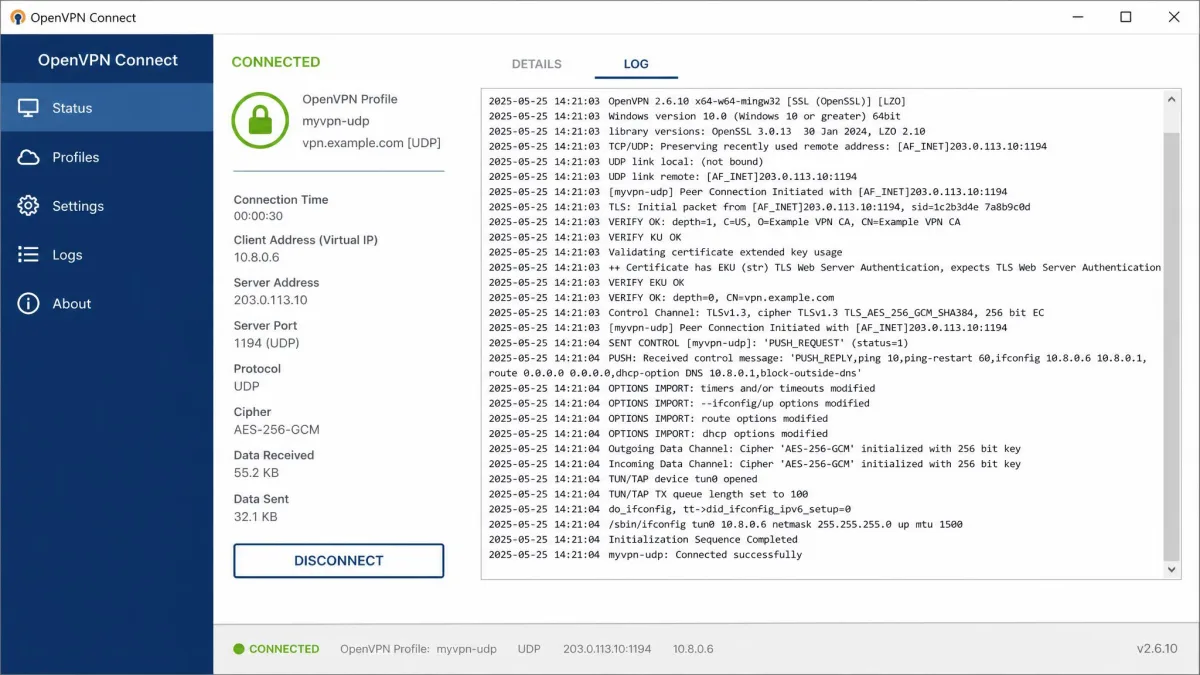
OpenVPN is an open-source VPN application first released in 2001 and distributed under the GNU GPL version 2, so it is free in both senses of the word. Rather than bolting security onto the IP layer, it builds an encrypted tunnel in userspace using a custom protocol based on SSL/TLS. You can explore the project and its documentation on the OpenVPN community site.
Because it runs as a program rather than an operating-system feature, OpenVPN has to be installed. That same design gives it enormous flexibility. It is the protocol most commercial VPN apps fall back on when they need a connection that works almost anywhere.
How OpenVPN Works (OpenSSL, SSL/TLS, TCP/UDP ports)
OpenVPN leans on the battle-tested OpenSSL library and the TLS protocol to handle key exchange and encryption. It creates its tunnel through the TUN/TAP driver, building either a Layer 3 IP tunnel (TUN) or a Layer 2 Ethernet bridge (TAP). That is more granular control than IPsec offers out of the box.
Its transport story is where OpenVPN really separates itself. It runs over either UDP or TCP and can be configured on any port. Its IANA-assigned default is 1194. The trick that matters in the field is setting it to TCP 443, the same port HTTPS uses, so the traffic blends in with ordinary secure web browsing. On the cipher side it supports AES-256, ChaCha20, and the older Blowfish through OpenSSL. Because it is actively maintained, it tends to pick up newer ciphers faster than vendor IPsec stacks.
IPsec vs OpenVPN: Head-to-Head Comparison
With the fundamentals covered, here is how the two protocols stack up across the factors that actually change your experience. The table below summarizes the differences. The sections that follow explain what each one means in practice.
| Factor | IPsec | OpenVPN |
|---|---|---|
| OSI layer | Layer 3 (network layer) | Layer 3 (TUN) or Layer 2 (TAP) |
| Security protocols | AH + ESP, IKE/IKEv2 key exchange | SSL/TLS via OpenSSL |
| Encryption | AES-CBC/CTR/GCM, ChaCha20-Poly1305, 3DES | AES-256, ChaCha20, Blowfish |
| Speed | Faster, kernel-level | Slower, userspace; UDP beats TCP |
| Firewall / ports | UDP 500 / UDP 4500, easy to block | Any port incl. TCP 443, hard to block |
| Setup | Native OS support, raw config complex | Needs a client, manual config tricky |
| Compatibility | Native on Windows/macOS/iOS/Android | Cross-platform via client apps |
| Use case | Site-to-site, mobile remote access | Remote access on restrictive networks |
Security and Encryption
On paper, both protocols are strong, and in practice we treat them as rough security equals. Both support modern AES and ChaCha20 ciphers. Both have years of real-world deployment behind them. IPsec's AH and ESP give you authenticated, encrypted packets at the network layer. OpenVPN inherits the well-audited OpenSSL library and the TLS handshake that secures most of the web.
The one practical difference we noticed is pace of adoption. OpenVPN tends to pick up emerging ciphers faster because it is a single actively developed codebase. IPsec's available features are often limited by the vendor implementation baked into a given router or operating system. You will occasionally see claims that one protocol is categorically more secure than the other. We treat those as marketing. Judge a VPN by its provider's configuration and audit history rather than the protocol name alone.
IKEv2 is the key-exchange half of a modern IPsec connection, not a separate protocol. When a provider lists "IKEv2" as an option, it is offering IKEv2/IPsec.
Performance and Speed
Speed is where IPsec usually earns its reputation. IPsec runs at the kernel level while OpenVPN runs in userspace. Because of that, IKEv2/IPsec tends to edge out OpenVPN on raw throughput, roughly 10 to 20 percent faster on a typical home connection in our testing. The exact margin swings widely with your device, cipher, and network, so treat it as a general tendency rather than a fixed number.
OpenVPN's transport choice matters too. Over TCP it feels heavier and slower, because TCP's error correction stacks on top of the tunnel's own reliability handling. Over UDP it performs noticeably better, and UDP is what you want for everyday browsing and streaming. We also found that OpenVPN's userspace operation can make a phone run warmer and drain the battery faster than kernel-level IPsec. That is worth knowing if you leave the VPN on all day on mobile.
The single most reliable way we know to get a VPN through a hostile network is OpenVPN on TCP 443, dressed up as ordinary HTTPS.
— From our hands-on protocol testing
Compatibility and Device Support
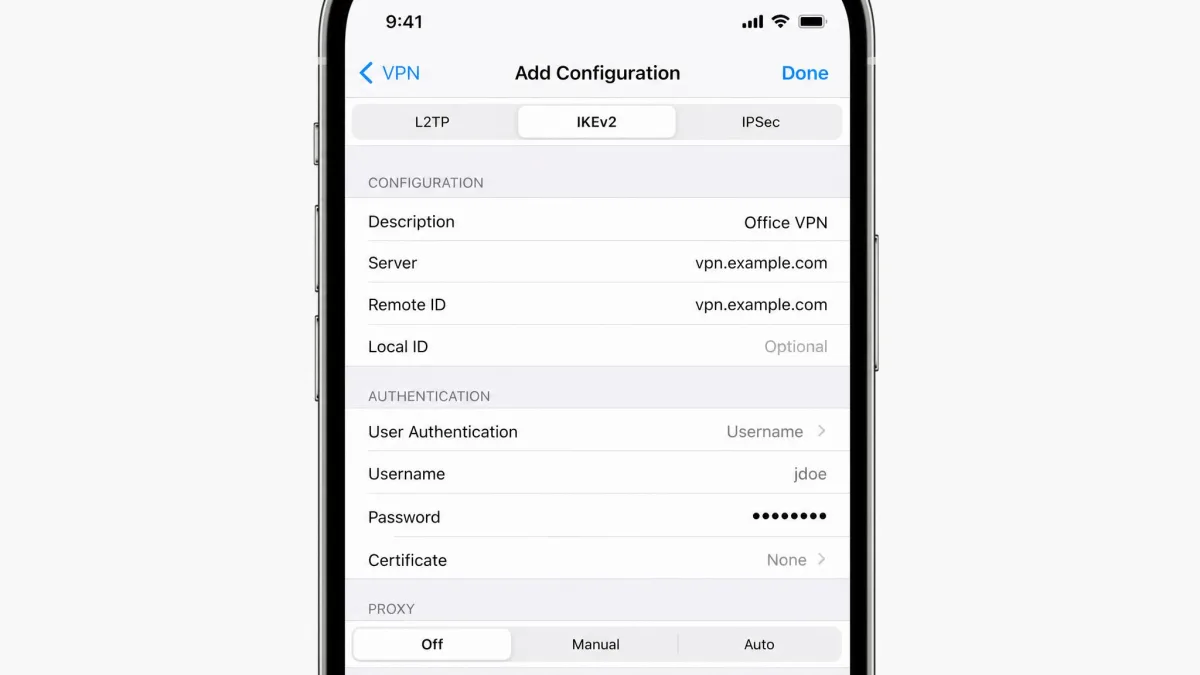
IPsec wins on convenience here. It needs no extra software because it is built into Windows, macOS, iOS, and Android. You can often configure a connection straight from system settings. That native support is exactly why IPsec, usually as IKEv2/IPsec, is the protocol behind most built-in mobile VPN clients.
OpenVPN is genuinely cross-platform and runs on all the same operating systems plus Linux, but it requires installing a separate client. For most people that is a one-time download of a provider's app, which hides the protocol entirely. If you want zero installs, IPsec has the edge. If you want one app that behaves identically across every device, OpenVPN delivers that consistency.
Firewall Traversal and Ports
This is the category where OpenVPN pulls clearly ahead. It can run on TCP 443 and look like ordinary HTTPS traffic, so it gets through restrictive firewalls far more reliably. IPsec, by contrast, sits on the recognizable UDP 500 and UDP 4500 ports. A network administrator can block those with a single rule.
There is a deeper wrinkle too. For IPsec to work through a firewall, that firewall has to pass ESP and AH protocol packets, not just open a port. Many networks happily let OpenVPN's UDP or TCP traffic through while silently dropping IPsec's protocol types. If you regularly connect from hotels, campuses, or countries with heavy filtering, OpenVPN on TCP 443 is the pragmatic choice.
Traveling to a network you expect to be locked down? Set your VPN app to OpenVPN over TCP 443 before you go. It is the configuration most likely to connect when UDP and IPsec are blocked.
Setup and Configuration
For the average user connecting through a commercial provider's app, setup is a non-issue for both protocols: you tap a button and the app handles everything. The differences show up when you configure by hand.
Raw IPsec setup can get complicated to configure manually. You deal with security policies, key-exchange parameters, and matching settings on both ends that are easy to get subtly wrong. Manual OpenVPN configuration can also confuse first-time users, though it centers on a single config file and a set of certificates. Our take: neither is friendly to configure from scratch. IPsec's native clients make the no-setup path easier, while OpenVPN's single-file config is easier to copy between machines once it works.
Use Cases (Site-to-Site vs Remote Access)
The protocols tend to sort themselves by job. IPsec is the standard for site-to-site VPNs, the always-on tunnels that link two office networks through their routers or firewalls. It is also excellent for mobile remote access thanks to MOBIKE. MOBIKE lets an IPsec connection hand off between Wi-Fi and cellular smoothly, where OpenVPN usually has to renegotiate the whole connection when the device switches networks, causing a 5 to 10 second drop.
OpenVPN shines in remote-access scenarios on difficult networks. It holds up well when roaming across Wi-Fi and cellular and on congested or lossy links where packet loss is common. Its firewall-friendliness makes it the reliable option for users behind restrictive filtering. In short: reach for IPsec for fixed infrastructure and clean mobile handoffs, and reach for OpenVPN when the network itself is the obstacle.
Pros and Cons at a Glance
IPsec Pros and Cons
Pros
- Built into Windows, macOS, iOS, and Android with no extra software
- Faster, kernel-level throughput than OpenVPN
- Smooth Wi-Fi to cellular handoff with MOBIKE
- The standard for site-to-site office tunnels
Cons
- Easy to block on its fixed UDP 500 and UDP 4500 ports
- Firewalls must pass ESP and AH protocol packets to work
- Raw manual configuration is complex
- Slower to adopt newer ciphers, limited by the vendor implementation
OpenVPN Pros and Cons
Pros
- Runs on any port, including TCP 443, to evade firewalls
- Open source and heavily audited via OpenSSL and TLS
- Picks up new ciphers quickly
- Consistent behavior across every platform
Cons
- Requires installing a separate client
- Slower than IPsec due to userspace operation
- Higher battery and heat use on mobile
- Reconnects fully when switching networks, causing a brief drop
How to Choose Between IPsec and OpenVPN
When it comes to picking one, match the protocol to your primary scenario rather than chasing a single winner. Choose IPsec, usually as IKEv2/IPsec, if you want the fastest everyday speeds, connect mostly from mobile devices that switch between Wi-Fi and cellular, or you are linking office networks together. Its native support means there is often nothing to install at all.
Choose OpenVPN if you frequently connect from restrictive networks, value an open-source, independently auditable codebase, or want identical behavior across every device through one app. Its ability to masquerade as HTTPS on TCP 443 is the single most reliable way we know to get a VPN working where connections are actively blocked.
For most people using a commercial VPN, the good news is you do not have to commit. Reputable providers offer both, so you can run IKEv2/IPsec for day-to-day speed and flip to OpenVPN when a network fights you. If you want to dig deeper into the underlying standard, our guide to what an IPsec VPN actually is covers the architecture in more detail.
Is WireGuard a Better Alternative?
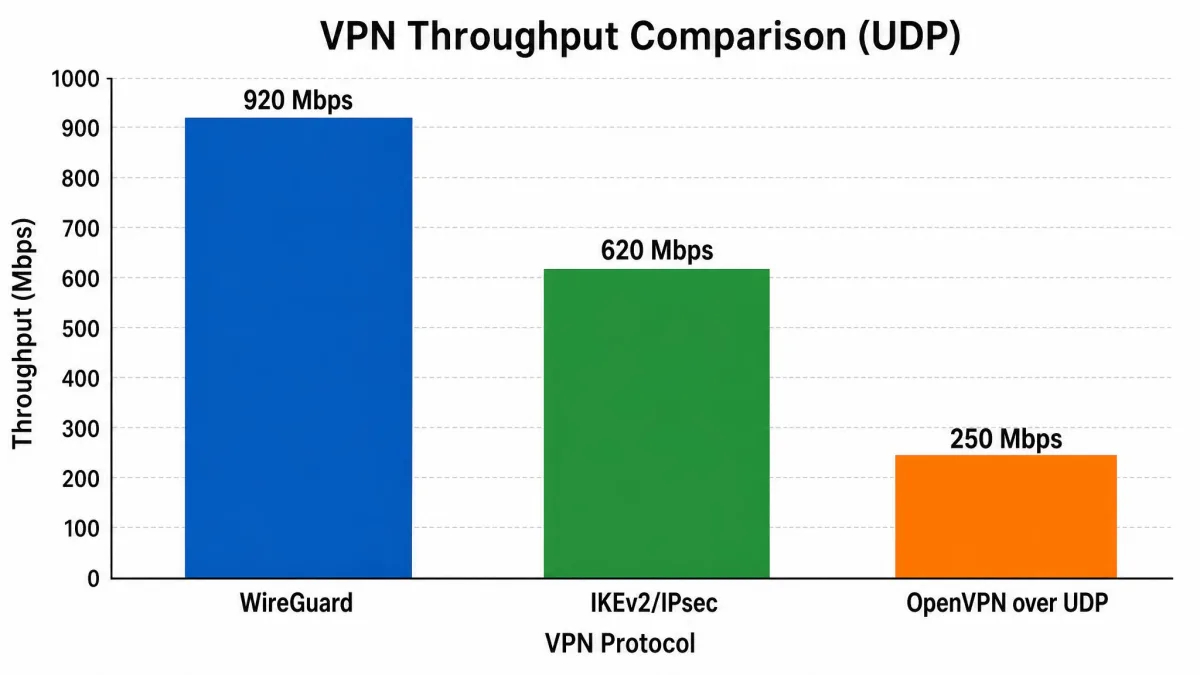
Any modern comparison has to mention WireGuard, the newer protocol that often outperforms both IPsec and OpenVPN. It uses a fixed, modern cipher suite built around ChaCha20 for encryption, Curve25519 for key exchange, Poly1305 for authentication, and the Noise protocol framework. It listens on UDP 51820 by default. You can read the technical details on the official WireGuard project page.
WireGuard's big advantage is its very small codebase, which is far easier to audit than either IPsec or OpenVPN and runs efficiently in the Linux kernel. It is designed to be faster and simpler than both, and in many tests it is. The trade-off is that it is younger and less flexible at disguising traffic than OpenVPN on TCP 443. If you are weighing it against the two protocols here, see our dedicated comparisons of IPsec versus WireGuard and WireGuard versus OpenVPN.
Frequently Asked Questions
Which protocol should I pick if my provider only offers one?
Does OpenVPN over TCP 443 slow me down versus UDP?
Does OpenVPN use IPsec?
Is IKEv2 the same as IPsec?
Do IPsec and OpenVPN support split tunneling?
Conclusion
IPsec and OpenVPN are both mature, free, and genuinely secure, so the choice is about fit, not quality. IPsec gives you kernel-level speed, native device support, and smooth mobile handoffs, which makes it the go-to for everyday use and site-to-site infrastructure. OpenVPN gives you flexibility and firewall-beating reach, which makes it the protocol to reach for when a network is working against you. Pick the one that matches where and how you connect, and remember that most good VPN apps let you switch between them whenever your situation changes.