Choosing a VPN for Saudi Arabia is harder than it looks, because the right answer depends on which problem you are solving. Some readers want private browsing and a stable connection while they are inside the country. Others need a Saudi IP address while abroad, a different task that calls for a different kind of server. Mixing the two up is the most common reason people pick the wrong service.
For privacy and a stable connection inside the country, NordVPN is our best-fit pick. It pairs fast throughput with NordWhisper and an Obfuscated server category built for restricted networks. Surfshark, ExpressVPN, Proton VPN (paid only) and Private Internet Access each list a location that provides a Saudi IP address. We explain below why that does not mean the server is in the kingdom.
We are a small team of hands-on VPN testers, and we put every service through speed, leak and streaming checks before we recommend it. Our research drew on current vendor documentation, the published Saudi law, and our own testing notes, and prices throughout are dated 2026-11-08.
Best VPNs for Saudi Arabia at a glance
All five services below pass our baseline of a working kill switch, independent no-logs assurance and apps for the main platforms. They differ most in how they handle restricted networks, whether they offer a Saudi IP location, and what they cost after the first term. Prices are the introductory offers we saw on 2026-11-08, and they change with promotions, taxes and currency.
| Product | Buy | Restricted-network option | Saudi IP location | Devices | Refund or trial | Intro price |
|---|---|---|---|---|---|---|
 |
Check price → | NordWhisper; Obfuscated servers | None identified | 10 | 30-day refund | $3.49/monthequivalent, renews at $139.08/year |
 |
OpenVPN obfuscation; NoBorders | Saudi location offered | Unlimited | 7-day trial, 30-day refund | $2.49/monthequivalent | |
 |
Stealth | Paid plans only, London-hosted | 10 paid, 1 free | Free plan, 30-day refund | $3.49/monthequivalent, renews at $83.88/year | |
 |
Automatic obfuscation | Virtual Saudi location listed | 10 to 14 by tier | 30-day refund | $3/monthequivalent, renews at $99.95/year | |
 |
Shadowsocks Multi-Hop on desktop | Virtual Riyadh | Unlimited | 30-day refund | $2.03/monthequivalent, three-year term |
How we evaluate VPNs for Saudi Arabia
We work through the same checklist for every service: throughput on repeated connections, streaming behavior, kill switch and leak behavior, ease of setup, and how clearly each vendor explains its pricing and renewal terms.
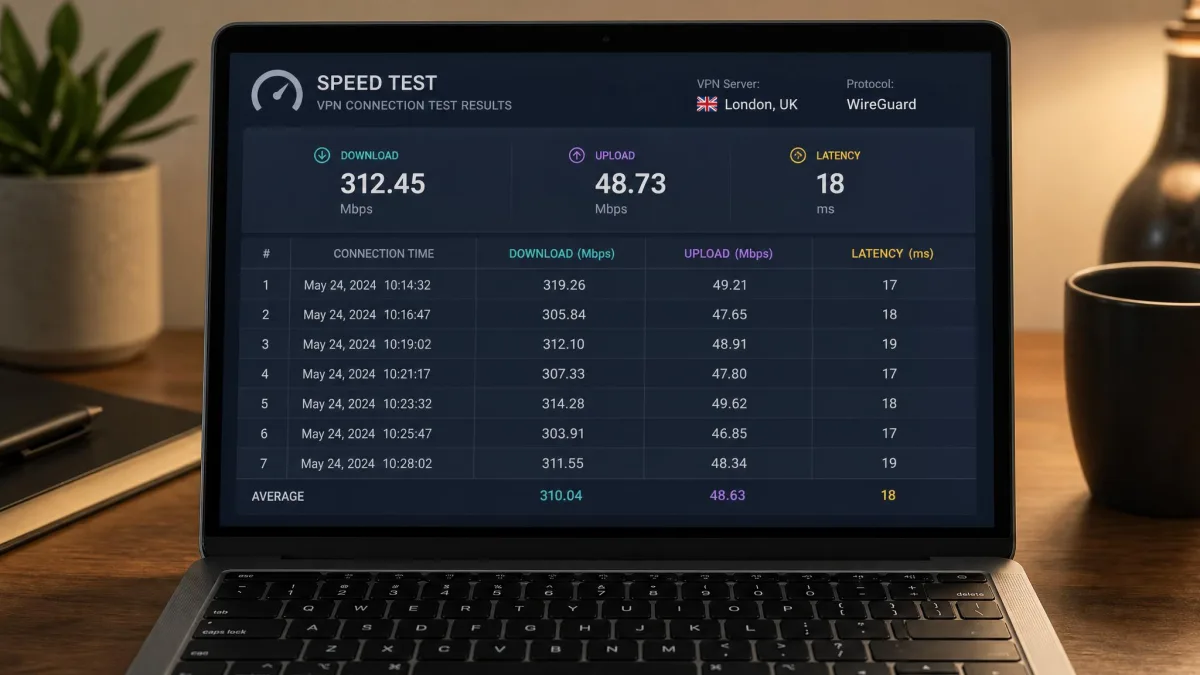
Our findings come from hands-on testing of speed, streaming and kill switch behavior, backed by current vendor documentation. We tested throughput on repeated US-server connections, which tells us about a service's consistency but is not a measurement of any Saudi network. We have no corroborated carrier-by-carrier success rate or Saudi baseline latency, so we do not publish one.
Everything we say about features, Saudi locations, audits and prices comes from vendor pages and support articles checked on 2026-11-08. Where a comparison page disagreed with a current vendor page, such as on ExpressVPN's Saudi location or NordVPN's obfuscation setup, we went with the current source. The order of our picks reflects editorial judgment, since we could not measure Saudi performance and cannot rank services on that basis.
The 5 best VPNs for Saudi Arabia
Our order is an editorial judgment, not a lab ranking. We weighed restricted-network tools, privacy assurance, device allowance and how honest each pricing page is about renewals. Where a service offers something the others do not, we say so.
1. NordVPN
NordVPN is the one we would install first for use inside Saudi Arabia. In our testing it kept consistently fast throughput across repeated US-server connections, and it handled demanding streaming platforms well. Obfuscated connections can be slower, so expect some loss of speed when you enable obfuscation.
Its restricted-network toolkit is the most current of the five. NordVPN's own support guidance now recommends NordWhisper first, then the Obfuscated server category with Auto or NordWhisper selected. OpenVPN TCP is a separate fallback. You can read the steps in NordVPN's guide to connecting in a country with internet restrictions. The Obfuscated category is no longer tied only to OpenVPN, so update the app before you rely on either description.
The rest of the feature set is broad. NordLynx, Double VPN, Onion over VPN, split tunneling and an optional dedicated IP are all available, and the apps cover Windows, macOS, Linux, Android and iOS. Its no-logs practices have undergone independent assurance, including Deloitte reviews, and the reports are available through your Nord Account.
The weak points are location and price. We could not identify a Saudi IP location, so NordVPN will not help if you need a Saudi address from abroad. Catalogs change, so recheck before you buy. The advertised Basic offer was $3.49 a month equivalent, or $94.23 upfront for 27 months, but it renews at $139.08 a year, and that jump is substantial. Taxes depend on checkout. Every paid purchase carries a 30-day money-back guarantee.
Pros
- Fast, consistent throughput in our repeated connections
- NordWhisper and Obfuscated servers for restricted networks
- Independent no-logs assurance with reports in your account
- 10 simultaneous devices
Cons
- No Saudi IP location identified
- Large price jump at renewal
- Obfuscated connections run slower
Best for: Privacy and a stable connection while you are inside Saudi Arabia. Skip if: You need a Saudi IP address from abroad.
2. Surfshark
Surfshark is our pick when device count and a Saudi location both matter. Paid plans allow unlimited simultaneous connections, so one subscription covers a household of phones, laptops and TVs. It also offers a Saudi IP location, which is a virtual Riyadh server. That means the IP reads as Saudi while the hardware sits elsewhere.
Its obfuscation is easy to find. Surfshark calls its use of obfuscated servers with OpenVPN Camouflage, and offers it on Android, macOS, Windows, iOS and Linux. NoBorders detects a restrictive network and offers suitable servers, while the kill switch, MultiHop and auto-connect are separate settings. Protocols include OpenVPN, WireGuard and IKEv2, though availability differs by platform and app edition.
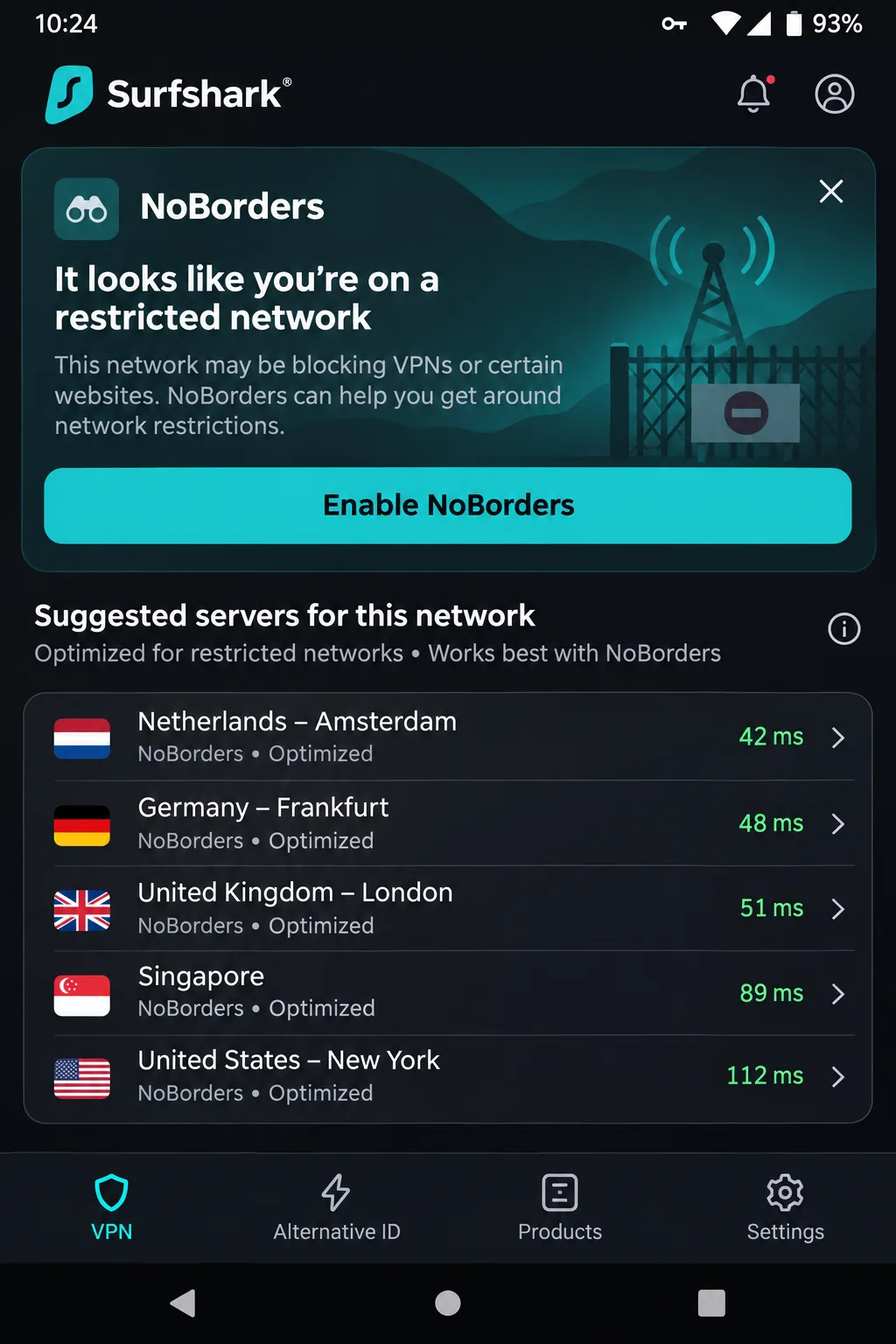
In day-to-day use, the apps were stable and intuitive, and Surfshark held steady, streaming-friendly throughput across repeated connections. Long-distance performance is less convincing, and latency can run high even when download speed is strong. The limited advanced customization will also frustrate anyone who wants detailed connection controls.
Starter was advertised at $2.49 a month equivalent, or $67.23 for the first 27 months. Long-term plans renew annually. We could not confirm the renewal amount for that offer, so check it at checkout. You get a 30-day money-back guarantee, plus a 7-day trial for first-time users on eligible annual or two-year plans. The trial needs payment details, covers three devices and turns into a paid plan unless you cancel. Surfshark's trust center documents Deloitte no-logs assurance and independent infrastructure assessments.
Pros
- Unlimited simultaneous connections on paid plans
- Saudi IP location offered
- Stable, easy apps with NoBorders for restricted networks
Cons
- Higher latency over long distances
- Limited advanced controls
- Renewal amount not clear from the pricing page
Best for: Households with many devices, or anyone who wants a Saudi IP location. Skip if: You want detailed protocol and connection tuning.
3. Proton VPN
Where Surfshark emphasizes device count, Proton VPN stands out as the only service here with a permanent free plan. That makes it the most useful choice for a short stay or a first try. The Free plan has unlimited data, no ads and no payment card requirement. It protects one device at a time. Locations are assigned randomly, Stealth access is included, and Saudi Arabia is excluded from the Free locations.
The paid plan changes the picture. VPN Plus protects 10 devices, adds location choice and streaming support, and includes the Saudi location. As Proton's Smart Routing explanation makes clear, that location uses Smart Routing through physical servers in London rather than Saudi Arabia. The IP looks Saudi, but your traffic travels to the United Kingdom first.
Stealth is Proton's restricted-network protocol. It runs on Android, Windows, macOS and iOS. The native Linux app also supports it through Proton Protocols, but the Linux Snap package does not. Proton also offers open-source apps, Secure Core multihop, Tor over VPN, NetShield blocking, a kill switch and split tunneling, with some features varying by platform. Securitum publishes its no-logs audits, and the audit page includes the report for 2026.
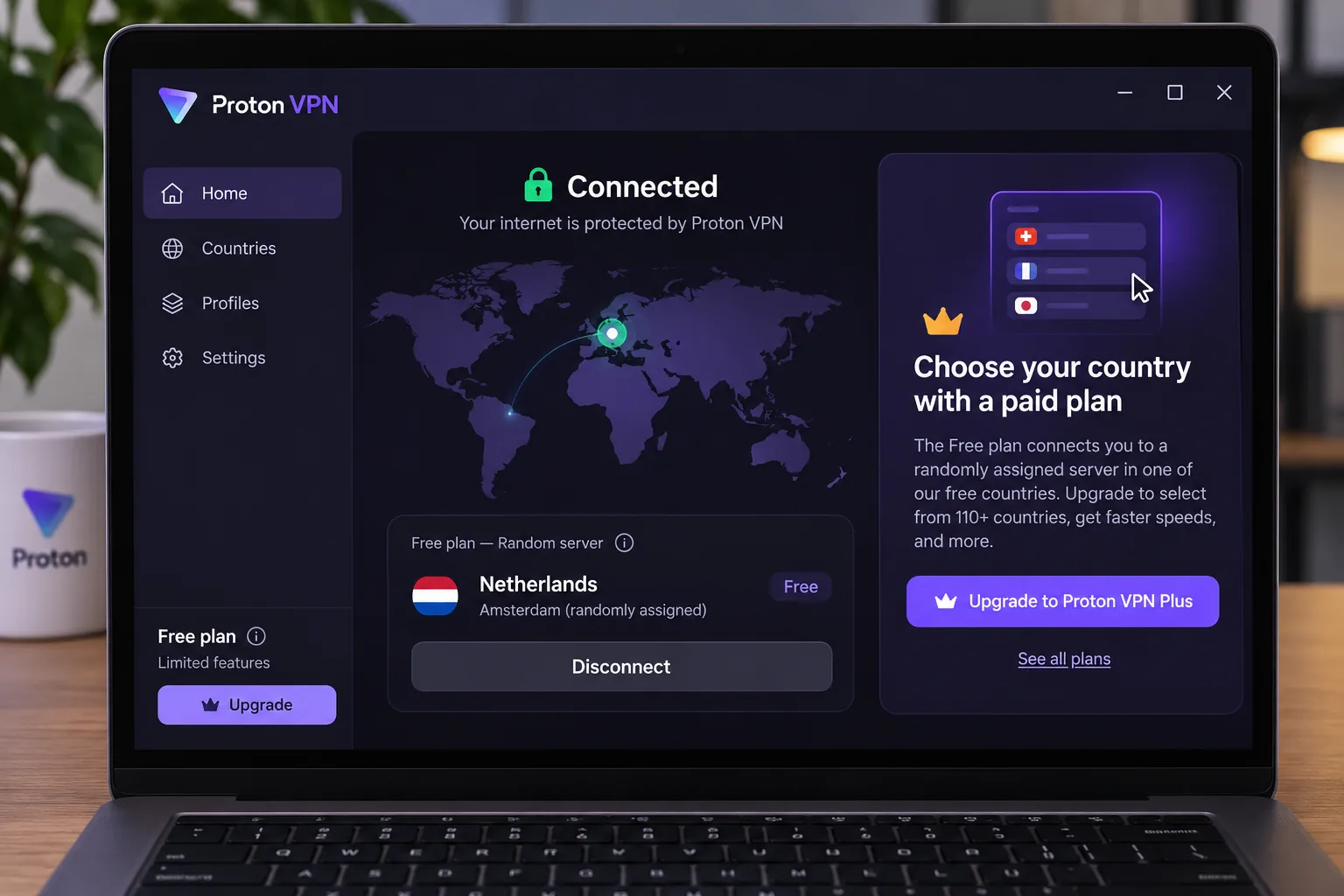
In our testing, Proton VPN Free was convenient for everyday browsing, though learning to use its apps takes longer than with the simplest VPN interfaces. The automatic location assignment is frustrating when you need a particular country's IP, and streaming or torrenting performance can disappoint despite the generous data. On a Mac, the kill switch can interfere with casting to Apple TV.
VPN Plus displayed $3.49 a month equivalent, or $83.76 for 24 months, then $83.88 every 12 months. Offers and checkout currency can change, and some promotional fields were placeholders on the page. A 30-day money-back guarantee covers the paid plan.
Pros
- Permanent free plan with unlimited data
- Open-source apps and published Securitum audits
- Stealth protocol on desktop and mobile
Cons
- Free plan protects one device and excludes Saudi Arabia
- Paid Saudi location is London-hosted
- Mac kill switch can interfere with casting
Best for: Light browsing on a budget, or testing a VPN before paying. Skip if: You need a specific country's IP without paying.
4. ExpressVPN
After Proton's learning curve, ExpressVPN is the easiest of the five to start using. It was straightforward to operate, required little configuration and delivered strong streaming performance across major services. Lightway, automatic protocol selection, an internet kill switch, private DNS and leak protection are all built in.
Obfuscation is automatic on supported platforms, so you do not flip a separate switch. That is different from saying the bare Lightway protocol always disguises traffic, and the distinction matters if a network is actively blocking VPNs. The apps cover desktop, mobile, Linux, routers and TVs.
The official server list now includes Saudi Arabia as a virtual location, although some comparison pages still omit it. We could not identify the physical host country, and a listed IP does not guarantee that a bank or streaming service will accept it. We cover that limit in more detail further down.
There are tradeoffs. ExpressVPN's fastest performance depends on its Windows-specific acceleration, so results differ across devices. The lack of auto-connect and split-tunneling controls on iOS makes some mobile tasks less convenient. Basic allows 10 devices, Advanced 12 and Pro 14, so the allowance depends on the tier you pick.
The US offer we saw was $3 a month, or $84 for 28 months, then $99.95 a year. The euro page showed a different contract at EUR 2.50 a month and EUR 79.95 a year after the first term. New users get a 30-day money-back guarantee, and KPMG has independently audited the no-logs policy. Our own ExpressVPN review covers the service in more depth.
Pros
- Minimal setup and automatic obfuscation
- Strong streaming results
- KPMG no-logs audit
Cons
- Fastest speeds depend on Windows acceleration
- No iOS auto-connect or split tunneling
- Priced above the other four after renewal
Best for: First-time VPN users who want it to work without tuning. Skip if: You rely on split tunneling on iPhone.
5. Private Internet Access
Where ExpressVPN hides its settings, Private Internet Access is the tinkerer's choice. Paid plans allow unlimited simultaneous connections and unlimited data. The apps are open source, and the servers run from RAM. Kill switch and advanced kill switch options are included, along with desktop split tunneling, port forwarding and MACE blocking.
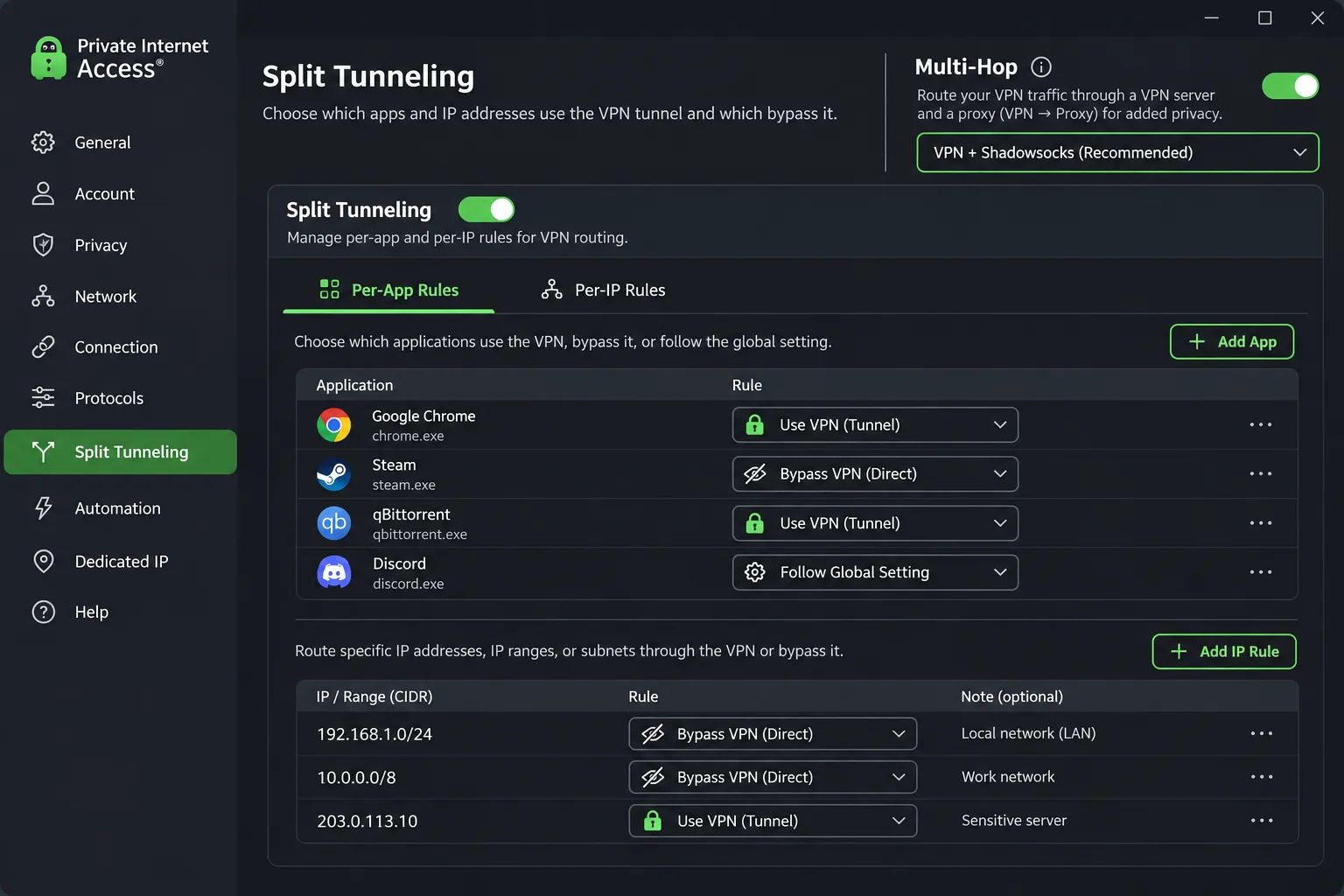
In our testing, the Windows kill switch blocked traffic when the tunnel failed and promptly attempted to reconnect. Its desktop split-tunneling controls are unusually granular, letting you route by app or by IP address. That level of control is rare at this price.
For restricted networks, the desktop Multi-Hop option uses Shadowsocks or a SOCKS5 proxy. Not every location offers Shadowsocks, and automatic selection picks a supported low-latency hop. Riyadh is a virtual location that delivers a Saudi IP from hardware outside Saudi Arabia, and a dedicated Saudi IP is not offered.
Speed and streaming are where PIA gives ground. Its connection speeds and streaming access can lag behind stronger competitors. Some regional Prime Video and Disney+ catalogs failed to open even when Netflix worked. Other sessions gave trouble-free access, so results vary with region and timing. Deloitte Audit Romania has reviewed PIA's infrastructure and operations against its no-logs description, which is independent assurance but not a promise about future bugs.
Pricing was $2.03 a month equivalent for three years plus four extra months, renewing at $81.20 every three years. The annual plan was $47.88, and rolling monthly was $11.95. New subscribers get a 30-day money-back guarantee, while app-store purchases follow the store's refund terms. We did not find a permanent free plan.
Pros
- Unlimited devices and data
- Granular desktop split tunneling
- Open-source apps and RAM-only servers
Cons
- Speeds and streaming access can lag
- Shadowsocks not offered everywhere
- Saudi location is virtual only
Best for: Users who want fine control over which apps use the tunnel. Skip if: Streaming performance is your top priority.
How to choose a VPN for Saudi Arabia
Start with the problem you are solving. If you are inside the country and worried about blocked connections or privacy, a restricted-network protocol and a reliable kill switch matter most. If you are abroad and want a Saudi address, the location list matters most. Everything else, from pricing to device count, comes second.
No VPN guarantees anonymity or access. A VPN encrypts the path between your device and its server, but it cannot control how an account, an app or a network operator uses information it already has about you.
Obfuscation, kill switches and leak protection
Obfuscation hides the recognizable signature of VPN traffic so a network is less likely to block it. Each service names it differently: NordWhisper, Camouflage and NoBorders, Stealth, automatic obfuscation, or Shadowsocks. Check which app and platform your device uses, because support differs. Proton's Stealth, for example, skips the Linux Snap package, and PIA's Shadowsocks Multi-Hop is a desktop feature.
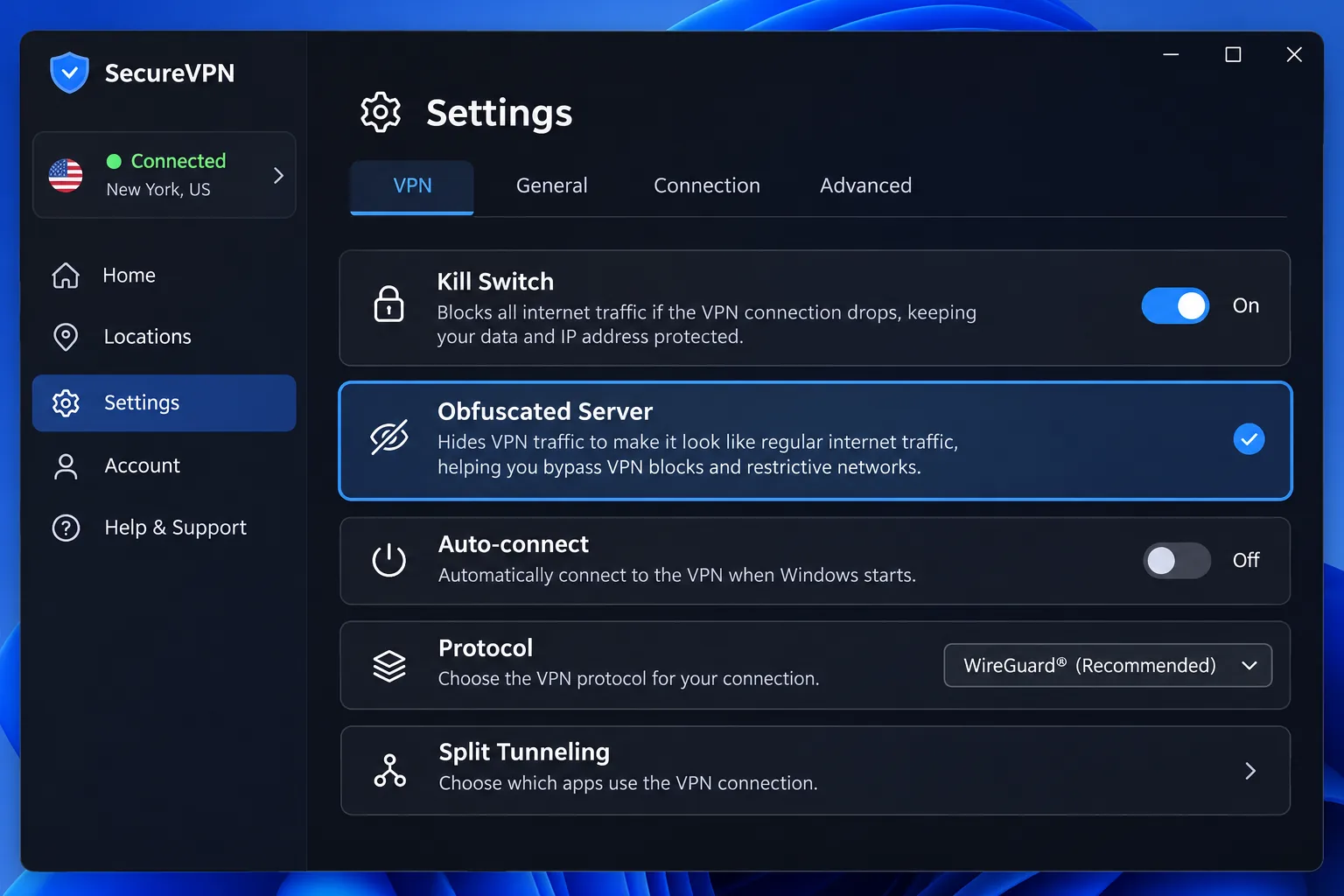
A kill switch is the second line of defense. If the tunnel drops, the kill switch cuts your traffic instead of letting it travel unprotected. All five services include one. Our guide to what a VPN kill switch does explains how to test yours. Leak protection, private DNS and auto-connect are worth checking too, since a silent leak undoes the whole point of the tool.
Privacy audits, app support and connection limits
An audit is useful evidence, not a guarantee. NordVPN, Surfshark and PIA have Deloitte assurance, ExpressVPN has a KPMG audit, and Proton publishes Securitum reports along with public source code. We treat these as proof that independent parties examined the no-logs claims, and we do not use headline audit counts to rank the services.
Device allowance matters for families. Surfshark and PIA are unlimited, NordVPN and Proton Plus allow 10, and ExpressVPN runs from 10 to 14 by tier. Also confirm that the VPN works with your operating system version, since support for a mainstream platform does not necessarily extend to older versions.
Speed, pricing and renewal terms
Distance and congestion decide speed more than any brand claim. Choosing a server near Saudi Arabia reduces the distance your traffic travels, though a virtual location may sit on hardware much farther away. Obfuscation adds overhead on top of that, so expect a slower connection once it is on.
Price is where buyers get caught. Every service here advertises a low monthly equivalent that requires paying for a long term upfront, and renewal terms differ sharply. NordVPN renews at $139.08 a year after a 27-month offer, ExpressVPN at $99.95 a year, and Proton at $83.88 a year, while PIA's three-year term renews at $81.20. Read the renewal line before you pay, and set a reminder to cancel or switch.
A low monthly price applies only during the introductory term. The renewal line on the checkout page is the number you will actually live with.
— From our pricing review
Using a VPN in Saudi Arabia versus getting a Saudi IP address
These are two separate jobs. Using a VPN inside Saudi Arabia means connecting out to a server elsewhere so your traffic is encrypted and you can reach sites your network restricts. Getting a Saudi IP address means connecting to a server that makes you look as though you are in Saudi Arabia, which is what travelers abroad need for local services.
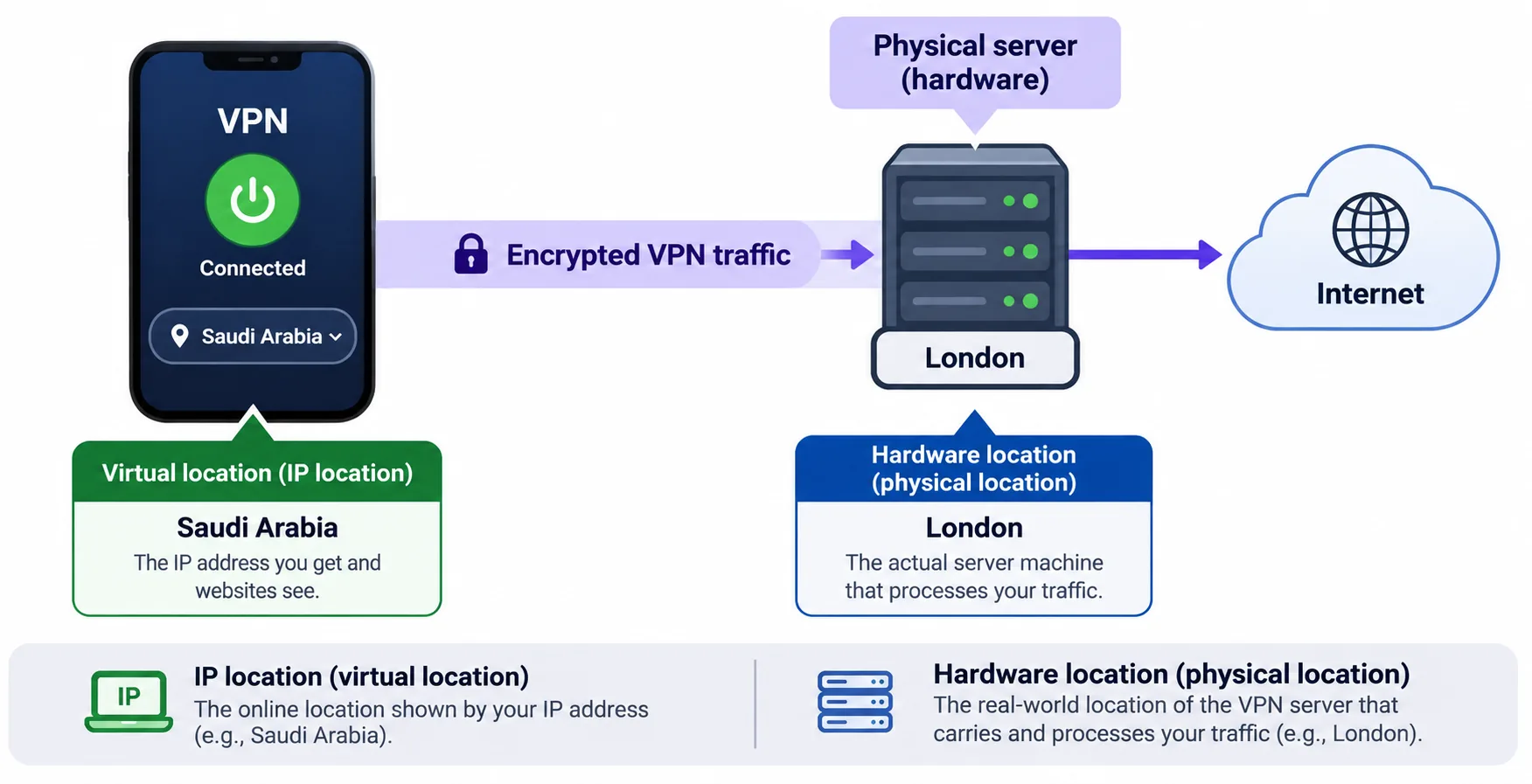
The second job is where marketing gets slippery. A Saudi Arabia entry in a server list does not mean the hardware sits in the kingdom. A nearby country's label does not guarantee nearby hardware either.
Local server locations, virtual locations and access limitations
A virtual location gives you that country's apparent IP while the hardware sits in another country. On our list, Proton's paid Saudi location routes through London, PIA's Riyadh runs on hardware outside Saudi Arabia, and the physical hosts for Surfshark and ExpressVPN are not identified. Because routing is physical, a virtual server can add latency that its country label does not suggest.
Access has limits too. A Saudi IP listing does not prove that a specific bank, work portal, streaming account or calling service will accept it. Many of those services run their own VPN detection and may block the address regardless of what the VPN provider claims.
Are VPNs legal in Saudi Arabia?
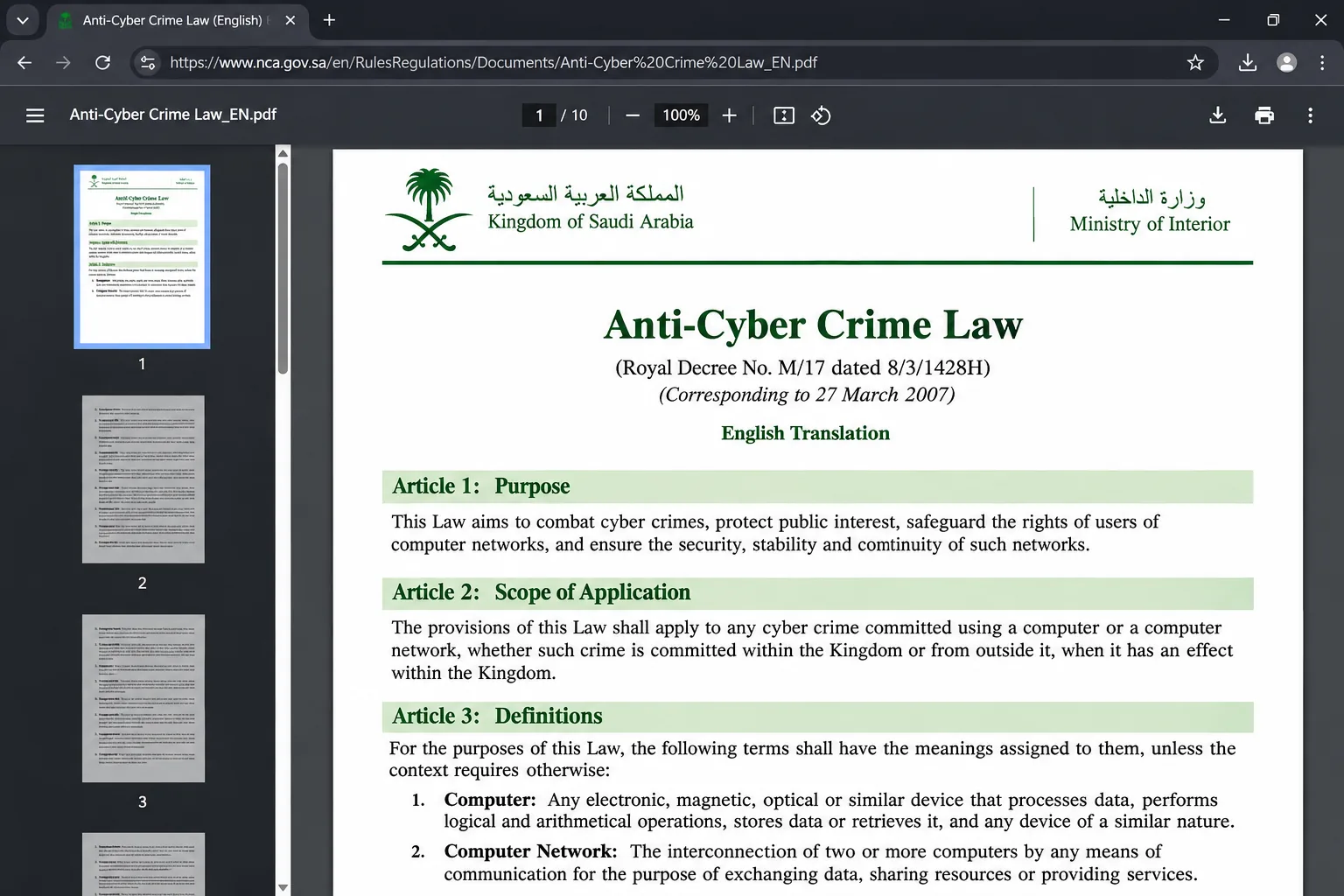
We are not lawyers, and this is not legal advice. What we can report is what the primary source says. The Anti-Cyber Crime Law covers specified online material affecting public order, religious values, public morals or privacy, among other offenses, and Article 6 is the provision to read. You can find the text in the official English PDF of the Anti-Cyber Crime Law.
The law we examined does not explicitly name VPNs, but it does regulate online conduct. That is not an authorization for every VPN use, and legality depends on what you do online and on other applicable rules. We did not find an explicit blanket permission, a blanket ban or a VPN-specific fine in the primary source.
The wider context is serious. Freedom House's 2025 Saudi Arabia internet-freedom report records extensive censorship, surveillance and punishment for peaceful online expression. If you are unsure about your own circumstances, check with a qualified local adviser before you travel.
How to set up a VPN for Saudi Arabia
Do the work before you travel if you can. Vendor sites and app stores can be harder to reach from restricted networks. Having the app installed and being signed in to your account saves a lot of frustration. A short routine covers most cases.
Install the app and check device-specific settings
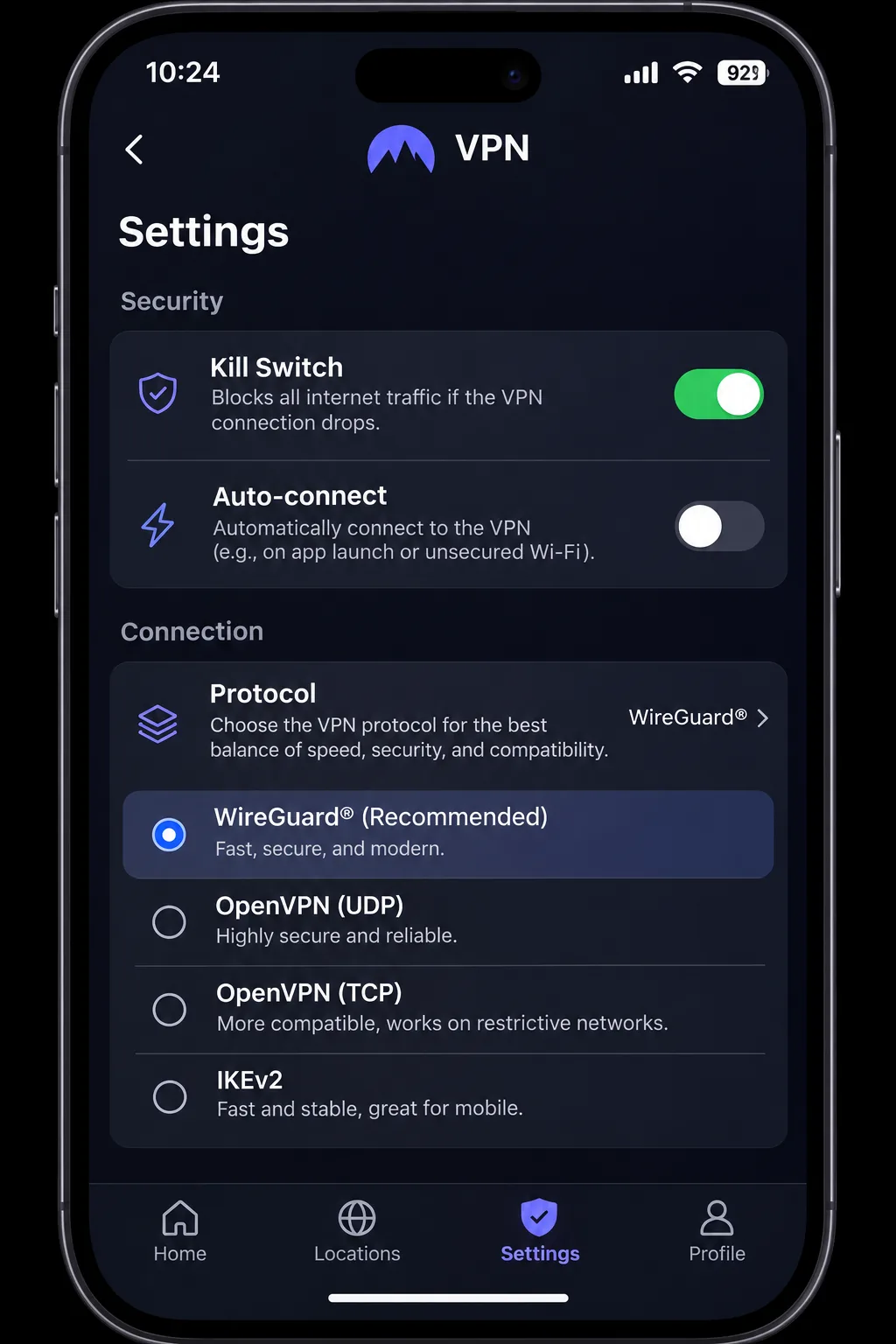
Download the app from the official site or your store, sign in, then open the settings before you connect. Turn on the kill switch, enable auto-connect where it exists, and find the restricted-network option for your service. On a desktop, that means NordWhisper, Stealth, Camouflage or Multi-Hop. Remember that feature availability varies by platform, so a setting you see on Windows may be missing on iOS.
Choose a server and verify your connection
Pick a nearby server first, then connect and confirm it worked. Open a site that shows your IP address and check that it is not your local address. Run a DNS leak test, then disconnect and confirm the kill switch cuts traffic when it should. If you need a Saudi address, choose the Saudi location and recheck the IP, keeping in mind it is a virtual listing.
Troubleshoot blocked or unstable connections
Work through the fixes in order, changing one thing at a time. NordVPN documents timeout, connecting-loop and connected-without-internet failures, and its steps are a good template for any provider:
- Update the app to the latest version.
- Try the service's restricted-network protocol, such as NordWhisper or Stealth.
- Change the server, then change the protocol.
- Compare a different network or device, such as mobile data versus Wi-Fi.
- Contact the provider's support.
OpenVPN TCP is a fallback after NordWhisper on NordVPN. ExpressVPN recommends Automatic first, then the available Lightway UDP and TCP options. Disconnect and reconnect after changing the protocol. Obfuscation also has a ceiling, because protocol-fingerprinting research has identified traffic even in commercially obfuscated configurations. Treat it as a way to reduce blocking, not a way to become invisible.
Can you use a free VPN in Saudi Arabia?
Yes, with limits, and only one of our five picks has a permanent free plan. Proton VPN Free gives unlimited data and no ads without a payment card, but it protects one device, assigns your location randomly and excludes Saudi Arabia. That makes it fine for general browsing and poor for any task that needs a specific country's IP.
Most other free VPNs are a worse bet. A free service still has to pay for its servers somehow, and a tool you rely on for privacy is the wrong place to take that gamble. We only recommend a free option when its funding model and audits are public, which is why Proton is the only free name on this page.
A free VPN will not give you a Saudi IP address. If a Saudi location is the point, you need a paid plan and a refund window to confirm it works for your service.
Free plans versus trials and money-back guarantees
These three are easy to confuse, and they behave differently. A free plan is permanent and needs no payment. A trial gives temporary access but may collect payment details and convert automatically to a paid plan. A money-back guarantee requires you to pay first and then ask for a refund.
Surfshark offers a 7-day trial for first-time users on eligible annual or two-year plans, with payment details required and three devices covered. NordVPN, Surfshark, Proton, ExpressVPN and PIA all advertise a 30-day refund window, and NordVPN's requires a paid purchase. PIA's refund follows the store's terms if you bought through an app store. We could not fully verify current mobile trial eligibility, so confirm the terms at checkout.
Final recommendation
Pick by who you are. A traveler flying in should install the app, sign in and run a leak test at home before the flight, and keep the account details somewhere reachable without the VPN. A household sharing one subscription is better served by Surfshark or Private Internet Access, since both allow unlimited devices. A reader on a budget can start with Proton VPN Free and upgrade only if a specific location matters.
If you need a Saudi IP location, remember that every option we found is virtual. Whichever you choose, read the renewal line before you pay, test on the network you will actually use, and keep your expectations realistic about what any VPN can do.