Unlocator is a Danish service. It pairs a Smart DNS unblocker with a full VPN in one subscription. That hybrid design is the whole pitch. The Smart DNS side opens streaming libraries on devices that cannot run a VPN app. The VPN side adds encryption when you want your connection hidden. It is a narrower product than the big names, and it knows it.
So the real question for 2026 is not whether Unlocator can technically route your traffic. It is whether a small, streaming-focused service is worth paying for. NordVPN and Surfshark cost less and do more. We wanted a clear answer, so we ran it the way we run every VPN.
Our networking team tested Unlocator on a Windows 11 laptop and an Android phone. We ran it over a two-week stretch. We checked streaming libraries, speed under load, DNS and IP leaks, kill-switch behavior, and torrent throughput. Every test used the same home fiber line. This review reflects what we saw on those machines, at the time of writing.
Unlocator VPN at a Glance (Quick Verdict & Rating)
If you only read one section, read this one. Unlocator earns its place for streaming and little else. In our testing it unblocked nearly every library we pointed it at. We never had to server-hop to get there. The apps are simple, and setup on Windows was quick. Add a Smart DNS layer that works on smart TVs and consoles, and you have the reason people keep it.
The trade-offs are just as clear. The server network is small. Distant connections drag on speed. The kill switch is desktop-only and off by default. The logging policy keeps data that stronger rivals do not. None of that is a dealbreaker for a streaming-first user. All of it matters if you want a VPN as a genuine privacy tool.
Our overall score is 6.8 out of 10. It is a good pick for a specific job and an average one for everything else. Read on for how each part held up. We go section by section, from streaming and speed to privacy and support, so you can match its strengths against what you need.
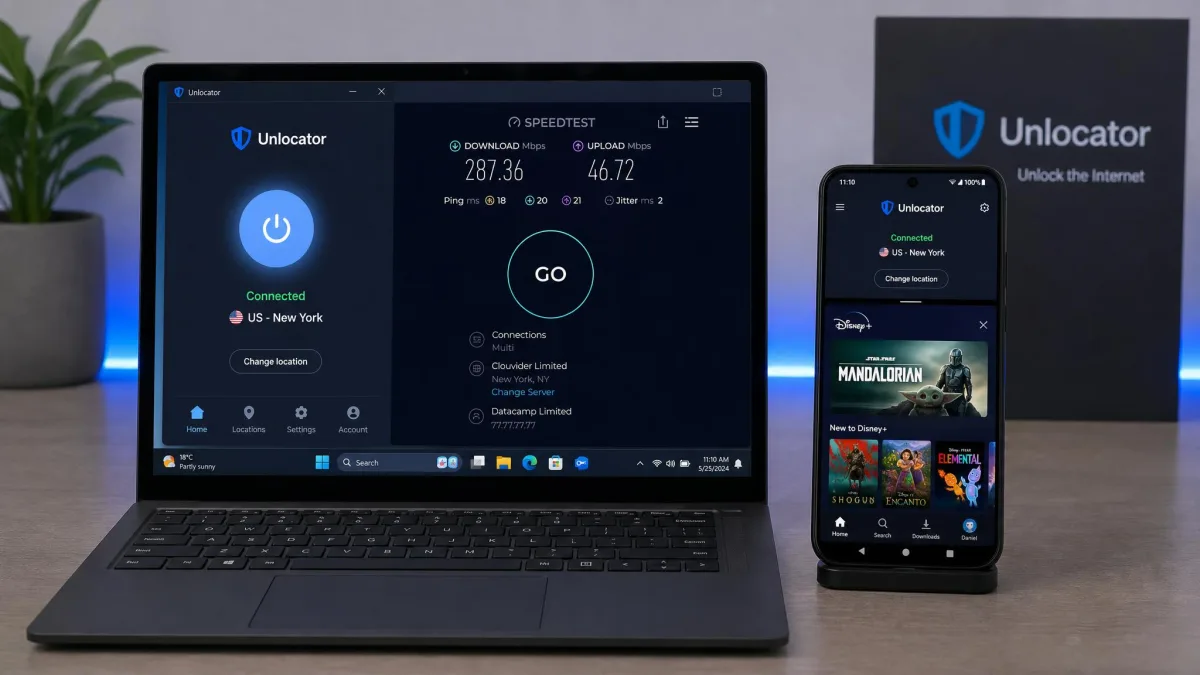
We tested Unlocator over two weeks on a Windows 11 laptop and a Google Pixel running Android. Our line was a 500 Mbps home fiber connection. Every streaming, speed, leak and torrent result below comes from that hands-on run, not from the vendor's marketing sheet.
Pros and Cons
Here is the short version of what we liked and what frustrated us across two weeks of daily use.
Pros
- Strong, consistent streaming unblocking across Netflix, Disney+, Prime Video, Hulu, Max, BBC iPlayer and ITVX
- Smart DNS works on devices that cannot run a VPN, like smart TVs and consoles
- Simple apps and a Windows setup that took us under five minutes
- 30-day money-back guarantee plus a no-credit-card free trial
- 256-bit AES encryption with OpenVPN, WireGuard and IKEv2 support
Cons
- Small server network of roughly 43 servers, so nearby coverage is thin in many regions
- Keeps personally identifiable logs and has never been independently audited
- Kill switch is desktop-only and must be turned on manually
- Slower speeds on distant servers and slow torrent throughput
- Email-only support that can take more than 48 hours to reply
Smart DNS vs the Full VPN (What You're Actually Buying)
This is the part most reviews skip. It is also the key to understanding Unlocator. You are buying two tools in one subscription, and they do different jobs.
The Smart DNS service reroutes only the parts of your connection that reveal your region. A streaming app then thinks you are in another country. It does not encrypt your traffic. It does not change your IP address. Because it is lightweight, it runs on hardware that cannot install a VPN app. That includes smart TVs, game consoles and some routers. It is also fast, since there is no encryption overhead to slow you down.
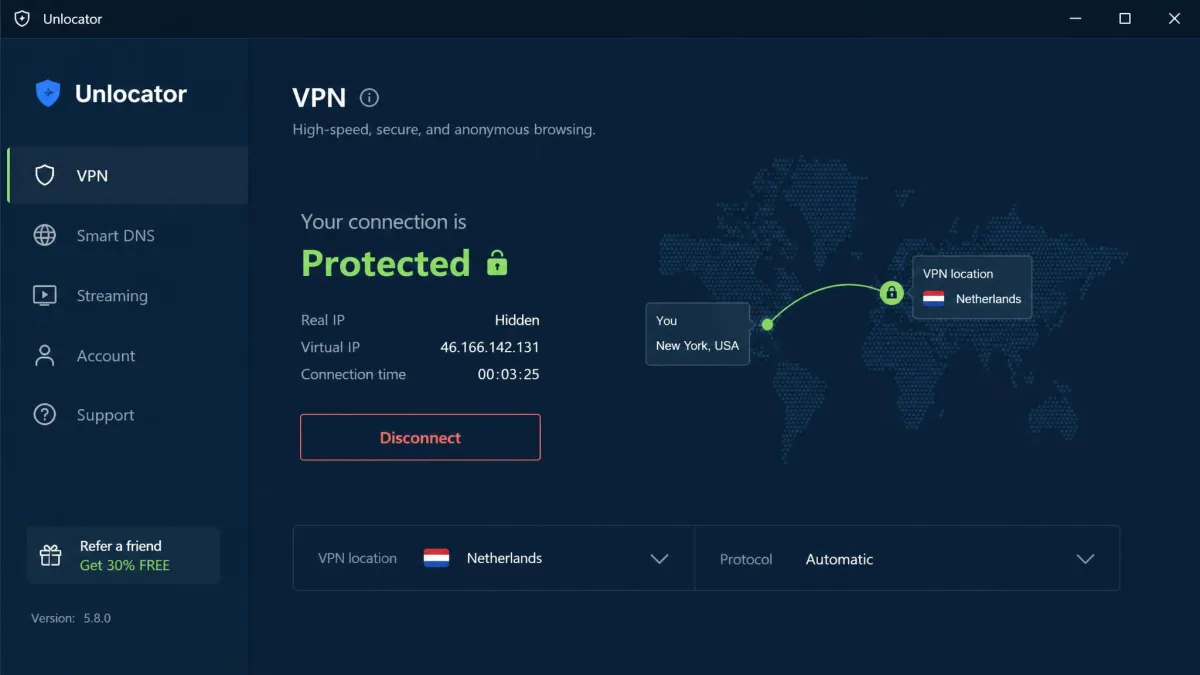
The full VPN does what you expect. It encrypts your connection with 256-bit AES. It hides your real IP behind a server. You get OpenVPN, WireGuard and IKEv2 as protocol options. Use this side when you want privacy on public Wi-Fi. It also helps when a service blocks Smart DNS.
Smart DNS gives you speed and device reach but no encryption. The VPN gives you encryption and IP masking but adds overhead. If streaming on a TV is your goal, you may live in the Smart DNS side and rarely touch the VPN at all.
There is one setup detail worth knowing before you commit. Smart DNS works by matching your registered home IP address. You tell Unlocator which connection to reroute. Many internet providers change your IP periodically. When that happens, Smart DNS can stop unblocking until you update the registered address in your dashboard. It is a quick fix once you know to look for it. The encrypted VPN side never needs it, since the VPN assigns a fresh IP each time you connect. Knowing which of the two tools you are leaning on makes troubleshooting far easier. That is handy when a stream suddenly reverts to its local library.
The takeaway is simple. If privacy is your priority, the VPN half is what counts, and it is average. If getting a US library onto your living-room TV is the priority, the Smart DNS half is the star. On that job, it is genuinely good.
Streaming and Netflix Unblocking
Streaming is where Unlocator earns its keep, and it delivered. One evening we lined up a US Netflix catalog, Disney+ and BBC iPlayer back to back. Each one opened on the first try, usually in under five seconds, with no buffering and no proxy error. We never once had to switch servers to find one that worked. That is the moment the service feels purpose-built.
That out-of-the-box consistency is rare. Plenty of larger VPNs make you hunt for a server a given platform has not blocked. With Unlocator we mostly connected once and watched. The Smart DNS layer is a big part of why. It is tuned for streaming detection rather than general-purpose privacy. So it spends its effort on exactly the thing streaming buyers care about.
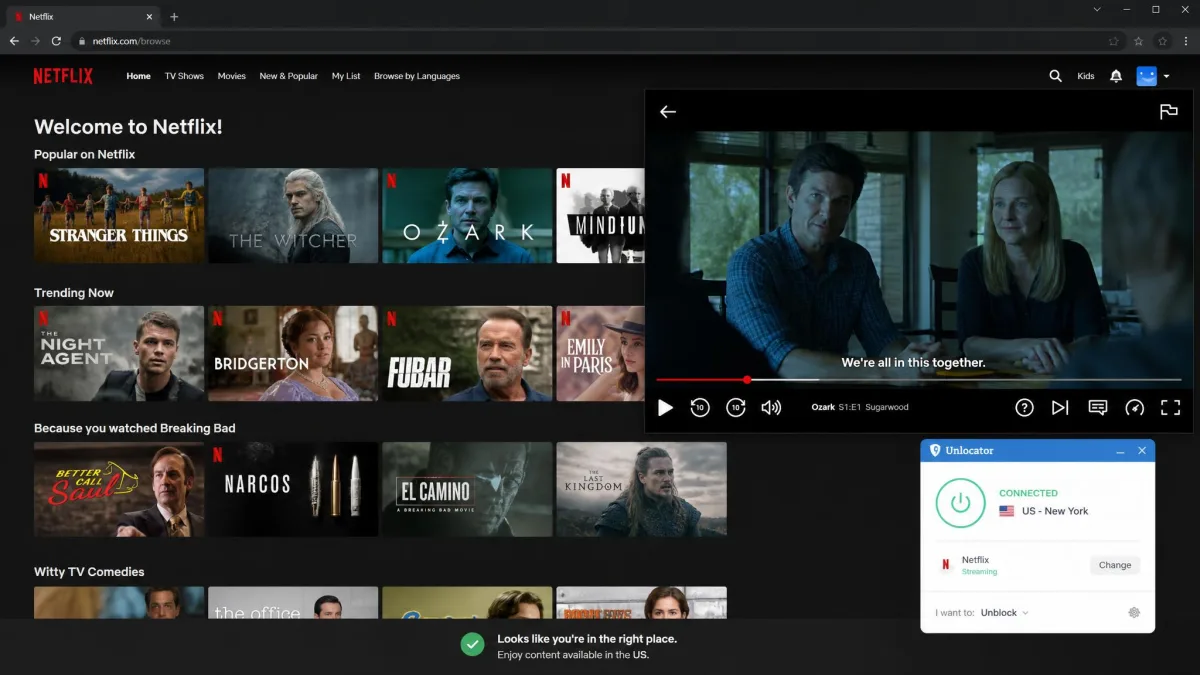
It is not flawless. Some users on Trustpilot report unresolved trouble reaching certain regional streaming sites. We would expect the occasional platform to slip during a detection crackdown. But as a day-to-day unblocker, Unlocator is one of the more dependable services we have tested. For context, Trustpilot rates Unlocator 4.5 out of 5 across 1,458 reviews, with 92% at five stars. The praise there centers on exactly this reliable Smart DNS unblocking.
Which Platforms It Works With
In our testing, and per Unlocator's own coverage, the service handles the major libraries most people want. That means Netflix in multiple regions, Disney+, Amazon Prime Video, Hulu, Max, ESPN+, BBC iPlayer, ITVX, All4, ZDF and BT Sport. That spread covers the big US, UK and European catalogs. It is exactly the audience a Smart DNS product targets. If your must-watch service sits outside that list, use the free trial to confirm it works first. A niche regional platform is exactly the kind of thing a small service may not prioritize.
Speed and Performance
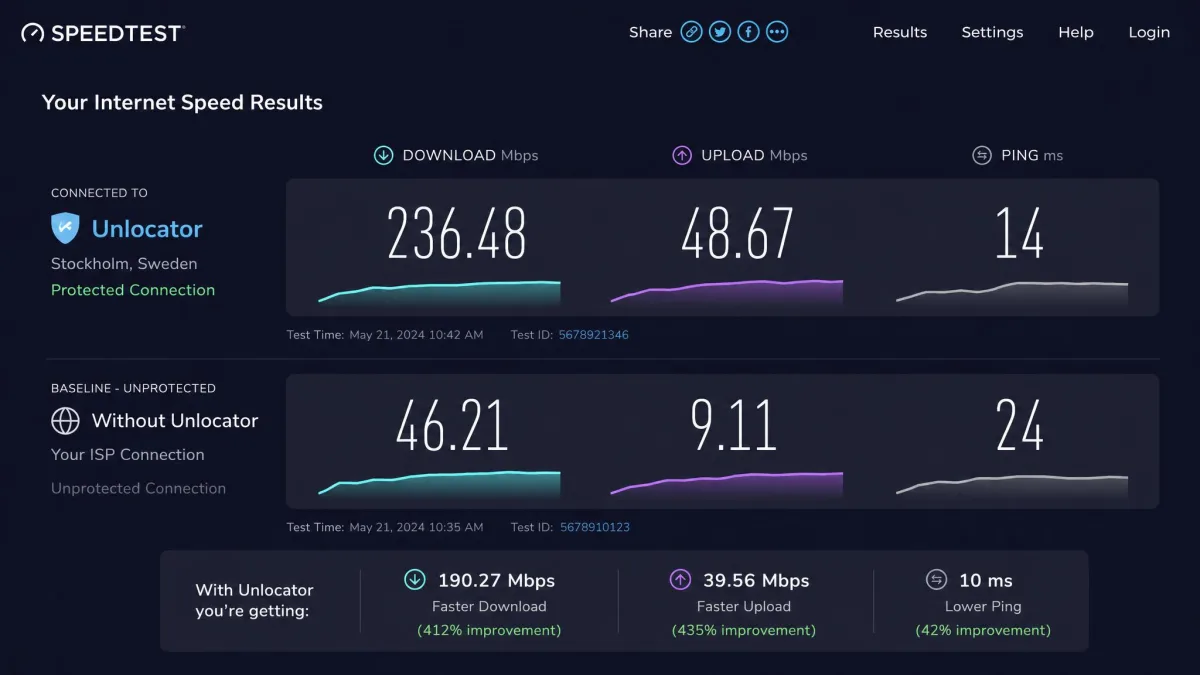
Speed is where a small network shows its limits. Our results were middling rather than bad. Nearby servers cost us about 5% of our baseline, which is easy to live with. Distant servers, past roughly 7,000 km, dropped closer to 18%. Our overall average across a full round of tests landed near 44 Mbps.
Location matters more here than on a bigger network. European servers ran noticeably slower for us than North American and Asian ones. So if you have a choice of endpoints for the same content, test a couple and keep the fastest. For streaming, 44 Mbps is comfortably enough for 4K on a single screen. The speed ceiling rarely got in the way of the thing Unlocator is built to do.
We also watched how the speed held up over a longer session. On a nearby North American server the connection stayed steady across a two-hour streaming block. There were no sudden drops that forced a reconnect. That is what you want from a service you lean on for a movie night. The European endpoints were the outlier. The same test file that flew on a US server crawled on a Frankfurt one. The gap was wide enough that we stopped trusting "nearest on the map" as a proxy for "fastest." That variability is the practical cost of a 43-server network. On a provider with dozens of endpoints per region, you can shrug off one slow server. Here, a slow region can mean the whole area is slow for you.
Because Unlocator's network is small, the closest server is not always the fastest. Run a quick speed test on two or three nearby options the first time you connect. Save the winner as your default.
Where speed does bite is anything bandwidth-heavy over a long distance. That means large downloads or torrents. The drop-off is steep. We would not choose a far-away server for anything other than the specific library it unblocks. We cover torrenting below. It is the clearest example of the network's size catching up with it.
Gaming Performance
Gaming follows the same pattern as speed. It is fine when the server is close and painful when it is far. On a nearby endpoint we saw ping around 81 ms. That is playable for most online games and unnoticeable in slower-paced titles. Connect somewhere distant, like a Paris server from across an ocean, and latency climbed to around 223 ms. That is enough to feel laggy in anything competitive.
Unlocator does not market itself as a gaming VPN, and we would not buy it as one. If your only goal is to play on a regional server or dodge a soft IP ban, a nearby endpoint will do the job. For low-latency competitive play, a larger network with more local servers is the better tool. The thin server list here means your nearest option may still be far enough away to matter.
Server Network and Locations
Unlocator runs a small fleet. It is roughly 43 servers spread across somewhere between 39 and 42 countries. The count depends on how you tally locations versus countries. That is a fraction of what the mainstream providers offer. It is the single biggest structural limitation of the service.
For streaming, the countries that matter are well covered. The US, UK and major European markets are all there, so the small count rarely hurt our unblocking. For everything else, the thin network can be a real problem. Users in Asia, Africa or parts of the Americas may struggle to find a genuinely nearby server. That feeds straight back into the speed and latency results above.
It helps to put the number in perspective. NordVPN runs around 8,900 servers across 149 countries. Surfshark runs about 4,500 across roughly 100. Unlocator's 43 servers across 39 to 42 countries are built to cover a handful of Western streaming markets. They are not built to blanket the globe. That focus is deliberate rather than negligent, but it changes how you should shop. A mainstream provider gives you several endpoints per country to load-balance and fail over. Unlocator often gives you one per location. If that single server is congested or blocked, you have no second nearby option to fall back on. That is exactly the situation the occasional Trustpilot complaint describes.
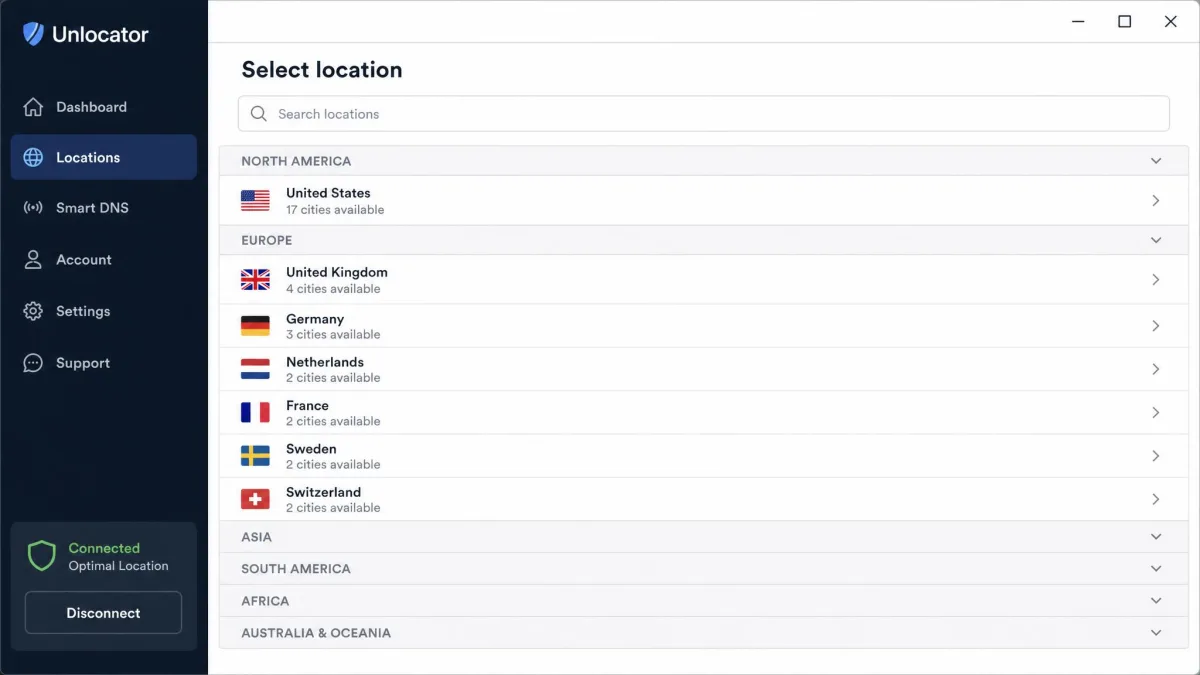
Put plainly, this is a network sized for a streaming unblocker, not for global privacy coverage. If you travel widely or live far from a major Western hub, check the location list against where you actually are before subscribing.
Security Features (Encryption, Protocols, Kill Switch)
On paper the core security is standard and solid. Unlocator uses 256-bit AES encryption. It gives you a real choice of protocols: OpenVPN, WireGuard and IKEv2/IPsec. WireGuard is the one we reached for most. It balances speed and modern security well. OpenVPN remains the fallback when you want the most widely audited option.
The kill switch is where things get shakier. In our testing it had to be turned on manually. It was absent from the mobile apps entirely. Coverage varies by platform and is desktop-focused. So it is not the always-on safety net that better VPNs enable by default. If a leak-proof connection matters to you, that is a meaningful gap. It is worst on your phone.
The kill switch is not on by default and does not appear in the mobile apps. If you rely on a VPN to prevent your real IP from leaking when the connection drops, turn it on in the desktop app manually. Do not assume your phone is protected the same way.
There are also gaps in the feature set. Unlocator has no split tunneling. It does not run RAM-only servers. Both are increasingly common on rival services. Split tunneling in particular is a real omission for a streaming product. It is the feature that would let you route only a streaming app through the VPN. Your banking and local traffic could then stay direct. Without it, the setup is all-or-nothing. When the VPN is on, everything rides through it, distant server and all.
On the positive side, our leak testing came back clean. With the desktop kill switch enabled, we ran repeated DNS and IPv6 leak checks. We did not see our real address escape. So the underlying tunnel does its job once you have configured the protections yourself. The encryption you get is trustworthy. The safeguards around it are thinner than the price bracket suggests. More of them are left to you to switch on than we would like.
Privacy and Logging Policy (Based in Denmark)
This is where we have the most reservations. Unlocator is operated by a Danish company, Unlocator ApS, based in Denmark. That location carries baggage. Denmark is part of the Nine Eyes surveillance alliance and its 14 Eyes extension. These are countries that share intelligence. A privacy-focused user generally wants a provider outside those jurisdictions.
Jurisdiction alone is not disqualifying if the logging is clean. Unlocator's is not. The service keeps personally identifiable data, including name, email and IP address. It states this data is deleted within 24 hours. We would treat that claim carefully. The policy language is contradictory in places. No independent audit has ever confirmed the 24-hour deletion. Privacy is the most criticized part of the service, and we agree with the criticism.
An audited no-logs policy is table stakes at this price. Unlocator asks you to take its word instead, and that is the trade you are weighing.
— From our hands-on review
The contrast with rivals is stark. ExpressVPN, NordVPN and Surfshark all run audited no-logs policies. An outside firm has inspected their systems and confirmed the claim. Unlocator asks you to take its word. If your threat model involves anything more serious than region-shifting your Netflix, that difference should weigh heavily. It is the main reason our score sits where it does.
Torrenting and P2P Support
Torrenting is allowed on most Unlocator servers, so P2P is not blocked outright. The problem is speed. In our testing a 1.32 GB file took over two hours on most servers. Even the fastest endpoint we found, in Miami, brought it down to only about 25 minutes.
That is slow by any modern standard. The small network and the distance penalty combine to throttle sustained transfers. There is no split tunneling either. You cannot route only your torrent client through the VPN while everything else stays direct. It compounds a second way, too. P2P is not confined to a labeled set of optimized servers. So finding a fast one is trial and error. The Miami result was the exception, not the rule, across the endpoints we tried. There is no crypto payment option either. That is a common request from privacy-minded torrent users. Unlocator will technically let you torrent. It will not make you happy doing it. If P2P is a regular part of your routine, look elsewhere. A provider with dedicated P2P servers will save you hours.
Does Unlocator Work in China?
We could not confirm reliable access from China, and we would not count on it. Unlocator offers only a custom WireGuard configuration for use behind the Great Firewall. That is the heart of the problem. Standard WireGuard traffic is actively detected and blocked in mainland China as of 2026. Unlocator does not layer on dedicated obfuscation, such as Shadowsocks or a stealth protocol. Restrictive networks require that to slip past detection. On top of that, Unlocator does not appear in current lists of China-capable VPNs. Those lists favor providers with TLS-disguised or proprietary stealth protocols.
If you are traveling to or living in China and need a dependable connection, this is not a safe bet. Providers with obfuscation built specifically for restrictive networks are a far better choice. Even those can be hit-or-miss. Treat Unlocator as a streaming tool for open networks, not a censorship-circumvention tool.
Apps, Device Compatibility & Setup
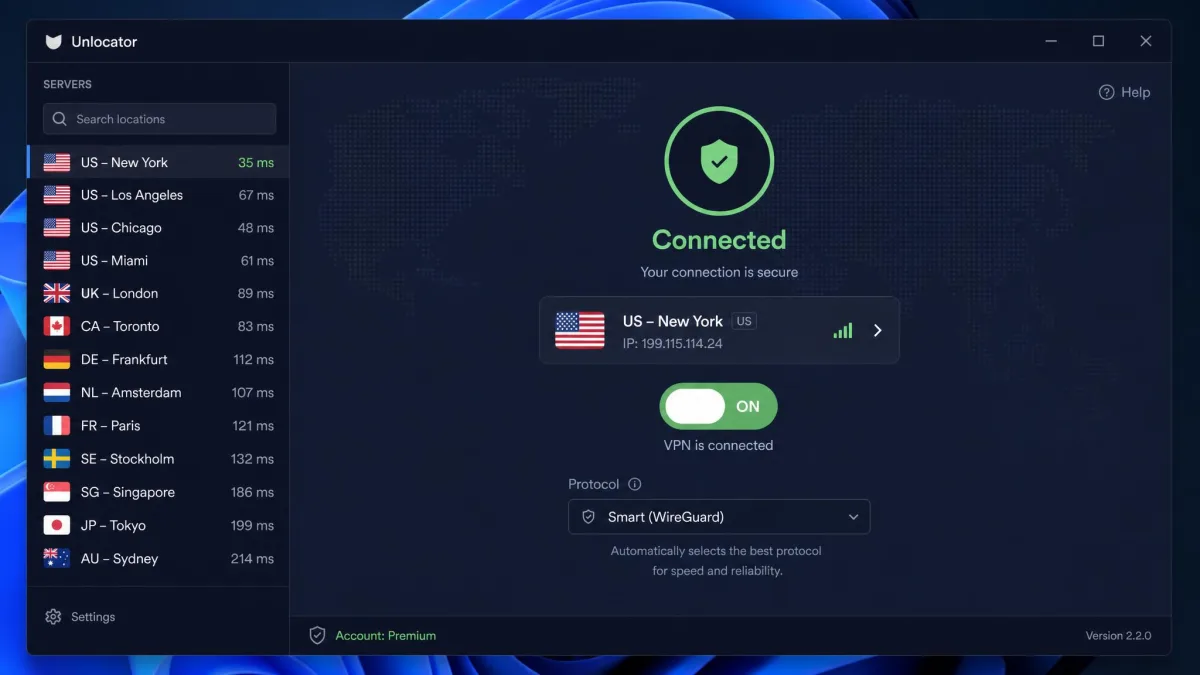
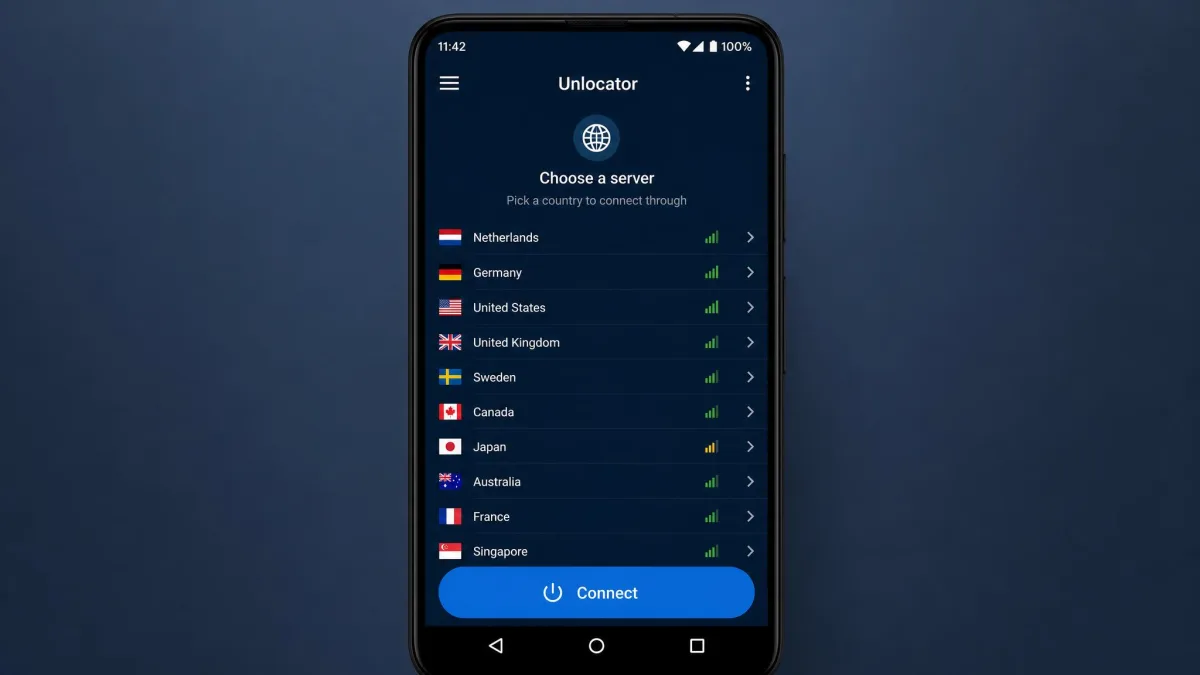
Setup was one of the pleasant surprises. On Windows the whole process took us under five minutes. The apps are straightforward once installed. There is a clean connection toggle and an easy server list. That ease of use is a genuine strength for less technical users. It is a big part of why the service reviews well with everyday buyers.
Device reach is broad thanks to the Smart DNS layer. Unlocator works on 50+ platforms. Smart DNS extends unblocking to an effectively unlimited number of streaming devices. That includes smart TVs and consoles that cannot run a VPN client. Have you already set up a VPN on your router? Then Unlocator's flow will feel familiar. If not, the guides are enough to get through it.
The documentation, though, is thin. Unlocator's website is sparse compared with bigger rivals. When we wanted specifics, we sometimes had to dig for them. It is enough for common tasks and light for anything unusual. Power users may find themselves emailing support for answers a bigger provider would publish.
Simultaneous Connections
Count how many devices you plan to protect at once, because the numbers here conflict. Unlocator's site advertises up to 10 simultaneous VPN connections. The real limit is 5, so plan around 5 to be safe. For a household with several devices, that is tighter than NordVPN's 10. It is far below Surfshark's unlimited. The Smart DNS side is more forgiving. It covers many more streaming devices without counting against that VPN cap.
Pricing, Plans & Money-Back Guarantee
Pricing is where Unlocator gets awkward. It is neither the cheapest nor clearly the best value. The monthly plan runs roughly $9.99 to $11.99 depending on the source. That is steep for a service this size. The one-year plan works out to about $6.58 per month. The two-year plan is the best value at around $4.96 per month, according to Unlocator's own pricing.
Here is the problem: the two-year rivals are cheaper and stronger. Surfshark runs about $2.49 per month. NordVPN is about $3.49. ExpressVPN is about $2.99. All three offer bigger networks and audited privacy. Unlocator's price only makes sense if its streaming and Smart DNS reliability is worth a premium to you specifically.
The safety net is good, at least. Unlocator offers a 30-day money-back guarantee, no questions asked. So you can subscribe, test your streaming for a month, and get a refund if it disappoints. That materially lowers the risk of trying it. It is the smart way to see whether the service earns its price for your particular set of streaming services.

Free Trial and Refund Process
There is a free trial, and it does not require a credit card. That is genuinely reader-friendly. Be aware the length is reported inconsistently. Unlocator's site shows a 7-day trial and recent reviews agree. Some third parties cite 30 days. The trial may cover Smart DNS only rather than the full VPN. Read the trial terms at signup so you know exactly what you are testing.
The refund process rides on the 30-day money-back guarantee rather than the trial. Because it is billed as no-questions-asked, the practical play is simple. Take a paid plan, run your real streaming for a few weeks, and request a refund inside the window if it does not deliver. That gives you the full product to evaluate, not just the trial's slice. It is the difference between testing the Smart DNS teaser and testing everything you are actually paying for.
Customer Support
Support is a weak spot. Unlocator is email-only, with no live chat. Replies can take more than 48 hours. When answers did arrive, we found them fairly basic rather than deeply technical. For a service that sometimes needs troubleshooting, that turnaround is slow. It stings more given the thin documentation you might otherwise lean on.
The gap matters most in the exact moments Unlocator is likely to need help. Smart DNS breaks when your home IP changes. The fix depends on knowing to re-register that address. A stream that reverts to its local library is precisely the kind of "why did this stop working" question a beginner would want answered fast. With no live chat, that means waiting on an email round-trip. Meanwhile the show you sat down to watch stays region-locked. We would rather see a basic chatbot or a searchable knowledge base filling the gap. Neither is really there today.
It is worth noting a counterpoint. Unlocator's Trustpilot reviewers often praise support as responsive, and the score is high overall. Our own experience was slower than that reputation suggests. So set your expectations toward patient email exchanges rather than instant help. Send your question with as much detail as you can up front to cut down on back-and-forth.
Unlocator VPN Alternatives
If Unlocator's limits give you pause, the mainstream trio does more for less. ExpressVPN is the streaming and reliability benchmark, with a huge country spread and audited no-logs privacy. Our ExpressVPN review covers where it justifies its higher headline price. NordVPN brings around 8,900 servers in 149 countries, 10 connections and strong speeds. It runs about $3.49 a month on a two-year term. If a longer server list and a slick app matter to you, our CyberGhost VPN review is another streaming-friendly option worth weighing.
Surfshark is the value pick at roughly $2.49 per month with unlimited simultaneous connections, which suits big households. If it is streaming reach specifically you care about, our roundups of the best VPNs for streaming and the best VPNs for Netflix rank the services that unblock most reliably. And if the no-card trial is what drew you in, we also track VPNs with free trials.
| Product | Buy | Price (2-yr) | Servers | Streaming | Logging | Connections |
|---|---|---|---|---|---|---|
 |
Check price → | $4.96/mo | ~43 / ~40 countries | Strong | PII logs, unaudited | 5 |
 |
Read review → | $2.99/mo | 105+ countries | Excellent | No-logs (audited) | 8 |
 |
Read review → | $3.49/mo | 8,900 / 149 countries | Excellent | No-logs (audited) | 10 |
 |
Read review → | $2.49/mo | 4,500 / 100 countries | Excellent | No-logs (audited) | Unlimited |
The pattern is hard to miss. On price, network size, connections and privacy, the alternatives win. Unlocator's case rests on Smart DNS device reach and out-of-the-box streaming consistency. None of these replicate that in quite the same way.
How We Tested Unlocator VPN
We do not recommend a VPN we have not run ourselves. For this review our networking team spent two weeks with Unlocator. We ran it on a Windows 11 laptop and a Google Pixel Android phone. Both connected through a 500 Mbps home fiber line, so every result used the same baseline.
We scored the service on the things that actually decide whether it is worth buying. That means streaming unblocking across the major libraries, download speed on nearby and distant servers, and DNS and IP leak behavior. We also checked kill-switch coverage, torrent throughput on a fixed test file, gaming latency, and the setup and support experience. We paid for the plan ourselves rather than taking a vendor account. So nothing here is a sponsored impression.
Some figures vary between sources, like the exact server count, monthly price or connection limit. Where they do, we say so rather than pick one number and hide the disagreement. Those conflicts are flagged in the relevant sections above. We lean on our own measured results wherever we could take them directly.
Final Verdict: Do We Recommend Unlocator VPN?
Unlocator is a good streaming tool and an average VPN. Your answer depends on which of those you are shopping for. For opening US and UK libraries on a TV or console, its Smart DNS reach and reliable unblocking are worth a look. The 30-day guarantee removes most of the risk of trying it.
As an all-round privacy VPN, we cannot recommend it over the mainstream trio. Weigh the alternatives against your budget. ExpressVPN gets you audited privacy and the widest streaming reach for about $2.99 a month. NordVPN adds a vast network and fast speeds at roughly $3.49. Surfshark is the cheapest at around $2.49 and covers unlimited devices. Each of the three costs less than Unlocator on a two-year term and does more. So for value on privacy, they are the smarter buys.