If you rely on hotel, café or mobile data connections in Papua New Guinea, you probably want a VPN to protect your traffic. Three different questions get mixed up here. Using a VPN while you are in PNG is one. Getting a PNG IP address is another. Where the provider's hardware physically sits is a third. In this guide we compare NordVPN, ExpressVPN and Surfshark on privacy evidence, price and PNG support, and we keep those three questions apart.
Best VPNs for Papua New Guinea at a glance
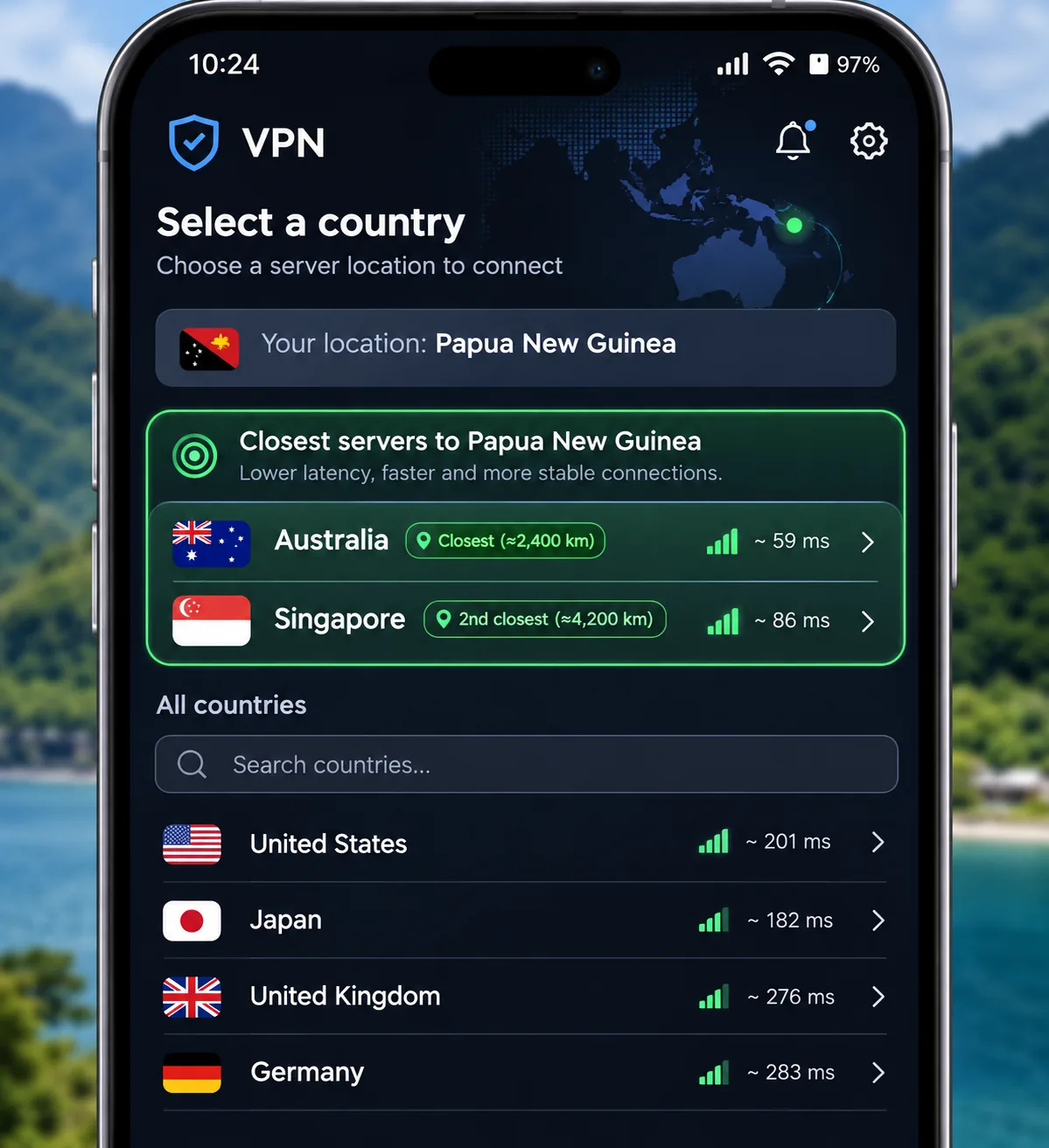
Only NordVPN advertises a Papua New Guinea location. The other two list Australia and Singapore, which are useful nearby exits but do not give you a PNG IP. Prices below are USD web offers that change with promotions. The monthly figure represents the equivalent monthly cost of a prepaid term, not monthly billing.
| Product | Buy | PNG IP | Devices | Intro price | Renewal |
|---|---|---|---|---|---|
 |
Check price → | Advertised virtual location, server in Australia | 10 | $94.23for 27 months | $139.08/year displayed |
 |
Not listed; Australia and Singapore | Basic 10, Advanced 12, Pro 14 | $83.72for 28 months | $99.95/year (Basic) | |
 |
Not listed; Australia and Singapore | Unlimited | $67.23for 27 months | Exact amount unconfirmed |
3 VPNs to consider for Papua New Guinea
The order below reflects our research scope rather than a verified ranking.
How we compared these VPNs
We judged each provider on four things. We checked whether its own server or location pages list Papua New Guinea and whether it has an independent audit on record. We also checked the minimum Android and iOS versions its current app supports, plus its displayed price and renewal terms. We took no speed or dropout measurements from inside PNG, so we do not name a speed winner. Hands-on notes below describe how each app behaved, not how fast it ran on a PNG carrier.
1. NordVPN
NordVPN's Papua New Guinea page says the location is virtual and the physical server is in Australia. That distinction matters if a site checks IP geography, and it also means traffic physically exits in Australia.
Setup is simple. Download the official app, sign in, then select Papua New Guinea from the map or country list. Privacy evidence is solid, with no-logs assessments from PwC and Deloitte. The latest Deloitte review was conducted in 2025. We cover that history in our NordVPN safety review.
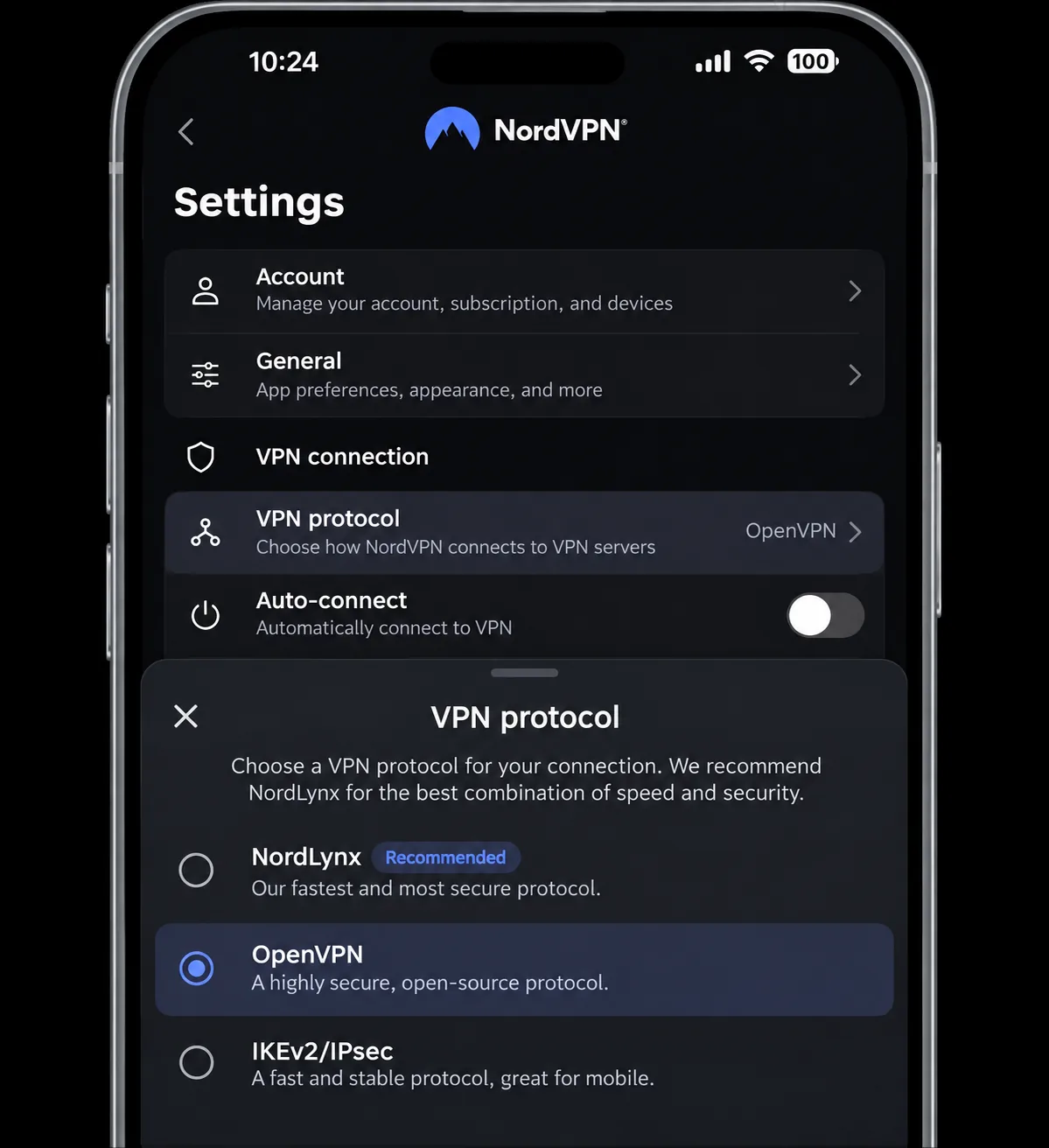
We found the tabbed interface exposes more controls at once than ExpressVPN or Surfshark, so it feels busier while keeping advanced options within reach. The scenario worth planning for is restrictive Wi-Fi, such as a hotel network. On those networks, NordLynx can fail to connect, leaving the app stuck. To restore access, open Settings, choose Protocol, switch to OpenVPN and reconnect. Double VPN adds noticeable page-loading lag, so leave it off for everyday browsing. Automatic renewal charges are a common complaint, so check the renewal price before you pay. The Android app needs Android 9 and the iPhone app needs iOS 17.0.
Pros
- Advertises a PNG IP location
- Independent no-logs assessments
- Kill switch, split tunneling and advanced options
Cons
- The PNG location is virtual, hosted in Australia
- Busier interface
- Highest displayed renewal of the three
2. ExpressVPN
Where NordVPN offers a PNG entry, ExpressVPN's published server directory has none. It lists Australia, with Brisbane, Melbourne, Perth and Sydney choices, and Singapore. Those connections give you an IP address in Australia or Singapore, not PNG.
We found installation straightforward and the apps intuitive on desktop and mobile, although a laptop restart may be needed before the first connection. The limitations become apparent on the iPhone. The iOS app has no auto-connect and no split tunneling, so after you join a café or airport network the VPN stays off until you open the app and connect. Forgetting is the usual way people end up unprotected on public Wi-Fi, so make connecting the first thing you do on each new network. Lightway Turbo gives strong Windows download performance, while standard Lightway can be much slower on other devices.
Its privacy evidence is a public KPMG assurance report on its privacy and TrustedServer controls. The report excludes operating effectiveness, so treat it as a defined-scope check rather than a guarantee. Our ExpressVPN review goes deeper. The app needs Android 7 or above and iOS 15 or above. Live chat starts with a troubleshooting bot, then transfers you to helpful human agents.
Pros
- Simple, intuitive apps
- Public KPMG assurance report
- Nearby Australian city choices
Cons
- No PNG location listed
- No iOS auto-connect
- Feels expensive next to rivals' extra tools
3. Surfshark
Surfshark is the cheapest of the three, and like ExpressVPN it has no PNG entry. Its server list offers Australia and Singapore but gives no reason to think a PNG IP is available. The big draw is unlimited simultaneous devices, which suits a household with many phones and laptops.
The renewal figure is harder to pin down. A $79 annual price is commonly listed, but the official page we checked states renewal pricing without a number, so confirm it at checkout. Surfshark's no-logs policy was verified by Deloitte, and the public report is available. Our Surfshark review has more detail. The Android app supports Android 7.0 and newer.
We would be careful with its kill switch. Tests that deliberately interrupt the connection show the kill switch blocking IP exposure. A system reboot, however, can expose traffic outside the tunnel. If your phone or laptop restarts while you are on shared Wi-Fi, reconnect the VPN before you open anything sensitive.
Streaming needs patience. Netflix and Amazon Prime Video can need retries or fail, while BBC iPlayer and 10Play stayed accessible. CleanWeb may need to be switched off for ad-funded services to play.
Pros
- Unlimited devices
- Public Deloitte no-logs report
- Kill switch blocks exposure on interrupted connections
Cons
- No PNG location listed
- Streaming can need retries
- Exact renewal cost unconfirmed
Why use a VPN in Papua New Guinea?
A VPN encrypts the connection between your device and its exit server, and it changes the IP address that sites see. It does not give you data service, and it does not make you invisible.
Privacy on public Wi-Fi and mobile data
Shared Wi-Fi in hotels, cafés and airports is where encryption helps most. A VPN keeps prying eyes on the local network from reading your traffic. It works over an eSIM, a physical SIM or Wi-Fi, so it adds to your connection rather than replacing it.
Streaming access and the limits of VPN protection
Streaming access is never guaranteed, which is why we treat it as a bonus. Services block VPN ranges, and a provider that works one week can fail the next. Local law and each service's terms still apply. We could not find a current primary legal source on ordinary consumer VPN use in PNG, so check official guidance before you travel.
A PNG IP, a VPN used inside PNG and a server physically in PNG are three separate things. Check which one a service actually needs before you pick a provider.
How to choose a VPN for Papua New Guinea
PNG IP addresses, virtual locations and nearby servers
Decide first whether you need a PNG address at all. If you only want protection on public Wi-Fi, any of the three works through Australia or Singapore. If a service needs a PNG-looking address, you need NordVPN. Distance and load still change speed, and a nearby exit is not automatically the fastest route on your carrier.
Connection speed, privacy evidence and mobile apps
Speed varies by carrier, protocol and server, and a VPN adds some overhead on any mobile link. Judge privacy by independent audits, not marketing. Then check the app minimums: Android 9 and iOS 17.0 for NordVPN, Android 7 and iOS 15 for ExpressVPN, and Android 7.0 for Surfshark. Older phones may rule out NordVPN's current app.
Total cost, renewal terms and device limits
Compare the first-term total and the renewal together. All three advertise a 30-day money-back guarantee, with exclusions for app-store purchases and reseller sales, so read the terms before you pay. Device limits range from 10 up to unlimited. Promotional prices change, so confirm the checkout amount.
Test the account at home before you travel. Connect to your eSIM first, then to the VPN. This is the cleanest way to find setup problems early. Overhead and carrier signal both affect speed.
How to set up your VPN and choose a server
Install the app and sign in before you leave. Open the server list and compare Australia and Singapore against any PNG option, checking page load and video call quality at different times of day. Turn on the kill switch. If NordLynx will not connect on restrictive Wi-Fi, open Settings, choose Protocol and select OpenVPN. Your phone's VPN does not automatically cover devices on its hotspot, so install the app on laptops too.
Which VPN should you choose?
Your choice depends on which of the three opening questions matters to you. Here is a brief recap before the box below.