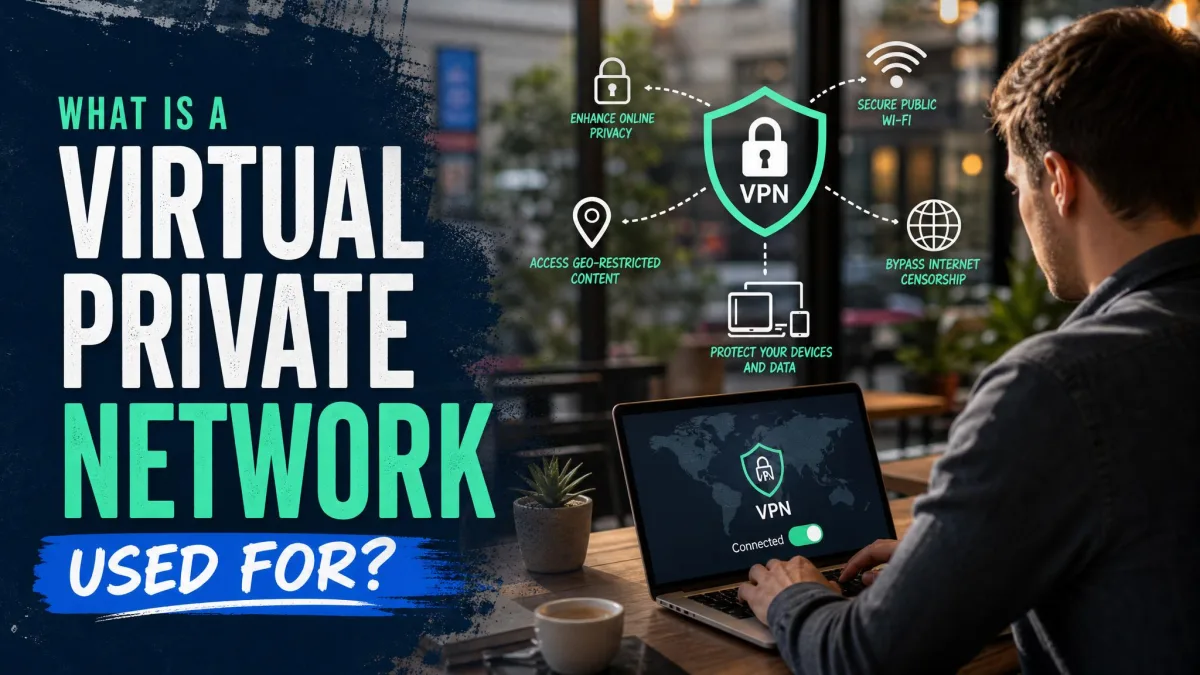
A virtual private network, or VPN, is a service that routes your internet traffic through an encrypted tunnel to a remote server. That single mechanism is what makes everything else possible. It hides your real IP address, shields your data on untrusted networks, and lets one device reach a private network from anywhere.
So what is a VPN actually used for day to day? People use it to work securely from home, to stay private on public Wi-Fi, to mask their location, and to connect entire office networks together. We have spent years testing VPNs against real speed, leak, and streaming benchmarks, and the same core uses come up again and again.
This guide walks through what a VPN is, how it works, and the jobs it does well. We also cover the protocols under the hood, the limits you should know about, and how to pick a provider you can trust.
What Is a VPN? (Definition)
A VPN is an encrypted link that extends a private network across a public one like the internet. In plain terms, it builds a secure connection between your device and a server run by the VPN service. Your traffic travels inside that connection rather than across the open web.
The NIST glossary describes a VPN as a protected system link that uses tunneling and security controls to give the impression of a dedicated private line. That is a precise way of saying it makes a shared public network behave like a private one. Engineers often call this an overlay network, because the private path sits on top of existing internet infrastructure.
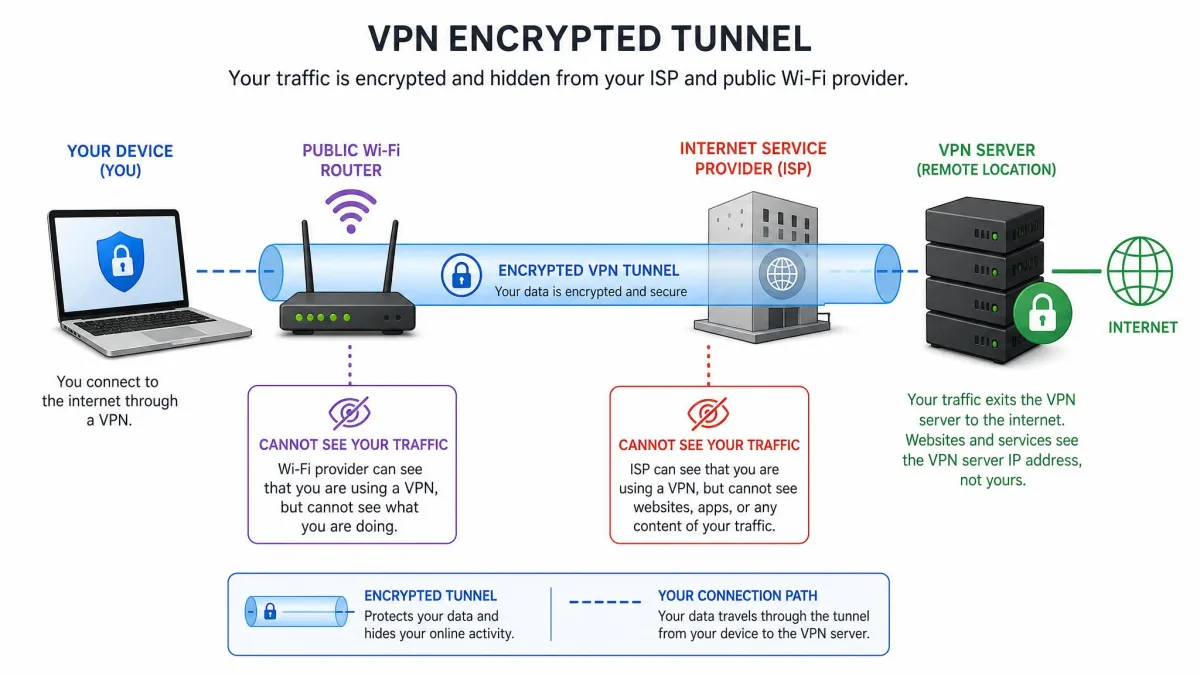
The key word is virtual. There is no physical private cable between you and the server. The privacy comes from encryption and tunneling, not from dedicated hardware. Once the tunnel is up, anyone watching the network in between sees scrambled data and a single destination, not your activity.
How Does a VPN Work?
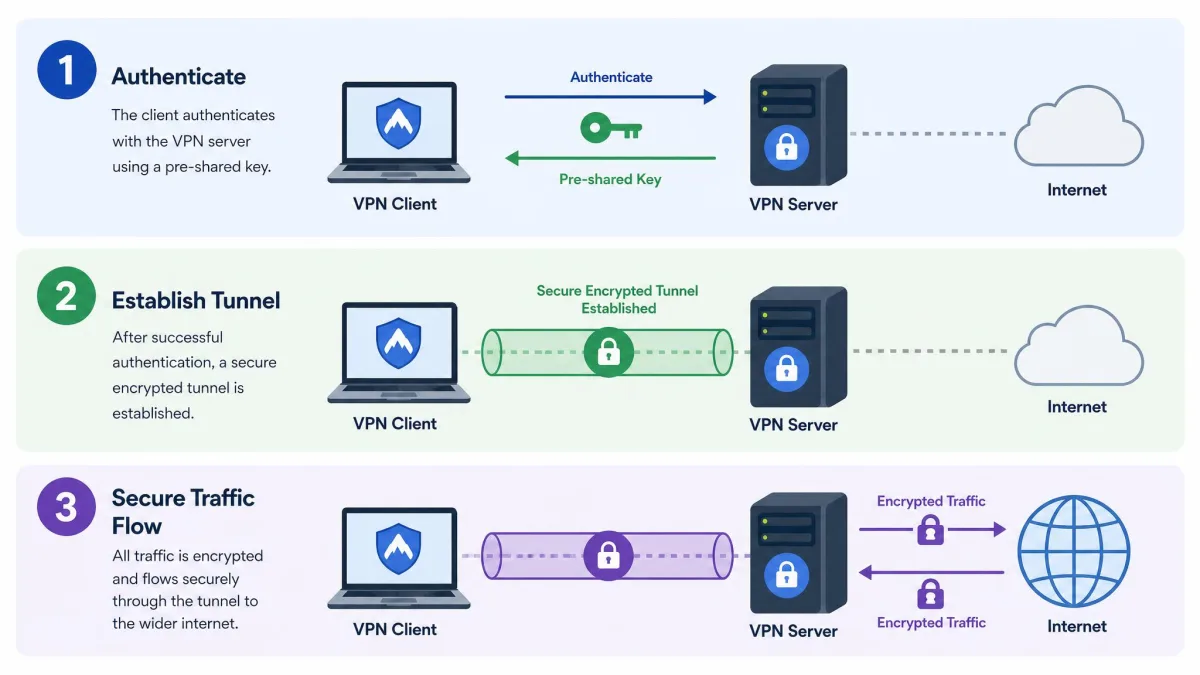
A VPN combines three pieces of technology: encryption, tunneling, and authentication. Each one handles a different part of the job. Understanding how they fit together explains both what a VPN protects and what it cannot.
Encryption
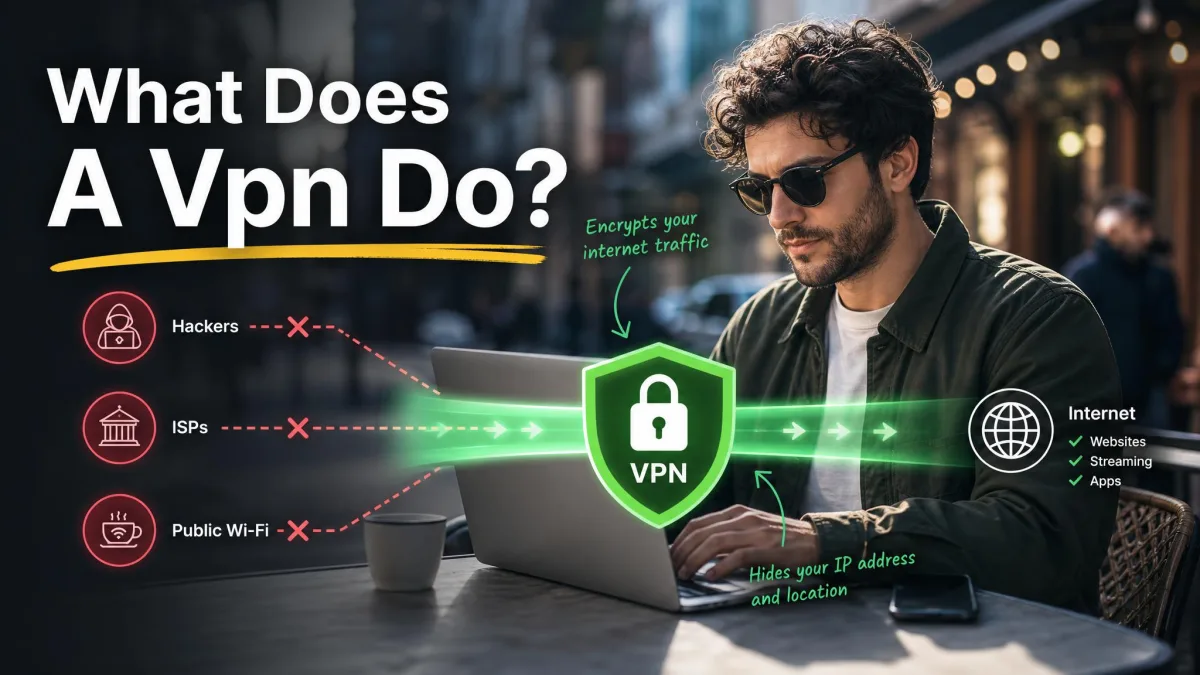
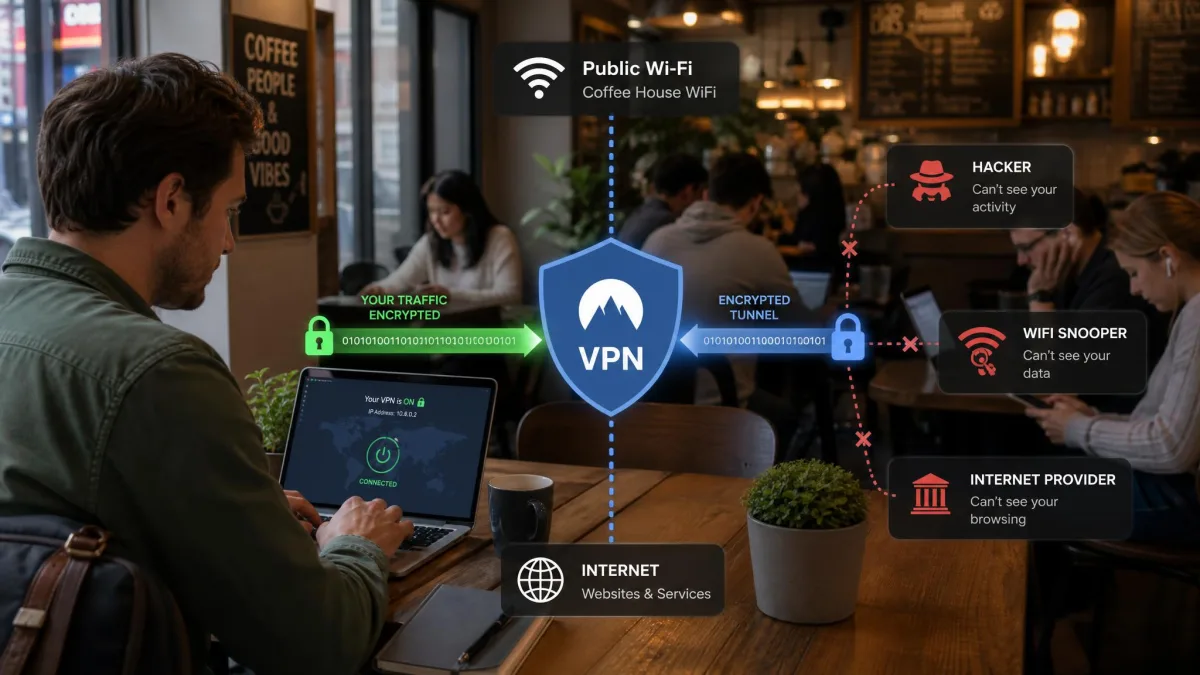
Encryption scrambles your data so that only the two ends of the connection can read it. When you open a website through a VPN, your device encrypts each packet before it leaves. The VPN server decrypts it, forwards the request, then encrypts the reply on the way back.
Anyone sitting in the middle sees only ciphertext. That includes your internet provider, the operator of a coffee-shop hotspot, and anyone snooping on the same network. The strength of the encryption depends on the protocol, which we cover further down.
On open public Wi-Fi, your data is normally sent across a network you do not control. A VPN encrypts that traffic before it leaves your device, which closes off the exposure that comes from transmitting unencrypted data on an untrusted network.
Tunneling
Tunneling is the process of wrapping one network connection inside another. Your encrypted packets are placed inside outer packets addressed to the VPN server. This wrapper is the encrypted tunnel that VPN marketing talks about, and it is a literal description of what happens.
The tunnel keeps your real traffic hidden and intact as it crosses the public internet. To the networks in between, it looks like an ordinary stream of data heading to one address. Only at the server does the outer wrapper come off and your real request continue to its destination.
Authentication and the VPN server
Before any tunnel opens, both ends prove who they are. Authentication confirms that your client is talking to the genuine VPN server and not an impostor. This usually relies on cryptographic keys or certificates exchanged during the handshake.
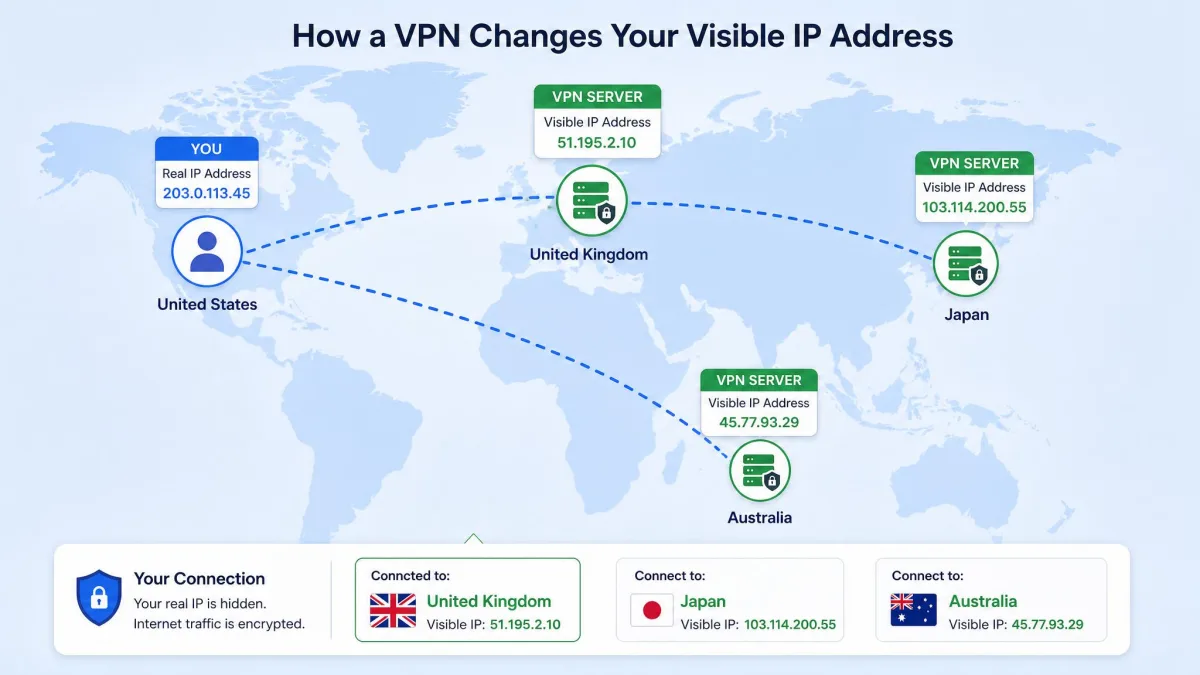
The VPN server is the exit point for your traffic. Websites see the server's IP address and location instead of yours. That single fact is why a VPN can hide where you are and make you appear to browse from another city or country.
What Is a VPN Used For? (Core Use Cases)
A VPN is a general-purpose privacy and access tool, so its uses span home, travel, and business. In our testing the same handful of jobs account for almost everything people reach for a VPN to do. Here are the core use cases and why each one works.
Secure remote work and business access
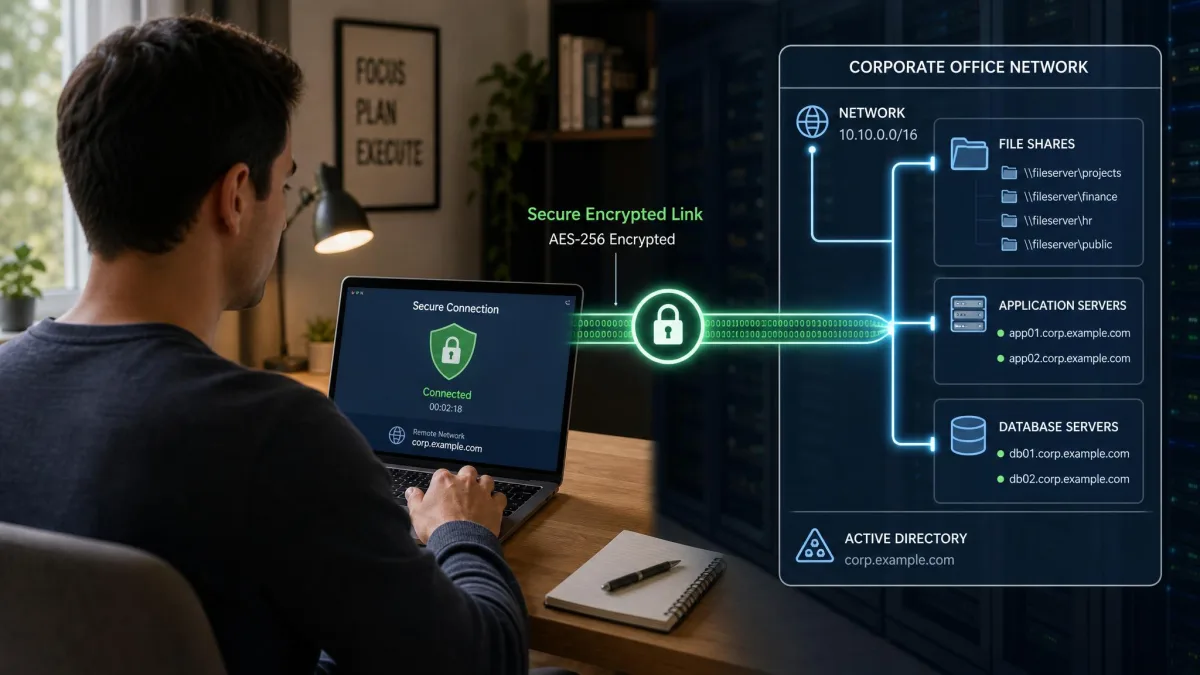
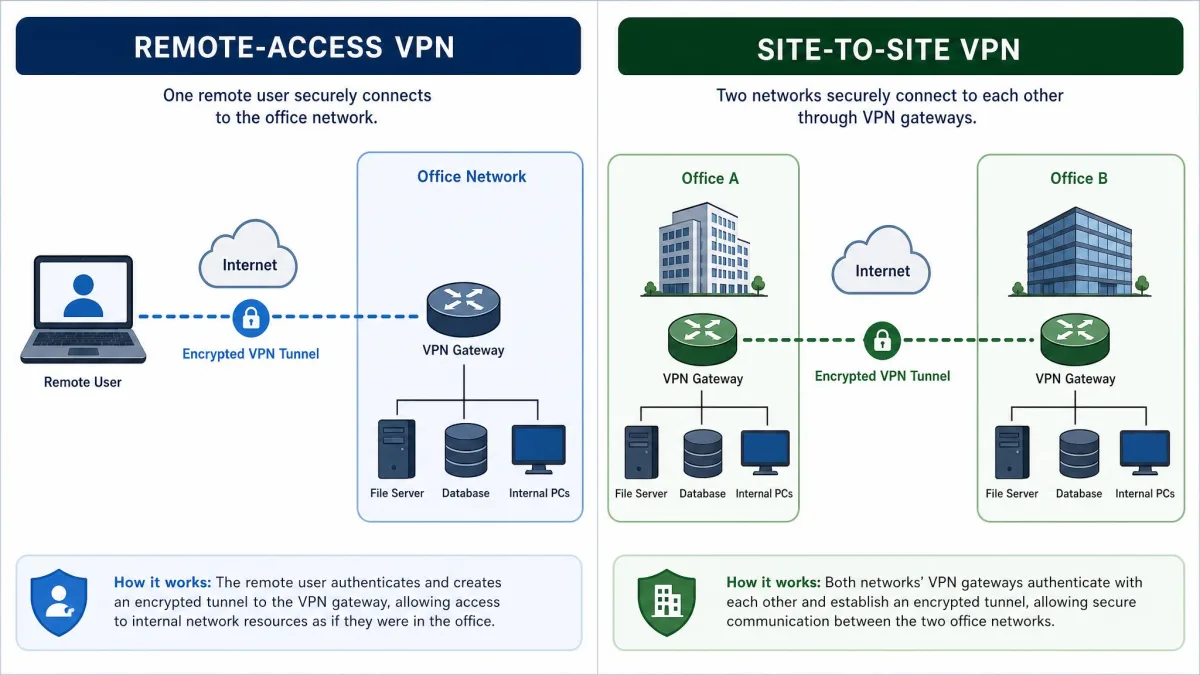
The original job of a VPN was connecting remote staff to an office network. A remote-access VPN lets a laptop at home reach internal servers, file shares, and applications as if it were plugged in at the office. The traffic stays encrypted the whole way, so sensitive company data never crosses the internet in the clear.
This is still the biggest business use by far. It lets a company keep resources private while giving employees secure access from anywhere. For many organizations, the VPN is the front door to everything behind the firewall.
Privacy on public Wi-Fi
Public Wi-Fi in airports, hotels, and cafes is convenient and rarely trustworthy. You have no control over who else is on the network or how it is configured. A VPN encrypts everything you send, so even a hostile network sees only scrambled data.
We treat this as one of the strongest everyday reasons to run a VPN. It removes the guesswork about whether a given hotspot is safe. The protection travels with you regardless of which network you join.
Hiding your IP address and location
Every site you visit normally sees your IP address, which reveals a rough location and ties activity back to your connection. A VPN replaces your address with the server's, masking where you really are. Pick a server in another country and you appear to browse from there.
This matters for privacy as much as access. Advertisers, trackers, and websites build profiles partly from IP data, and a VPN breaks that direct link. Privacy advocates such as the Electronic Frontier Foundation treat control over this kind of metadata as a core part of online privacy.
Accessing region-restricted content
Because a VPN changes your apparent location, it can unlock content that varies by region. Connecting to a server in another country lets you reach services and catalogs available there. Travelers use this to access their home services while abroad.
This use case is real but inconsistent. Streaming platforms actively block many VPN server addresses, so a server that works one day can be blacklisted the next. Expect to switch servers occasionally, and treat reliable streaming as a bonus rather than a guarantee.
Site-to-site and cloud connectivity
Businesses also use VPNs to link whole networks rather than single devices. A site-to-site VPN joins two office networks over the internet so they act as one. The same idea connects an office to resources hosted in the cloud.
Here the tunnel runs between routers or gateways instead of individual laptops. Staff at either location share files and systems without a separate login for each person. It is the quiet backbone of a lot of distributed company infrastructure.
Benefits of Using a VPN
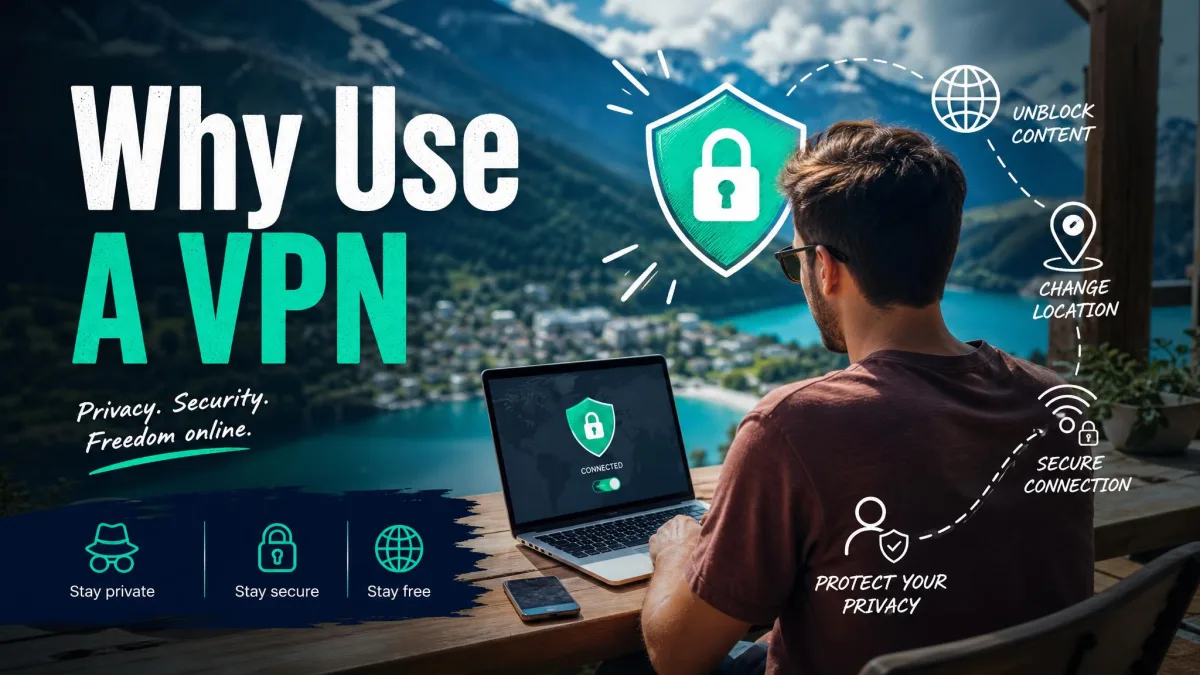
The benefits of a VPN follow directly from how it works. Encryption protects your data in transit, so anything you send stays private on networks you do not trust. That protection is constant once the tunnel is connected, whatever network you are on.
Masking your IP address adds a layer of privacy from the sites and trackers you interact with. It also gives you flexible access, letting you reach home or work resources and location-varying content from anywhere. For businesses, a VPN keeps internal systems private while still reachable by the people who need them.
There is also simple peace of mind. You stop having to judge each network you join, because your protection no longer depends on the network being safe. That consistency is a large part of why VPN use has grown so widely.
A VPN does one thing extremely well: it moves your data through an encrypted tunnel so the networks in between cannot read it or trace it back to you.
Types of VPNs
Not every VPN does the same job, and the differences matter when you choose one. There are three broad categories, split by what they connect. The broad VPN categories map cleanly onto how people actually deploy them.
Remote-access VPN
A remote-access VPN connects a single device to a private network. This is the type most people mean when they say VPN, and it covers both work-from-home access and consumer privacy services. Your laptop or phone runs a client app that builds the tunnel to a server.
It is a host-to-network setup: one host reaching one network. When you install a VPN app on your phone and tap connect, you are using a remote-access VPN. The whole consumer VPN market is built on this model.
Site-to-site VPN
A site-to-site VPN connects two entire networks rather than a single device. Two office locations, for example, can be joined so they share resources as one network. The tunnel is handled by gateway hardware at each site, not by individual devices.
Users at either end usually never see it running. There is no app to launch and no button to press, because the connection lives in the network equipment. This is a business tool rather than a consumer one.
Personal vs. business VPNs
The practical split for most readers is personal versus business. A personal VPN is a subscription service focused on privacy, location masking, and safe browsing. You pay a provider, install an app, and pick a server.
A business VPN focuses on secure access to company resources, whether for remote workers or linked offices. It is administered by an IT team and tuned for control, not for streaming or location switching. Provider-provisioned VPNs, run for customers by a carrier, are a further business-oriented variant.
VPN Protocols Explained (OpenVPN, WireGuard, IPsec/IKEv2, L2TP, PPTP, SSTP)
A VPN protocol is the set of rules that builds the tunnel and encrypts your traffic. The protocol you use decides how fast, how secure, and how compatible your connection is. A handful dominate today, and a couple linger only for legacy reasons.
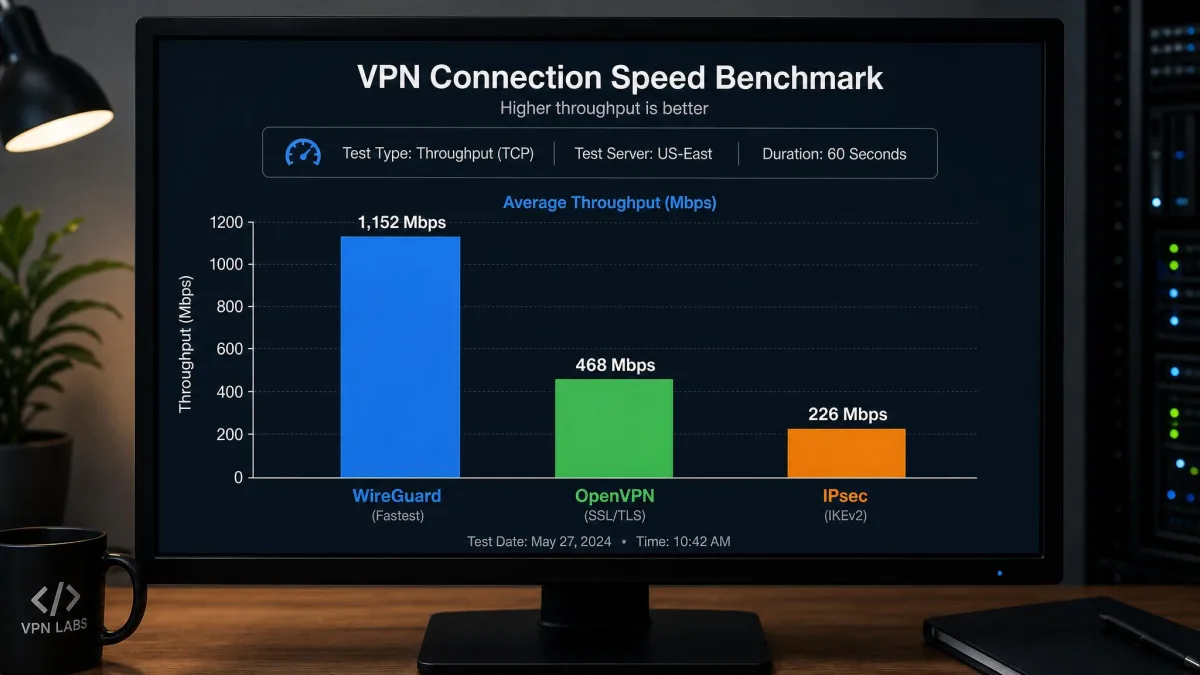
OpenVPN, first released in 2001, is the long-standing open-source workhorse. It is highly configurable and widely trusted, and it runs on UDP port 1194 or over TCP 443 to slip through restrictive networks. WireGuard, released in 2015, is the modern challenger. It is around 4,000 lines of code compared with up to roughly 600,000 for older stacks, which makes it easier to audit, and it uses ChaCha20-Poly1305 encryption with Curve25519 key exchange. WireGuard was merged into the mainline Linux kernel in version 5.6 in 2020, a strong signal of its acceptance.
IPsec, which dates to 1996, is often paired with IKEv2 and is common on business gear and mobile devices. L2TP is almost always run over IPsec, since on its own it provides no encryption. That leaves the legacy protocols. PPTP is defined in RFC 2637, published in 1999, and is now considered insecure, so avoid it. SSTP, introduced in 2007, is a Microsoft protocol that tunnels over TLS and still sees occasional Windows use.
| Protocol | Released | Default port | Security | Core crypto |
|---|---|---|---|---|
| OpenVPN | 2001 | UDP 1194 / TCP 443 | Strong, widely trusted | OpenSSL, configurable |
| WireGuard | 2015 | UDP 51820 | Modern, strong | ChaCha20-Poly1305 |
| IPsec/IKEv2 | 1996 | UDP 500/4500 | Strong | AES with IKEv2 |
| PPTP | 1999 | TCP 1723 | Insecure, deprecated | MPPE, weak |
For most people the right answer is simple. If your provider offers WireGuard or OpenVPN, use one of those and ignore the rest. The older protocols exist mainly for compatibility with legacy systems.
Steer clear of PPTP for anything that matters. It is fast and widely supported, but its encryption has known weaknesses and it is treated as broken today. If a provider still leans on it as a default, that is a red flag.
Limitations and What a VPN Won't Do
A VPN is powerful within its lane, and it is easy to overestimate. It protects data in transit and hides your IP address, but it is not a complete security suite. Knowing the limits keeps your expectations honest.
First, a VPN is not antivirus. It does nothing to stop malware you download or a phishing page you type your password into. It also cannot make you truly anonymous, since you still log into accounts, and the VPN provider itself can see your traffic at the exit point. That is why the provider you trust matters so much.
Second, a VPN has a performance cost. Every VPN slows your connection to some degree, because traffic has to travel through the encrypted tunnel and often a more distant server. The size of the slowdown depends on the provider, the distance to the server, and your connection type. In our testing, connections to even a nearby server sometimes fail and then work fine on a retry, so day-to-day reliability varies.
Pros
- Encrypts your traffic so untrusted networks cannot read it
- Hides your real IP address and apparent location
- Enables secure remote access to work and home networks
- Protection is consistent across every network you join
Cons
- Slows your connection to some degree, always
- Does not replace antivirus or safe browsing habits
- Cannot make you fully anonymous online
- You must trust the provider with your traffic
How to Choose a VPN (Paid vs. Free)
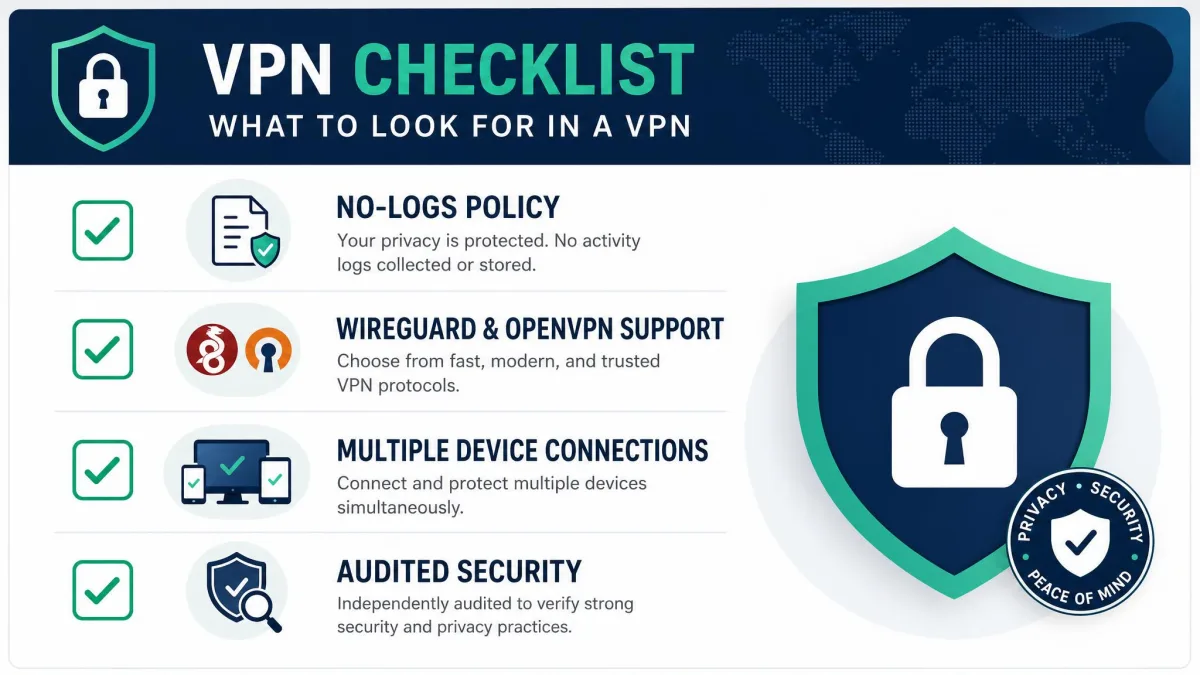
Choosing a VPN comes down to trust, protocols, and how you plan to use it. Start with the provider's reputation and privacy policy, because you are handing them your traffic. A clear no-logs stance and a track record matter more than a long server-count number.
Next, check the protocols on offer. You want WireGuard or OpenVPN available, and you want the app on every device you use. Look at how many simultaneous connections a plan allows, and whether the server locations you care about are covered.
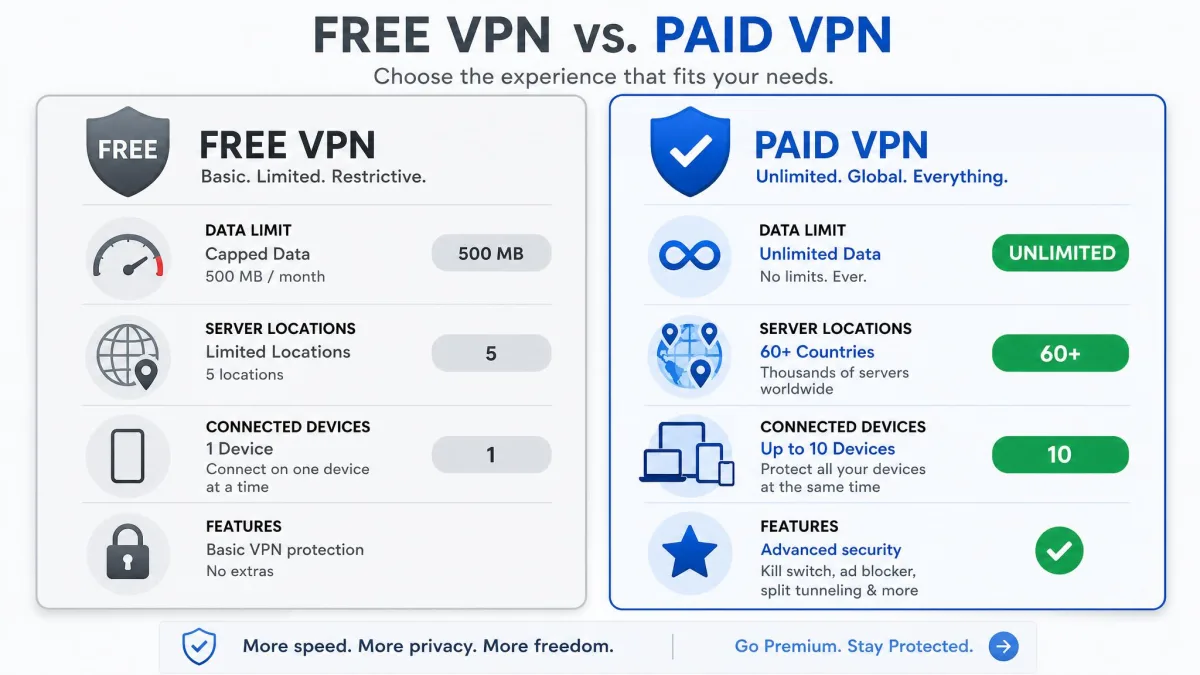
The paid-versus-free decision is where we see people trip up most. Free tiers are genuine, but they impose hard limits: tight bandwidth caps, fewer server locations, and fewer simultaneous devices. TunnelBear's free tier, for instance, caps you at 500 MB. Paid subscriptions, roughly $2 to $15 a month, remove those caps in exchange for an ongoing cost.
If you only need occasional protection on public Wi-Fi, a reputable free tier can be enough. If you want it running full time across several devices, a paid plan is the better value once you hit the free caps.
Be wary of free VPNs that seem too generous. Running a VPN network costs money, and a provider giving away unlimited service has to earn revenue somewhere, sometimes from your data. That is the opposite of what you are paying a VPN to do.
Are VPNs Legal and Safe?
In most countries, using a VPN is completely legal and a normal part of security practice. Businesses rely on them, and privacy laws often encourage encryption. A small number of countries restrict or ban VPN use, so check local rules if you travel to one of them.
Legal is not the same as safe, and safety depends on the provider. A reputable, audited VPN with strong protocols genuinely protects your traffic in transit. A shady one can log your activity, leak your data, or inject unwanted content, which defeats the purpose entirely.
The safe path is straightforward. Pick a provider with a clear privacy policy and modern protocols, keep the app updated, and understand what the VPN does and does not cover. Do that, and a VPN is one of the more reliable privacy tools you can run.