BleachBit and Glary Utilities are two of the most recommended free tools for cleaning up a Windows PC, but they take very different approaches. BleachBit is a lean, open-source privacy cleaner that deletes temporary files and shreds data beyond recovery. Glary Utilities is an all-in-one tune-up suite that bundles more than 20 tools behind one dashboard. The right pick depends on whether you want a focused privacy tool or a full toolbox, and we have tested both.
BleachBit vs Glary Utilities at a Glance
Both apps are free to start, both run on Windows, and both clear gigabytes of cached junk. BleachBit does a few things thoroughly, with a bias toward privacy; Glary tries to be your whole maintenance department. The table below sums up where each one leads.

| Feature | BleachBit | Glary Utilities |
|---|---|---|
| Price / license | Free, open-source (GPLv3) | Freemium; Pro $39.95/yr for 3 PCs; proprietary |
| Platforms | Windows and Linux (macOS limited) | Windows, plus a separate Android app |
| Scope | Focused privacy and junk cleaner | 20+ tool all-in-one suite |
| Registry cleaner | No dedicated cleaner (limited key deletion) | Yes, cleaner plus registry defrag |
| Secure file shredding | Yes; shred, free-space wipe, chaff | Basic file shredder only |
| Extra tools | None (cleaning-focused) | Defrag, startup manager, duplicate finder, updater |
| Ease of use | Manual checkboxes, preview-first | 1-Click Maintenance |
| Ads / bundleware | None | Bundled offers during install |
| Best for | Privacy, secure deletion, Linux | One-click Windows maintenance |
What Is BleachBit?
BleachBit is a free, open-source system cleaner first released in 2008 and still led by its creator, Andrew Ziem. It wipes temporary files, browser caches, and logs, then makes the deleted data genuinely unrecoverable. Because it ships under the GNU GPLv3 (GPL-3.0 license), there is no paid tier and no "Pro" upsell. The current line is BleachBit 6.0, with a legacy 4.x branch kept for older Windows.
Key features
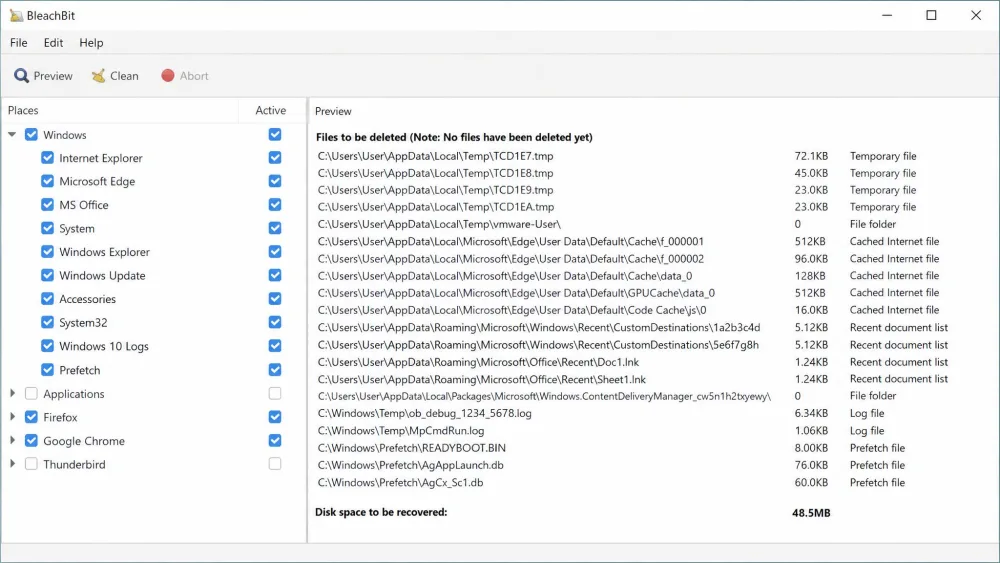
BleachBit clears junk and cache from browsers like Chrome, Edge, and Firefox, plus system logs and app leftovers. A cookie manager keeps the logins you want while purging trackers. Its standout tools are on the privacy side: secure file shredding, an option to overwrite free disk space, and a "chaff" decoy generator. A preview step shows what will be removed before deletion, and the app is localized into 72 languages.
Pros and cons
Pros
- Free and open-source, with no ads, telemetry, or bundleware
- Best-in-class secure deletion and free-space wiping
- Preview-before-delete stops you erasing the wrong files
- Runs on both Windows and Linux
Cons
- Utilitarian, dated interface
- No dedicated registry cleaner or optimization tools
- No stop button once a clean is running
- The log does not clearly show how much space was freed
What Is Glary Utilities?
Glary Utilities is a Windows tune-up suite from Glarysoft that packs more than 20 maintenance tools into one interface. Where BleachBit focuses on privacy, Glary covers the whole spectrum of housekeeping: junk removal, a registry cleaner, a startup manager, a duplicate finder, and a defragmenter. It is proprietary, closed-source software on a freemium model, with a useful free version and a Pro upgrade that adds automatic background maintenance.
Key features
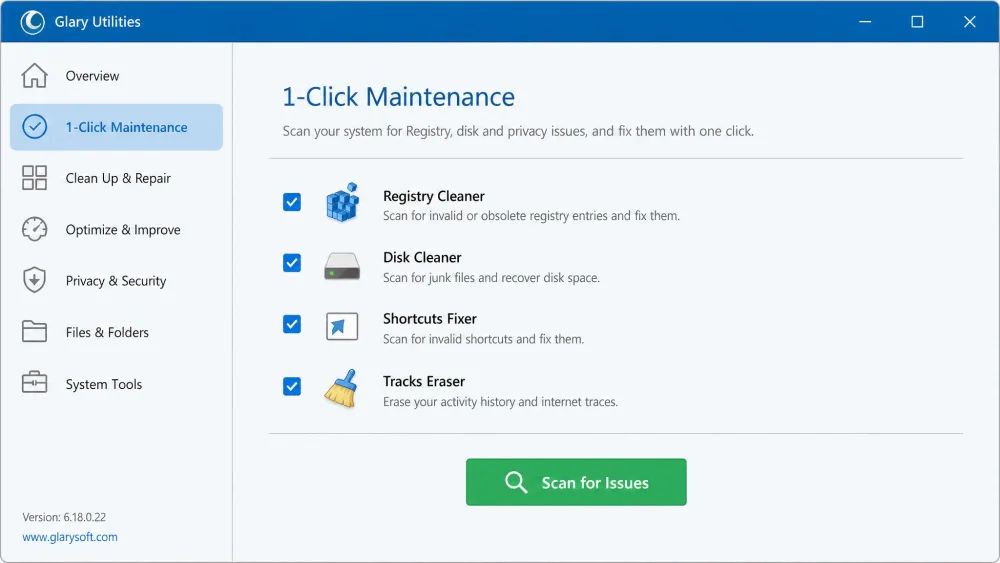
The centerpiece is 1-Click Maintenance, which rolls disk cleanup, registry repair, shortcut fixing, and tracks erasing into a single button. Beyond that you get a standalone registry cleaner and registry defrag, a startup manager, a duplicate finder, a disk analyzer, a file undelete tool, and a basic shredder.
Pros and cons
Pros
- More than 20 tools in one place for all-round maintenance
- Beginner-friendly 1-Click Maintenance
- Genuinely useful free version, including the registry cleaner
- Registry cleaner and defrag that worked reliably in our use
Cons
- Proprietary and, on the desktop, Windows-only
- The installer offers bundled software that is easy to accept by mistake
- The interface looks visibly dated
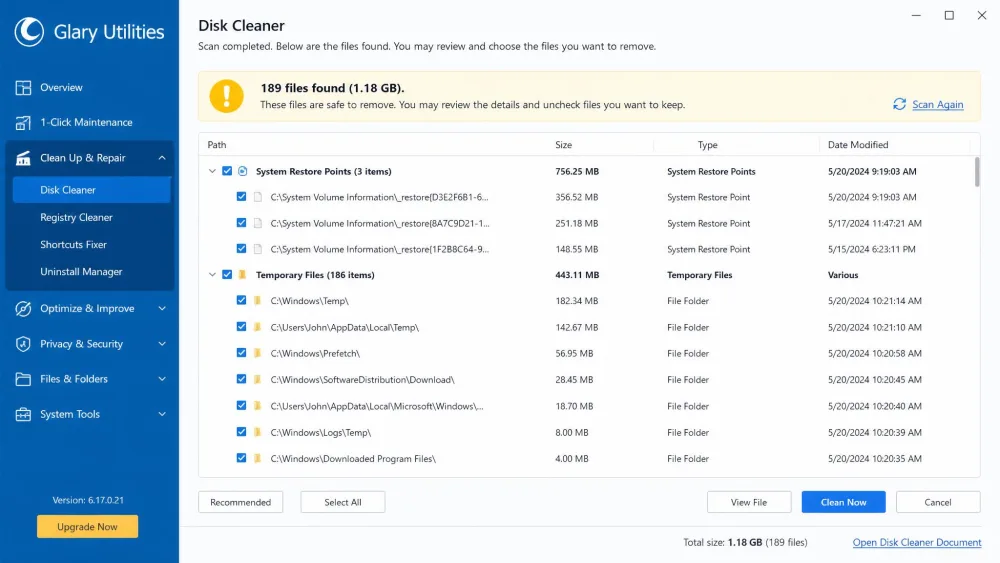
- Disk cleanup can remove stored system restore points
Head-to-Head Comparison
Here is how the two stack up on the things that decide the winner for you.
Cleaning power and disk space recovered
Both do the core job well. BleachBit reaches deep into browser profiles and, with winapp2.ini rules, covers thousands of extra targets, while Glary handles the same everyday junk through its disk cleaner. Both clear the cache and temp-file clutter you would expect in a single pass, though BleachBit's log does not clearly report which drives it touched.
Privacy and secure file shredding
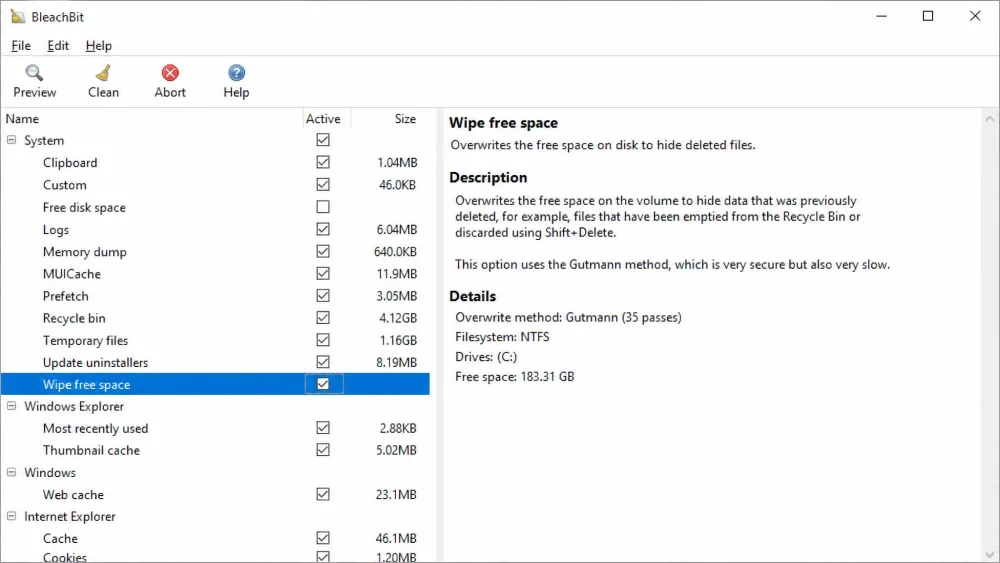
This is BleachBit's home turf, and it wins comfortably. It shreds individual files beyond recovery, overwrites free disk space to erase traces of data other apps deleted, and generates "chaff" decoy files. Glary includes only a basic file shredder and no free-space wipe. To erase sensitive data before selling a machine, BleachBit is the clear choice.
Registry, startup, and extra maintenance tools
Here the tables turn. Glary carries a dedicated registry cleaner that scans and repairs issues, plus a registry defrag, a startup manager, and a duplicate finder. In our use the registry cleaner ran effectively without breaking anything. BleachBit can delete individual registry keys where MRU lists live, but it has no scan-and-repair module. For maintenance tools beyond cleaning, Glary is the only option.
Registry cleaners can occasionally remove an entry a program still needs, which is one way a cleanup can break Windows. Review what any cleaner plans to change before you apply it, and remember that Glary's disk cleanup can also clear stored system restore points.
Ease of use and interface
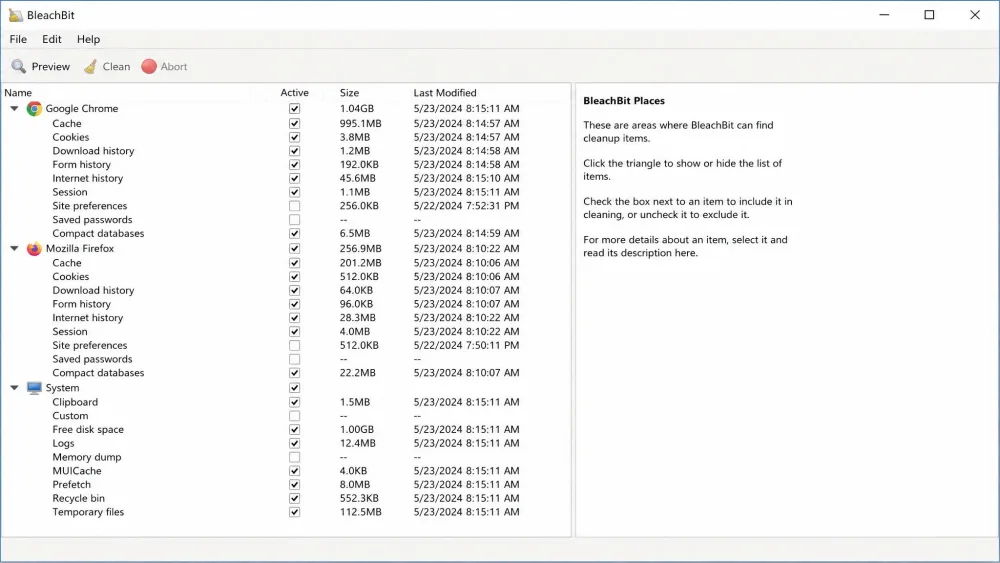
Neither app is pretty. BleachBit greets you with checkboxes grouped under "Places," and it takes a moment to learn what is safe to tick. Running the preview the first time, we watched it list every file queued for deletion and unticked an over-aggressive selection before anything was erased. It then remembers your choices, so repeat cleans are a single click. Glary is friendlier for beginners thanks to 1-Click Maintenance, but its interface looks visibly outdated. For a one-button user, Glary wins; BleachBit is faster once set up.
Platform support (Windows, Linux, macOS)
This is BleachBit's real differentiator. It runs officially on Windows and Linux, from desktops to servers. A macOS build exists but is limited and command-line only, so treat it as experimental. Glary is Windows-focused with no macOS or Linux version, though a separate Android app runs on Android 2.2 and newer. On Linux, BleachBit is effectively your only option.
Price, licensing, and bundleware
BleachBit is free and open-source under the GPLv3, with no subscriptions or bundleware. Glary is freemium: the free version already includes the registry cleaner and 1-Click Maintenance, while Glary Utilities Pro costs $39.95 per year for up to three PCs, with a 90-day money-back guarantee. The catch is at install time, where Glary's installer offers bundled software and the opt-out is easy to miss.
Performance, Safety, and System Impact
Both tools are lightweight and will not tax a modern PC. After a single Glary scan, we saw apps that had been slow to launch open almost instantly.
Is it safe to run a system cleaner?
Used sensibly, yes. BleachBit's biggest real-world risk is the operator: tick the wrong box and it deletes data you wanted, which is why previewing before you clean is essential. Glary asks for a bit more vigilance at install and cleanup time, but neither tool is dangerous with a little care. Ratings reflect the split: Glary sits near 4.6 out of 5 on Capterra but 3.3 on Trustpilot, where complaints center on support and activation.
Do You Even Need a Third-Party Cleaner?
Windows already ships Windows' built-in Disk Cleanup and Storage Sense, which remove temporary and junk files with no extra download. For most people, those handle routine cleanup well. Add a third-party app for a specific reason: BleachBit for secure deletion Windows lacks, Glary for breadth. If you only need space back, start with the built-in tools.
Other PC Cleaners Worth Considering
BleachBit and Glary are not the only names here. CCleaner from Piriform is the long-standing mainstream option that both tools are measured against; our CCleaner vs BleachBit comparison breaks that down. For removing leftover programs, Bulk Crap Uninstaller is a free, open-source tool that does one job well. See also our BleachBit vs Wise Disk Cleaner writeup, our full BleachBit review, and our Glary Utilities review.
Which One Should You Choose?
Match the tool to the job rather than chasing the "best" label.
Both tools can run on a schedule instead of by hand. BleachBit exposes a command-line interface you can drop into a scheduled task, while Glary Utilities Pro adds automatic background maintenance. Set it up once and routine cleanups take care of themselves.
Choose BleachBit if…
You care most about privacy and want data erased beyond recovery. You value open-source software with no ads or bundleware. You run Linux, or you switch between Windows and Linux and want one tool on both. You do not need registry repair or a box of extra utilities.
Choose Glary Utilities if…
You want one app for many chores, from junk cleanup to a registry cleaner, startup manager, and duplicate finder. You prefer a single button over manual setup. You are on Windows and want a free suite with room to upgrade to paid automation later.
Frequently Asked Questions
Can I run BleachBit and Glary Utilities together?
Is BleachBit safe, and can it break Windows?
What is BleachBit's chaff feature for?
How often should you run a PC cleaner?
Can these tools recover deleted files?
Final Verdict
The two tools answer different needs, so the real question is not which is "better" but which job you are solving. Here is where we land after testing both.