
Wise Registry Cleaner Review: Is It Safe and Worth It?

When Windows starts hanging or throwing errors, a registry cleaner is one of the first tools people reach for. Wise Registry Cleaner is a free Windows utility that scans, cleans, and defragments the Windows registry. The registry is a central database of your installed software, hardware, and system settings, and over years of installing and uninstalling programs it fills with leftover or invalid entries.
Removing those entries should keep your system stable and help optimize your PC, though the reality is more measured. We installed it on a Windows 11 test machine and checked the scans, backups, Pro upsell, and safety claims. This review covers what it does, whether it is safe and legit, how it compares to CCleaner and Advanced SystemCare, and whether Pro earns its price.
Our Verdict at a Glance
Wise Registry Cleaner does its narrow job well. It cleans invalid registry entries quickly, backs up before every change, and the free version is genuinely usable rather than a crippled trial. The catch is that registry cleaning delivers little measurable speed benefit on a modern machine, and the free build nudges you toward other WiseCleaner products.
Pros
Pros
- Core registry scanning and cleaning are completely free
- Automatic registry backup and restore-point creation before every cleanup
- Scheduled daily, weekly, or monthly cleaning
- Clean, lightweight interface with a small 10.7 MB installer
- Backed by WiseCleaner, an established developer
Cons
- The free version shows an in-app box promoting other WiseCleaner tools
- Measurable speed gains from registry cleaning are marginal at best
- Registry defrag and multi-user cleaning are reserved for the Pro tier
- Overlaps heavily with the company's own Wise Care 365 suite
What Is Wise Registry Cleaner?
Wise Registry Cleaner is a dedicated registry maintenance tool for Windows, made by WiseCleaner. Unlike broad cleaners that also handle junk files and startup items, it focuses on one component: the Windows registry. That database stores configuration entries for the operating system, applications, and user preferences, and Windows reads from it constantly.
Over time, uninstalled programs, broken file associations, and orphaned settings leave behind invalid entries. Wise Registry Cleaner finds and removes them, keeping the registry consistent and error-free. The current release is version 11.3.2, and it supports Windows XP through Windows 11 in both 32-bit and 64-bit builds.
This is a registry tool, not an all-in-one optimizer. If you want junk-file removal, privacy cleaning, and disk tune-up too, that is the job of the larger Wise Care 365 suite, which we compare below.
Key Features and Hands-On Testing
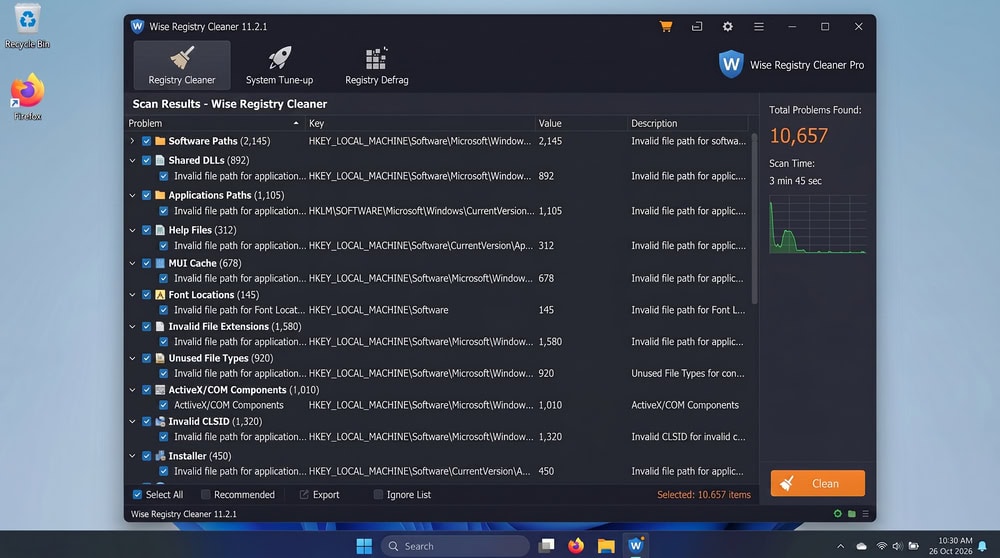
The feature set is focused but complete. Beyond the core scan, you get error fixing, registry defragmentation, automatic backups, restore-point creation, scheduling, and a system tune-up panel for startup and shutdown tweaks, all behind a single window with clearly labelled tabs.
Registry Cleaning, Defrag and System Tune-Up
The scan is the heart of the program. You choose between a Fast scan for common safe-to-remove entries, a Deep scan that digs further, and a Custom mode for picking exactly which registry areas to examine. On our test machine the Fast scan finished in well under a minute and flagged a few hundred invalid entries, which is typical after years of installing and removing software.
Results are colour-coded by safety. Entries marked safe to remove are clear, so cautious users can clean only those and leave anything ambiguous untouched. You can also exclude specific keys you never want touched.
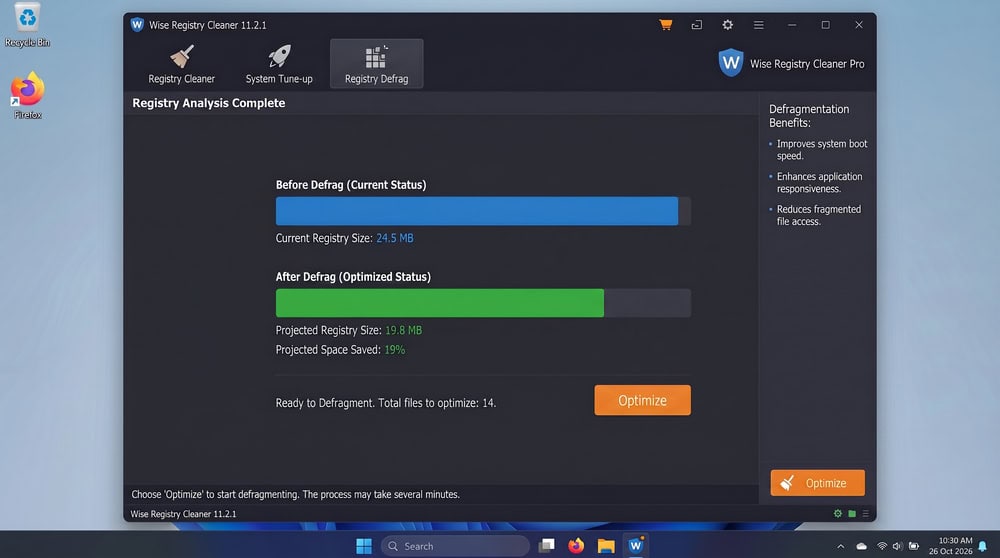
Registry defragmentation rewrites the registry to remove gaps after heavy cleaning. Full defragment and optimization sit in the Pro tier, while the free build handles core scanning and cleaning. The system tune-up panel adds a few registry tweaks for startup and shutdown behaviour, though these are minor adjustments.
Backups, Restore Points and Scheduling
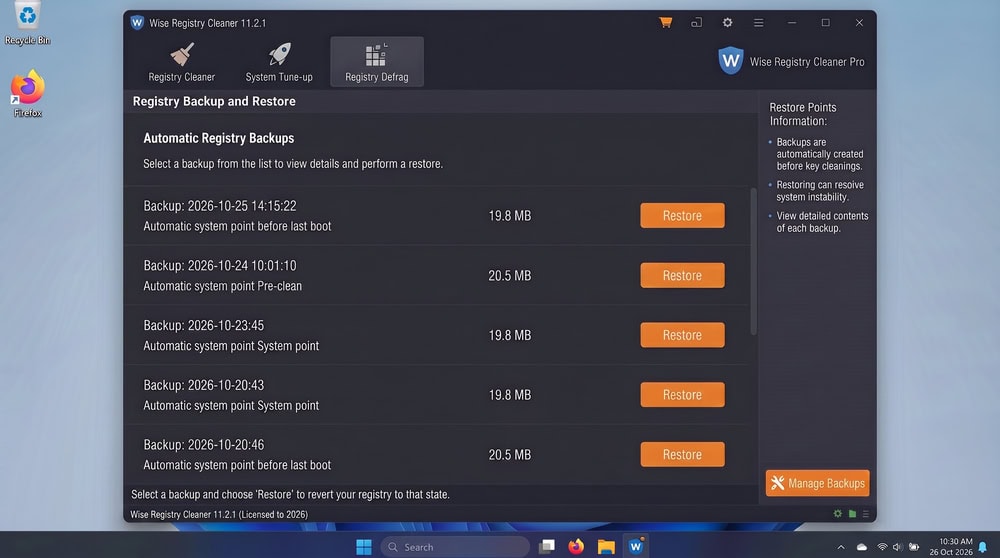
This is where Wise Registry Cleaner earns most of its trust. Before any change, it automatically backs up the registry and can create a full system restore point. If a cleanup ever causes a problem, you open the restore panel and roll the registry back. We tested this by restoring a backup, and the rollback completed without incident.
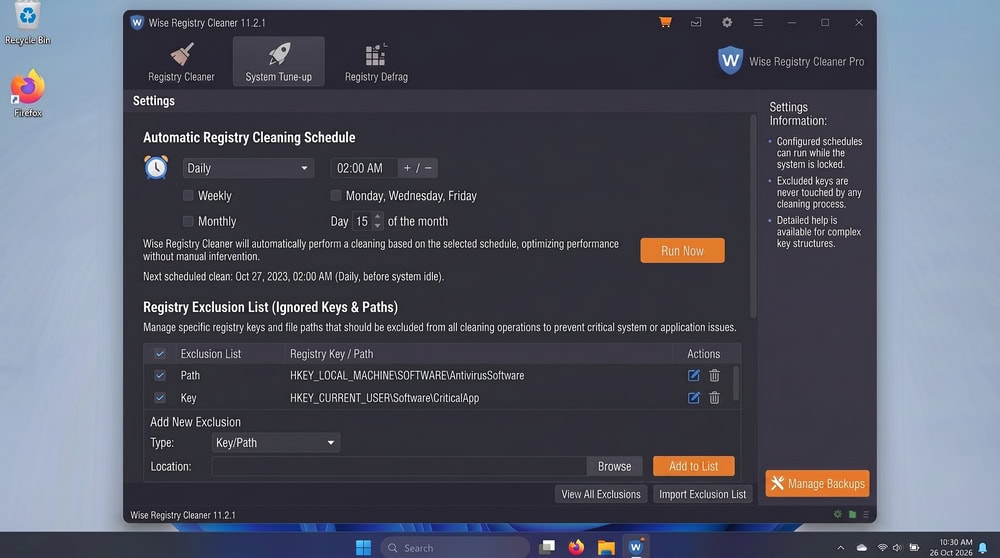
Scheduling is the other standout. You can set automatic scans on a daily, weekly, or monthly basis, ideal for anyone who would rather set maintenance once and forget it. The free version schedules for the current user; multi-profile cleaning is a Pro feature.
Interface and Ease of Use
The interface is one of the program's quiet strengths. It opens to a single uncluttered window dominated by a large scan button, with the other tools reachable from tabs along the top. There is no account sign-up; you install the 10.7 MB package, open it, and scan.
The defaults are sensible: most people can launch a Fast scan and clean the safe entries without touching a setting, while power users get the Custom scan and exclusion lists. The one blemish is the promotional box in the free version that points toward other WiseCleaner tools, which sits at odds with the otherwise clean layout.
Is Wise Registry Cleaner Safe and Legit?
Wise Registry Cleaner is a legitimate product from WiseCleaner and is not a scam. The software is signed, the free version is genuinely free, and the download comes directly from the official site. The "is it a scam" question in search results usually traces back to general suspicion of the registry-cleaner category, not anything specific to this tool.
Any tool that edits the registry deserves caution, since a bad change can cause boot or stability problems. Wise Registry Cleaner mitigates this with automatic backups and restore points, and in our testing we saw no harmful removals. The sensible approach is to clean the entries it marks as safe and keep backups enabled.
On performance, we have to be honest. Removing invalid entries produces little measurable speed difference on modern Windows, and our before-and-after testing showed no meaningful change in boot time or responsiveness. The real value today is keeping the registry consistent and resolving the occasional error tied to a stale entry, not a speed boost. User sentiment tracks with this: people praise the backups, scheduling, and price, while technical reviewers temper the speed claims.
Pricing: Is the Pro Version Worth It?
The core of Wise Registry Cleaner is free, covering registry scanning, cleaning, backups, restore points, and scheduling for the current user. For most people, that is enough on its own.
The Pro version is around $20 for the introductory first year and $29.95 on renewal, adding registry defragmentation and optimization, multi-profile cleaning, automatic program updates, and premium support. A 60-Day money-back guarantee gives you room to try the paid features risk-free.
Is Pro worth it? For a single-user home PC, the free version covers nearly everything you need, so the upgrade is optional. Pro makes more sense on a shared computer with several Windows accounts, or for someone who wants full registry defragmentation and priority support. We would not buy it for speed.
Download Wise Registry CleanerWise Registry Cleaner vs. the Competition
The right pick depends on whether you want a focused tool or a broad suite. The table below sets Wise Registry Cleaner against the competitors people ask about most, with Wise Care 365 as the same vendor's larger suite.
| Feature | Wise Registry Cleaner | CCleaner | Advanced SystemCare | Wise Care 365 |
|---|---|---|---|---|
| Invalid-registry cleanup | Yes | Yes | Yes | Yes |
| Registry defrag | Yes (Pro) | No dedicated | Limited | Yes |
| Registry error fixing | Yes | Yes | Yes | Yes |
| Auto backup / restore point | Yes (automatic) | Limited | Restore point | Yes |
| Scheduled cleaning | Yes | Yes | Yes | Yes |
| Free version | Yes | Yes | Yes | Yes |
| Paid price (annual) | ~$20 intro / $29.95 renewal | $44.95 | ~$39.95 list | ~$39.95 (1yr/3PC) |
| In-app ads / upsell | Yes | Yes | Yes | Yes |
| Scope | Registry only | Broad cleaner | Full optimizer | Full suite |
Wise Registry Cleaner vs. CCleaner
CCleaner casts a wider net: it cleans junk files, browser data, and the registry, with a Health Check dashboard tying it together. Its registry cleaner, though, is a secondary feature, and CCleaner Professional runs $44.95 a year against Wise Registry Cleaner's far lower price. For careful registry cleaning with automatic backups, Wise Registry Cleaner is more focused and affordable; if you want one tool for junk files and browsers too, our CCleaner review covers the broader option, and the CCleaner alternatives are worth weighing before you commit.
Wise Registry Cleaner vs. Wise Care 365 / Advanced SystemCare
Wise Care 365 is WiseCleaner's own all-in-one suite, bundling the same registry cleaner with disk cleaning, privacy tools, and system tune-up, at Pro pricing around $39.95 for a one-year, three-PC license. If you want more than registry maintenance, it is the natural step up, and the in-app promotion inside the free Registry Cleaner essentially points you toward it. Advanced SystemCare from IObit is the heavier full-system optimizer, currently at version 19, with one-click scans and real-time features; our IObit Advanced SystemCare review digs into where that weight pays off. For pure registry work, Wise Registry Cleaner stays lighter and more transparent than either suite.
Final Verdict: Should You Use Wise Registry Cleaner?
Wise Registry Cleaner is a solid, safe, and genuinely free tool for cleaning the Windows registry. It scans quickly, backs up before every change, schedules itself sensibly, and comes from a developer with a real track record. The in-app promotion is mildly annoying and the speed benefits are modest, but neither is a dealbreaker for a free utility.
We would recommend it to anyone who wants a careful, no-cost way to keep the registry tidy and resolve the occasional registry error, with its automatic backups making it low-risk to run. The Pro upgrade is worth it mainly for multi-user PCs or full registry defragmentation, not speed. Treat it as a tidy-up tool rather than a performance miracle, and it earns its place.
Frequently Asked Questions
Is Wise Registry Cleaner safe?
Yes. It automatically backs up the registry and can create a restore point before any cleanup, so you can roll back if a change causes a problem. In our testing it removed only entries it marked as safe.
Is Wise Registry Cleaner free?
Yes, the free version handles scanning, cleaning, automatic backups, restore points, and scheduling for the current user. Pro adds registry defrag, multi-user cleaning, and priority support.
Is Wise Registry Cleaner legit, or is it a scam?
It is legit. The software comes from WiseCleaner, an established Windows-utility developer, and downloads directly from the official site. Scam concerns stem from general skepticism toward registry cleaners as a category, not this product.
Does Wise Registry Cleaner actually speed up your PC?
Only marginally. On modern Windows, cleaning invalid entries produces little measurable speed change. Its real value is keeping the registry consistent and fixing the occasional error tied to a stale entry.
Wise Registry Cleaner vs CCleaner
For dedicated registry cleaning with automatic backups, Wise Registry Cleaner is more focused and cheaper. CCleaner is the better pick if you also want junk-file and browser cleaning in one tool, since its registry cleaner is only a secondary feature.

 Best Registry Cleaner
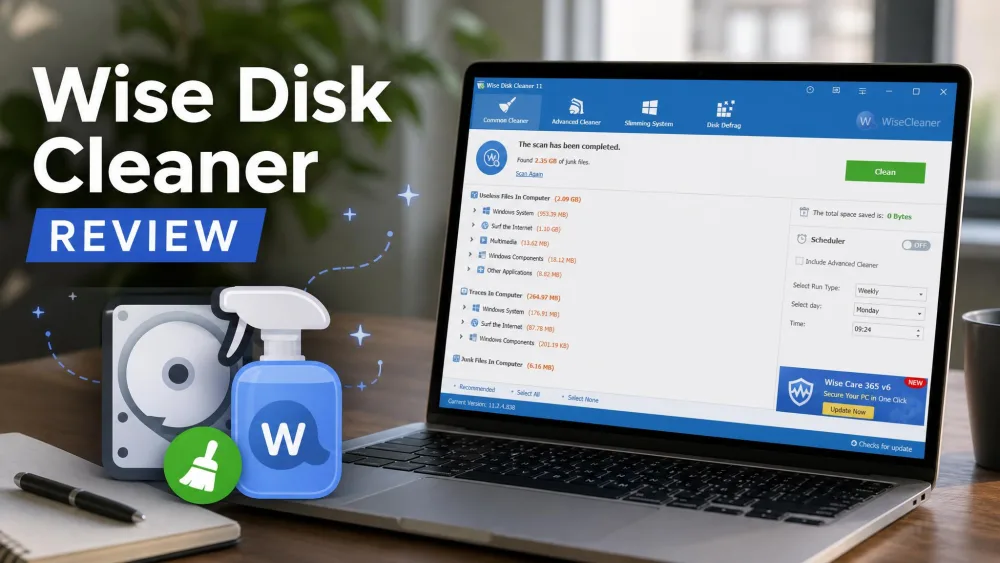 Wise Disk Cleaner Review
 Wise Disk Cleaner vs Advanced SystemCare
 CCleaner Review
 Glary Utilities Review
 Advanced SystemCare Review
 Best Computer Cleaner
 How to Repair a Slow PC