
Honest iKeyMonitor Review 2026: Is It Safe, Legit, and Worth It?
We tested iKeyMonitor for two weeks on a non-rooted Android phone and a jailbroken iPhone, logging every keystroke, call, and GPS ping it captured so you can decide whether it earns a spot on your shortlist. Across that fortnight we installed it twice, broke it once, and watched its dashboard fill with data that a competing parental-control app would have missed. The short version: iKeyMonitor is a serious surveillance tool with a generous free tier, but its parental-control polish lags the price-matched competition.
This review walks through the scorecard, the full feature set we tested, pricing, what real customers say on Trustpilot and Sitejabber, and how it stacks up against mSpy, uMobix, and XNSPY. We tested so you can buy with your eyes open.
iKeyMonitor Review: Quick Verdict & Rating
iKeyMonitor is one of the most data-hungry monitoring apps we have tested. It logs keystrokes across every app, records calls and ambient audio, captures screenshots, and pulls chat content from WhatsApp, Instagram, Telegram, and a long list of other platforms. For a parent or employer who wants raw visibility, that breadth is the main selling point.
The weaknesses are just as clear. The free plan keeps only your latest records, paid add-on pricing is fiddly rather than tiered, iOS needs a jailbreak, and the parental-control side, app blocking and screen-time limits, feels thin next to the surveillance side. That gap is exactly why our verdict lands as balanced rather than glowing.
Visit iKeyMonitorAffiliate disclosure: if you buy through the link above, we may earn a commission at no extra cost to you. It does not change our rating.
Our Test Scorecard (Features, Reliability, Dashboard, Value)
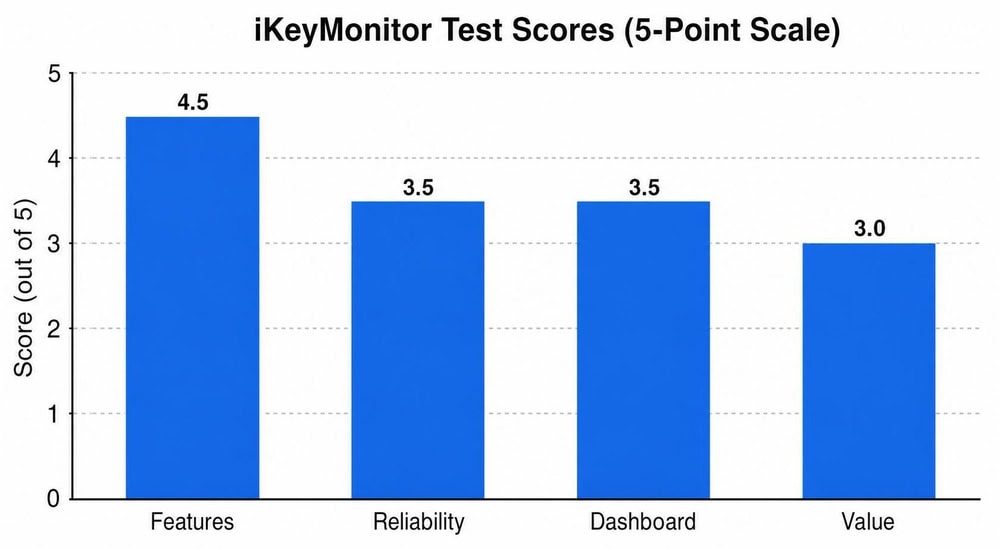
We score every monitoring app on four axes, each out of 5, then weight them into the overall figure. iKeyMonitor's profile is lopsided: it scores high where it captures data and lower where it asks you to pay or behave like a parental-control suite.
| Category | Score | What drove it |
|---|---|---|
| Features | 4.5/5 | Keylogger, call recording, ambient audio, and broad social-app capture |
| Reliability | 3.5/5 | Solid on Android; iOS depends on a jailbreak that can break on updates |
| Dashboard | 3.5/5 | Functional and data-dense, but dated next to rivals |
| Value | 3/5 | Free tier is real, yet add-on pricing is confusing and stacks up fast |
The Features score carries the verdict. The Value score is what drags it back toward the middle.
How We Tested iKeyMonitor
What Is iKeyMonitor and How Does It Work?
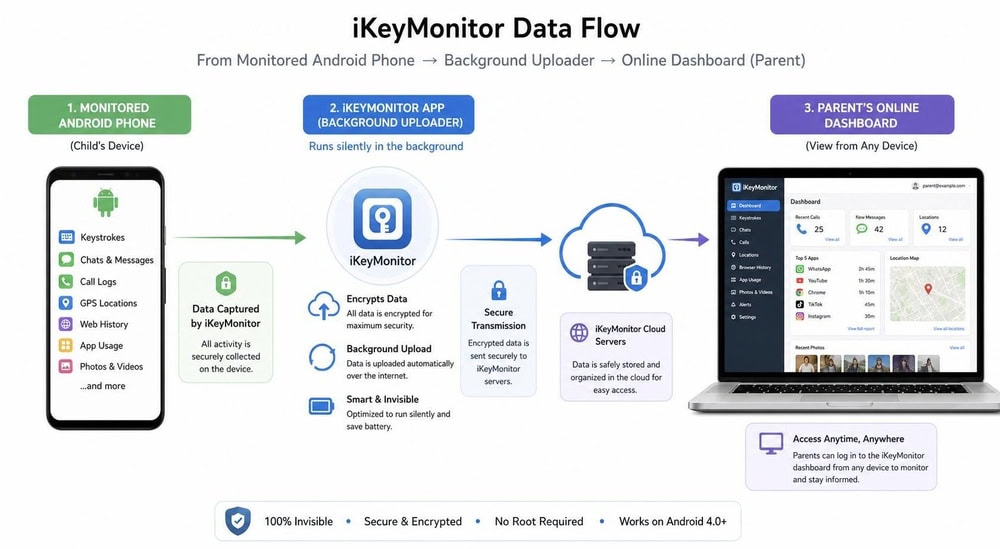
iKeyMonitor is a phone and computer monitoring app that installs on a target device, runs quietly in the background, and uploads what it captures to an online dashboard you log into from anywhere. At its core sits a keylogger that records typed text across apps, paired with capture modules for calls, messages, location, screenshots, and audio.
You install the app on the device you want to monitor, configure which features are active, then read the results remotely. The data flows on a schedule rather than instantly, so expect a short delay between an event on the phone and its appearance in your dashboard.
Supported Devices & Compatibility (Android, iOS, Windows, Mac)
iKeyMonitor runs on Android and iOS, and the company also sells a separate desktop product for Windows and Mac. For phone monitoring, which is what most buyers want, you are choosing between an Android install and an iOS install, and those two paths behave very differently.
On Android, installation is direct: you sideload the app onto the handset. The compatibility page lists both rooted and non-rooted Android as supported, and iKeyMonitor officially supports a wide range of Android versions going back several releases, though its own pages disagree on the exact minimum, so we would not lean on a single version floor. On iOS, the picture is clearer in one respect: the no-jailbreak edition has been discontinued, so iOS monitoring now requires a jailbroken device. The exact iOS ceiling is less settled, with official sources landing somewhere around iOS 14 to 15 and below, so check the live compatibility page for your handset before buying. The desktop builds for Windows and Mac target keystroke and screenshot logging on computers rather than phones.
Does It Require Rooting or Jailbreaking?
This is the question that trips up most buyers, so here is the honest answer. On Android, iKeyMonitor's core features, call history, SMS, and GPS, run without root. However, some advanced features, including full social-app capture and complete web history, have historically required a rooted Android device, despite marketing copy that suggests it works fully without root. Treat "no root needed" as true for the basics, not for everything.
On iOS, the on-device app requires jailbreaking. That is a meaningful hurdle: jailbreaks are version-specific, can be undone by an iOS update, and add a layer of fragility that the Android path does not have.
Is iKeyMonitor Legal and Safe to Use?
iKeyMonitor is a legitimate, long-running product from an established vendor, not malware, and it is safe in the sense that it does what it claims without hijacking your own device. "Legal" is the harder word. The app is legal to use on a device you own or on your minor child's phone; using it to monitor another adult without consent is illegal in most places.
On safety for the monitored device, the main practical risks we saw were battery drain and the jailbreak fragility on iOS. Neither makes the app unsafe to run, but both are worth weighing before you install.
iKeyMonitor Features Tested
iKeyMonitor's feature list is its strongest argument. We tested the headline modules on real conversations and calls rather than trusting the spec sheet, and this is where the app earns its 4.5 Features score.
Keylogger & Keyword Alerts
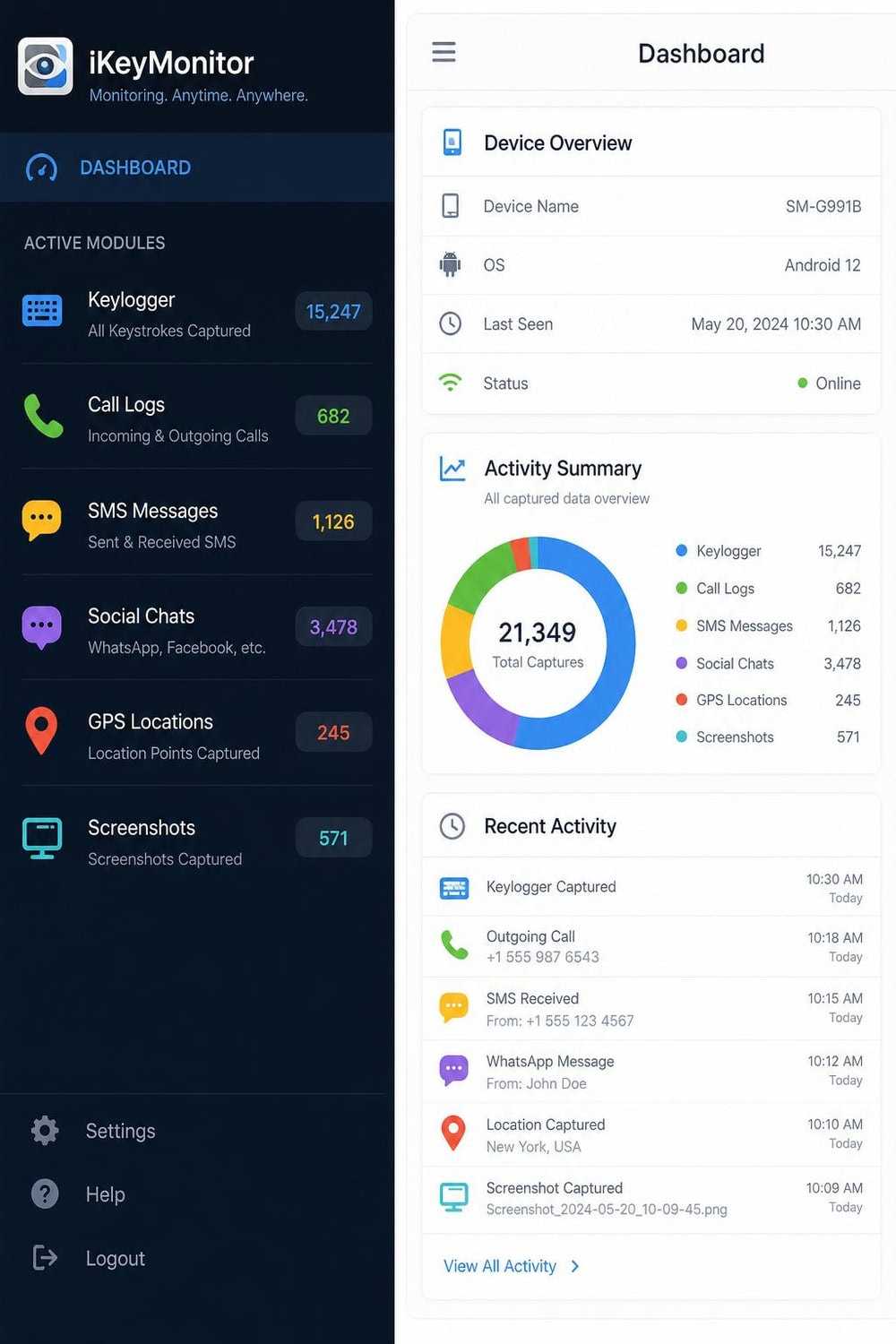
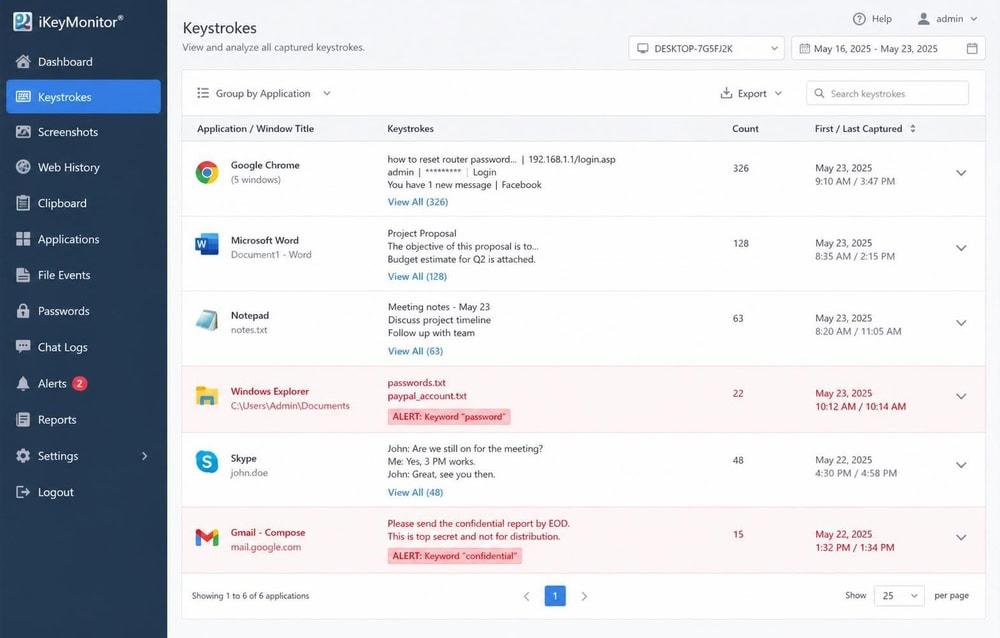
The keylogger is the heart of the product, and it performed well in our tests. It captured typed text across the apps we tried, including search boxes and chat fields, and tagged each entry with the app it came from. Keyword alerts let you set trigger words so the app flags risky terms instead of forcing you to read every log line.
In practice the alerts are the more useful half for parents, because they turn a wall of captured text into a short list of things worth checking. We set a handful of trigger words and got notified each time one appeared.
Call Logs & Call Recording
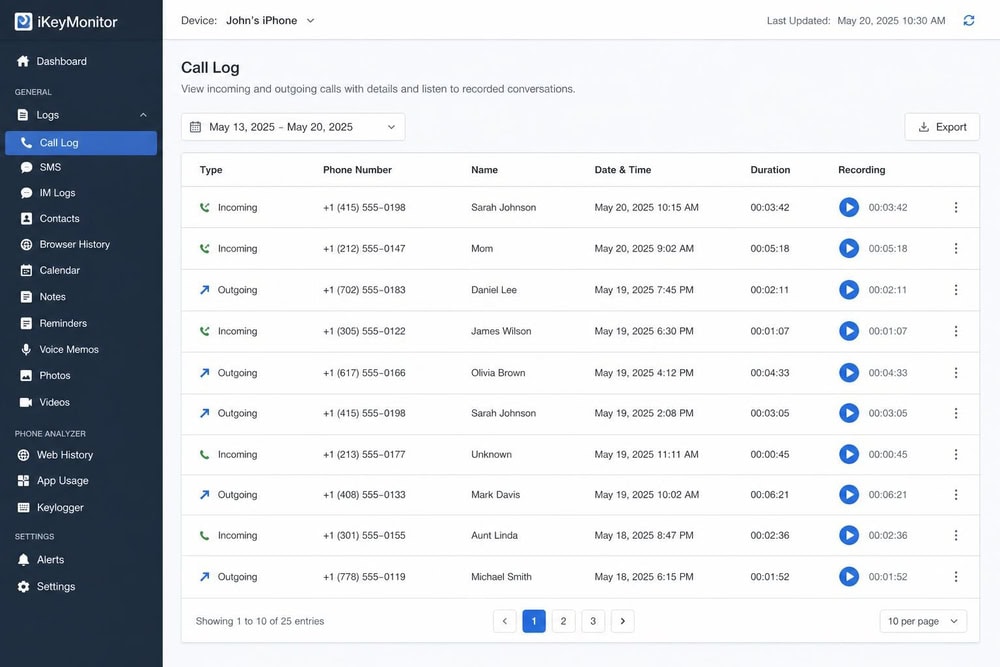
iKeyMonitor logs incoming and outgoing calls with numbers, timestamps, and duration, and its built-in call recorder captures the audio of the calls themselves. Call recording is a genuine differentiator, because several rivals log call metadata but stop short of recording the conversation.
Recording quality was clear on our Android test calls. As with everything here, recording calls without consent carries legal weight, so the warning above applies double to this feature.
SMS and Social Media Chat Monitoring (WhatsApp, Instagram, Telegram)
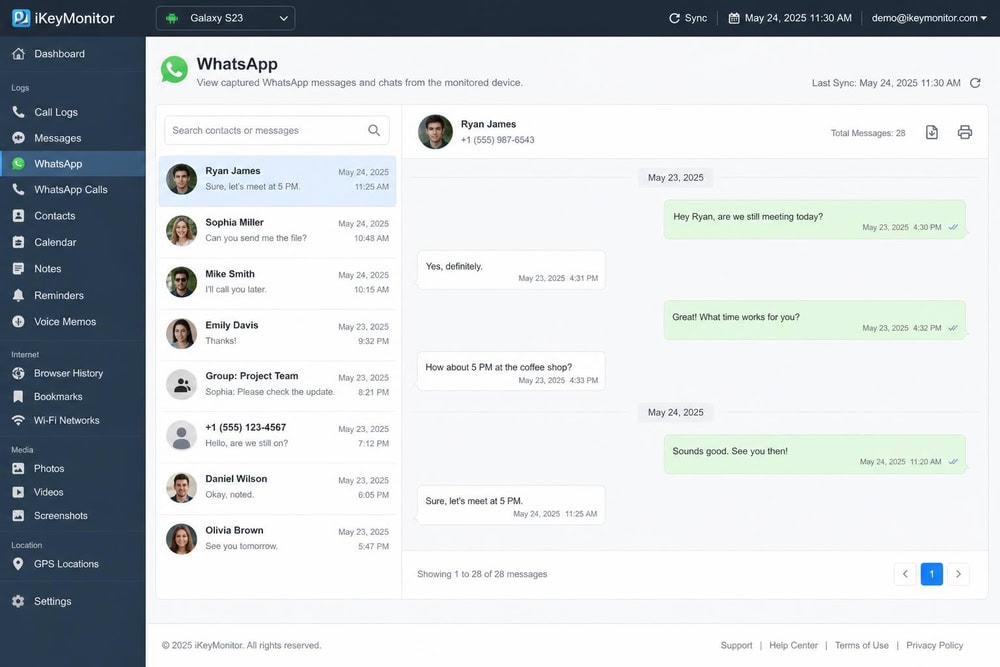
iKeyMonitor reads SMS and pulls chat content from a long list of social and messaging apps, including WhatsApp, Facebook, Instagram, Telegram, WeChat, and KakaoTalk. In our tests it captured the messages we sent and received on WhatsApp, Instagram, and Telegram, though full social capture on Android leaned on the root-dependent advanced features rather than the no-root core.
GPS Location Tracking & Geofencing
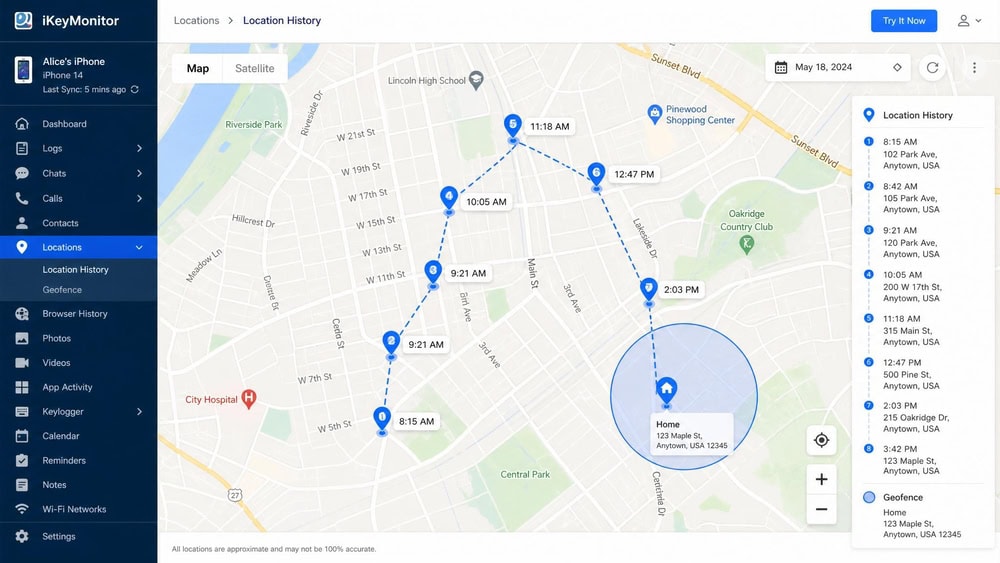
GPS tracking plots the device's location on a map with timestamps, and geofencing lets you draw zones, home, school, work, and get alerted when the phone enters or leaves them. We drove a short test route and the location history matched it closely, with the expected small lag between movement and dashboard update.
Geofencing is the feature that makes location data actionable for parents, because it replaces constant map-watching with a single alert when it matters.
Screenshots & Screen Recording
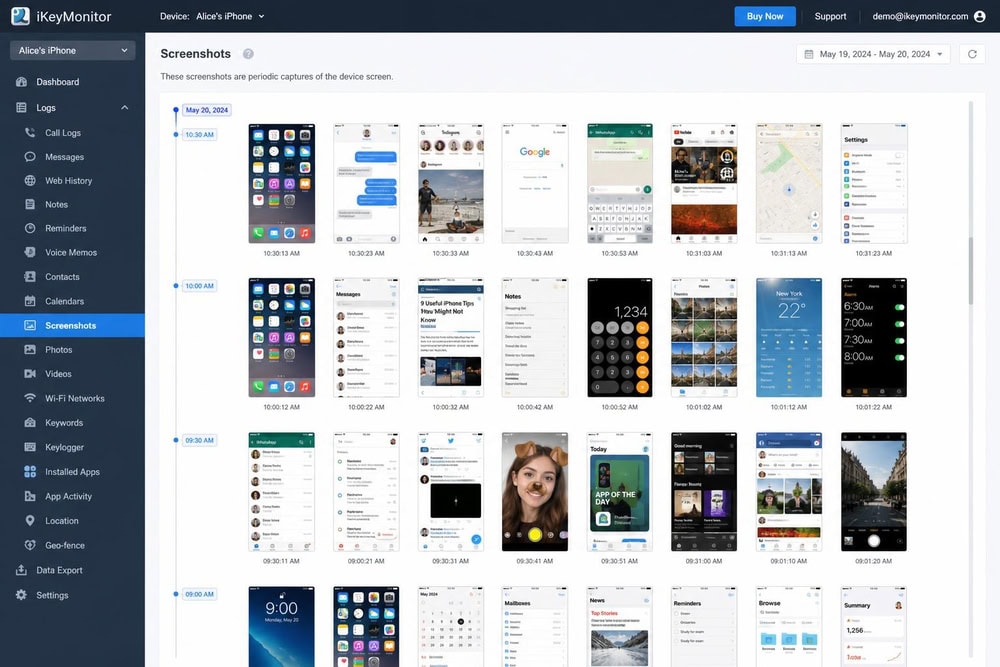
iKeyMonitor takes periodic screenshots of the target device and can capture live screen video, so you see not just what was typed but what was on screen. Screenshots fired on schedule in our testing and landed in the dashboard as a browsable timeline.
This is one of the more invasive features in the suite, and it is also one of the heavier on battery and data, so we left it off except during dedicated test windows.
Ambient / Surround Recording
Ambient recording activates the device microphone to record the surroundings, not just calls. It worked as described on our Android handset, capturing room audio on demand. It is powerful and, predictably, the feature most likely to cross a legal line, so reserve it for clearly lawful use.
Web History & Website Blocking
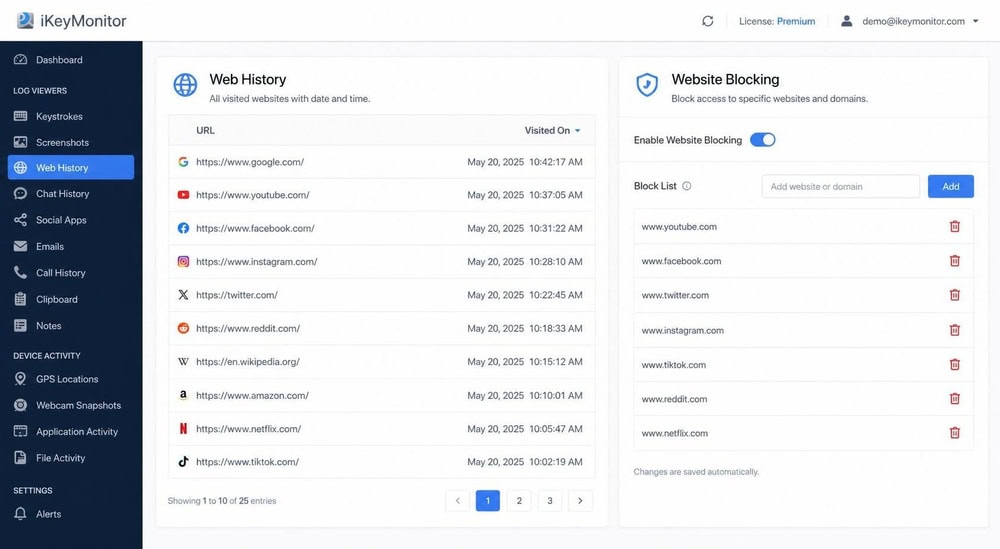
iKeyMonitor logs visited websites and lets you block specific sites, giving you both a record of browsing and a basic content filter. Web history capture was reliable for standard browsing in our tests, though, like full social capture, complete history on Android leaned on the advanced root-dependent path.
Website blocking is competent but basic next to dedicated parental-control suites, which is the recurring theme on the parental-control side of this app.
App Blocking & Screen Time Limits
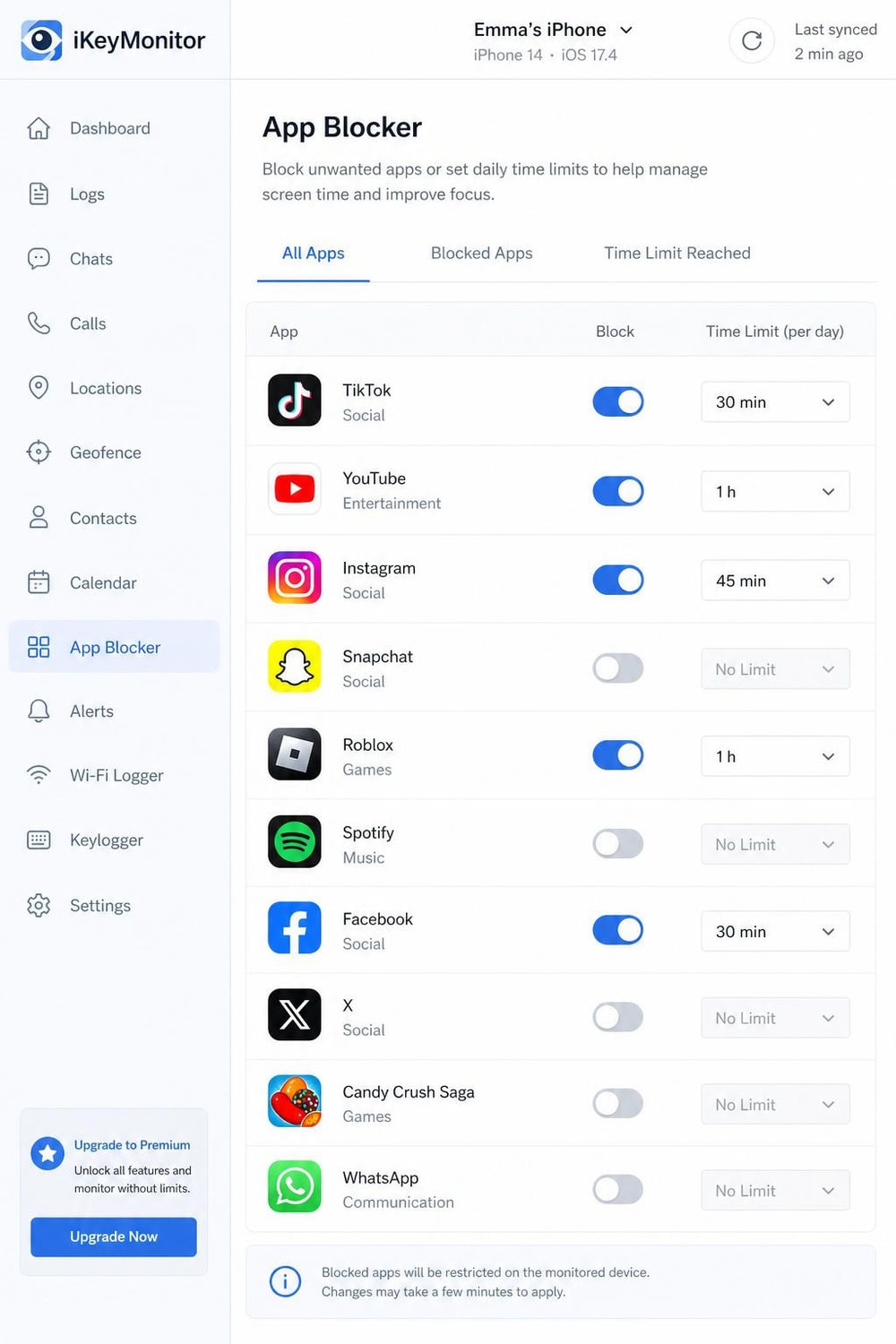
App blocking and screen-time limits are where iKeyMonitor feels least developed. The controls exist, but they are coarser than what purpose-built parental apps offer, and one third-party reviewer found app blocking missing entirely in their testing. If clean app blocking and scheduling are your priority, this is the weakest part of the product, and it is the main reason our parental-control verdict is muted.
Installation & Setup
Installation difficulty depends almost entirely on the platform. Physical access to the target device is required for every install, so plan for a few uninterrupted minutes with the phone in hand. Below is how each platform actually went for us.
How to Install iKeyMonitor on Android
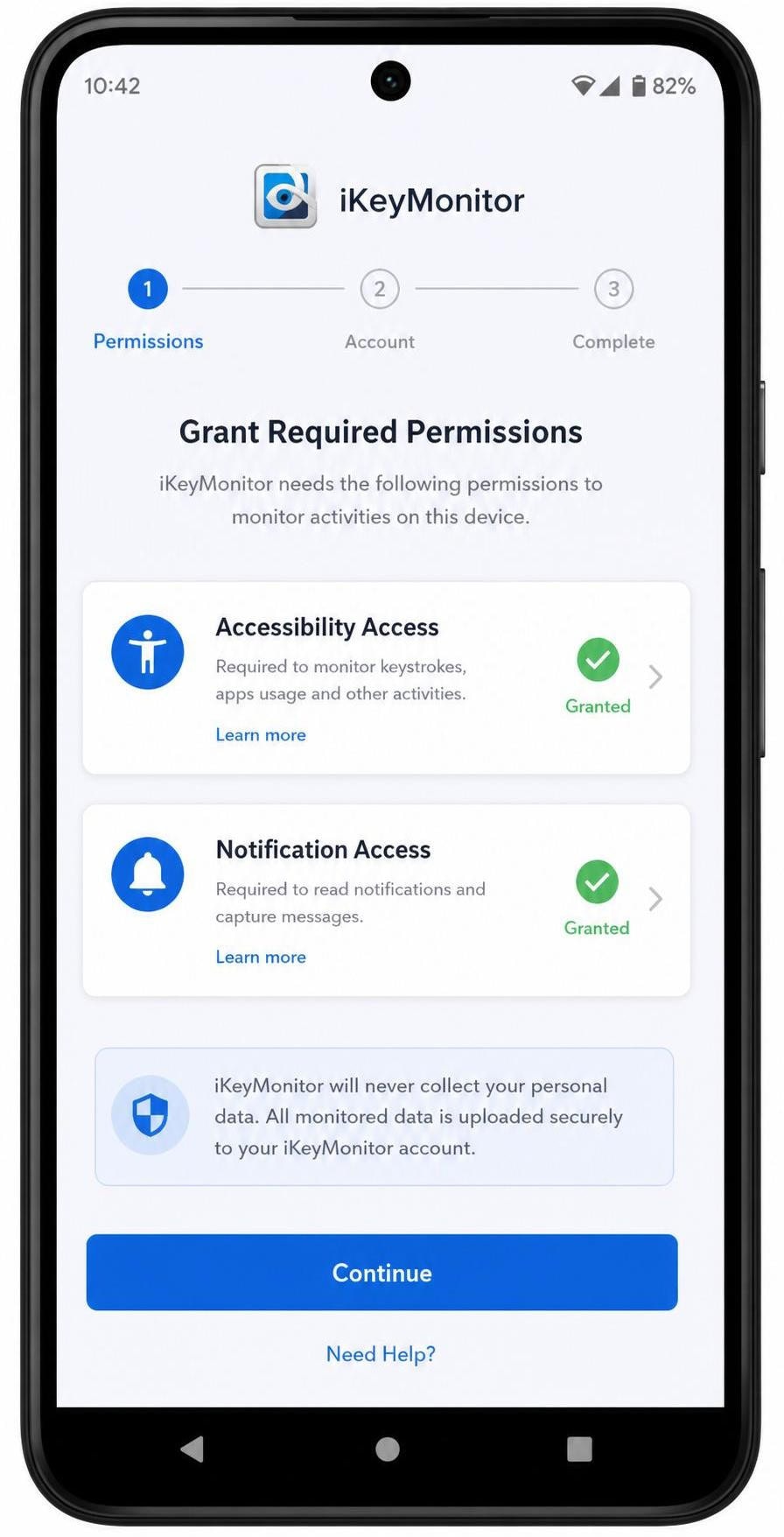
On Android, you sideload the app and grant it the permissions it needs. To install, enable installation from unknown sources, download the app to the target phone, then open the installer and grant accessibility and notification access when prompted. Core monitoring runs without root from there; rooting comes into play only if you need the advanced social and web features.
Setup took us under ten minutes on the test handset, not counting the optional rooting step.
How to Install iKeyMonitor on iOS
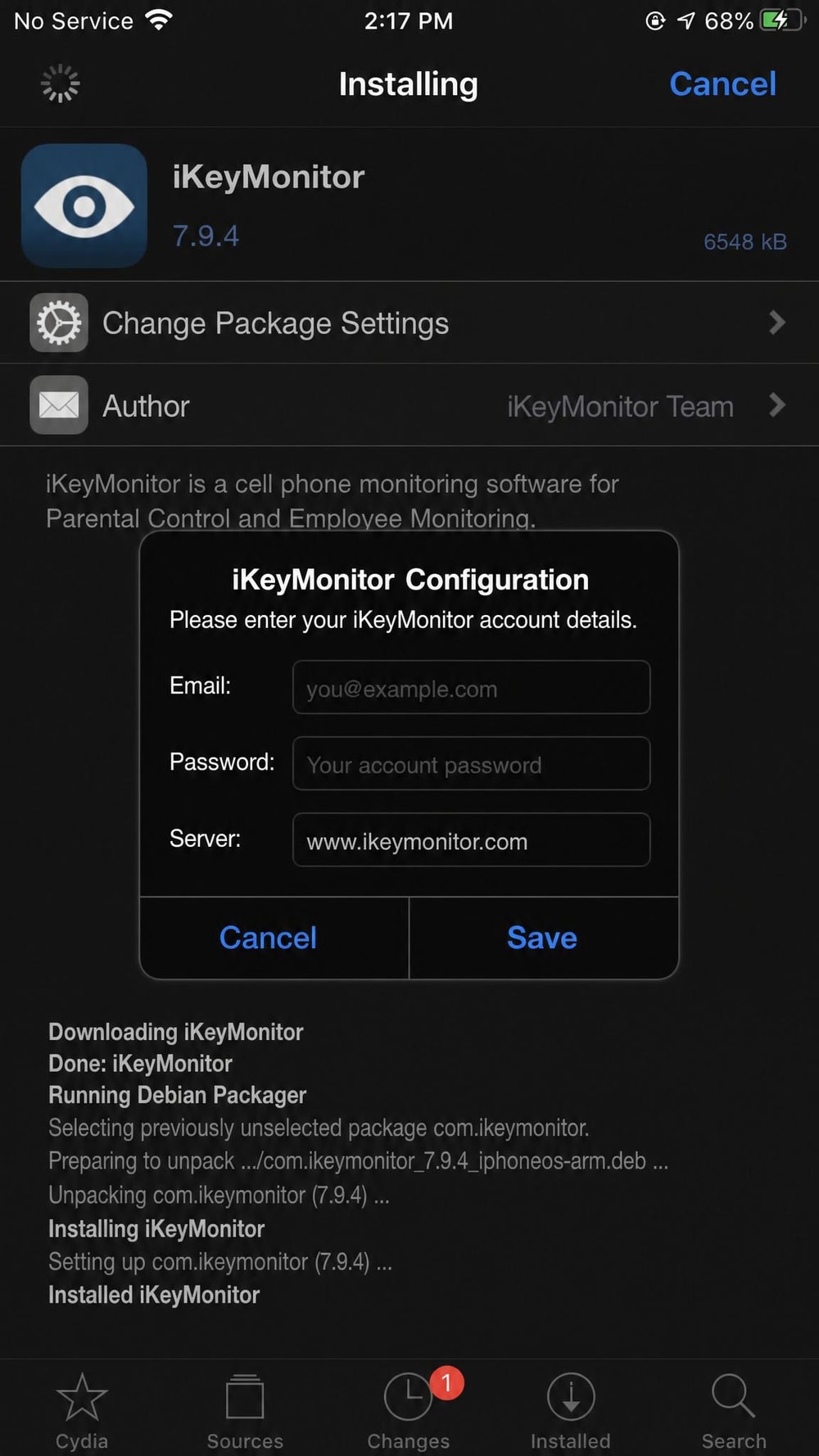
On iOS, the on-device app requires a jailbreak, which makes this the harder install by a wide margin. To set it up, jailbreak the target iPhone for your iOS version, then install iKeyMonitor through the jailbreak's package manager. The fragility is real: an iOS update can undo the jailbreak and stop monitoring until you redo it.
How to Install iKeyMonitor on Windows/Mac
The desktop product is a separate install aimed at computers rather than phones. To set it up, download the Windows or Mac build onto the computer you own and run the installer with administrator rights to enable keystroke and screenshot logging. This path is best thought of as a different product that shares the iKeyMonitor name.
Dashboard & Ease of Use
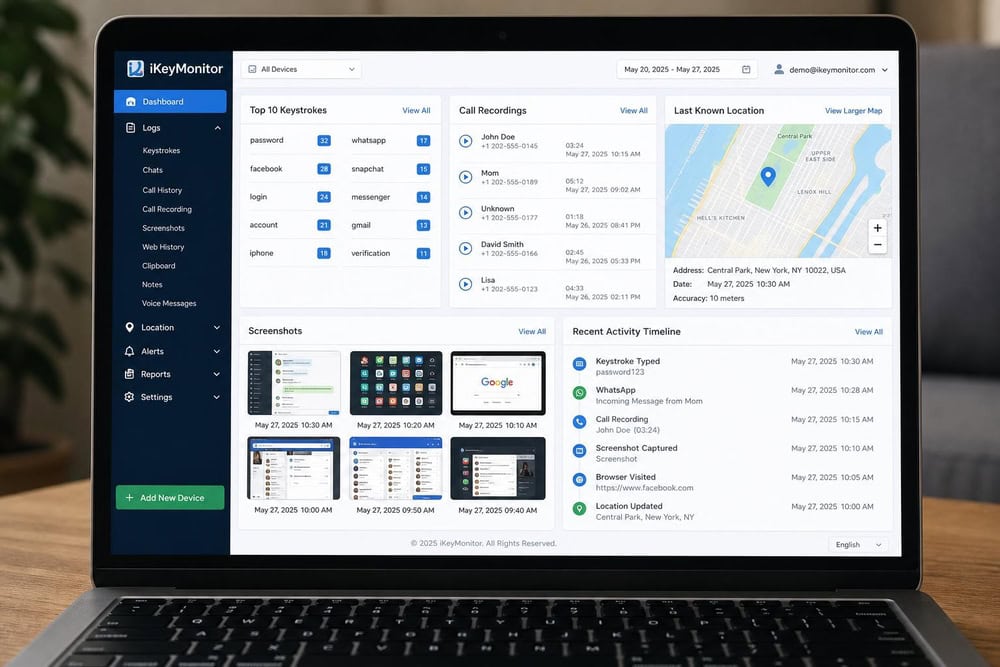
iKeyMonitor's dashboard is functional and dense rather than slick. Every captured module gets its own panel, and the data is all there, but the interface looks dated next to the cleaner consoles mSpy and uMobix ship today. We never got lost, yet we never felt the design was helping us either.
For a power user who wants raw data, the density is a feature, not a flaw. For a parent who wants a calm weekly summary, it asks more effort than the friendlier rivals.
iKeyMonitor Pricing & Plans
iKeyMonitor's pricing is the most confusing part of the product, and it is the main reason its Value score sits at 3 out of 5. Instead of a clean ladder of tiers, you get a free plan plus add-ons you stack to unlock features. Here is how the money actually works.
Free Plan vs Paid Plans
The free plan is genuinely free, "forever," with no credit card, and it monitors call history, SMS, and GPS only. The catch is the cap: the free plan saves only your latest 20 log records, so older data rolls off as new data arrives. It is enough to evaluate the app, not enough to rely on.
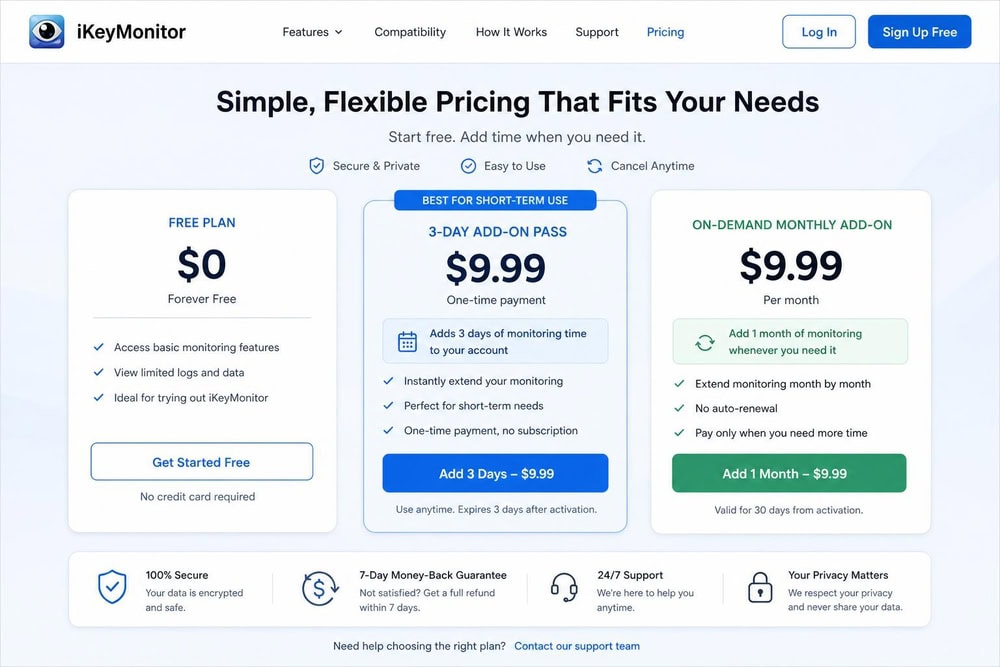
To go further, you buy add-ons. Full-feature access starts at $9.99 for a 3-day pass, and on-demand add-on features run from roughly $16.66 per month, which we treat as an approximate starting price rather than a fixed tier. There is also a self-hosted business plan at $10 per month per device, billed annually with a 25-device minimum.
One source of confusion worth flagging: several third-party aggregators describe named iKeyMonitor plans, "Logger," "Social Monitor," and "Voice Recorder," priced around $29.99 per month. We could not confirm those named tiers on iKeyMonitor's official purchase page, which instead shows the free plan, the on-demand add-ons ($9.99 for 3 days and from roughly $16.66 per month), and the self-hosted business plan. A $29.99 one-month price point does surface on iKeyMonitor's own blog, but as an unnamed package rather than a labeled tier, so we treat the named-tier pricing as reported by review sites rather than confirmed official pricing.
Is There a Money-Back Guarantee?
iKeyMonitor advertises a 30-day money-back guarantee, but read the condition before you count on it. The refund applies only if the app does not work and support cannot fix the problem within 30 days. It is a "we will make it right or refund you" guarantee, not a no-questions-asked satisfaction refund, so do not buy expecting to change your mind freely.
iKeyMonitor Pros and Cons
The balance below is the whole review in miniature: a strong surveillance core weighed against weak parental controls and awkward pricing.
Pros
- Deep, wide-ranging surveillance: keylogger, call recording, and ambient audio in one app
- Broad social-app capture across WhatsApp, Instagram, Telegram, and more
- A genuinely free "forever" plan with no credit card required
- Built-in call recording, which several rivals lack
- Cheap $9.99 three-day pass to trial full features
Cons
- Weak app blocking and screen-time limits versus dedicated parental apps
- iOS requires a jailbreak, which is fragile and breaks on updates
- Confusing add-on pricing instead of clean tiers
- Free plan keeps only the latest 20 records
- Battery drain on the monitored device with heavy features enabled
What Real Customers Say (iKeyMonitor User Reviews & Ratings)
Customer sentiment matters more here than usual, because the SERP for this app is dominated by review aggregators and user forums. We read across them so the picture below reflects buyers, not just our two-week test.
Trustpilot & Sitejabber Sentiment Summary
On iKeyMonitor's Trustpilot reviews, the app holds about a 4-star score across roughly 110 to 115 reviews; review counts shift over time, so we attribute the figure to Trustpilot rather than freezing a number. On Sitejabber, iKeyMonitor carries 3.8 out of 5 stars from 45 reviews, with about 91% of reviewers saying they would recommend it. Among third-party testers, scores diverge widely, with one reviewer rating it 8.8 out of 10 and the often-cited WizCase score landing lower at 7.1 out of 10, so we lean on our own hands-on result rather than any single external grade.
Those numbers track our experience: people who want raw monitoring data tend to be satisfied, which is roughly the demographic that matters here given that over half of U.S. parents now monitor their kids online.
Common Complaints (Refunds, Tracking Stops, Battery Drain, Stealth)
The recurring complaints are consistent across reviews and match what we saw. Battery drain on the monitored device is the most common gripe, especially with screenshots and ambient recording active. The conditional refund policy frustrates buyers who expected a no-questions-asked guarantee. Tech-savvy users report that the app's stealth can be spotted on close inspection, and the iOS jailbreak requirement draws steady criticism. We also saw the add-on pricing model named as a source of confusion more than once.
iKeyMonitor vs Alternatives
iKeyMonitor does not compete in a vacuum. mSpy, uMobix, and XNSPY all chase the same buyer, and each makes a different trade. The table below lines up the features that decide most purchases, with prices treated as approximate starting points that shift with promotions and currency.
| Feature | iKeyMonitor | mSpy | uMobix | XNSPY |
|---|---|---|---|---|
| Entry price | Free plan; add-ons from $9.99/3 days | ~$11.67/mo (annual, intro) | ~$12/mo (annual) | $59.99/yr Basic (~$4.99/mo) |
| 1-month price | from ~$16.66/mo (add-on) | $48.99 | $49.99 | $35.99 Premium (official) |
| Platforms | Android, iOS (+ Win/Mac) | Android, iOS | Android, iOS | Android, iOS |
| Keylogging | Yes (all apps) | Yes | Yes | Premium only |
| Social-app monitoring | Yes | Yes | Yes | Yes |
| Call & SMS tracking | Yes (+ call recording) | Yes | Yes | Yes (recording Premium) |
| GPS / geofencing | Yes / Yes | Yes / Yes | Yes | Yes |
| Stealth / hidden mode | Yes | Yes | Yes (no Android icon) | Yes |
| Root / jailbreak | Core no-root; full social needs root; iOS jailbreak | No root for most; iOS via iCloud | No root; iOS via iCloud | Some features need root; iOS via iTunes |
| Customer support | Email/ticket | 24/7 live chat | 24/7 live chat | Live chat/email |
iKeyMonitor vs mSpy
mSpy is the closest rival and the cleaner all-rounder. It captures a similar feature set, but its iOS path runs through iCloud credentials without a jailbreak, and its dashboard and support feel more polished. iKeyMonitor counters with its free plan, built-in call recording, and ambient audio, none of which mSpy matches as cheaply. If you want the smoothest setup, mSpy wins; if you want the deepest capture for the least money, iKeyMonitor holds its ground. You can read our full mSpy review for the detail.
Other Top Monitoring Apps Compared
uMobix leans on a slick, fast-refreshing dashboard and a no-root Android install with an iCloud-based iOS path, which makes it the friendlier choice for non-technical buyers, though it lacks iKeyMonitor's free tier; see our uMobix review. XNSPY undercuts everyone on annual price, but it gates keylogging and call recording behind its Premium tier and needs root for the heavier features, so its low headline cost is less of a bargain once you add what iKeyMonitor includes by default.
Verdict: Is iKeyMonitor Worth It?
iKeyMonitor is worth it for a specific buyer: someone who needs deep, wide-ranging surveillance data, values built-in call and ambient recording, and is willing to navigate fiddly add-on pricing to get it. For that person, few apps capture more for the money, and the free plan lets you confirm the fit before paying.
It is not worth it if your real goal is tidy parental control, app blocking, screen-time scheduling, and a friendly weekly summary, because that side of the product trails the competition, and the iOS jailbreak requirement adds friction that mSpy and uMobix avoid. That split is why we land on a balanced 3.6 out of 5: strong surveillance, weak parental controls.
Try iKeyMonitorAffiliate disclosure: we may earn a commission if you purchase through this link, at no extra cost to you.
Frequently Asked Questions
Is iKeyMonitor really free?
Yes, iKeyMonitor offers a genuinely free plan with no credit card required, but it is limited. It monitors only call history, SMS, and GPS, and it keeps just your latest 20 log records, so older data rolls off as new captures arrive. To unlock the keylogger, call recording, and social-app capture, you buy paid add-ons starting at $9.99 for a 3-day pass.
Does iKeyMonitor work without rooting or jailbreaking?
On Android, the core features, call history, SMS, and GPS, work without root, but full social-app capture and complete web history have historically needed a rooted device. On iOS, the on-device app requires a jailbreak, so there is no fully no-root, no-jailbreak path to every feature.
Can iKeyMonitor be detected on the target phone?
iKeyMonitor runs a stealth, hidden mode and can convert to a system app on Android, so it stays out of sight for most users. However, several tech-savvy reviewers report that close inspection can reveal it, so treat its stealth as strong rather than perfect.
Do I need physical access to install it?
Yes. Physical access to the target device is required to install iKeyMonitor on every platform. Plan for a few uninterrupted minutes with the phone or computer in hand to complete setup and grant the necessary permissions.
Does iKeyMonitor cause battery drain?
Some battery drain is the most common complaint we saw, and it tracks our testing. Lightweight features like call and SMS logging have little impact, but screenshots, screen recording, and ambient audio noticeably increase battery use on the monitored device, so enable the heavy features only when you need them.
Is iKeyMonitor safe and legal to use?
iKeyMonitor is a legitimate, established product and is safe in the sense that it does what it claims. Whether your use is legal depends on consent: monitoring your own device or your minor child's phone is generally lawful, while secretly monitoring another adult is illegal in most jurisdictions. Check your local law before you install.

 mSpy Review
 UMobix Review
 Cocospy Review
 Spyera Review
 SpyFone Review
 Highster Mobile Review
 HoverWatch Review
 Best Android Monitoring Apps