
Can Someone See You Through Your Phone Camera? Signs, Risks, and How to Stop It

The thought that someone could be watching you through your phone camera is unsettling, but in most cases there are clear signs you can check for. So can someone see you through your phone camera? Yes, it is technically possible, though for the average person it is uncommon and usually requires malware or spyware on the device first. The good news is that a hijacked camera tends to leave fingerprints: indicator lights, battery drain, and odd data usage among them. In this guide, we'll cover how camera spying works, the warning signs to look for, how to check your permissions on iPhone and Android, and the steps that stop the spying.
Can Someone Actually See You Through Your Phone Camera?
The short answer
Yes, someone can see you through your phone camera, but only if they first get malicious software onto your device or trick you into granting access. Your camera is not open to the internet by default. For a remote attacker to watch you, something on the phone has to capture the feed and send it somewhere, and modern operating systems make that hard to do silently. That is why a truly hijacked camera is far less common than the worry suggests, and why it usually leaves traces.
It helps to separate two fears. One is a targeted attacker, such as an abusive partner, who installs stalkerware on your unlocked phone. The other is opportunistic malware that spreads through bad apps or phishing links. Both call for the same response: check the signs, then lock the device down.
How camera hijacking (camfecting) works
Camfecting is the term for remotely hijacking a device's camera, typically through malicious apps, spyware, phishing links, unsecured Wi-Fi, physical access, or zero-click exploits. The principle is simple: software gains camera permission, then quietly turns the lens on and records what it sees. Because the camera and microphone draw power and move data, that activity often shows up as battery drain or a usage spike.
How Hackers Gain Access to Your Phone Camera
Each access method leaves a different trail, which makes the warning signs easier to read. Cyber-enabled crime is common: the FBI's Internet Crime Complaint Center (IC3) logged a record $16.6 billion in reported losses in 2024. Here is how attackers get in.
Malicious apps, spyware, and stalkerware
The most common route is software the user installs without realizing what it does. A flashlight app that demands camera access, a cracked game, or a "system update" sent by text can all carry spyware. Stalkerware is a nasty subset, sold as monitoring software but used to spy on partners.
The scale is larger than most people assume. Kaspersky found that 31,031 unique users worldwide were affected by stalkerware in 2023, up from 29,312 the year before, and detected 195 different stalkerware apps. Russia led with 9,890 affected users, and the app TrackView reached 4,049 users globally. The Coalition Against Stalkerware has roughly estimated real-world use could be close to one million instances a year, so treat the reported figures as a floor.
Phishing links and "camfecting"
A tap on the wrong link can be all it takes. Phishing messages posing as a delivery notice or a bank alert can route you to a page that drops malware or harvests a login. Once an attacker controls the right credentials, the camera becomes reachable. This is the everyday version of camfecting, far more common than the cinematic, no-touch hack.
Unsecured Wi-Fi and network attacks
Public Wi-Fi is convenient and risky. On an open network, an attacker on the same connection can intercept traffic or push you toward malicious pages. Such attacks rarely flip your camera on by themselves, but they reliably plant the malware that does. A trusted VPN closes most of this gap.
Physical access to your device
The fastest way to compromise a phone is to hold it. Someone who knows your passcode, or catches you with the phone unlocked, can install monitoring software in minutes. This is the classic stalkerware scenario, and it is why a strong, private passcode matters.
Zero-click exploits
At the high end sit zero-click exploits, which infect a device with no user interaction at all, no tap and no link. The best-known example is NSO Group's Pegasus, a piece of zero-click spyware that can silently turn on a device's camera and microphone. These tools are expensive and generally aimed at journalists and officials rather than ordinary users, and keeping your operating system patched is the best defense, since zero-click attacks rely on unfixed flaws.
Signs Someone Is Watching You Through Your Phone Camera
No single clue proves you are being watched, but a cluster of these warning signs is a strong red flag. Run through the list and count how many apply.
1. The camera indicator light turns on unexpectedly
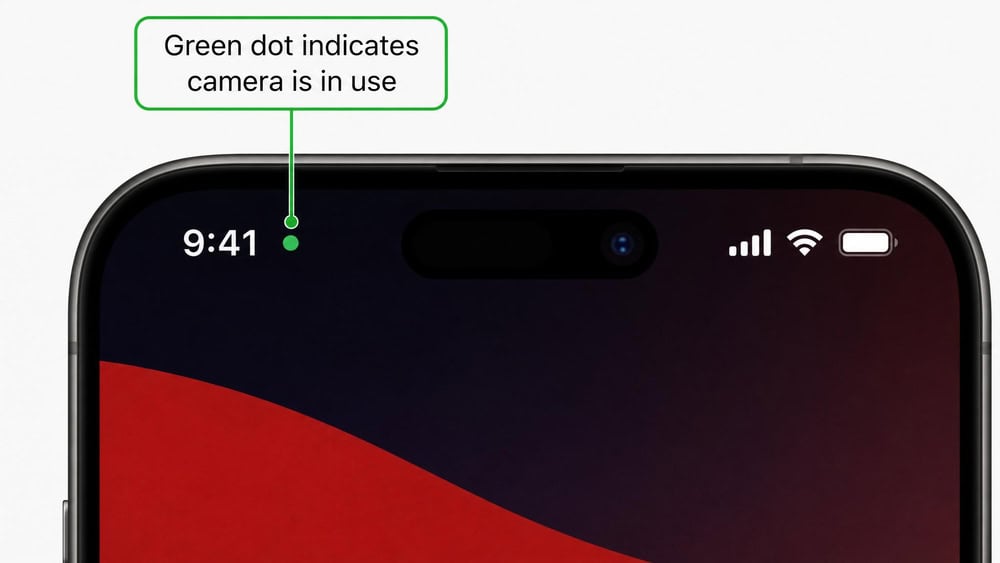
Modern phones tell you when the camera is live. On iPhone, a green indicator in the status bar means the camera is in use, while orange means only the microphone is active. These status-bar indicators arrived with iOS 14. On Android 12 and up, a green indicator appears in the top-right corner whenever an app uses the camera or microphone; swipe down to see which app it is.
If that indicator comes on while you are not using the camera, take it seriously. On an up-to-date phone the indicator is hard to bypass, so a light with no obvious cause is one of the clearest signals you have. Older or unpatched devices deserve more caution, since historic exploits could sometimes dodge it.
2. Unfamiliar apps with camera permissions
Scroll through your installed apps and watch for anything you do not remember adding, especially generically named ones like "System Service" or "Device Health." Spyware often hides behind a bland name and a plain icon. An unknown app that holds camera permission deserves a closer look.
3. Photos or videos you didn't take
Open your camera roll and look for images or clips you have no memory of capturing. Spyware that operates the camera sometimes saves test shots. Pictures of unfamiliar surroundings, or shots timestamped when the phone was on a table, are a red flag.
4. Unusual battery drain or overheating
Running the camera in the background is power-hungry, so spyware frequently shows up as battery drain. If your phone suddenly cannot make it through the day, or feels warm when idle and not charging, something is working hard behind the scenes. Battery drain alone is not proof, since aging batteries cause it too, but paired with other signs it matters.
5. Higher-than-normal data usage
Captured video and audio have to be uploaded somewhere, and that uses data. A sudden, unexplained jump in data usage can be a clue that something is transmitting in the background. To check this on iPhone, open Settings → Cellular and review per-app data use for anything out of place. Treat a spike as a possible indicator rather than proof, since ordinary apps also spike after an update or a week of heavy streaming.
6. The phone behaves oddly (reboots, slow shutdown, background activity)
Spyware running quietly can make a phone act strangely. Random reboots, a slow shutdown, screens that light up on their own, or general sluggishness can all point to unwanted software competing for resources. On its own this is weak evidence, but combined with battery and data clues it strengthens the case.
7. Poor performance during video calls
If your video calls have become laggy or stuttery on a connection that used to be fine, a background process may be sharing the camera. When two apps fight for the same lens and bandwidth, call quality often suffers first.
8. Strange sounds during calls
Clicking, echoing, or faint static during calls is sometimes cited as a sign of interception. Modern digital networks make this unreliable on its own, since bad reception causes the same noises. Still, if odd sounds appear alongside the signs above, add it to the pile.
How to Check Your Camera Permissions
Reviewing which apps can reach your camera is the fastest way to spot trouble, and the steps differ slightly by platform.
On iPhone
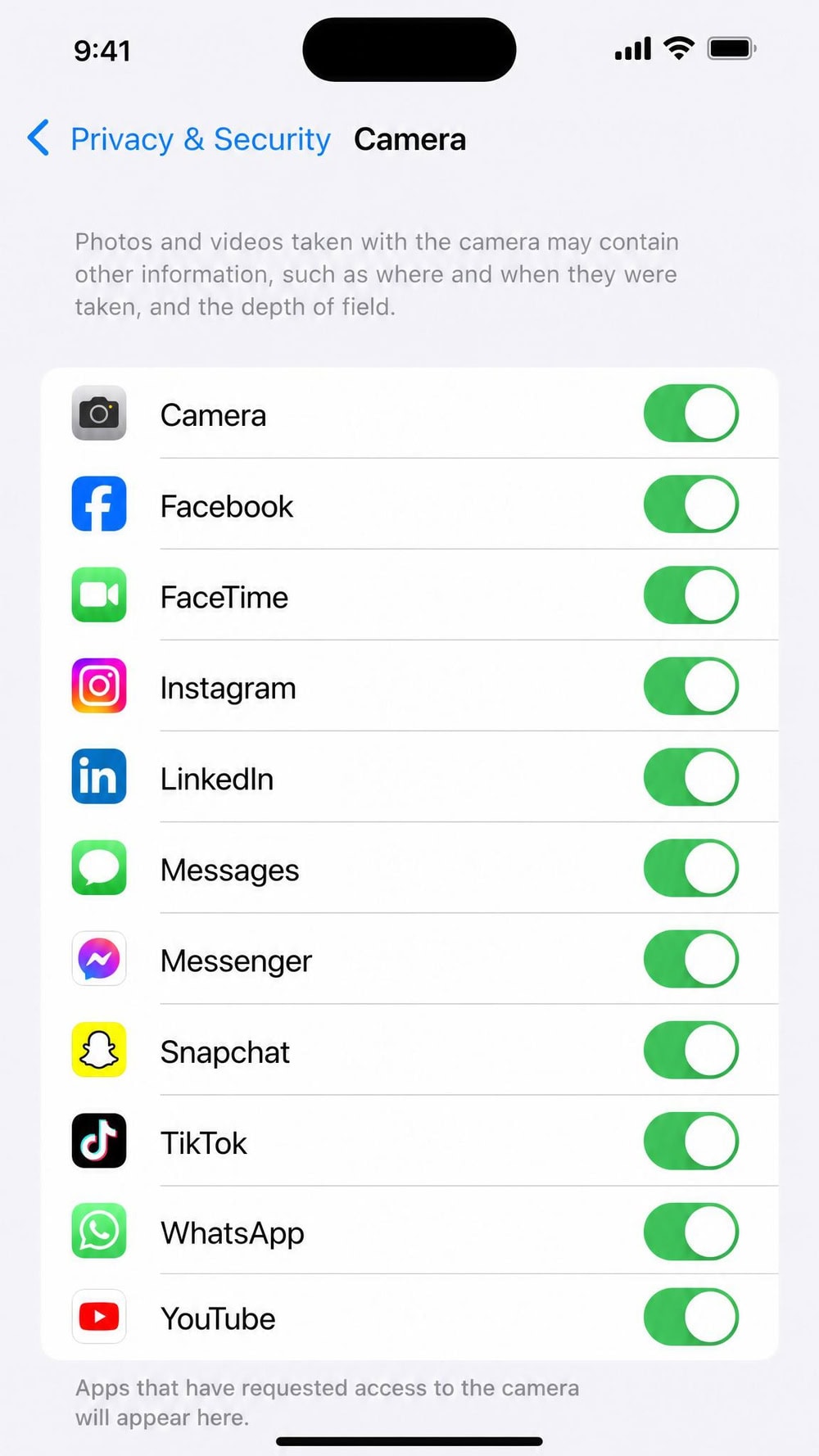
On iPhone, camera and microphone access is managed in one place. Open Settings → Privacy & Security, then tap Camera to see every app that has requested access. Turn off the toggle for anything you do not recognize. Apple's own app-privacy guidance covers granting and revoking access in more detail.
On Android
On Android, you can approach permissions two ways. To check a single app, open Settings → Apps, choose the app, and tap Permissions. To review by permission type instead, open Settings → Security & Privacy → Privacy → Permission manager and select Camera. Google's Android permission settings documentation covers both paths, and on Android 12 and up you can also turn camera access off device-wide from Quick Settings.
How to Stop Someone From Spying on Your Phone Camera
If the signs point to a problem, do not panic. Work through these steps in order to close off the most likely ways an attacker holds onto your camera.
Step 1: Audit and revoke app permissions
Start by reviewing every app that holds camera and microphone permission using the steps above, and revoke access for anything you do not actively trust. This alone disconnects a lot of opportunistic spyware, so pay special attention to apps you did not install yourself.
Step 2: Run a malware/security scan
Next, install a reputable security app and run a full scan, which can flag stalkerware and malware that a manual review would miss. Bitdefender Mobile Security, for example, is available for both Android and iPhone and is a sensible starting point.
Step 3: Update your operating system
Then update your phone. Many camera-spying attacks, including zero-click exploits, rely on flaws the OS maker has already patched. Install any pending iOS or Android update, since a current operating system shuts the door on a large share of known exploits.
Step 4: Remove suspicious apps (and factory reset as a last resort)
Finally, delete any app you identified as suspicious. If the signs persist after you have revoked permissions, scanned, and updated, a factory reset is the surest way to remove deeply embedded spyware. Back up your photos and contacts first, then reset and restore only the apps you trust. A reset wipes everything, so treat it as a last resort, but it is decisive when nothing else works.
How to Protect Your Phone Camera Going Forward
Once your phone is clean, a few habits keep it that way. None are difficult, and together they make you a much harder target.
Keep software updated and download only from official stores
Install updates promptly and get apps only from the App Store or Google Play. Official stores screen for malware, while sideloaded apps and unofficial stores carry far more risk. An up-to-date phone with vetted apps is the foundation everything else builds on.
Use strong authentication and a VPN on public Wi-Fi
Lock your phone with a strong passcode and turn on biometric unlock and two-factor authentication where you can. On public Wi-Fi, route your traffic through a trusted VPN so an attacker on the same network cannot read it. Strong authentication also blocks the physical-access route, since a snoop cannot install spyware on a phone they cannot unlock.
Physically cover your camera when not in use
A camera cover is low-tech and effective against video spying. Even former FBI Director James Comey said in 2016 that he covers his laptop webcam with tape, calling it one of the "sensible things" people should do. A slider or a piece of tape over the front lens guarantees the camera sees nothing, whatever software is running.
Treat links and attachments as suspicious
Most phone compromises start with a tap on something the user should not have trusted. Be skeptical of unexpected links and attachments, even from people you know, and never install software sent by text or email. When a message creates urgency and asks you to click, slow down and verify it another way.
Conclusion: Staying Private and In Control
So can someone see you through your phone camera? It is possible, but far from inevitable, and it almost never happens without leaving signs you can detect. A camera indicator that lights up on its own, unexplained battery drain, and unusual data usage are the clearest warning signs, and a quick permissions audit usually settles the question. Keep your software current, run an occasional security scan, and cover the lens when it matters. Do those things and you stay in control of who looks through your camera.
Frequently Asked Questions
How do I know if someone can see me through my phone camera?
Look for a cluster of warning signs rather than a single clue. The strongest signals are a camera indicator light that turns on when you are not using the camera, photos or videos you did not take, unexplained battery drain, and a sudden spike in data usage. If several appear together, audit your camera permissions and run a security scan.
What code can I dial to check if someone is spying on me?
There is no dial code that detects camera spyware. Popular MMI codes such as #21#, #62#, and ##002# only reveal or cancel call-and-text forwarding settings on your carrier, a different issue entirely. They will not tell you whether an app is using your camera, so do not rely on them as a spyware test. Checking your app permissions and running a security scan are the dependable ways to know.
Can someone watch me through my iPhone camera?
It is possible but uncommon. An attacker would need to install spyware or trick you into granting camera access, and on an up-to-date iPhone the green camera indicator makes covert use hard to hide. Review which apps have access under Settings → Privacy & Security → Camera, keep iOS updated, and the risk stays low.
Can a hacker see me if they have my Google or iCloud login?
Your account password does not give someone a live view of your camera by itself, but it is still dangerous. With your iCloud or Google credentials, an attacker can reach your backups, photos, and location, and may be able to push a monitoring app to your device. Change the password, turn on two-factor authentication, and review the devices signed in to the account.
Is my camera safe to use after I remove spyware?
Once you have deleted the suspicious app, revoked its permissions, updated your operating system, and confirmed a clean security scan, the camera is safe to use again. If you are still uneasy, or the warning signs return, a factory reset removes anything that survived. Then reinstall only apps you trust from official stores.
Does covering my camera actually protect me?
Yes. A physical cover or a small piece of tape over the lens guarantees the camera captures nothing, regardless of what software is running, which is why even security-minded officials use one. A cover does not stop microphone spying or data theft, though, so pair it with permission audits, updates, and strong authentication.

 Apps That Detect Spyware
 Best iPhone Spyware Detection Apps
 Signs Someone Is Spying on iPhone
 Signs of Remote iPhone Access
 Find Hidden Spy Apps on iPhone
 Signs Someone Is Tracking Your Phone
 Stop Remote Phone Access