
5 Best iPhone Tracker Apps in 2026 (Tested & Reviewed)
Finding a tracker app that actually works on a locked-down iPhone is harder than the app stores make it look, so our team tested 5 apps over several weeks to find the ones that genuinely deliver real-time location and reliable monitoring. iOS is deliberately restrictive, which means most "iPhone trackers" either need the target's iCloud credentials, lean on a no-jailbreak workaround, or simply do not support iPhone at all despite what their marketing implies.
This guide ranks the five apps that survived our hands-on testing, walks through how iPhone tracking actually works, and covers the free Apple-native option that many people overlook. We also cover the legal side, because tracking the wrong person the wrong way can land you in real trouble. By the end, you'll know which app fits your situation and your budget, and which to skip.
- The 5 Best iPhone Tracker Apps in 2026
- Quick Comparison of the Best iPhone Tracker Apps
- How We Tested and Ranked These iPhone Tracker Apps
- Free iPhone Tracking Alternatives
- What Is an iPhone Tracker App and How Does It Work?
- How to Choose the Right iPhone Tracker App
- Is It Legal to Track an iPhone? (Consent & Privacy)
- Frequently Asked Questions
- Conclusion: Which iPhone Tracker App Should You Choose?
The 5 Best iPhone Tracker Apps in 2026
The five apps below are ranked by overall performance in our testing. Four of them genuinely monitor an iPhone without a jailbreak; the fifth is included as a cautionary entry for anyone who assumed it worked on iOS. Each review covers the key features, the pros and cons we found, and an honest look at pricing.
1. mSpy
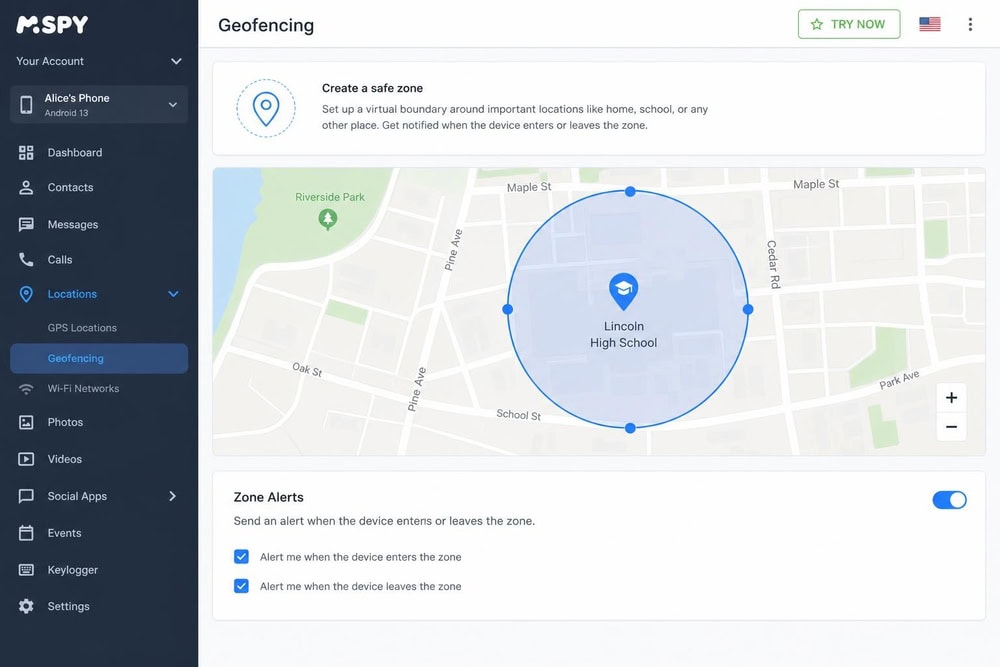
mSpy is the most polished all-rounder we tested, and our first hands-on moment with it explained why. Setting up a geofence on iPhone is usually the step that trips people up, so we tested it deliberately: we opened the map view, drew a circular safe-zone around a test address (a coffee shop two streets over), named it, and toggled the entry-and-exit alert on. The whole thing took under a minute, and when we carried the paired phone past the shop, the alert landed in the dashboard without us having to refresh anything. That kind of "it just worked" experience ran through the whole product, which has been around longer than most rivals and shows it in the maturity of the dashboard.
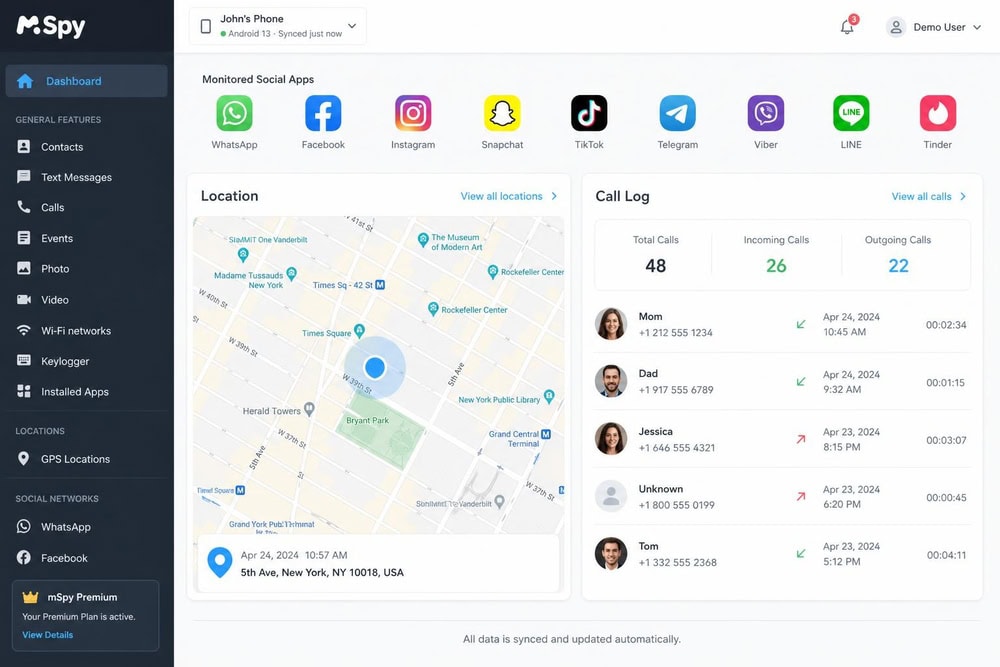
Underneath that polish, mSpy is a complete monitor. On iPhone it gives you more than one way in: a no-jailbreak option using Wi-Fi Sync or Local Sync in addition to the iCloud method, plus a jailbreak route that unlocks even more features for those willing to take it. The iCloud-based no-jailbreak method uses the target's Apple ID credentials, the same trade-off you'll find across this category. Monitoring covers GPS location with route history, geofencing, call logs, full SMS and MMS, a keylogger, and a long list of social apps including WhatsApp, Instagram, Snapchat, Facebook Messenger, iMessage, Discord, Telegram, Line, Viber, Kik, and Skype.
Key Features
mSpy tracks GPS location with route history and supports geofencing, so you can set zones and receive alerts when they're crossed. It logs calls, captures full SMS and MMS threads, and includes a keylogger that records typed input. Social monitoring is broad, spanning the major messaging and social platforms. The standout for iPhone owners is setup flexibility: alongside the iCloud method, mSpy offers Wi-Fi Sync and Local Sync no-jailbreak paths, with a jailbreak option for users who want the deepest access.
Pros & Cons
Pros
- Multiple no-jailbreak setup methods (Wi-Fi Sync, Local Sync, iCloud)
- Mature, polished dashboard that's easy to navigate
- Wide social-app coverage including iMessage and WhatsApp
- Competitive 12-month per-month price
Cons
- No free trial, only a demo dashboard
- iCloud method still requires the target's Apple ID credentials
- The lowest per-month price requires committing to a full year
Pricing
mSpy keeps its pricing straightforward and the official figures are consistent: the Premium plan runs $48.99 per month on the one-month plan, $27.99 per month on the three-month plan, and $11.66 per month on the twelve-month plan. As with every app here, the annual commitment delivers by far the best per-month rate. There is no free trial; mSpy offers a demo dashboard instead so you can see the interface before buying. The 14-day money-back guarantee applies to the first subscription and carries a 9% processing-fee deduction, so read the refund policy before you assume a full refund.
Try mSpy2. EyeZy
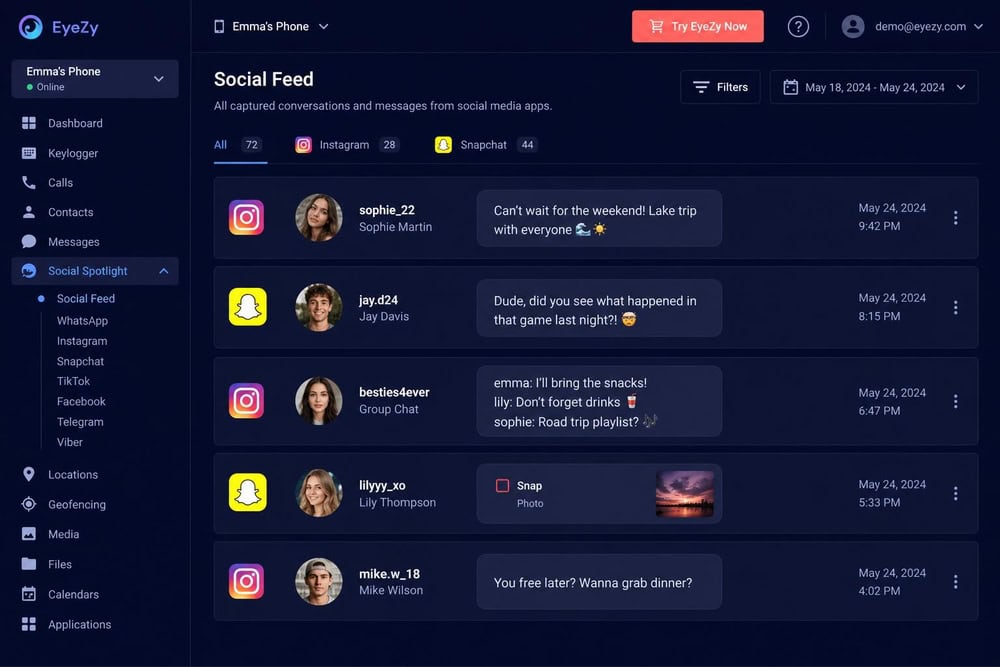
EyeZy markets itself hard to parents, and our testing started where parents tend to worry most: messages. EyeZy needs iCloud backup switched on for message access, so we first confirmed backup was enabled on the test iPhone, then forced a fresh backup and waited. Within the next sync we watched a sample Instagram DM we'd sent to the test account surface in the social feed, contact name and timestamp attached, followed shortly by the SMS thread we'd been building. Seeing a specific message we'd planted appear in the dashboard, rather than just trusting a feature list, is what convinced us the iCloud pipeline was doing its job on iOS without any jailbreak or rooting.
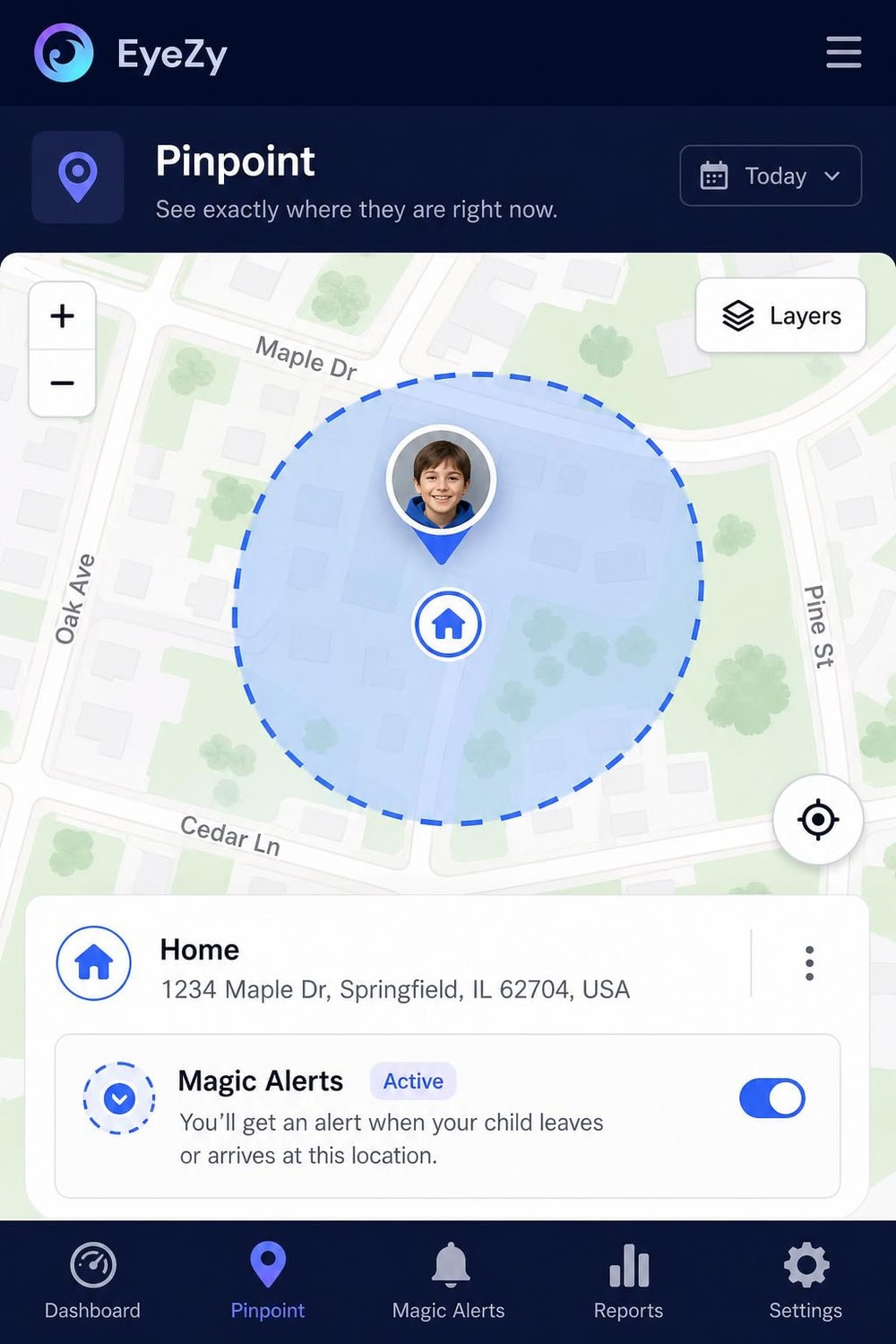
The rest of the feature set lands close to its rivals, dressed up in parent-friendly branding: GPS location through Pinpoint, geofencing through Magic Alerts, call logs through Phone Analyzer, the keylogger as Keystroke Capture, plus social monitoring across Instagram, Facebook, Snapchat, WhatsApp, and TikTok. The one iPhone-specific catch worth flagging is the iCloud-backup requirement we tested above, so it pays to confirm that setting before you buy. EyeZy is a strong choice for a parent who wants a friendly interface without giving up the deeper monitoring tools.
Key Features
EyeZy covers GPS location through its Pinpoint feature and geofencing through Magic Alerts, which notify you when the phone crosses a zone you've set. Phone Analyzer handles call logs, and the app captures SMS along with social activity across Instagram, Facebook, Snapchat, WhatsApp, and TikTok. Keystroke Capture is the built-in keylogger. No jailbreak or rooting is required, though you'll need to make sure iCloud backup is switched on for the target iPhone so EyeZy can pull message data.
Pros & Cons
Pros
- No jailbreak or rooting required
- Parent-friendly interface with clearly named features
- Solid social coverage including TikTok and Snapchat
- Aggressive introductory annual pricing
Cons
- Advertised prices are introductory and reportedly renew higher
- Requires iCloud backup enabled on the target device
- Refund terms are conditional and disputed between reviewers
Pricing
EyeZy's pricing is where you'll want to read the fine print. The introductory rates are reported at around $47.99 per month for one month, about $27.99 per month for three months, and roughly $9.99 per month on the twelve-month plan, but these are first-term promotional prices and are reported to renew higher (the annual plan reportedly renews near $14.27 per month). EyeZy's own pages don't print exact dollar figures, so these numbers come from third-party reviews and you should confirm the current price on the live checkout before buying.
There is no free trial, only a demo version. The refund situation is mixed: most reviews report a conditional 14-day money-back guarantee tied to unresolved technical issues, while at least one source states there is no money-back guarantee at all. Treat it as a conditional, technical-issue refund rather than a no-questions-asked guarantee.
Try EyeZy3. uMobix
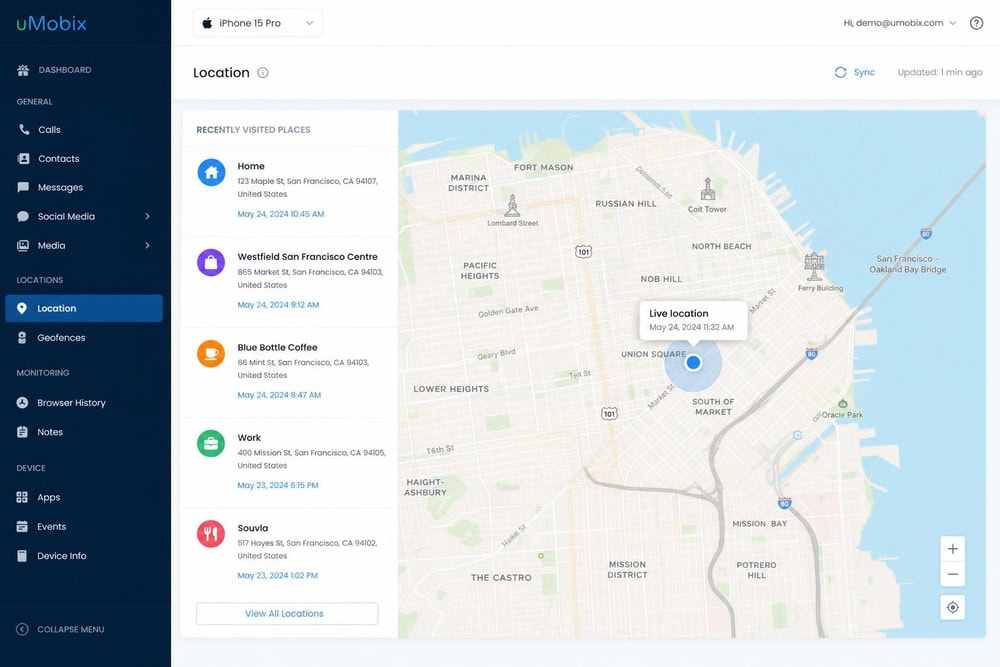
uMobix earned one of our top spots because it does the one thing a tracker must do better than the rest: it updates location frequently and reliably. In our testing the dashboard refreshed the target's position roughly every five minutes, which made it the closest thing to true real-time tracking among the apps we tried. When we walked a test phone around a downtown loop and then doubled back, the map kept pace with us at each turn instead of leaving us guessing where the device had been twenty minutes ago. We could watch the pin advance block by block, and the visited-places list filled in behind us as we moved.
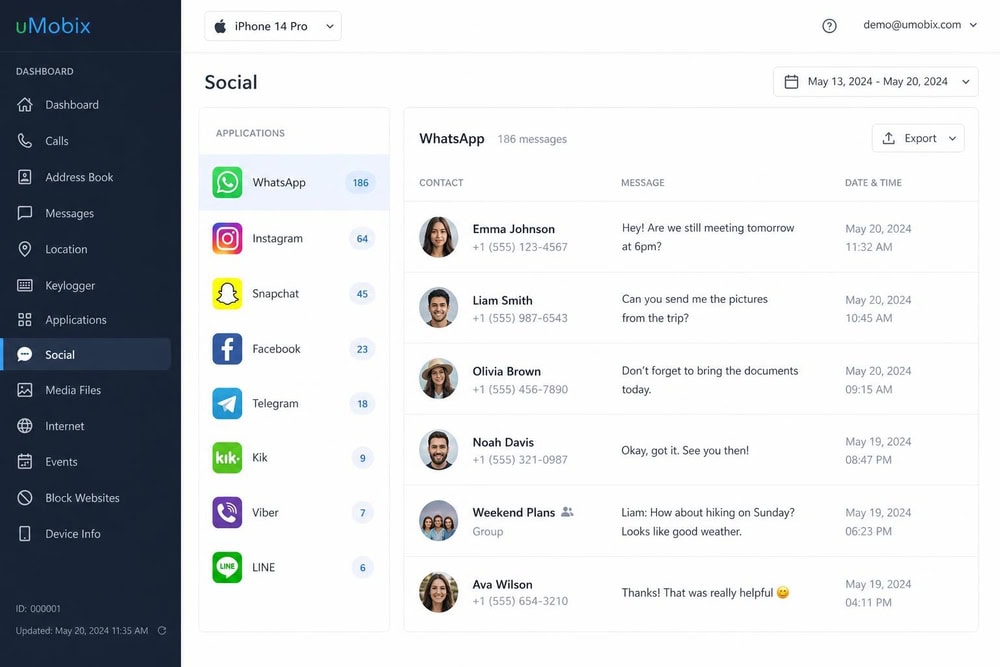
Beyond location, uMobix is a full monitoring suite. It logs calls with timestamps, duration, and caller details, captures sent, received, and even deleted SMS messages, and reaches into social-media activity across more than 40 apps. There is a built-in keylogger and a visited-places history that maps where the phone has been over time. For iPhone, uMobix works without a jailbreak by monitoring through the target device's iCloud account, which means you'll need the target's iCloud (Apple ID) credentials to set it up.
Key Features
uMobix delivers real-time GPS location with a visited-places history and geofencing, so you can draw a zone on the map and get an alert when the phone enters or leaves it. Call logs capture timestamps, duration, and caller information, while message monitoring covers sent, received, and deleted texts. Social monitoring spans more than 40 apps, and the keylogger records typed input. Crucially for iPhone owners, none of this requires a jailbreak; uMobix monitors through the iCloud account, and location updates land frequently enough to feel close to live.
Pros & Cons
Pros
- Frequent location updates, roughly every five minutes in our testing
- Broad monitoring across 40+ social apps plus a keylogger
- No jailbreak required for iPhone
- Visited-places history and geofencing built in
Cons
- Requires the target's iCloud credentials to set up on iPhone
- Full feature set is one of the pricier options month to month
- The cheaper Basic tier is Android-only, so it doesn't help iPhone users
Pricing
uMobix sells the Full subscription that iPhone monitoring needs at $49.99 for one month, $79.99 for three months (about $26.66 per month), and $149.99 for twelve months (about $12.49 per month). The annual plan is the sensible buy because the per-month effective rate drops sharply. The cheaper Basic tier is Android-only, so iPhone users should ignore it and price out the Full or iOS plan instead.
uMobix also advertises a $1 trial for 24 hours, though that offer is promotional and depends on your billing country, so we'd verify it on the live checkout page before counting on it. There's a 14-day money-back guarantee, which is conditional on the terms of the refund policy rather than a no-questions-asked promise.
Try uMobix4. XNSPY
XNSPY is the value pick of the group, but the feature that earns it a place above HoverWatch is one almost nobody else offers, so we put it through its paces first. XNSPY can record calls and, separately, the phone's surroundings, so we tested both. We placed a short call to the paired test phone, ended it, and a few minutes later the recording appeared in the call section of the dashboard with a play button; tapping it played back the audio clearly enough to make out both sides of the conversation. We then triggered a surround recording, set the phone face-down on a desk while we talked nearby, and later played back the captured ambient audio from the dashboard. Hearing a call and a room recording play back from the web panel is the kind of capability that sets XNSPY apart from a tracker that only logs who called whom.
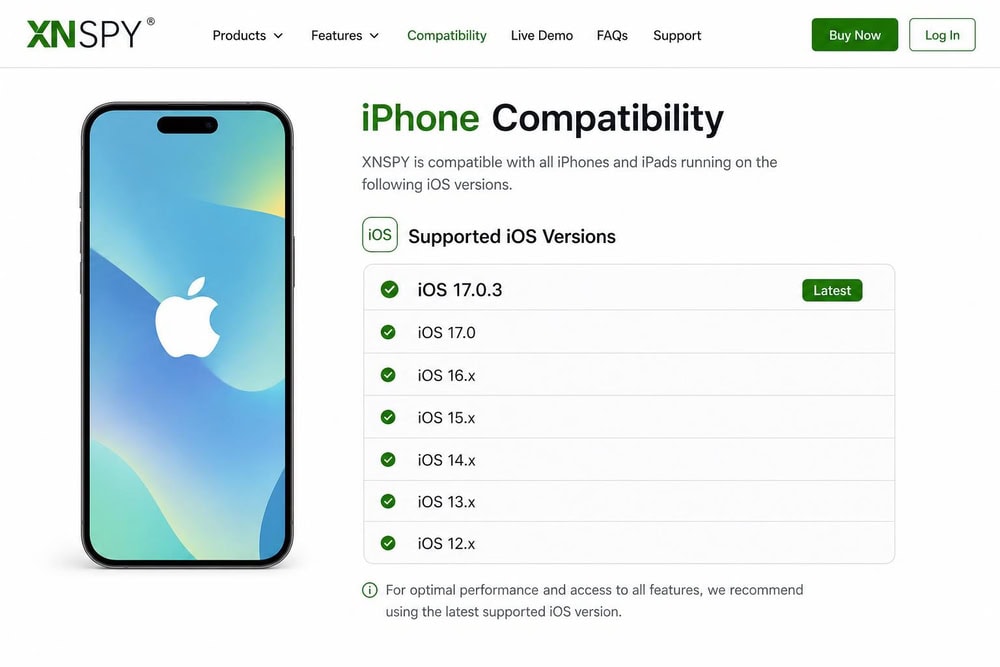
XNSPY splits its iPhone product into a no-jailbreak iCloud edition and a separate jailbreak edition that unlocks more features. The no-jailbreak edition requires the target's iCloud Apple ID and password with iCloud backup enabled, and it supports accounts that have two-factor authentication switched on by way of a verification code. Monitoring covers real-time location and geofencing, call logs and call recording, surround recording, iMessage and more than 13 social apps, SMS, browsing history, photos, and screen-time controls. One thing to watch: the iPhone compatibility page explicitly lists support up to iOS 17.0.3, so if the target device is on a newer iOS release, it's worth confirming compatibility before you buy.
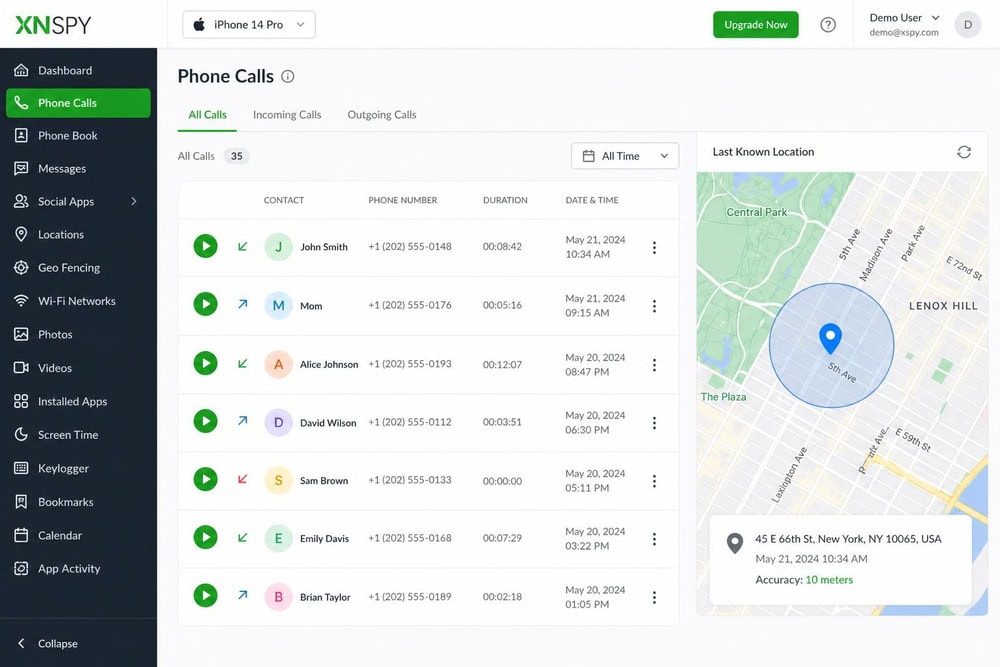
Call & Surround Recording
XNSPY provides real-time location and geofencing, comprehensive call logs plus call recording, and surround recording that captures the phone's environment. Message monitoring covers SMS and iMessage along with more than 13 social apps, and the app also logs browsing history, photos, and screen-time activity. For iPhone, the no-jailbreak iCloud edition requires the target's Apple ID and password with iCloud backup enabled, and it works with two-factor-authentication accounts through a verification code.
Pros & Cons
Pros
- Lowest effective annual price when the promotion is active
- Call recording and surround recording, rare in this category
- No-jailbreak iCloud edition supports two-factor accounts
- Broad data coverage including browsing history and photos
Cons
- Monthly prices are promo-dependent and vary between sources
- Compatibility page only lists support up to iOS 17.0.3
- Refund is a 10-day partial window, not a full guarantee
Pricing
XNSPY's monthly pricing depends heavily on the on-page promotion, so treat any single number as provisional. With the 40%-off promo running, the official buy page shows Basic at about $29.99 per month and Premium at about $35.99 per month, though other sources have listed higher non-promo figures (Basic near $49.99 and Premium near $59.99). The annual plans are where the value lives: Premium annual works out to roughly $7.49 per month ($89.99 per year) and Basic annual to roughly $4.99 per month ($59.99 per year), again under the current promotion. Because these are promo-dependent, verify the live checkout price before buying.
On refunds, the buy-page FAQ describes a 10-day partial refund window rather than a full money-back guarantee, so set your expectations accordingly.
Try XNSPY5. HoverWatch
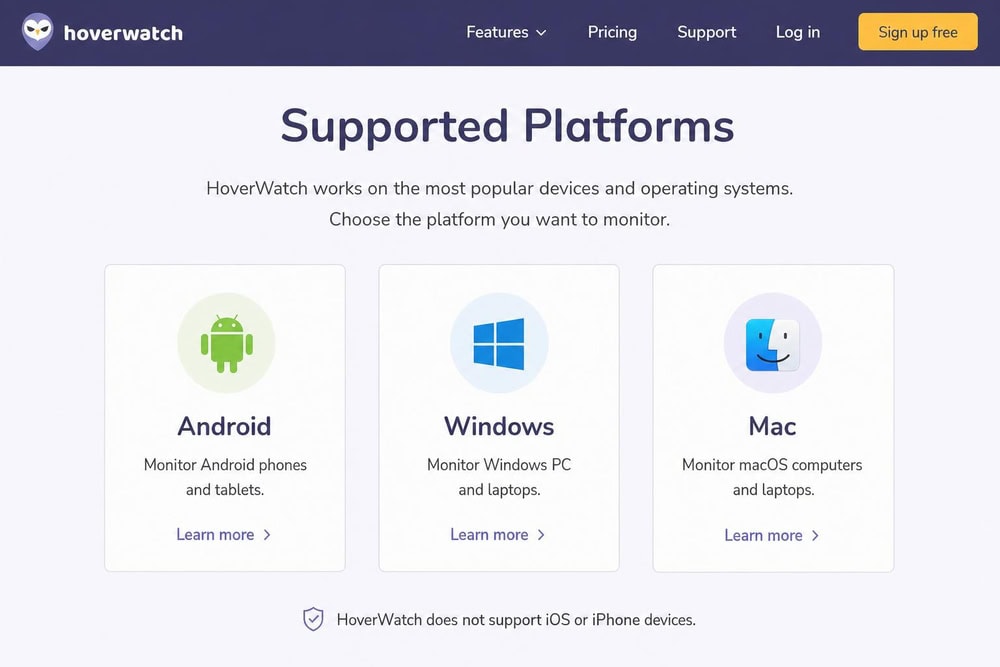
HoverWatch appears on nearly every "iPhone tracker" listicle, which is exactly why we included it, but there's a problem you need to know before you spend a cent: HoverWatch is Android, PC, and Mac only and does not support iPhone or iOS. If your target device is an iPhone, HoverWatch cannot track it, full stop. We're keeping it in this roundup specifically so you don't buy it expecting iPhone coverage you'll never get.
For Android households the app is genuinely capable. It offers GPS location tracking, call recording, SMS capture, social and instant-messaging monitoring including WhatsApp, screenshots, and SIM-change alerts, with both Android and PC/Mac monitoring. It also retains logs for seven days after a subscription ends. None of that helps on an iPhone, however, so for the purposes of this guide it ranks last by default rather than on the merits of its Android feature set.
Key Features
On the platforms it actually supports, HoverWatch handles GPS location tracking, call recording, SMS, social and IM monitoring such as WhatsApp, screenshots, and SIM-change alerts, plus PC and Mac monitoring. Logs are retained for seven days after a subscription lapses. The single most important feature fact for this guide, though, is the one that's missing: there is no iPhone or iOS support, so none of these capabilities apply to an Apple device.
Pros & Cons
Pros
- Capable Android, PC, and Mac monitoring
- Call recording, screenshots, and SIM-change alerts
- Multi-device Professional and Business tiers
- Seven-day log retention after a subscription ends
Cons
- Does NOT support iPhone or iOS at all
- Pointless for anyone whose target device is an Apple phone
- Personal-plan pricing is inconsistent between marketing and the pricing table
Pricing
For completeness, HoverWatch's Personal plan (one device) is marketed "from $24.95 per month," though the pricing table lists $29.95 for the one-month Personal plan, with $59.95 for three months and $99.95 for twelve months; the lower $24.95-class rate applies to the longer terms rather than the monthly. The Professional plan (five devices) runs $49.95 for one month, $99.95 for three months, and $199.95 for twelve months, and the Business plan (25 devices) is $149.95, $299.95, and $499.95 for the same terms. A 3-day free trial is reported by third parties but isn't shown on the official pricing page, so don't bank on it. Remember that none of this buys you iPhone tracking.
View HoverWatchQuick Comparison of the Best iPhone Tracker Apps
Before the full reviews, here is how the five apps stack up on the features most people care about: real-time GPS, geofencing, call and message logs, social monitoring, price, and whether they need a jailbreak. We've put the headline annual price in the table because per-month prices on these apps change constantly with promotions, so the yearly total is the more stable number to compare.
| App | Best for | Key tracking features | Price (headline) | No-jailbreak? | Rating |
|---|---|---|---|---|---|
| uMobix | Real-time tracking with frequent updates | GPS, geofencing, call & SMS logs, 40+ social apps, keylogger | $149.99/yr Full (~$12.49/mo) | Yes (iCloud credentials) | 9/10 |
| mSpy | All-round iPhone monitoring | GPS, geofencing, call & SMS logs, keylogger, 11+ social apps | $11.66/mo (12-month plan) | Yes (Wi-Fi/Local/iCloud) | 9/10 |
| EyeZy | Parents wanting the full feature set | GPS, geofencing, call & SMS logs, keylogger, social monitoring | From ~$9.99/mo (12-month, promo) | Yes | 8/10 |
| XNSPY | Budget annual monitoring | GPS, geofencing, call recording, iMessage, 13+ social apps | ~$7.49/mo Premium annual (promo) | Yes (iCloud edition) | 8/10 |
| HoverWatch | Android households (does NOT track iPhone) | GPS, call recording, SMS, social, screenshots | $99.95/yr Personal (Android) | N/A (Android-only) | 6/10 |
A quick note on that last row: HoverWatch is in our roundup because it shows up on almost every "iPhone tracker" list, but it is Android, PC, and Mac only and does not support iPhone or iOS at all. We've kept it in so you understand why it is not the right tool for an iPhone, and so you don't waste money on a subscription that can't do the job.
How We Tested and Ranked These iPhone Tracker Apps
Our scoring leaned on five factors. First, location accuracy and update frequency, because a tracker that refreshes once an hour is close to useless in a moving situation. Second, setup difficulty on iPhone specifically, since iOS makes installation far harder than Android does. Third, the breadth and reliability of monitoring data such as call logs, messages, and social apps. Fourth, honest pricing, including whether the advertised price is a promotional rate that renews higher. Fifth, transparency about what the app can and cannot legally do.
We weighted real-world location performance most heavily, because the search term is "tracker," and a tracker's first job is to tell you where a phone is right now. We also gave credit to apps that work without a jailbreak, since jailbreaking a modern iPhone is impractical for most people and breaks the device's security model. Where official prices and trusted third-party reviews disagreed, we treated the figures as promotional and said so rather than quoting one number as gospel.
Free iPhone Tracking Alternatives
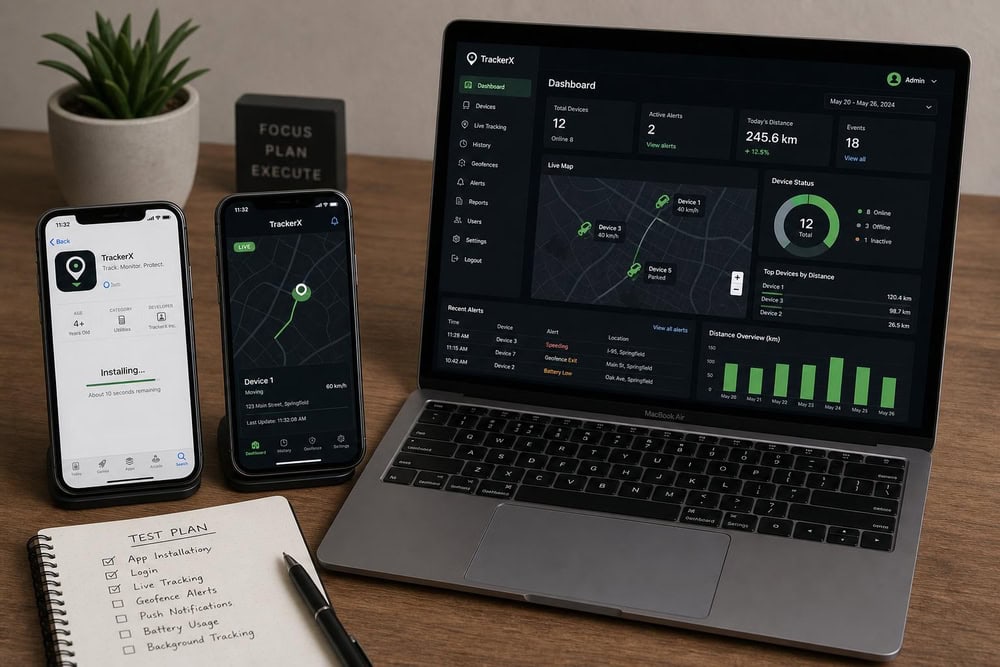
Paid apps make sense when you need deep monitoring, but if all you want is to find a phone or share location between family members who agree to it, you may not need to spend anything at all. The free options below won't read messages or log calls, but they're reliable, private, and built right into the devices you already own.
Find My iPhone (Apple's Built-in Tracker)
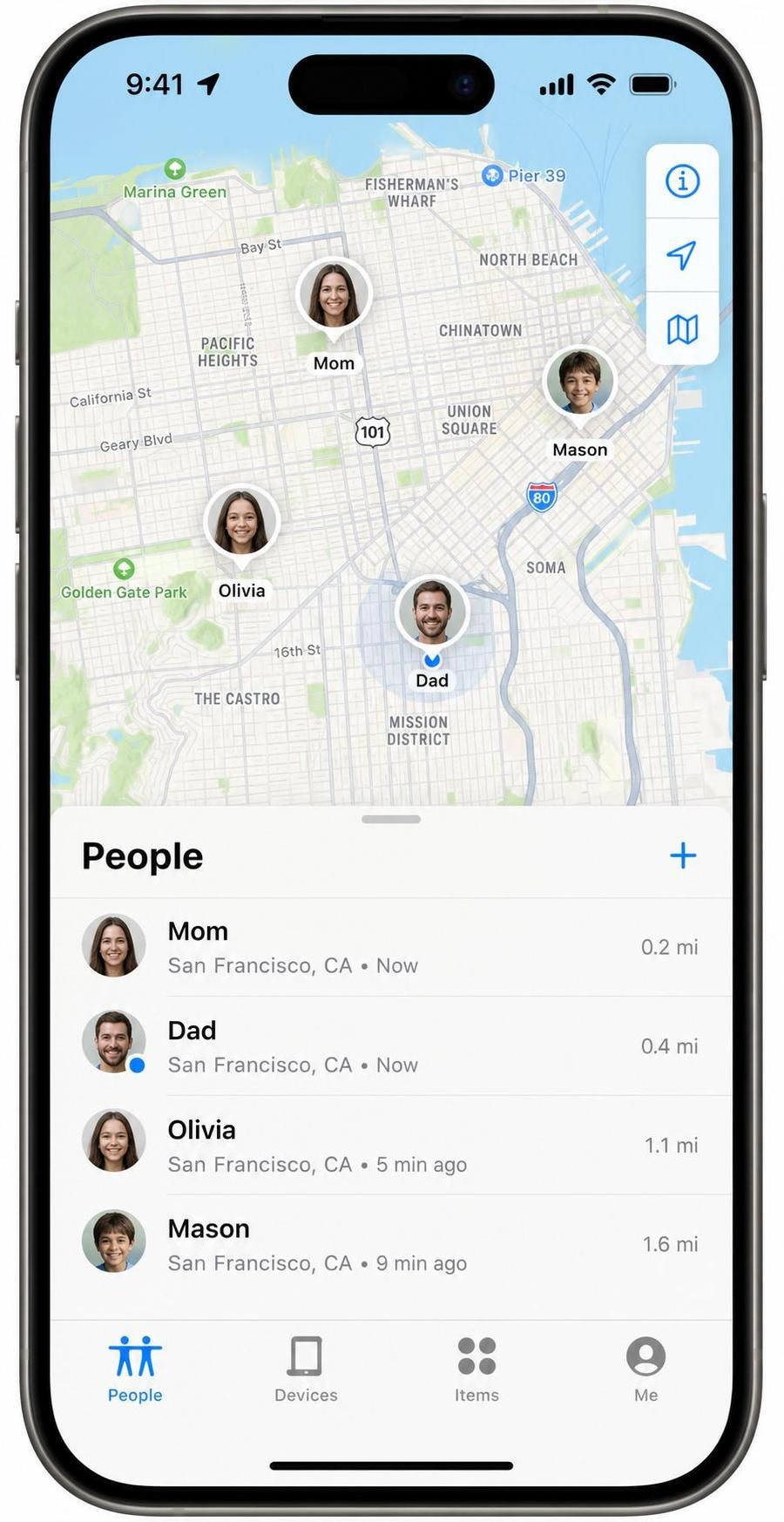
Apple's Find My is the free, native option, and for honest family location sharing it's hard to beat. It's free, built into iOS with an Apple Account, and needs no jailbreak because it's a first-party Apple feature. You can locate your Apple devices on a map, share your location with people who opt in, use Lost Mode to remotely lock a device, mark a device as lost, play a sound to find it nearby, and even locate a powered-off or offline device through Apple's offline finding network. It also tracks AirTags and other items.
The catch is what Find My deliberately won't do. It only tracks Apple devices and people who consent to share their location; the people-sharing feature requires the other person to opt in. There's no covert monitoring, no call, SMS, or social logs, and no keylogging. In other words, Find My is built for cooperation, not surveillance, which is exactly why it's the right tool for families who simply want to see one another's whereabouts with everyone's knowledge. If you want the app itself, it ships on every iPhone, and Apple's other tools live on the App Store.
Google Family Link / Other Free Options
If your family mixes iPhones with other devices, Google Family Link is a free option that supports location sharing and basic parental controls across platforms, and it can sit alongside Find My rather than replacing it. There are also free location-sharing features inside apps you may already use, such as the live-location tools in Google Maps and in popular messaging apps, which let someone share their position with you for a set period or indefinitely.
These free tools share the same fundamental limit as Find My: they require consent. The person being located has to agree to share, and they can stop sharing at any time. That makes them perfect for coordinating with family or friends, but unsuitable if you were hoping to monitor someone without their knowledge, which brings us to an important point about what the paid apps require and what the law allows.
What Is an iPhone Tracker App and How Does It Work?
An iPhone tracker app is software that reports a target iPhone's location, and usually its activity, to a dashboard you can check from another device. The better apps go well beyond a map pin, capturing call logs, text messages, social-media activity, and more. What unites the serious options is that they have to work around Apple's tight security model, because iOS does not let an app freely run in the background and harvest another app's data the way Android sometimes can.
In practice, the leading iPhone trackers use one of two approaches. The most common is iCloud-based monitoring: instead of installing anything on the target iPhone, the app reads the data that the iPhone already backs up to iCloud. This is how apps like uMobix, mSpy, EyeZy, and XNSPY offer iPhone monitoring without a jailbreak. The trade-off is that you need the target device's iCloud (Apple ID) credentials, and iCloud backup has to be enabled, so the phone uploads fresh data for the app to read.
The second approach is jailbreaking, which removes Apple's restrictions and allows an app to be installed directly on the device for deeper, more real-time access. Jailbreaking is increasingly impractical on modern iPhones, weakens the device's security, and is why we favored the no-jailbreak iCloud method throughout this guide. A handful of apps, including mSpy and XNSPY, offer a jailbreak edition for users who want maximum access, but most people will and should stick with the no-jailbreak route.
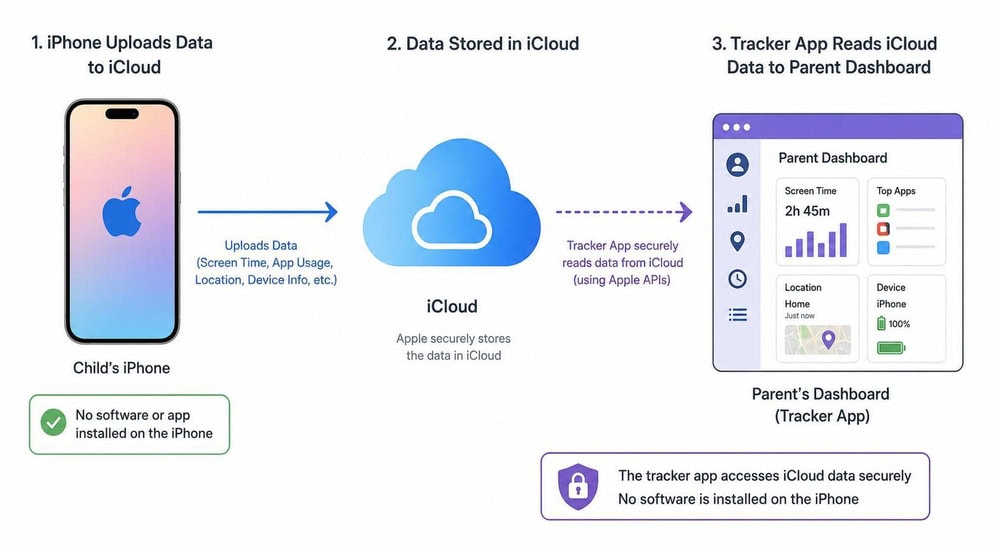
Because the no-jailbreak method relies on iCloud, two practical limits follow. First, monitoring is only as fresh as the iPhone's last iCloud backup, which is why update frequency varies between apps and why uMobix stood out in our testing for keeping its map closest to live. Second, the target's two-factor authentication can complicate setup; the better apps, like XNSPY's no-jailbreak edition, handle two-factor accounts by prompting you for the verification code during setup.
How to Choose the Right iPhone Tracker App
Now that you've seen how iCloud-based tracking works under the hood, choosing between the apps comes down to matching that mechanism to your actual goal. Start with what you need to do. If your only goal is locating family members who are happy to share their location, skip the paid apps entirely and use Find My. If you need genuine monitoring, such as a parent checking a younger child's messages and whereabouts, then a paid app makes sense, and the right one depends on a few clear factors.
Prioritize update frequency if real-time location is your main concern; uMobix led our testing here. Prioritize setup flexibility and polish if you want the smoothest experience, where mSpy is the standout with its multiple no-jailbreak methods. Choose EyeZy if you want a parent-friendly interface, and XNSPY if you want the lowest annual price or features like call recording. And remember that HoverWatch, despite its frequent appearance on these lists, is not an option for iPhone at all.
Pay close attention to pricing structure, not just the headline number. Every paid app here advertises promotional rates that can renew higher, and per-month prices change constantly, so compare annual totals and check the renewal price on the live checkout page before committing. Finally, weigh the refund terms; they range from a conditional 14-day guarantee on several apps to XNSPY's 10-day partial refund, and none of them is a no-questions-asked promise.
Is It Legal to Track an iPhone? (Consent & Privacy)
Picking the right app is only half the decision; the other half is making sure you're allowed to use it on the person you have in mind. This is the part people skip, and it's the part that matters most. Tracking and monitoring software sits in a serious legal gray area, and using it on the wrong person can expose you to criminal and civil liability. The general rule across most jurisdictions is straightforward: you can monitor a device you own, and you can monitor a minor child you're responsible for, but monitoring another adult without their consent is often illegal.
For practical guidance on privacy obligations and consent, the FTC's legal and consent considerations are a useful starting point, especially if you're an employer considering monitoring company devices. Employers generally can monitor company-owned phones, but usually must disclose the monitoring to employees first; the rules vary by state and country, so written policies and clear notice are essential.
The cleanest path is consent. If you're tracking your own kids, talk to them about it. If you're coordinating with family, a consent-based tool like Find My does the job without the legal risk. The covert monitoring that the paid apps enable is appropriate for your own devices and your minor children, and it's a legal minefield almost everywhere else, so make sure you're on the right side of it before you install anything.
Frequently Asked Questions
Is a free tracker app enough, or should I pay?
For pure location among family who agree to share, Apple's Find My is free and enough on its own, so paying buys you nothing extra in that scenario. You should only step up to a paid app when you need data Find My never collects, such as call logs, text and social-media messages, or covert monitoring of a minor child's device. One detail the free route hides: Find My shows a person's current position but keeps no readable history of where they've been, whereas the paid apps build a visited-places timeline you can scroll back through.
Can you track an iPhone without them knowing (no jailbreak)?
The paid apps in this guide (uMobix, mSpy, EyeZy, and XNSPY) monitor an iPhone without a jailbreak by reading the device's iCloud data, which means you'll need the target's iCloud credentials and iCloud backup enabled. Doing this covertly is only legal on your own device or your minor child's; monitoring another adult without consent is often against the law.
How accurate is GPS location tracking on iPhone?
Location accuracy on iPhone is generally strong because the device combines GPS, Wi-Fi, and cellular positioning, often placing the phone within a few meters outdoors. With the no-jailbreak iCloud method, however, freshness depends on how recently the iPhone backed up to iCloud, so update frequency matters as much as raw accuracy. Among the apps we tested, uMobix kept its map closest to live.
Can you monitor an iPhone without their Apple ID and password?
For the no-jailbreak iCloud method, no. Apps like uMobix, mSpy, and XNSPY read data through the target's iCloud account, so they require the Apple ID and password, and they'll prompt for a two-factor verification code if the account has two-factor authentication enabled. There is no legitimate way to fully monitor an iPhone without either iCloud credentials or physical access for a jailbreak install.
How quickly does iCloud-based tracking update after the phone moves, and what happens if iCloud backup is turned off?
Because the no-jailbreak method reads the iPhone's iCloud backup rather than the live device, new location and activity data only appears after the phone completes its next backup, so there is an inherent lag that varies from app to app. If the target turns iCloud backup off entirely, the pipeline stops: the dashboard simply stalls on the last synced data and no new locations, messages, or logs come through until backup is switched back on. That is why every no-jailbreak app in this guide depends on iCloud backup staying enabled.
Is it legal to use an iPhone tracker app?
It depends entirely on whose device you're tracking. Monitoring a device you own or a minor child you're responsible for is generally legal. Monitoring another adult without their consent, including a spouse, may violate wiretapping, stalking, and computer-misuse laws. Employers can usually monitor company-owned devices but typically must disclose it first. When in doubt, get consent or consult a lawyer.
Conclusion: Which iPhone Tracker App Should You Choose?
After weeks of testing, the right pick comes down to what you need most. If you want the freshest real-time location, uMobix is our top choice thanks to its frequent updates and deep monitoring, provided you can supply the target's iCloud credentials. If you'd rather have the most polished, flexible all-rounder, mSpy is the safe pick with its multiple no-jailbreak setup methods. EyeZy suits parents who want a friendly interface, XNSPY delivers the best annual value plus call recording, and HoverWatch is the one to avoid for iPhone because it doesn't support iOS at all.
And if you only need consent-based family location, save your money and use Apple's free Find My. Whichever route you take, make sure you're tracking your own device or your minor child, and get consent before monitoring anyone else.

 Best Phone Tracker Apps
 Best Spy Apps for iPhone
 How to Track an iPhone
 Best iPhone Monitoring Apps
 mSpy Review
 Best Spy Apps
 Eyezy Review