
8 Best Tracking Apps for Android (2026)
We tested the 8 best Android tracking apps for 2026 across real-time location accuracy, geofencing, battery use, setup time, and privacy controls, then ranked them by who each one serves best. An Android tracking app uses your phone's GPS, Wi-Fi, and cellular signals to report a device's whereabouts on a live map, and the better ones add geofence alerts, location history, and lost-or-stolen recovery. Whether you want to keep an eye on a younger family member, share your live location with a partner, or recover a misplaced handset, the right pick depends on the job at hand.
Our team installed each app on Android test phones, ran them through everyday routines, and watched how they handled accuracy, alerts, and battery drain. Below is a comparison table, our hands-on take on all eight apps, and a buyer's guide covering the criteria that separated them. We also cover privacy and legality, because tracking a phone responsibly matters as much as the GPS dot on the screen.
The Best Tracking Apps for Android
We've ranked these mainstream-first: free built-in and family tools, then the dedicated monitoring apps, closing with the lightweight share tool. Each section covers what the app does well, where it falls short, and who should pick it.
1. mSpy - Best Overall Monitoring App
mSpy is our top monitoring pick and the most established name for discreet parental monitoring. It's built for parents who need to keep an eye on a younger child's activity without a visible app on the device. It runs on Android and iOS, and physical access to the target phone is required to install it. For core features you don't need to root, though some social-media and messaging monitoring does require rooting. We walk through the full setup and feature set in our mSpy review.
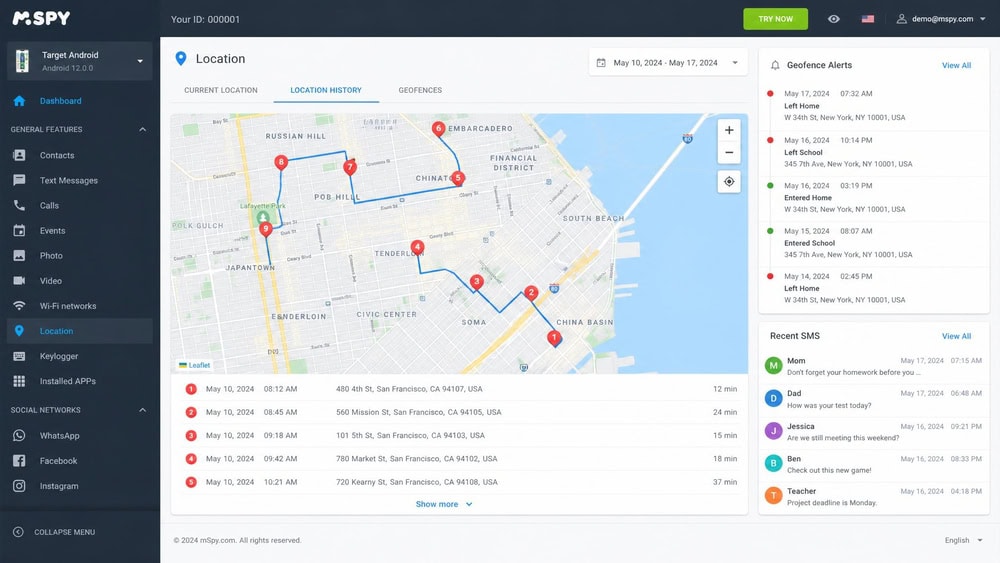
Pricing lands around $11.67/mo on the discounted 12-month plan; the 1-month and 3-month options run higher and shift with promotions, so treat short-term pricing as advertised rather than fixed. There's a conditional 14-day refund window. In testing, mSpy delivered reliable real-time GPS with location history and geofence alerts, alongside social-media monitoring, call and SMS logs, and browser history. Because it's covert by design, consent and legality matter more here than with any consent-based family app, a point we return to below.
Pros
- Reliable real-time GPS with location history
- Geofencing alerts and broad activity monitoring
- Discreet operation for legitimate parental oversight
- Works across Android and iPhone with the simplest setup of the monitoring apps
Cons
- Requires physical access to install
- Some social monitoring needs rooting
- Covert use carries real consent and legal obligations
2. EyeZy - Best for Ease of Use
EyeZy is the monitoring app we'd hand to someone who finds the others intimidating. It runs on Android and iOS, and for core features like GPS, SMS, calls, browser history, and keystrokes it works through standard Android permissions with no rooting; rooting is only optional for some advanced social-media capture. Sources differ slightly here, with an older source claiming a root requirement, so we'd plan for a no-root install of the core features. The walkthrough in our EyeZy review covers the setup flow in detail.
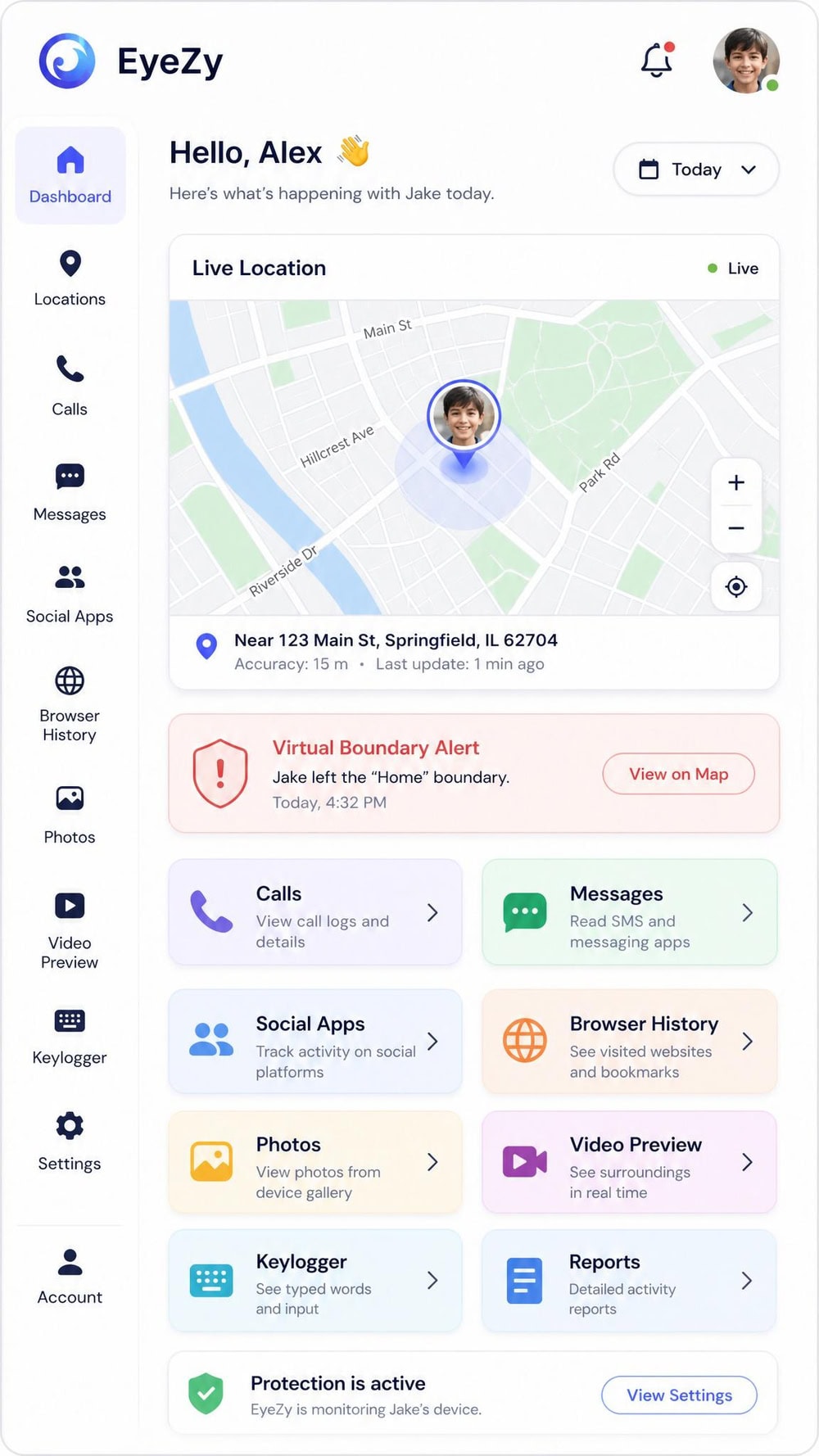
Pricing is around $9.99/mo on the annual plan, the same on iOS and Android, with pricier short-term tiers that fluctuate. There's a 14-day money-back guarantee and no free trial, though a live demo lets you preview the dashboard first. We liked how approachable the interface felt: real-time GPS and virtual-boundary geofence alerts sat front and center, with social-chat monitoring, browser history, and call and SMS logs a tap away. For a first-time user, EyeZy hit the best balance of capability and clarity.
Pros
- Approachable interface that's easy to learn
- Real-time GPS with virtual-boundary geofence alerts
- No rooting needed for core monitoring features
- Live demo lets you preview before buying
Cons
- No free trial, only a demo
- Advanced social capture may want root
- Short-term pricing fluctuates with promotions
3. uMobix - Best for Social Media Tracking
uMobix is the choice when social and messenger monitoring on an Android phone is the priority, but it lands third on compatibility and ease of use. It covers Android fully, while the iPhone version works only through iCloud backups and is much thinner, and many features such as SMS and call logs work without rooting, though some deeper capabilities need more access. Our full breakdown lives in our uMobix review, including the install steps and what each data feed actually shows.
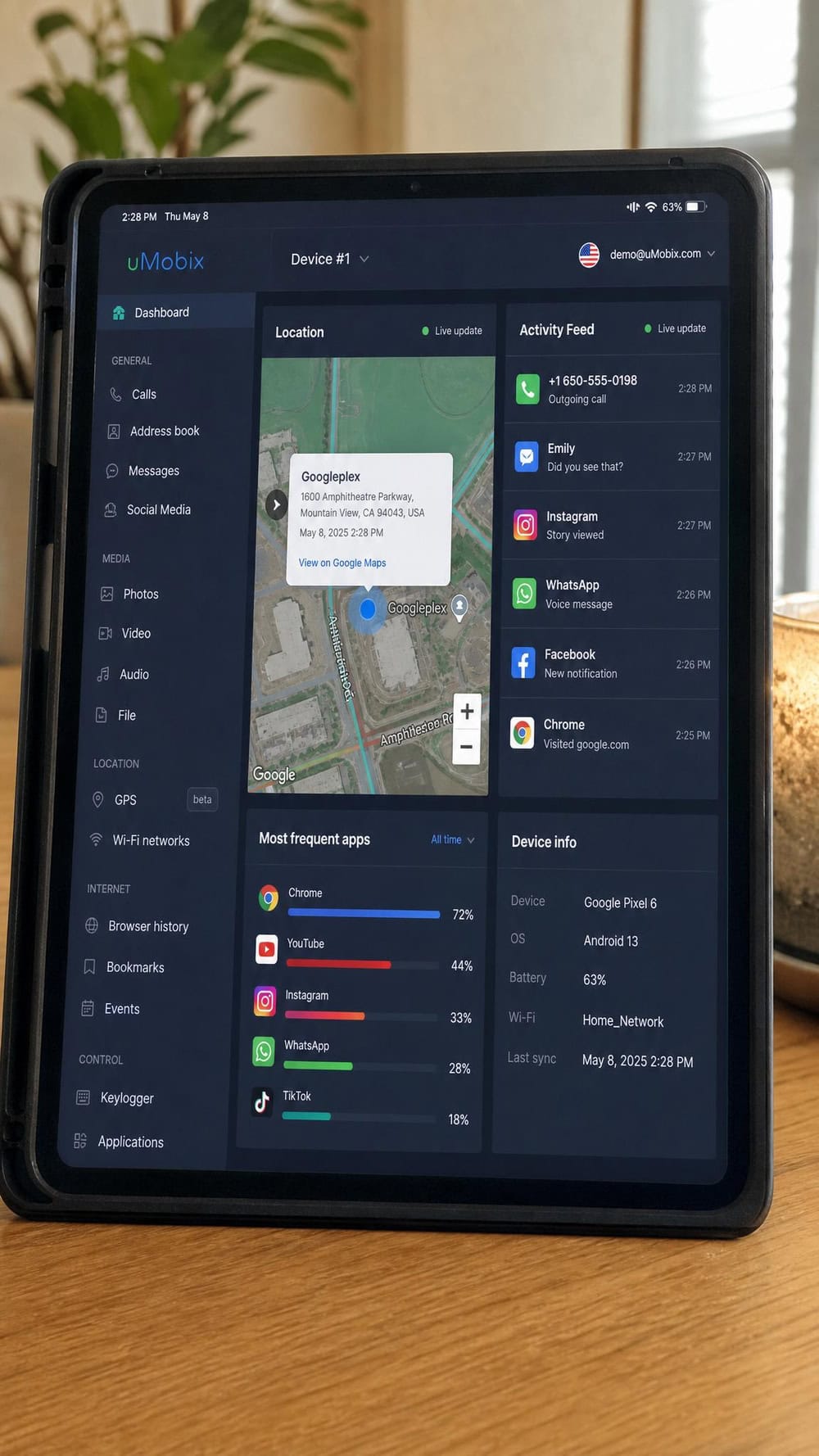
Pricing sits around $11.66/mo on the annual plan, but sources disagree on the exact plan structure, so we'd confirm the current tiers at checkout rather than assume a fixed monthly rate. There's a conditional 14-day refund that won't cover change-of-mind purchases. What impressed us was the frequent data refresh, which kept the location and activity feeds current during testing. Beyond GPS, uMobix pulls call and SMS logs, social and messenger monitoring, browser history, app activity, and camera or screenshot capture. What it lacks is geofencing: it won't alert you when the phone enters or leaves a zone.
Pros
- Deepest social and messenger monitoring here
- Frequent data refresh for current location and activity
- No rooting needed for core call and SMS logs
- Competitive annual rate around $11.66/mo
Cons
- Plan structure varies, so pricing can be confusing
- Refund policy is narrow and conditional
- No geofencing alerts
- iPhone support is iCloud-only and much thinner than Android
4. Google Find Hub (Find My Device) - Best Free Built-in Tracker
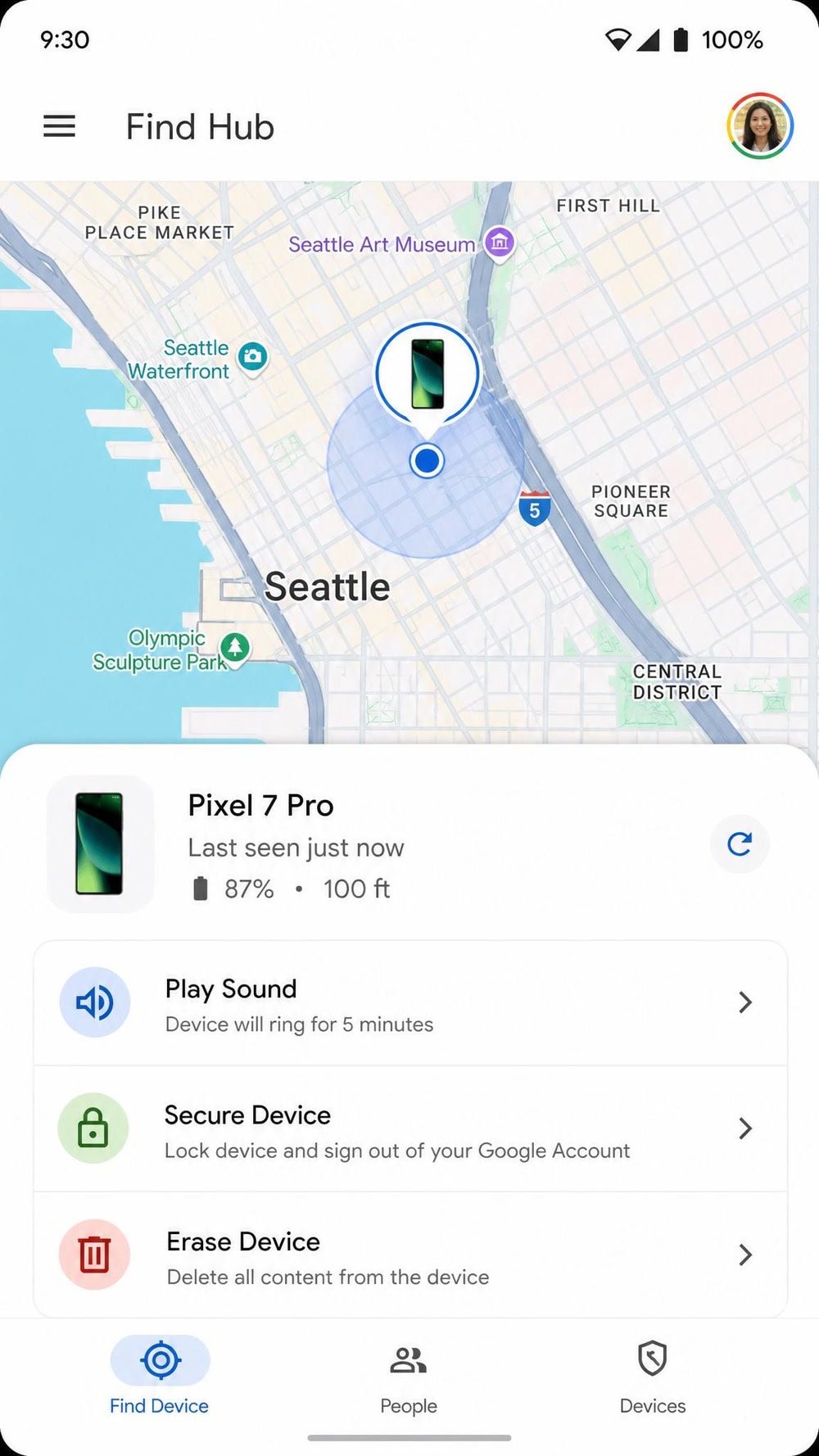
Google Find Hub is the built-in device-finder that ships with Android, and it's the first place we send anyone whose only goal is recovering a lost or stolen phone. Find My Device was rebranded to Find Hub during the 2025 rollout, but it's the same free Google service, and there's no paid tier. You can set it up in seconds from the Google Find My Device Play Store listing or from your Google account settings.
In testing, Find Hub located our devices on a map, rang them at full volume even on silent, and handled remote lock and erase without a hitch. It also covers the wider Google ecosystem, including tablets, watches, earbuds, and tracker tags, and can find compatible devices offline through Google's crowdsourced finding network. What it does not do is act as a parental-style geofencing tool. Find Hub is lost-device recovery and manual location sharing, so it has no place-based entry and exit alerts. It requires no rooting because it's a built-in system service.
Pros
- Completely free and built into Android
- Fast setup with no rooting required
- Remote ring, lock, and erase for lost or stolen phones
- Works across phones, tablets, watches, and tracker tags
Cons
- No geofencing or place-based alerts
- Live location only, with no location history
- Recovery-focused, not a family-monitoring suite
5. Life360 - Best for Family Location Sharing
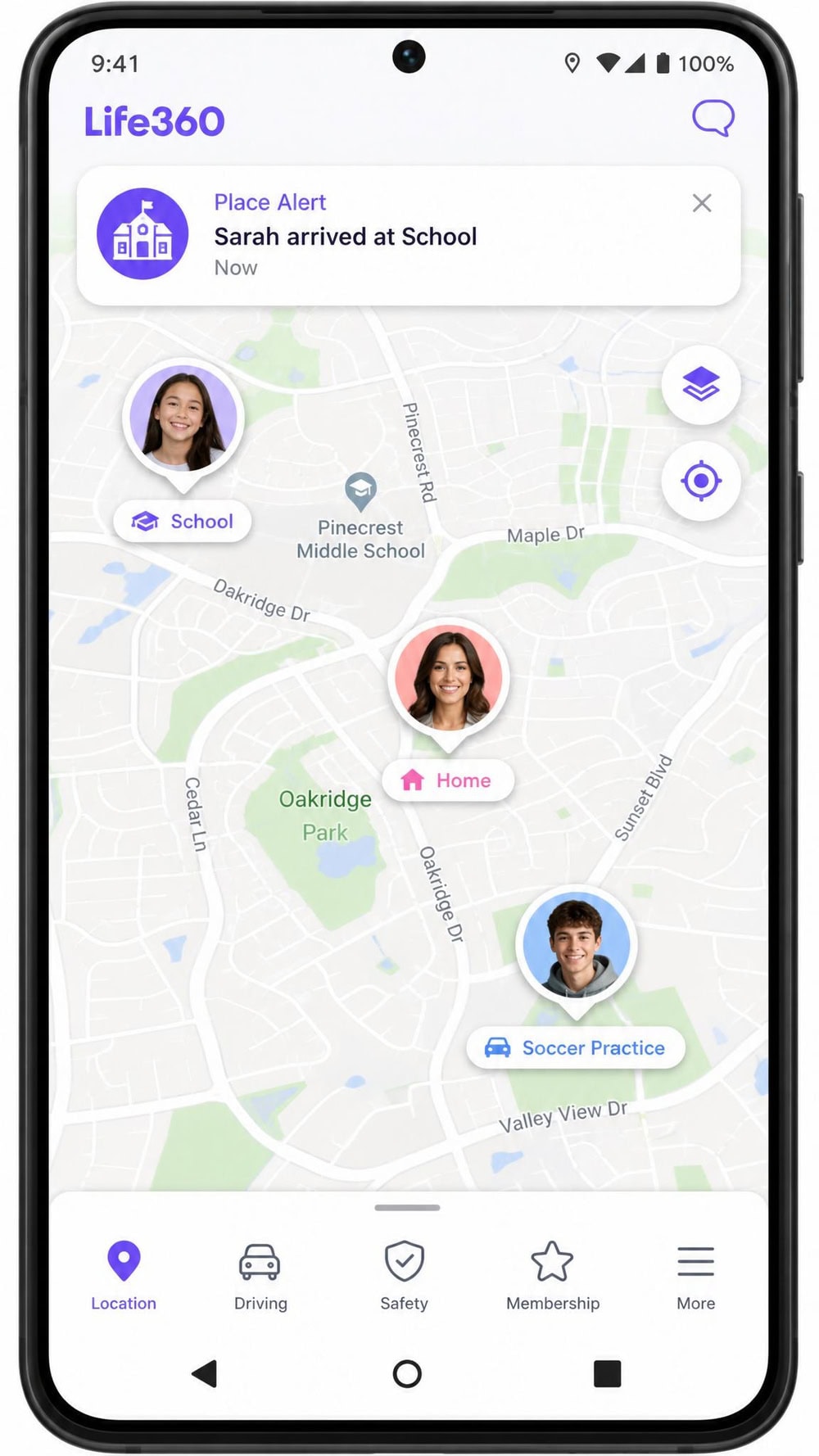
Life360 is the app most families reach for when everyone consents to share their whereabouts inside a private Circle. It runs on both Android and iOS, installs on each member's phone, and needs no rooting. There's a usable free tier with basic real-time location, limited Place Alerts, and a short window of location history that's commonly cited at around 2 days, so we'd treat the free history as a day or two rather than a fixed number.
We found the live map smooth and the Place Alerts genuinely useful for knowing when a family member reaches school, work, or home. Paid tiers add depth: Gold runs around $14.99/mo (or $99.99/yr) and includes 30 days of location history plus unlimited geofences, driver reports, and crash detection. Platinum sits around $24.99/mo and adds roadside assistance and identity monitoring. For most households, the free tier or Gold covers the real need: knowing where family members are in real-time.
Pros
- Strong free tier for basic family location sharing
- Reliable real-time map and Place Alerts
- 30 days of location history on Gold
- Driver reports and crash detection on paid plans
Cons
- Best features are paywalled behind Gold and Platinum
- Free location history is very short
- Consent-based, so it isn't a covert monitoring tool
6. FamiSafe - Best for Geofencing & Location History
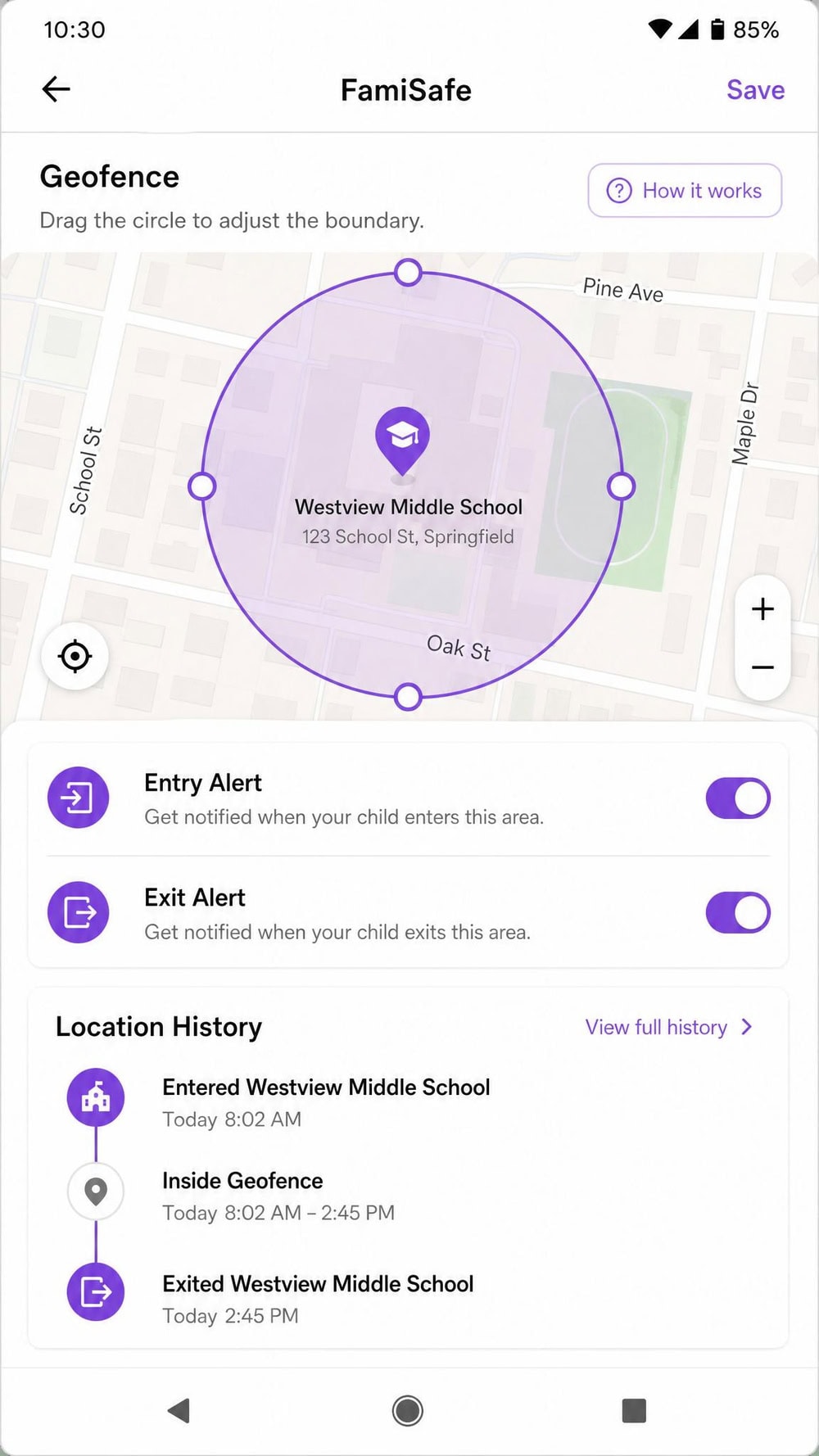
FamiSafe, from Wondershare, is the pick when geofencing and detailed location history matter more than anything else. It covers Android and iOS, needs no rooting or jailbreak, and runs on Android 4.4 or later, though in practice you'll want a far more recent device. Pricing starts at an advertised $4.99/mo on the annual plan ($59.99/yr), with monthly and quarterly options reported around $9.99/mo and $19.99 per quarter. Reviews consistently mention a 3-day free trial and a 7-day money-back guarantee, though the vendor page doesn't state the trial length outright.
In our hands, FamiSafe's geofencing stood out. You can draw boundaries and get SOS alerts when a child enters or leaves a zone, and the history made it easy to retrace a day's movements. It goes beyond location, too, bundling screen-time management, app and website blocking, and monitoring across more than 30 social apps. That breadth makes it a parental-control suite as much as a tracker, which is exactly why geofence-focused families like it.
Pros
- Excellent geofencing with entry, exit, and SOS alerts
- Detailed live location plus location history
- Low annual price starting around $4.99/mo
- Adds screen-time, app blocking, and social monitoring
Cons
- Monthly billing is noticeably pricier than annual
- Trial length isn't clearly stated by the vendor
- Feature breadth can feel heavy if you only want tracking
7. Hoverwatch - Best Budget Option
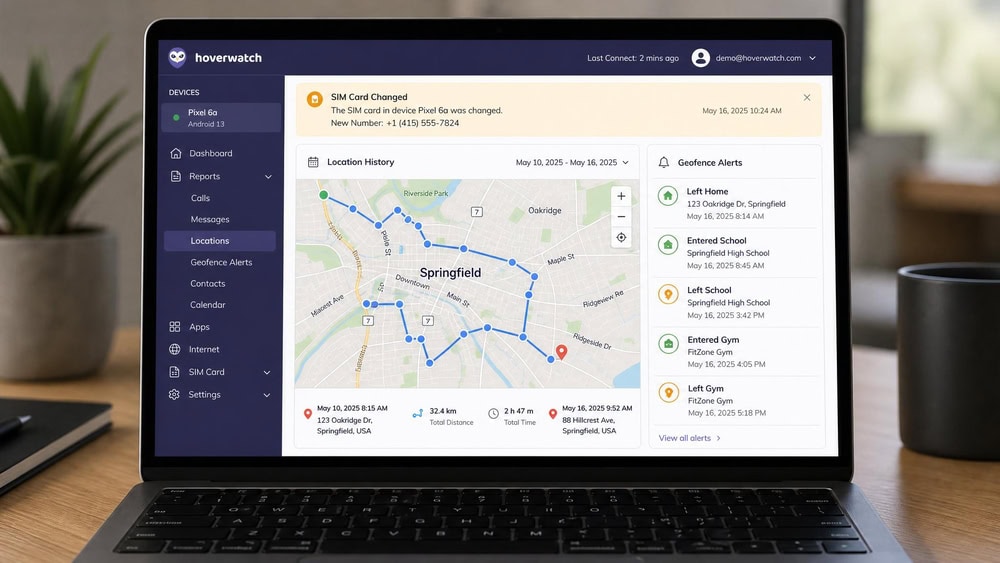
Hoverwatch is the value pick, especially once you factor in its frequent coupons. It's Android-focused (with Windows and macOS clients too), and it needs no rooting for core tracking, though some advanced features benefit from root access. We cover the setup and stealth-mode behavior in our Hoverwatch review.
The Personal plan (one device) is cited around $29.95/mo, with multi-month plans cheaper per month at roughly $59.95 for three months and $99.95 for a year. Hoverwatch runs frequent discounts of around 35%, so the effective price is often lower than the headline. Professional and Business tiers drop the per-device cost further. There's a genuine 3-day free trial with full features and no credit card required, which we used to confirm the basics before committing. In testing, Hoverwatch logged real-time and historical GPS from GPS, Wi-Fi, and cell sources, fired unlimited geofence alerts, sent SIM-change notifications, and ran hidden.
Pros
- Low effective price with frequent coupons
- Real 3-day free trial, no credit card needed
- Unlimited custom geofence alerts
- SIM-change alerts and stealth mode
Cons
- Headline Personal price is the highest here
- Some advanced features benefit from root
- Interface feels more utilitarian than rivals
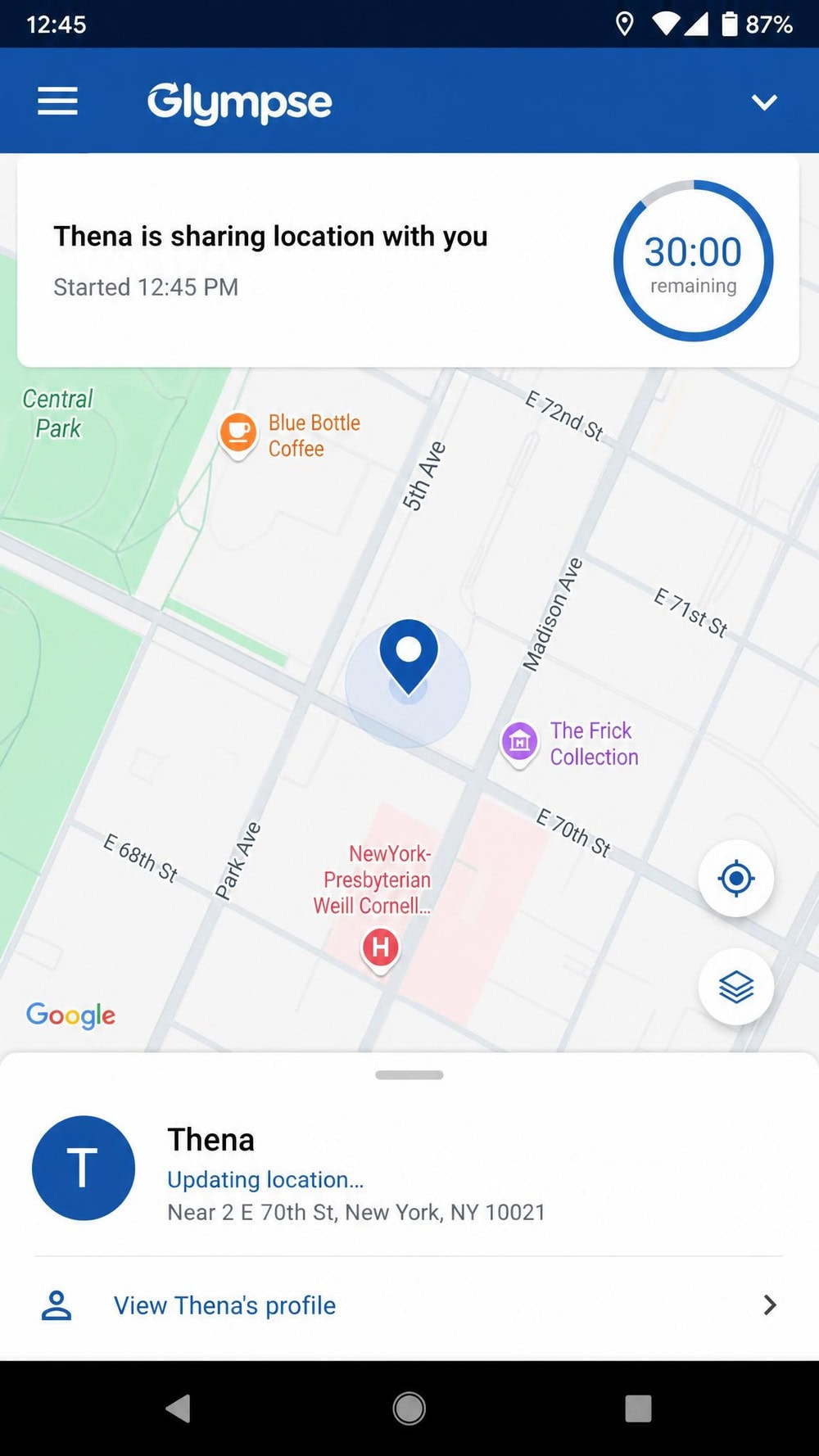
8. Glympse - Best for Quick One-Time Location Shares
Glympse is the app for the simplest job on this list: sharing your live location with someone for a set window, then having it disappear. It's free, runs on Android and iOS, and needs no rooting because it's a consent-based share-link app. The standout is how lightweight it is. You set a timer, send a link, and the recipient watches your location move in a browser with no app install on their end. The share auto-expires when the timer ends.
Timers start as low as 5 minutes and run up to several hours, though the exact maximum varies by source, so we'd verify the ceiling in the app for long shares. Beyond live sharing, Glympse adds ETA sharing, one-tap Favorites, private Groups for families or carpools, and quick-message templates like "running late." What it deliberately skips is geofencing and long-term location history, which keeps it focused. For meeting up, a commute check-in, or letting someone know you're nearly there, Glympse is the cleanest tool we tested.
Pros
- Completely free with no account barriers for recipients
- Timed shares that auto-expire for privacy
- Recipients need no app, just a web link
- ETA sharing and quick-message templates
Cons
- No geofencing or place-based alerts
- No long-term location history
- Not built for ongoing or covert tracking
Best Android Tracking Apps at a Glance
The table below summarizes how the eight apps compare on platform support, the features most people search for, and pricing. Free vs. paid is where the field splits hardest: built-in and link-sharing tools cost nothing, while the dedicated monitoring apps sit behind a subscription.
| App | Best For | Platform | Real-Time GPS | Geofencing | Location History | Free vs Paid / Price | Our Pick |
|---|---|---|---|---|---|---|---|
| mSpy | Overall monitoring | Android & iOS | Yes | Yes | Yes | Around $11.67/mo (annual) | Best overall monitoring |
| EyeZy | Ease of use | Android & iOS | Yes | Yes | Yes | Around $9.99/mo (annual) | Best ease of use |
| uMobix | Social media tracking | Android & iOS (iCloud only) | Yes | No | Yes | Around $11.66/mo (annual) | Best for social media |
| Google Find Hub | Free built-in lost-phone recovery | Android (+ Google ecosystem) | Yes | No (sharing/recovery only) | No (live only) | Free | Best free built-in tracker |
| Life360 | Family location sharing | Android & iOS | Yes | Yes (unlimited, paid) | 30 days (Gold) | Free tier; Gold around $14.99/mo | Best for family sharing |
| FamiSafe | Geofencing & location history | Android & iOS | Yes | Yes (+ SOS) | Yes | From around $4.99/mo (annual) | Best for geofencing/history |
| Hoverwatch | Budget option | Android (+ Win/macOS) | Yes | Yes (unlimited) | Yes | Around $29.95/mo (Personal) | Best budget |
| Glympse | Quick one-time location shares | Android & iOS | Yes (link-based) | No | No | Free | Best quick shares |
How to Choose the Best Android Tracking App
The right app depends on the job, the budget, and who's being tracked. These are the criteria that separated the field in our testing, and the ones worth weighing before you commit.
Real-Time Location Accuracy & GPS Reliability
Accuracy is the foundation, and it depends largely on the phone's hardware and surroundings rather than the app. Under open sky, smartphone GPS is typically accurate to within a 4.9 m radius, and real-world readings commonly land in the 3-10 m range. In dense urban areas, that degrades to roughly 7-13 m or more as buildings cause signal multipath. Every app delivered real-time location, but the ones with frequent refresh, like uMobix, felt more current minute to minute. For lost-phone recovery, Find Hub's live fix was as accurate as anything paid.
Geofencing & Location Alerts
Geofencing turns a map into a notification system: you draw a boundary around a place, and the app alerts you when the tracked phone enters or leaves it. This is the biggest dividing line in our roundup. FamiSafe, Life360, mSpy, EyeZy, and Hoverwatch all support geofence alerts, while uMobix does not, with Life360 and Hoverwatch offering unlimited zones on the right plan. Find Hub and Glympse, by contrast, don't do place-based alerts at all, so geofencing should steer you away from those two if alerts are the point.
Battery Usage
Continuous tracking asks a lot of the battery, since the GPS radio and background updates run nearly constantly. Across our test phones, the consent-based family apps and the built-in Find Hub were the lightest, while the always-on monitoring apps used more power, as you'd expect from the extra data they collect. If battery life matters, favor apps that let you tune update frequency, and remember that background location is a separate, stricter permission you control per app.
Privacy, Consent & Data Protection
Tracking is data collection, so privacy belongs in the buying decision. Consent-based apps like Life360 and Glympse install openly on each person's phone, keeping everyone informed. Covert monitoring apps collect far more and run hidden, which raises both privacy and legal stakes. Whichever you choose, check how the vendor stores and protects location data, use a strong account password, and be deliberate about who can see a live map. We treat any app that hides itself as one that demands a clear, lawful reason to use it.
Free vs. Paid: What You Actually Get
The free options are genuinely useful within their lanes. Google Find Hub handles recovery for nothing, Glympse covers quick timed shares, and Life360's free tier delivers basic real-time location for a Circle. Paid plans buy you geofencing depth, location history, and the broader monitoring features. FamiSafe's annual rate around $4.99/mo is the value leader for geofencing and history, while the dedicated monitoring apps cluster near $9.99 to $11.67/mo on annual billing. Match the spend to the job, and don't pay for monitoring breadth you won't use.
How Android Tracking Apps Work
An Android tracking app reads the phone's location from a blend of GPS satellites, nearby Wi-Fi networks, and cell towers, then reports that position to a server you view on a map. GPS gives the precise outdoor fix, while Wi-Fi and cell data fill in when satellites are blocked, which is how tracking keeps working indoors and in cities.
To do any of this, an app must hold Android location permissions that you grant at runtime. Android splits these into precise (ACCESS_FINE_LOCATION) and approximate (ACCESS_COARSE_LOCATION) access, and you can choose which to give. Crucially, an app that needs to report location while it isn't open must also request background location, which is a separate, stricter grant on modern Android. You can review and change these anytime in your device settings, and the official documentation on how Android handles location explains each permission in detail. That permission model is also why a legitimate app can't quietly track you without at least one grant somewhere in its history.
Is It Legal to Track an Android Phone?
The short answer is that it depends on consent and your relationship to the person and device. Tracking your own phone, a device you own, or a phone with the user's clear consent is generally fine. Sharing live location through a consent-based app like Life360 or Glympse, where everyone installs it knowingly, sits on the right side of that line.
Covert tracking is where it gets serious. Parents monitoring a younger child on a device they own generally have legal standing, which is why hidden parental apps exist. Installing monitoring software on another adult's phone without their consent, however, can break privacy and surveillance laws in many places, and the penalties are real. Laws vary by country and region, so if you're tracking anyone other than yourself or your own minor child, confirm your local rules first. For comparison, the iPhone side of this works similarly through Apple Find My, and the same consent principles apply across platforms.
Frequently Asked Questions
What is the best free tracking app for Android?
Google Find Hub (the rebranded Find My Device) is the best free built-in option for locating a lost or stolen Android phone, with remote ring, lock, and erase. For free real-time sharing between people, Glympse and Life360's free tier are the strongest picks.
Can someone track your Android phone without you knowing?
It's technically possible with hidden monitoring apps, but they require physical access to install and at least one location permission grant. On the flip side, Android shows location-access indicators, and you can audit app permissions in Settings to spot anything you didn't authorize.
Is it legal to track someone's phone?
Tracking your own device or a phone you own with the user's consent is generally legal, as is a parent monitoring a younger child on a family-owned device. Covertly tracking another adult without consent can violate privacy and surveillance laws, so confirm your local rules first.
How accurate is GPS phone tracking?
Under open sky, smartphone GPS is typically accurate to within about 4.9 meters, with real-world readings commonly between 3 and 10 meters. Accuracy degrades to roughly 7-13 meters or more in dense urban areas because buildings interfere with the signal.
Do I need to root the phone to use a tracking app?
No, not for most apps. Google Find Hub, Life360, FamiSafe, and Glympse need no rooting at all, and apps like mSpy, uMobix, EyeZy, and Hoverwatch work without root for core tracking. Rooting is only needed for some advanced social-media or messaging features on the monitoring apps.
How much does an Android tracking app cost?
Free options like Google Find Hub and Glympse cost nothing. Among paid apps, FamiSafe starts around $4.99/mo on annual billing, the dedicated monitoring apps cluster near $9.99 to $11.67/mo, and Life360 Gold runs around $14.99/mo. Short-term plans cost more per month and prices shift with promotions.
Conclusion: Our Top Pick for Tracking an Android Phone
After testing all eight, our top pick depends on what you need, but for the broadest audience, Google Find Hub is where we start. It's free, built into Android, needs no setup beyond your Google account, and handles the most common need: finding a lost or stolen phone fast. If your goal is family location sharing with consent, Life360 is the standout, and for geofencing depth at a low annual price, FamiSafe leads. When discreet parental monitoring on a device you own is genuinely warranted, mSpy is our top monitoring pick for its compatibility and ease of use, with EyeZy close behind and uMobix the pick when social media monitoring matters most.
Whatever you choose, match the app to the job, keep consent and local law front of mind, and remember that the best tracking app is the one that quietly does exactly what you need without collecting more than it should.

 Best Phone Tracker Apps
 Best Android GPS Trackers
 Best Android Monitoring Apps
 Best iPhone Tracker Apps
 How to Track an Android Phone
 Best Spy Apps for Android
 Parental Monitoring Apps for Android