
Can Someone Track My Phone Without Me Knowing? 8 Signs (and How to Stop It)
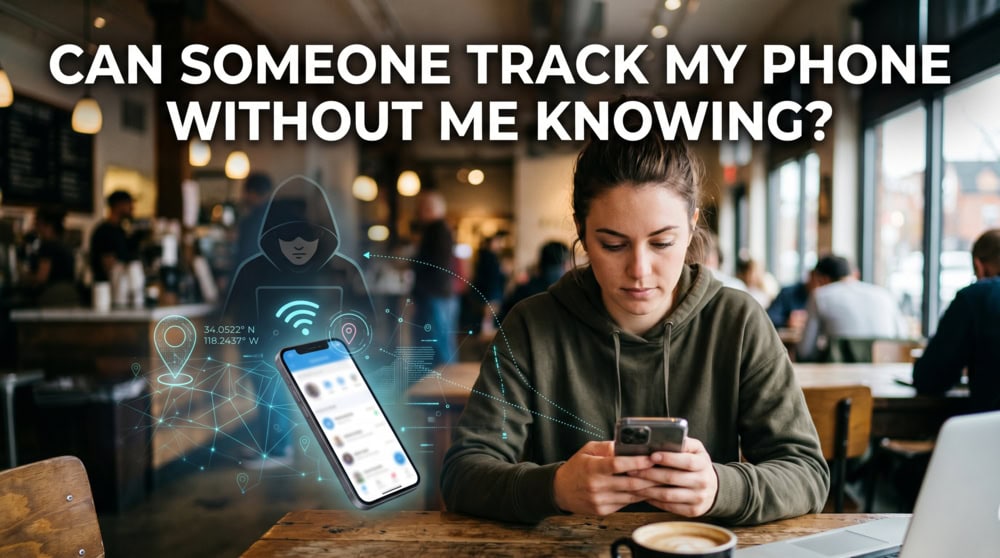
If you suspect someone is tracking your phone, you are right to take it seriously, because yes, it can happen without your knowledge. We have tested the most common tracking methods ourselves, and most of them leave detectable traces. So what should you look for, and how do you shut it down?
Can Someone Really Track Your Phone Without You Knowing?
Yes, someone can track your phone without your knowledge, and it is more common than most people assume. When we ran tracking tools across our own test devices, the phone kept working normally while quietly reporting its location to someone else. The goal here is to help you tell ordinary phone behavior apart from a real red flag, then check and stop it.
How can someone track your phone?
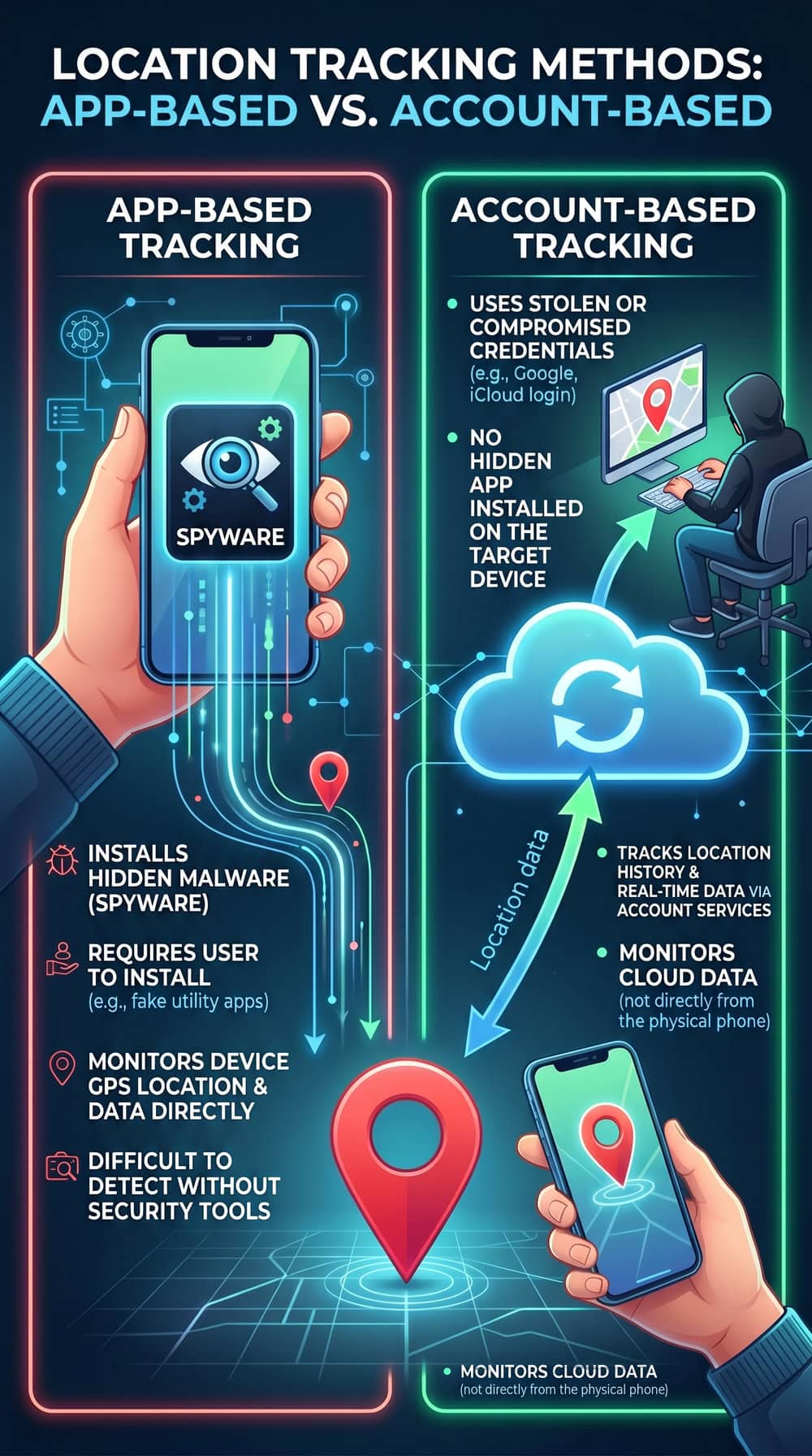
There are two broad categories. The first is app-based tracking, where someone installs spyware or stalkerware on the device, usually after a few minutes of physical access. The second is account-based tracking, which needs no app. If someone is signed into your iCloud or Google account, or has quietly enabled location sharing, they can follow you without ever touching your phone again.
Can it happen without spyware installed?
It absolutely can. Account-based tracking through Find My, Google Maps location sharing, or a shared cloud login follows you without any spyware on the device, since a clean malware scan does not always mean you are safe.
8 Warning Signs Someone Is Tracking Your Phone
No single symptom proves you are being tracked, since a tired battery or a buggy update can mimic several of these. The real signal is a cluster of red flags appearing together, especially after someone had physical access to your phone.
1. Faster-than-normal battery drain
Tracking software records your location, listens through the microphone, and uploads what it captures, and all of that drains battery. If your battery drains noticeably faster than a few weeks ago with no new heavy apps to explain it, that faster battery drain is one of the FTC's listed stalkerware warning signs.
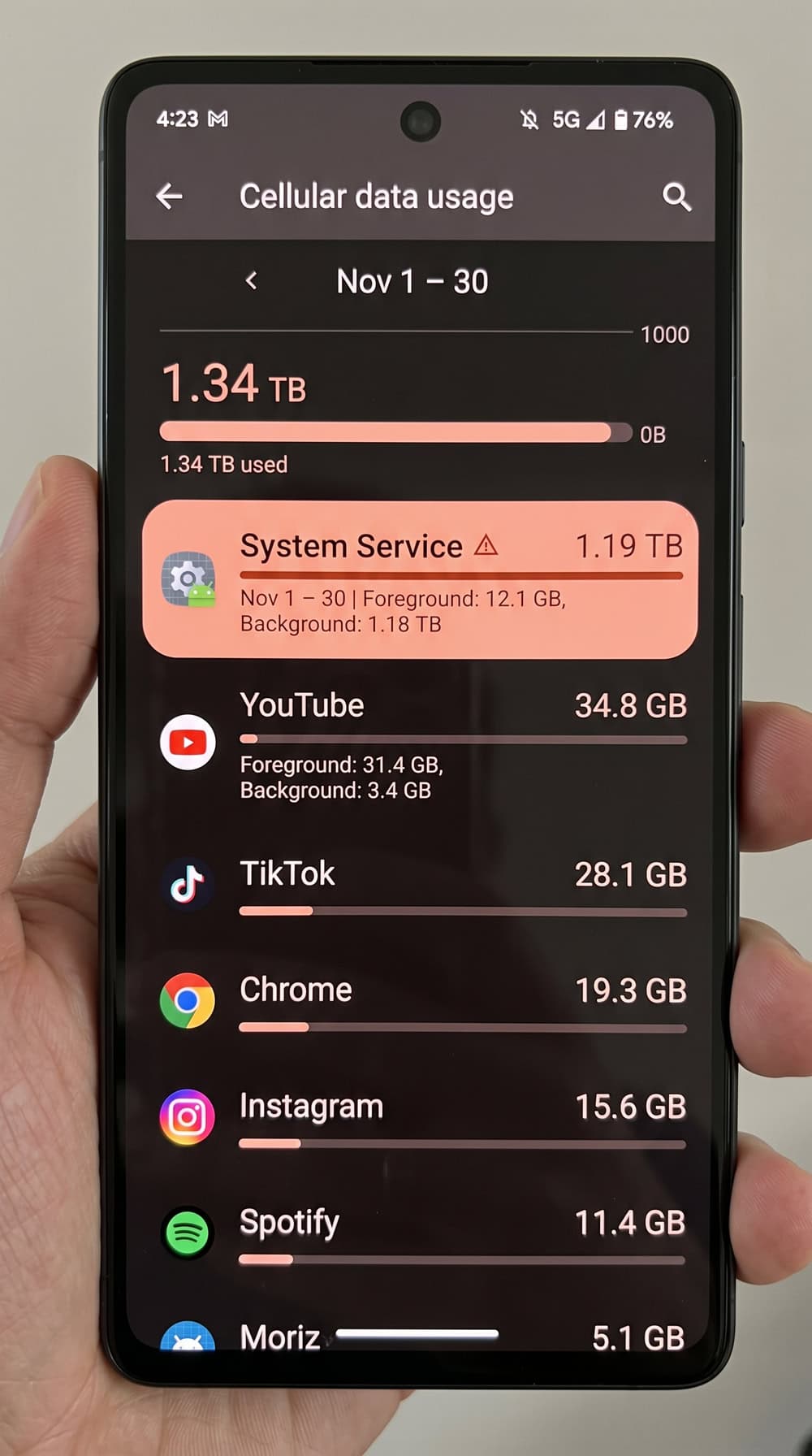
2. Unusual spike in data usage
Spyware has to upload what it captures, and that uses your mobile data. Check your usage by opening Settings > Cellular on iPhone or Settings > Network & internet > Data usage on Android. An unexplained spike from an app you do not recognize is a red flag, and we once watched a disguised "system" app on a test phone use more than a gigabyte in weeks.
3. Phone overheats or runs warm when idle
A phone that feels warm while streaming video is normal, but a phone that runs warm while it sits idle on the table is not. Hidden tracking processes keep the processor and radios busy in the background, which shows up as heat.
4. Unfamiliar apps or settings you didn't change
Look through your app list for anything you do not remember installing, especially apps with generic names like "Device Health" or "System Update," because stalkerware often disguises itself this way. Settings that change on their own, like your screen-lock timeout or location toggles, are another red flag.
5. Strange background noise or echoes during calls
Clicking, static, or a faint echo during otherwise clear calls can occasionally mean call audio is being intercepted or forwarded. This sign is less reliable than the others, since poor reception causes the same symptoms, but it is worth noting.
6. Phone reboots, lags, or won't shut down
Spyware running deep in the system can make a phone sluggish, cause random reboots, or make it slow to power down. The FTC specifically flags a phone that is hard to turn off as a possible sign of stalkerware, because some monitoring tools resist shutdown to keep reporting.
7. Random pop-ups, status icons, or camera/mic activity
Watch your status bar: both iPhone and Android show an indicator when the camera or microphone is active, so if that dot lights up while you are not using a relevant app, something is reaching your sensors. Sudden pop-ups, browser redirects, or unexpected ads can also point to malware bundled with a tracker.
8. Someone knows your location, or an unknown device is on your account
Sometimes the clearest sign is human. If someone consistently knows where you have been or references conversations they should not have heard, take it seriously: the FTC calls an abuser knowing specific details about your location and messages a classic stalkerware indicator. Check your Apple ID or Google account for any logged-in device you do not recognize.
How Someone Can Track Your Phone (and Who Might Be Doing It)
Spyware and stalkerware apps
Stalkerware is commercial software, often sold as parental or employee monitoring, that someone installs to watch your location, messages, and activity. This is a measurable problem. Kaspersky detected 31,031 unique users affected by stalkerware in 2023, up from 29,312 in 2022, and identified 195 distinct apps, the most-used being TrackView at 4,049 affected users. Some tools can even let an abuser turn on the microphone and camera remotely.
GPS, cell towers, and Wi-Fi triangulation
Even without an app, your phone can be located several ways. GPS gives the most precise fix, but cell-tower triangulation, Wi-Fi and IP geolocation, and your carrier's records can all reveal your approximate position. This is why turning off Location Services does not make a phone untrackable, a point we return to below.
Shared accounts and location sharing (Find My, Google Maps)
This is the quiet one. If someone is logged into your iCloud or Google account, or you once enabled location sharing in Find My or Google Maps and never turned it off, they can follow you with no spyware involved. It is worth learning your privacy rights here, because account-based tracking is often legal-gray inside a relationship.
Phishing, SIM swapping, and who is behind it
A SIM swap lets someone port your number to their own SIM and intercept your texts and two-factor codes, and Caller ID can be faked too, which is why the FCC explains how Caller ID spoofing disguises who is calling. In practice, the person tracking you is rarely an anonymous hacker. Stalkerware is overwhelmingly installed by someone close to you, most often a current or former partner. A Kaspersky survey found that 45.7% of respondents had experienced tech-enabled abuse in the prior year.
How to Check If Your Phone Is Being Tracked
Work through these checks in order, from the easiest account-level review to a deeper scan.
Review app permissions on iPhone and Android
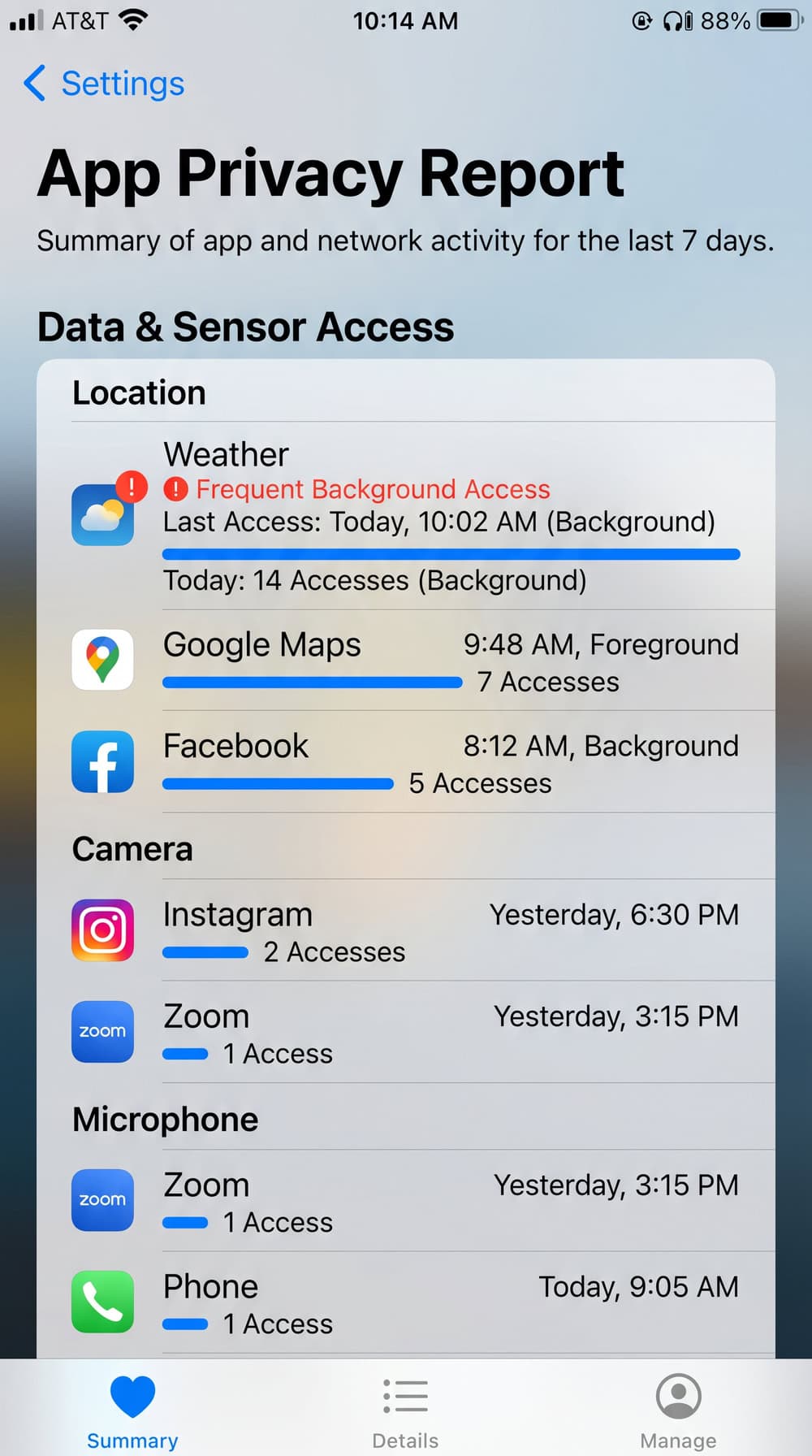
Start with what your apps can see. On iPhone, open Settings > Privacy & Security > App Privacy Report to see how often each app has used your location, camera, and microphone. Apple explains how to control app permissions on iPhone in detail. On Android, open Settings > Security & privacy > Privacy > Permission manager, tap a permission type, and revoke anything suspicious, following Google's guide to change app permissions on Android.
Check location sharing and logged-in devices
On iPhone running iOS 16 or later with two-factor authentication on, open Settings > Privacy & Security > Safety Check to review who you are sharing location with, sign out other devices, and reset access. On Android, review your Google Account's device list and your Google Maps location sharing, and remove any person or device you do not recognize.
Dial carrier/USSD codes to check call forwarding
Your carrier offers a few dial codes that show whether calls or texts are being forwarded away from you. Dial #21# to display your unconditional call-forwarding status, and dial #62# to show where calls and texts go when your phone is unreachable. These are carrier network features, not security scanners, so they tell you about forwarding only. We explain what *#21# does and does not prove in the FAQ.
Scan for malware and stalkerware
Finally, run a reputable mobile security app to scan for known stalkerware and malware. A scan will not catch account-based tracking, but it is the most reliable way to find an app hiding from your launcher. The FTC guidance on stalkerware is the clearest plain-language reference we have found.
How to Stop Someone From Tracking Your Phone
Once you have confirmed or strongly suspect tracking, here is how to shut it down. If your situation involves an abusive person, please read the safety warning above first, because timing matters.
Remove suspicious apps and revoke permissions
Delete any app you flagged as suspicious, and revoke location, camera, and microphone permissions from anything that does not need them. On both platforms, press and hold an app icon to remove it, then revisit the permission manager to confirm nothing was missed.
Turn off location sharing and sign out unknown devices
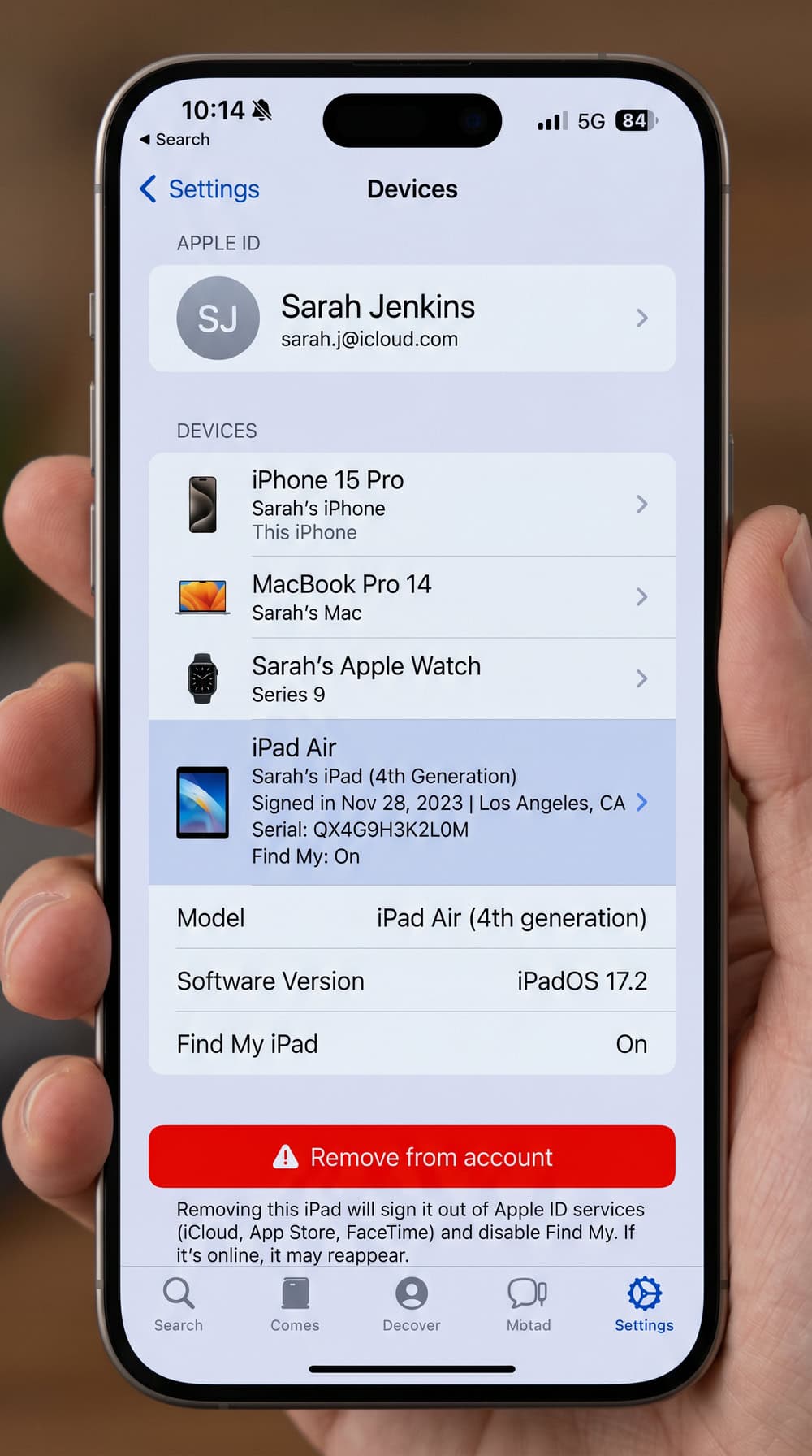
Open your location-sharing settings in Find My or Google Maps and stop sharing with anyone you did not intend to. Then sign out every unfamiliar device from your Apple ID or Google account. This single step shuts down most account-based tracking instantly.
Change passwords and enable two-factor authentication
Change the passwords for your Apple ID, Google account, and email from a device you trust. Then enable two-factor authentication everywhere it is offered, so a stolen password alone can no longer unlock your accounts.
Use a VPN and mobile security software
A VPN hides your IP address and makes IP-based geolocation far less useful to anyone watching your traffic. Pair it with a reputable mobile security app that scans for stalkerware continuously, not just once.
Factory reset as a last resort
If a tracker persists after everything above, a full factory reset will remove it. The FTC cautions that you should document any evidence first and avoid restoring from an old backup afterward, since restoring can quietly reinstall the spyware you just removed.
Report to your carrier and law enforcement
If someone has been tracking or harassing you, call your carrier to secure your SIM and account, and consider filing a report with law enforcement. For online crime and account takeover, keep screenshots and app names as evidence.
How to Protect Your Phone From Future Tracking
Prevention is about closing the doors a tracker would use. Lock your SIM with a PIN so no one can swap it without the code, and never leave your phone unlocked and unattended around someone you do not fully trust, since most stalkerware is installed during a few minutes of physical access. Keep your operating system and apps updated, because updates patch the vulnerabilities spyware relies on. Use a strong, unique passcode, review your logged-in devices and location-sharing settings periodically, and stay cautious with links in messages and email.
Frequently Asked Questions
Can my phone be tracked when it's turned off?
Mostly no, but with a caveat. Modern iPhones using the Find My network and recent Pixel phones with Powered Off Finding keep a low-power Bluetooth beacon alive after shutdown, so they can still be located for a while after they appear off. Apple's offline Find My is reported to keep updating an iPhone's location for up to about a day after it is powered off. An older phone with no such feature is effectively untrackable while off.
Can someone track my phone in airplane mode?
Sometimes. Airplane mode disables the cellular, Wi-Fi, and Bluetooth radios, but it does not turn off GPS, so the receiver can still talk to satellites and log your location offline. Installed spyware or a physical tracker can still record location while airplane mode is on and then sync that data once connectivity returns.
Can my phone be tracked with location sharing off?
Yes. Turning off Location Services does not make a phone untrackable. Cell-tower triangulation, Wi-Fi and IP geolocation, your carrier's records, and account-level data can all still reveal your approximate location. Location Services controls app-level GPS access, not the network signals your phone constantly produces.
What code shows if my phone is tapped?
No dial code detects a tap, spyware, or surveillance, despite viral posts claiming otherwise. Dialing *#21# only displays your call-forwarding status, and *#62# shows where calls go when your phone is unreachable. To erase all call-forwarding rules on a GSM line, dial ##002#, and dial *#06# to display your IMEI and compare it against your records. These are carrier features, not tap detectors.
Can someone see through my phone camera if it's tapped?
With certain stalkerware, yes. The FTC confirms that some monitoring tools let an abuser remotely use the phone's microphone and camera to see and hear its surroundings. Your defense is the status-bar dot that lights up when the camera or microphone is active, plus the App Privacy Report on iPhone or the Privacy dashboard on Android.

 Is Someone Tracking Your Phone
 Is Someone Spying on iPhone
 Signs of Remote iPhone Access
 Find Spying Apps on Phone
 Find Hidden Spy Apps Android
 Find Hidden Spy Apps iPhone
 Stop Remote Phone Access
 Detect Spyware on Android